











No products in the cart.

If you run an online store, sooner or later you’ll need help. Whether it’s a billing question, a technical glitch, or confusion about settings, knowing how to call Shopify support (or reach the right support channel) can save you hours of frustration.
In this guide, we’ll walk through everything you need to know about how support works at Shopify, when you can actually call Shopify support, what alternatives are available, and how to get the fastest resolution possible. We’ll also break down common mistakes merchants make when trying to contact support—and how to avoid them.
If you’re new to Shopify or scaling an established brand, this article will help you navigate the support system like a pro.

Before you try to call Shopify support, it’s important to understand how their customer service structure works.
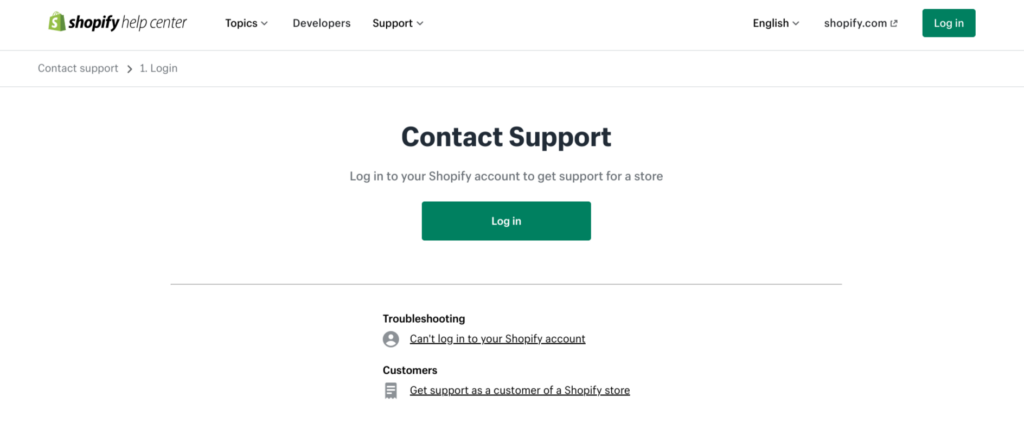
Shopify operates as a global SaaS platform, meaning their support system is centralized and ticket-driven. Unlike traditional companies that publish a direct customer service phone number, Shopify routes all support requests through their Help Center first.
This means:
So when people search for “call Shopify support,” what they’re really looking for is:
The reality is that Shopify does offer phone support in some cases—but only after you go through the proper channels.
Let’s break it down.
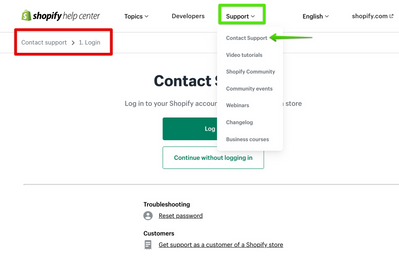
If your goal is to call Shopify support, follow this process carefully.
Start by visiting the official Shopify Help Center. From there, you’ll need to:
Shopify uses a guided system. Instead of immediately offering a contact method, it will first suggest help articles related to your problem.
You’ll be prompted to type in your problem.
For example:
Based on your description, Shopify will display recommended solutions.
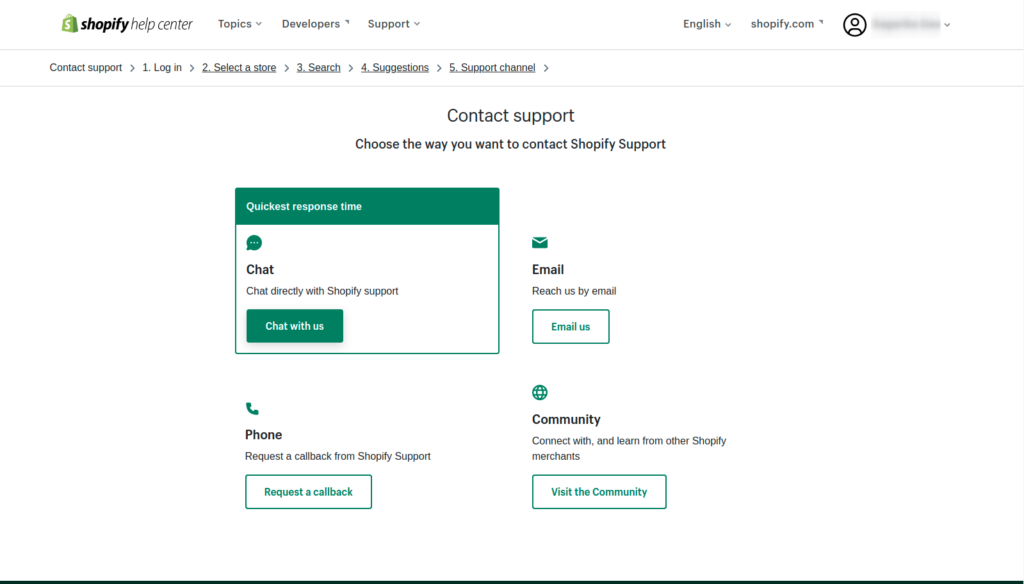
If those don’t solve your problem, you’ll see contact options.
Depending on your situation, you may see:
This is where “call Shopify support” becomes possible.
In some regions and cases, Shopify allows you to request a callback instead of directly dialing a number. A support advisor will then call you.
Important note:
Phone support availability may depend on:
If phone support isn’t available, live chat is usually the fastest alternative.
Not every issue requires you to call Shopify support. In fact, many problems can be solved faster using documentation or chat.
However, calling (or requesting a callback) makes sense in these scenarios:
If:
These are time-sensitive and may require identity verification. Phone support can speed things up.
If you notice:
Speaking to a human can clarify details quickly.
If your store is paused or flagged, documentation alone may not be enough. Direct communication helps you understand the next steps clearly.
If customers cannot complete purchases, this is revenue-impacting. You should escalate immediately.
Sometimes merchants search “call Shopify support” out of habit—but calling may not be necessary.
Here’s when self-service works better:
Most theme-related adjustments are handled by:
Shopify support does not modify your design or custom code.
If a third-party app is malfunctioning, you must contact the app developer directly. Shopify support cannot fix third-party apps.
If you’ve edited Liquid, CSS, or JavaScript, Shopify support generally won’t debug your custom code. You’ll need a developer or design partner.
Understanding this saves time and frustration.
Many users are surprised that Shopify doesn’t display a public phone number.
Here’s why:
By guiding you through the Help Center first, Shopify ensures that:
So if you’re searching “call Shopify support phone number,” remember: access is account-based, not public.
Even if your goal is to call Shopify support, you can speed up the process by preparing properly.
The clearer you explain your problem, the faster support can assist you.
You cannot access contact options without logging in.
If you select the wrong topic, you may be routed to irrelevant documentation.
Shopify support is technical and account-focused. They do not redesign stores or improve conversion layouts.
Always verify whether your issue is platform-related or app-related.
To better understand your options beyond “call Shopify support,” here’s a breakdown.
Although Shopify provides support to all plans, response priority may vary.
Basic Plan:
Shopify Plan:
Advanced / Plus:
If you’re running a high-volume store, you may qualify for enhanced support pathways.
Understanding boundaries helps you avoid disappointment.
Shopify support does not:
They help with:
This distinction is critical.
When people search “call Shopify support,” they often expect:
But Shopify support is technical, not strategic.
If your store isn’t converting, it’s rarely a platform problem—it’s usually a design, positioning, or user experience issue.
That’s where professional design expertise comes in.
Here are real examples of issues merchants often blame on Shopify:
These are not support issues.
They are design and positioning issues.
Calling Shopify support won’t solve:
That requires strategic design thinking.
If you truly want to grow your store, here’s the better path:
Support keeps your platform running.
Design drives revenue.
Both matter—but they serve different roles.
Knowing how to call Shopify support is important for every merchant. It ensures your store stays operational and your account issues get resolved quickly.
But remember:
Shopify support solves platform problems.
It does not solve business strategy problems.
If your issue is technical—log in, go through the Help Center, and request the appropriate contact method, including phone support when available.
If your issue is growth-related—design, structure, positioning, user experience—then what you need isn’t support.
You need strategy.
That’s exactly where we come in.
At AIRSANG, we specialize in cross-border eCommerce strategy and Shopify-focused website design. We help brands build conversion-driven layouts, strengthen visual hierarchy, and create premium brand experiences that turn traffic into revenue.
If you’re struggling with more than just technical errors—if you’re ready to elevate your store’s performance—we’re here to help.


















