If you run an online store, sooner or later you’ll need help. Whether it’s a billing question, a technical glitch, or confusion about settings, knowing how to call Shopify support (or reach the right support channel) can save you hours of frustration.
In this guide, we’ll walk through everything you need to know about how support works at ช็อปฟี่, when you can actually call Shopify support, what alternatives are available, and how to get the fastest resolution possible. We’ll also break down common mistakes merchants make when trying to contact support—and how to avoid them.
If you’re new to Shopify or scaling an established brand, this article will help you navigate the support system like a pro.
Understanding Shopify Support: How It Really Works

Before you try to call Shopify support, it’s important to understand how their customer service structure works.
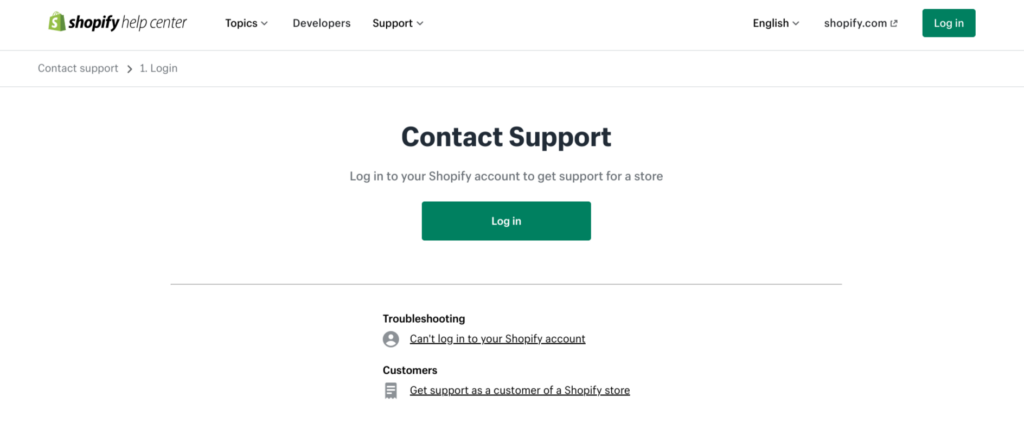
Shopify operates as a global SaaS platform, meaning their support system is centralized and ticket-driven. Unlike traditional companies that publish a direct customer service phone number, Shopify routes all support requests through their Help Center first.
หมายความว่า:
- There is no public phone number you can simply dial.
- You must log in to your account to access personalized support.
- The contact options available to you may vary depending on your issue and region.
So when people search for “call Shopify support,” what they’re really looking for is:
- A direct phone number
- Live assistance
- Fast escalation for urgent issues
The reality is that Shopify does offer phone support in some cases—but only after you go through the proper channels.
มาวิเคราะห์กันทีละส่วนดีกว่า.
Step-by-Step: How to Call Shopify Support
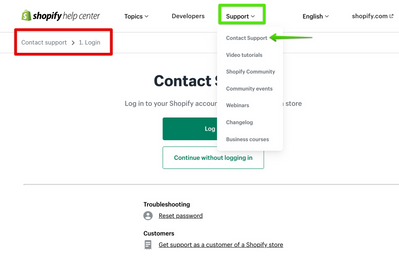
If your goal is to call Shopify support, follow this process carefully.
Step 1: Go to the Shopify Help Center
Start by visiting the official Shopify Help Center. From there, you’ll need to:
- Log into your Shopify account
- Select your store (if you manage multiple)
- Choose the topic related to your issue
Shopify uses a guided system. Instead of immediately offering a contact method, it will first suggest help articles related to your problem.
Step 2: Describe Your Issue
You’ll be prompted to type in your problem.
ตัวอย่างเช่น:
- “Billing issue”
- “App not working”
- “Domain not connecting”
- “Store locked”
Based on your description, Shopify will display recommended solutions.
If those don’t solve your problem, you’ll see contact options.
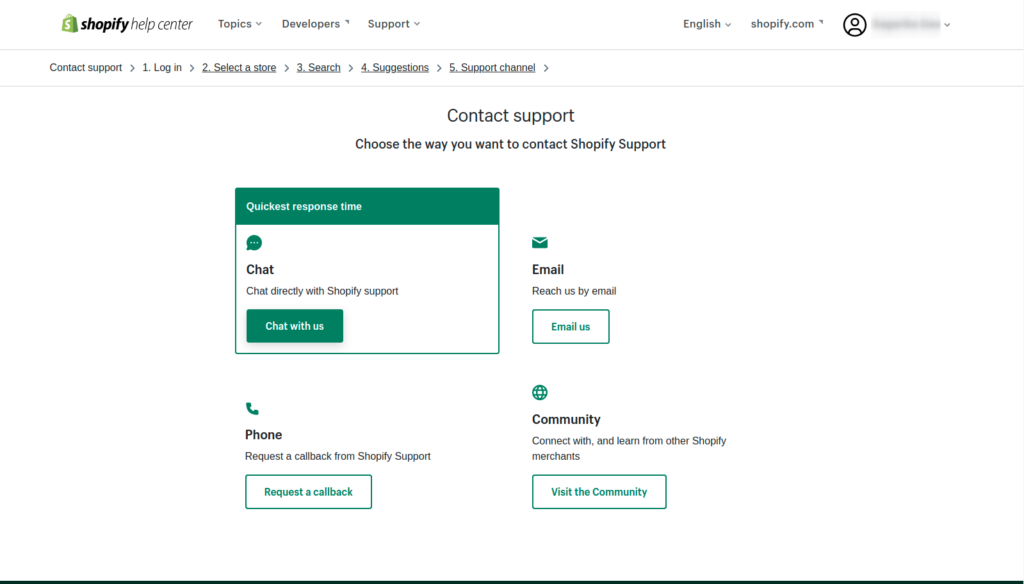
Step 3: Choose a Contact Method
Depending on your situation, you may see:
- แชทสด
- Email support
- Request a callback (phone support)
This is where “call Shopify support” becomes possible.
In some regions and cases, Shopify allows you to request a callback instead of directly dialing a number. A support advisor will then call you.
Important note:
Phone support availability may depend on:
- Your subscription plan
- Your country
- Time zone
- Type of issue
If phone support isn’t available, live chat is usually the fastest alternative.
When Should You Call Shopify Support?
Not every issue requires you to call Shopify support. In fact, many problems can be solved faster using documentation or chat.
However, calling (or requesting a callback) makes sense in these scenarios:
1. Account Access Issues
If:
- Your store is locked
- You can’t log in
- Two-factor authentication fails
These are time-sensitive and may require identity verification. Phone support can speed things up.
2. Billing Disputes
If you notice:
- Unexpected charges
- Subscription confusion
- Double billing
Speaking to a human can clarify details quickly.
3. Store Suspension or Policy Violations
If your store is paused or flagged, documentation alone may not be enough. Direct communication helps you understand the next steps clearly.
4. Critical Checkout Errors
If customers cannot complete purchases, this is revenue-impacting. You should escalate immediately.
When You Don’t Need to Call Shopify Support
Sometimes merchants search “call Shopify support” out of habit—but calling may not be necessary.
Here’s when self-service works better:
Theme Customization Questions
Most theme-related adjustments are handled by:
- Theme documentation
- Theme developers
- Designers (not Shopify core support)
Shopify support does not modify your design or custom code.
App Issues
If a third-party app is malfunctioning, you must contact the app developer directly. Shopify support cannot fix third-party apps.
Custom Code Problems
If you’ve edited Liquid, CSS, or JavaScript, Shopify support generally won’t debug your custom code. You’ll need a developer or design partner.
Understanding this saves time and frustration.
Why You Can’t Find a Direct Shopify Phone Number
Many users are surprised that Shopify doesn’t display a public phone number.
เหตุผลก็คืออย่างนี้:
- Security: Account verification must happen inside your logged-in session.
- Scalability: Shopify serves millions of merchants globally.
- Structured Support: Routing requests ensures proper categorization.
By guiding you through the Help Center first, Shopify ensures that:
- Simple issues are resolved instantly
- Complex issues reach the correct department
- Identity verification is secure
So if you’re searching “call Shopify support phone number,” remember: access is account-based, not public.
How to Get Faster Help Without Calling
Even if your goal is to call Shopify support, you can speed up the process by preparing properly.
Have These Ready:
- Your store URL
- Store ID
- ภาพหน้าจอแสดงปัญหา
- Exact error messages
- Timeline of when the issue started
The clearer you explain your problem, the faster support can assist you.
Common Mistakes When Trying to Call Shopify Support
Mistake 1: Not Logging In First
You cannot access contact options without logging in.
Mistake 2: Choosing the Wrong Issue Category
If you select the wrong topic, you may be routed to irrelevant documentation.
Mistake 3: Expecting Design Services
Shopify support is technical and account-focused. They do not redesign stores or improve conversion layouts.
Mistake 4: Contacting Support for Third-Party App Problems
Always verify whether your issue is platform-related or app-related.
Shopify Support Channels Explained
To better understand your options beyond “call Shopify support,” here’s a breakdown.
Live Chat
- Fastest response
- Real-time troubleshooting
- Available in many regions
Email Support
- Best for non-urgent matters
- Detailed documentation
- Slower turnaround
Callback / Phone Support
- Available in selected regions
- Good for complex discussions
- Must be requested through Help Center
How Support Differs by Shopify Plan
Although Shopify provides support to all plans, response priority may vary.
Basic Plan:
- Access to chat and email
- Standard response times
Shopify Plan:
- Same channels
- Potentially faster resolution
Advanced / Plus:
- Dedicated support options
- Account managers (in some cases)
If you’re running a high-volume store, you may qualify for enhanced support pathways.
What Shopify Support Does NOT Cover
Understanding boundaries helps you avoid disappointment.
Shopify support does not:
- Write custom code
- Redesign your homepage
- Optimize your conversion funnel
- Create product photography
- Run marketing campaigns
- Manage ads
- Configure complex third-party systems
They help with:
- Platform functionality
- Account settings
- Billing
- การแก้ไขปัญหาเบื้องต้น
This distinction is critical.
Why Many Merchants Confuse Support With Strategy
When people search “call Shopify support,” they often expect:
- UX guidance
- Branding advice
- Store structure optimization
- Conversion rate suggestions
But Shopify support is technical, not strategic.
If your store isn’t converting, it’s rarely a platform problem—it’s usually a design, positioning, or user experience issue.
That’s where professional design expertise comes in.
When Your Problem Isn’t Technical—It’s Structural
Here are real examples of issues merchants often blame on Shopify:
- “My checkout is confusing.”
- “My bounce rate is high.”
- “Customers don’t trust my site.”
- “My product pages look messy.”
- “Traffic isn’t converting.”
These are not support issues.
They are design and positioning issues.
Calling Shopify support won’t solve:
- Weak visual hierarchy
- Poor branding consistency
- Cluttered layouts
- Lack of trust signals
- Unclear value propositions
That requires strategic design thinking.
The Smarter Approach: Combine Support + Design Strategy
If you truly want to grow your store, here’s the better path:
- Use Shopify support for technical issues.
- Work with professional designers for structural improvements.
- Invest in UX-driven layouts.
- Optimize for clarity and trust.
Support keeps your platform running.
Design drives revenue.
Both matter—but they serve different roles.
Final Thoughts: When to Call Shopify Support—and When to Go Further
Knowing how to call Shopify support is important for every merchant. It ensures your store stays operational and your account issues get resolved quickly.
But remember:
ช็อปฟี่ support solves platform problems.
It does not solve business strategy problems.
If your issue is technical—log in, go through the Help Center, and request the appropriate contact method, including phone support when available.
If your issue is growth-related—design, structure, positioning, user experience—then what you need isn’t support.
You need strategy.
That’s exactly where we come in.
ที่ AIRSANG, we specialize in cross-border eCommerce strategy and Shopify-focused website design. We help brands build conversion-driven layouts, strengthen visual hierarchy, and create premium brand experiences that turn traffic into revenue.
If you’re struggling with more than just technical errors—if you’re ready to elevate your store’s performance—we’re here to help.