












Comments are one of WordPress’s default features. They were designed to encourage discussion, build community, and increase engagement.
However, for many modern websites—especially business websites, corporate sites, landing pages, and cross-border eCommerce stores—comments are often unnecessary, distracting, or even risky.
If you’ve ever asked yourself:
- Why are people spamming my posts with links?
- Do I really need comments on product pages or service pages?
- How do I turn off comments WordPress-wide without breaking my site?
You’re not alone.
In this guide, we’ll explain how to turn off comments in WordPress, why many professional websites choose to disable them, and how to do it properly depending on your situation—without harming SEO or user experience.
Why Many Websites Turn Off Comments in WordPress

Before jumping into the “how,” it’s important to understand why turning off comments in WordPress is often the right choice.
1. Spam Is a Constant Problem
If your site is publicly accessible, spam comments are almost guaranteed. Bots target WordPress sites because:
- Comment forms are easy entry points
- Links in comments can harm SEO
- Moderation takes time and effort
Even with plugins like Akismet, spam management can quickly become a burden.
2. Comments Don’t Always Match Business Goals
For blogs and communities, comments make sense.
For business websites, they often don’t.
If your site focuses on:
- Services
- Product sales
- Brand presentation
- Lead generation
then open comment sections may distract users from taking action.
3. Comments Can Create Legal and Brand Risks
User-generated content is not always harmless.
Comments can include:
- Offensive language
- False claims
- Copyright violations
- Unverified information
For companies—especially those serving international markets—this can become a compliance or brand image issue.
How WordPress Comments Actually Work
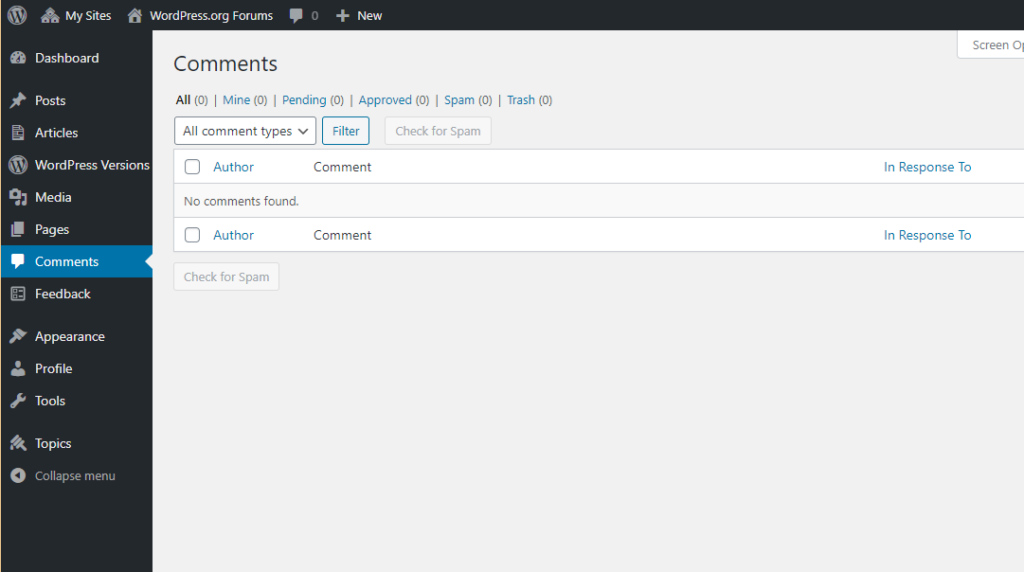
To properly turn off comments WordPress, it helps to understand how WordPress handles them internally.
WordPress comments are controlled at three levels:
- Global (site-wide) settings
- Post type level (posts, pages, products)
- Individual post or page level
Many users disable comments in one place but forget others—leading to confusion when comments still appear.
Method 1: Turn Off Comments Globally in WordPress Settings
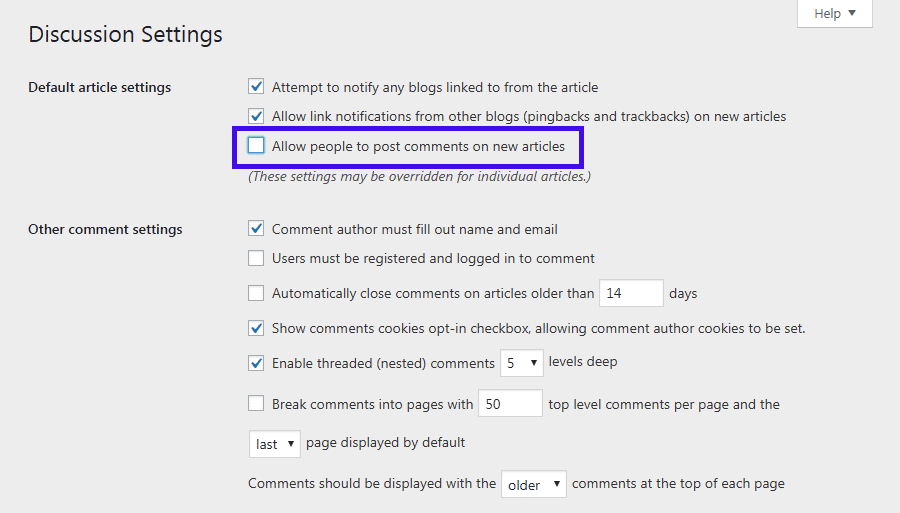
This is the most common starting point.
Step-by-Step
- Log in to your WordPress dashboard
- Go to Settings → Discussion
- Find the option:
“Allow people to submit comments on new posts” - Uncheck this box
- Click Save Changes
What This Does (and Doesn’t Do)
✅ Stops comments on future posts
❌ Does not remove comments from existing posts
This is an important detail many people miss.
Method 2: Turn Off Comments on Existing Posts and Pages
If your site already has content, global settings alone are not enough.
Bulk Disable Comments for Existing Content
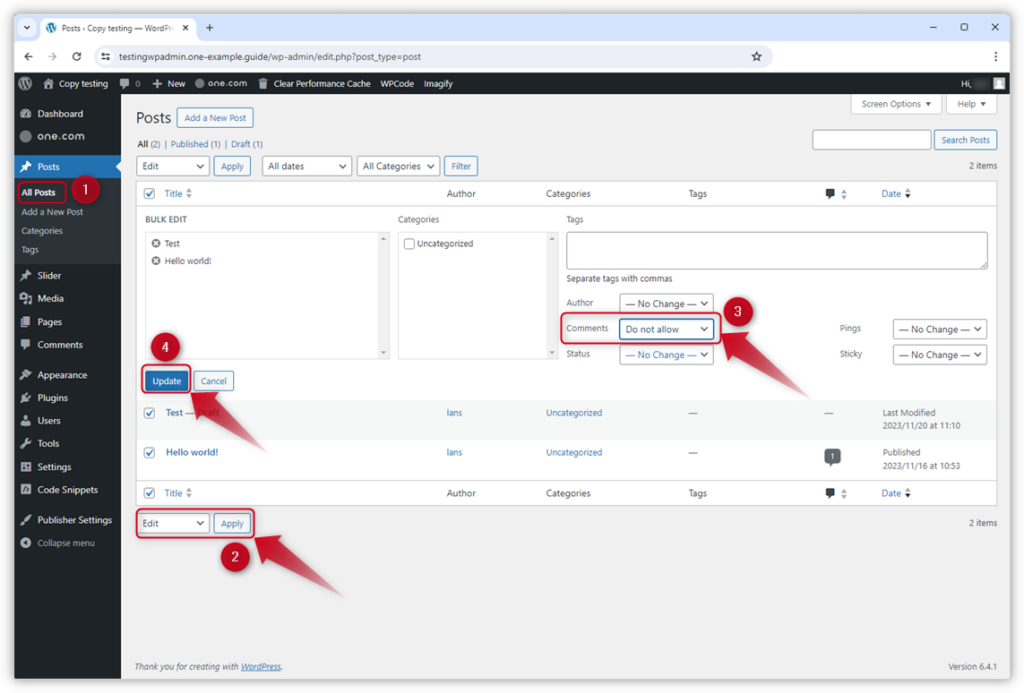
- Go to Posts → All Posts (or Pages → All Pages)
- Select all items (or filter by category)
- Choose Bulk actions → Edit
- Click Apply
- Set Comments to Do not allow
- Click Update
This method is especially useful when you want to turn off comments WordPress-wide on older blog posts.
Method 3: Disable Comments on Individual Posts or Pages
Sometimes you want selective control.
How to Do It
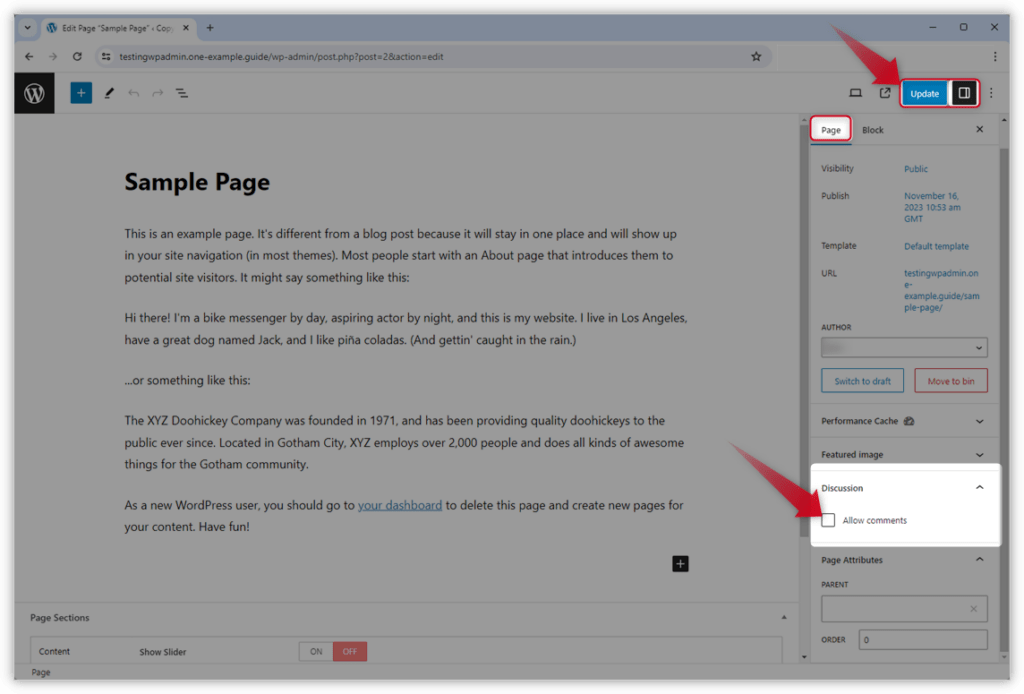
- Edit a post or page
- Scroll to the Discussion panel
- If you don’t see it, enable it via Screen Options
- Uncheck Allow comments
- Update the post
This is useful for:
- Landing pages
- Service pages
- Legal pages (Privacy Policy, Terms)
Method 4: Turn Off Comments on Pages Only (But Keep Them on Posts)
Many business websites want:
- ❌ No comments on pages
- ✅ Comments allowed on blog posts
How to Do This
WordPress treats posts and pages differently.
Steps:
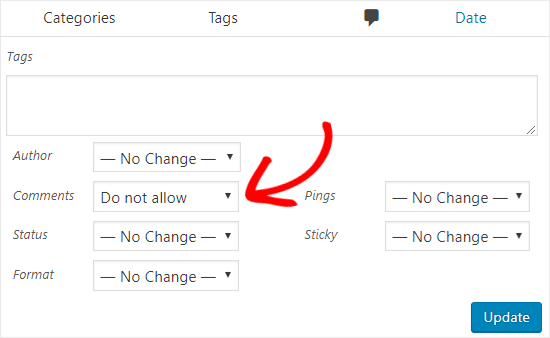
- Go to Pages → All Pages
- Bulk edit all pages
- Set Comments → Do not allow
- Save changes
This setup works well for corporate and service-based websites.
Method 5: Disable Comments on WooCommerce Products
If you’re running an online store, product comments (reviews) require special consideration.
Important Distinction
- Product comments = Reviews
- Disabling comments may also disable reviews
To manage this properly:
- Go to WooCommerce → Settings → Products
- Open the Reviews tab
- Uncheck Enable product reviews
- Save changes
For cross-border stores, many brands prefer controlled reviews rather than open comment systems.
Method 6: Remove Comment Forms and Comment Links from Themes
Sometimes comments are disabled, but:
- “Leave a Reply” still shows
- Comment counts still appear
This is a theme-level issue.
Common Solutions
- Check theme settings (especially in premium themes)
- Disable comments in theme options
- Remove comment-related widgets
- Use a child theme to hide comment templates if needed
This ensures a clean, professional layout.
Method 7: Use a Plugin to Turn Off Comments WordPress-Wide
If you want a fast, foolproof solution, plugins can help.
Popular options include:
- Disable Comments
- WPCode (custom logic)
Plugin Advantages
- One-click global control
- Supports custom post types
- Automatically removes comment UI
For large or complex sites, this is often the safest approach.
Common Mistakes When Turning Off Comments in WordPress
❌ Only Changing One Setting
Many users disable comments in Settings → Discussion but forget existing posts.
❌ Ignoring Theme-Level Comment Output
Some themes still display comment placeholders even when comments are disabled.
❌ Forgetting SEO and UX Context
Removing comments doesn’t harm SEO by itself—but broken layouts or empty sections can.
Does Turning Off Comments Hurt SEO?
Short answer: No—if done correctly.
Search engines care about:
- Content quality
- Page structure
- User experience
Comments can help SEO only if they add real value.
Spam or low-quality comments can actually hurt rankings.
For business-focused sites, turning off comments WordPress-style often improves clarity and conversion.
When You Should Keep Comments Enabled
There are still valid cases where comments make sense:
- Educational blogs
- Thought leadership content
- Community-driven platforms
The key is intentional design, not default settings.
Best Practices for Cross-Border Websites
For international and cross-border websites, we usually recommend:
- Turn off comments on pages and products
- Use structured contact forms instead
- Centralize communication (email, CRM, WhatsApp, forms)
- Maintain brand control and compliance
This approach reduces risk while improving conversion flow.
Final Thoughts
Learning how to turn off comments WordPress is not just a technical task—it’s a strategic decision.
A well-designed website should guide users toward action, not confusion.
At AIRSANG, we specialize in cross-border website design, WordPress architecture, and conversion-focused layouts. Whether you’re building a brand site, a service website, or an international eCommerce store, we help structure your site so every feature—including comments—serves a clear purpose.
If you’re unsure whether comments fit your website strategy, or you want professional help optimizing your WordPress site for global audiences, AIRSANG is here to help.


Design and build a WordPress website or corporate site with a full eCommerce system for you.
Price range: $200.00 through $2,500.00Custom requirements or special quotations
Original price was: $2.00.$1.00Current price is: $1.00. Are 50 Plugins Too Many for a WordPress eCommerce Store?
Understanding the Real Performance Impact Having 50 plugins on a WordPress eCommerce site isn’t automatically a problem. In fact, the number alone rarely determines performance....

Main Image Design for Amazon Lipstick Conversion
Introduction: Designing a Lipstick Main Image That Sells on Amazon When we design a Main image for an Amazon lipstick, our responsibility goes far beyond...

How Hackers Steal WordPress Admin Emails (And How to Stop Them)
Let’s start with an uncomfortable truth: Your WordPress admin email is probably way more public than you think.And hackers? They love that. To them, your...

What Makes an Amazon Liquid Foundation Main Image Convert
Introduction Designing a Main image design for Amazon Liquid foundation is never just about making a product look beautiful. On Amazon, the main image and...

Designing an Effective Amazon Main Image for Filter Cartridges
Introduction Designing a Main image for Amazon is never just about making a product look attractive. It is about clarity, trust, and instant understanding—especially for...

Replay Attacks on WordPress: Real Threat or Overhyped Myth?
Let’s clear something up first. Replay attacks don’t look scary.They don’t smash passwords.They don’t inject evil code with green hacker text flying everywhere. They’re sneaky....

How to Duplicate WordPress Pages Without Breaking Anything
Let’s face it. Sometimes you don’t want to create a new page.You just want the same page… but slightly different. Same layout.Same blocks.Same settings. Because...

Five Pet WordPress Themes Compared
Introduction Choosing the right pet-related WordPress theme is more than a design decision—it directly affects usability, scalability, and long-term business growth. Pet care and pet...

Comparing Five Swimwear eCommerce Themes
Introduction Choosing the right theme for a swimwear or lingerie independent store is not just a visual decision—it directly affects conversion rates, scalability, and long-term...

How to Turn Off Comments in WordPress (Without Losing Your Mind)
Let’s talk about WordPress comments. In theory, comments are great.They encourage discussion.They build community.They make your website feel “alive.” In reality? They’re often a magnet...

WordPress 500 Error: When Your Website Decides to Panic
Your WordPress site was fine a minute ago.You refreshed the page.And suddenly—boom 💥—500 Internal Server Error. No explanation.No apology.Just a cold, confusing message that basically...

How to Contact Shopify Support: Simple, Stress-Free Guide
Running a Shopify store should feel exciting—not confusing. When questions pop up or issues slow you down, Shopify offers several support paths depending on what...

How to Deactivate a Shopify Store: A Clear, Practical Guide
Deactivating a Shopify store isn’t complicated, but it does come with consequences many merchants overlook. This guide breaks the process down in a simple, educational...

Five Shoe Store Themes Compared
Introduction Choosing the right theme for a footwear-focused independent store is not just a visual decision—it directly affects scalability, daily operations, and long-term conversion performance....

Shopify vs Etsy: The Ultimate Online Selling Showdown
Introduction: Two Platforms Walk Into a Bar… If Shopify and Etsy were people, Etsy would be that charming friend who already has a booth at...

Is Your Shopify or WordPress Site Hacked? Here’s What to Do
Introduction: The Digital Equivalent of Waking Up to a Broken Window Imagine waking up, grabbing your morning coffee, opening your laptop… and discovering your website...

How to Start a Shopify Store Without Losing Your Mind
Starting a Shopify store sounds glamorous. You picture yourself sipping coffee at noon, checking sales notifications, and casually telling friends,“Yeah, my store did pretty well...

Is Shopify Legit? A Clear Guide for New Online Sellers
If you’re researching eCommerce platforms, chances are you’ve typed one very specific question into Google: is Shopify legit? That question is completely reasonable. Launching an...