












Deactivating a Shopify store isn’t complicated, but it does come with consequences many merchants overlook. This guide breaks the process down in a simple, educational way—so you know exactly what happens before, during, and after you close your store.
What Does “Deactivating a Shopify Store” Actually Mean?
When you deactivate your Shopify store, you’re canceling your subscription. The store automatically shuts down at the end of your current billing cycle, and your storefront goes offline. You won’t be able to access the Shopify admin unless you reactivate the store with a valid payment method.
Important: Shopify Support cannot deactivate your store for you. Only the store owner can do this from the admin panel.
Things You Should Know Before Deactivating
Think of deactivation as pressing “pause with consequences.” Here’s what to consider first:
1. Your Store URL Is Gone Forever
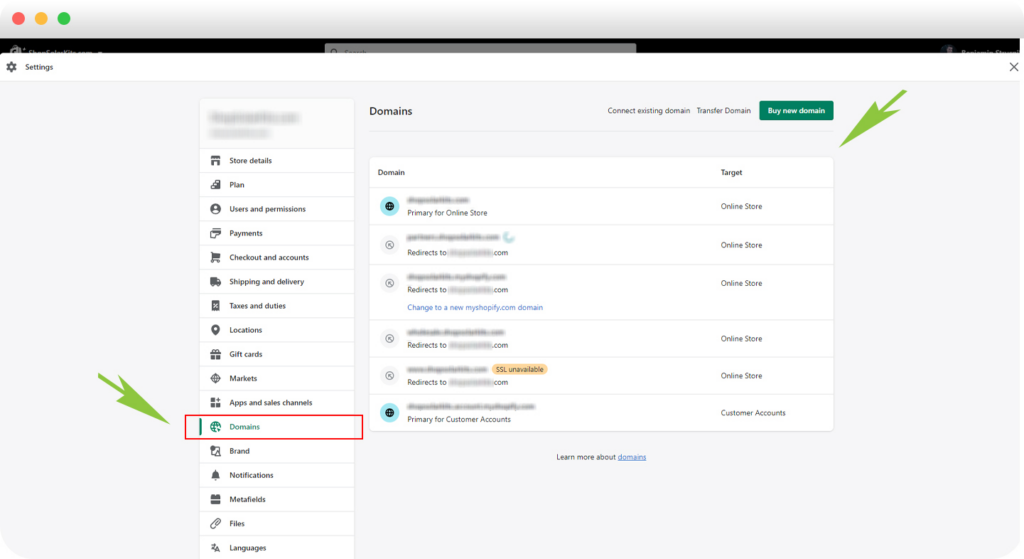
Each myshopify.com domain is unique. Once deactivated, you can’t reuse that same URL—even if you reopen a store with the same brand name later.
2. Back Up Your Data

Export important information such as:
- Products
- Orders
- Customers
- Gift cards (especially if unused balances exist)
CSV exports are your safety net.
3. Themes and Licenses Matter
If you purchased a paid theme, download a backup. Theme licenses apply only to the original store, but Shopify Support can sometimes help transfer a license to another store you own.
4. Financial Loose Ends Don’t Disappear
Even after deactivation:
- Pending Shopify Payments payouts still process
- Third-party app fees may still apply
- Chargebacks can still occur—and you won’t be able to submit new evidence
5. Custom Domains Need Special Attention
- Shopify-purchased domains can be transferred out
- Third-party domains should be removed from Shopify before deactivation
- Shopify’s HSTS security policy remains active for 90 days, meaning non-HTTPS platforms may show browser security warnings
How to Deactivate Your Shopify Store (Desktop)
- Go to Settings → Plan
- Click Cancel plan (or Cancel trial if applicable)
- Review pause options (optional)
- Confirm cancellation
- Select a reason and enter your password
You’ll receive a confirmation email once the store is deactivated.
Shopify Plus users: You must contact Shopify Plus Support to deactivate.
What Happens After Deactivation?
- Your store data is safely stored for 2 years
- You can view past invoices
- You can reactivate anytime within that period—no rebuilding required
If you want your customer data removed sooner, you can submit a formal data deletion request.
Reactivating a Deactivated Store
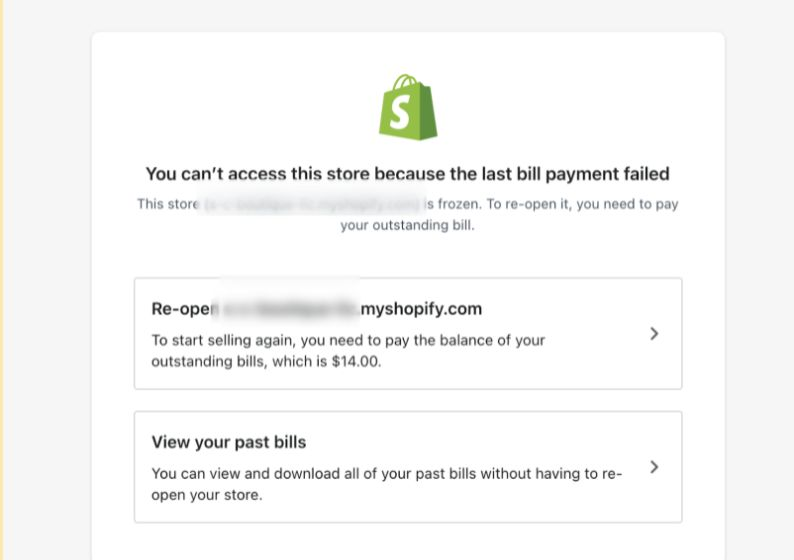
Reopening is simple:
- Log in as the store owner
- Click Re-open <store>.myshopify.com
- Choose a new plan
- Add payment details
- Confirm and reactivate
Your store comes back exactly as it was.
Final Thought
Deactivating a Shopify store isn’t just a technical step—it’s a business decision that affects branding, domains, customer trust, and future scalability. Understanding these details helps you avoid costly mistakes.
If you’re running a cross-border eCommerce business, planning a store migration, or thinking about redesigning or restructuring your Shopify website, this is exactly where strategy matters.
At AIRSANG, we specialize in cross-border eCommerce solutions and conversion-focused website design. If you’re planning your next move—or your comeback—feel free to follow us or reach out. We build stores with the future in mind.


Design and build a WordPress website or corporate site with a full eCommerce system for you.
Price range: $200.00 through $2,500.00custom-requirements-or-special-quotations
Original price was: $2.00.$1.00Current price is: $1.00. Are 50 Plugins Too Many for a WordPress eCommerce Store?
Understanding the Real Performance Impact Having 50 plugins on a WordPress eCommerce site isn’t automatically a problem. In fact, the number alone rarely determines performance....

Main Image Design for Amazon Lipstick Conversion
Introduction: Designing a Lipstick Main Image That Sells on Amazon When we design a Main image for an Amazon lipstick, our responsibility goes far beyond...

How Hackers Steal WordPress Admin Emails (And How to Stop Them)
Let’s start with an uncomfortable truth: Your WordPress admin email is probably way more public than you think.And hackers? They love that. To them, your...

What Makes an Amazon Liquid Foundation Main Image Convert
Introduction Designing a Main image design for Amazon Liquid foundation is never just about making a product look beautiful. On Amazon, the main image and...

Designing an Effective Amazon Main Image for Filter Cartridges
Introduction Designing a Main image for Amazon is never just about making a product look attractive. It is about clarity, trust, and instant understanding—especially for...

Replay Attacks on WordPress: Real Threat or Overhyped Myth?
Let’s clear something up first. Replay attacks don’t look scary.They don’t smash passwords.They don’t inject evil code with green hacker text flying everywhere. They’re sneaky....

How to Duplicate WordPress Pages Without Breaking Anything
Let’s face it. Sometimes you don’t want to create a new page.You just want the same page… but slightly different. Same layout.Same blocks.Same settings. Because...

Five Pet WordPress Themes Compared
Introduction Choosing the right pet-related WordPress theme is more than a design decision—it directly affects usability, scalability, and long-term business growth. Pet care and pet...

Comparing Five Swimwear eCommerce Themes
Introduction Choosing the right theme for a swimwear or lingerie independent store is not just a visual decision—it directly affects conversion rates, scalability, and long-term...

How to Turn Off Comments in WordPress (Without Losing Your Mind)
Let’s talk about WordPress comments. In theory, comments are great.They encourage discussion.They build community.They make your website feel “alive.” In reality? They’re often a magnet...

WordPress 500 Error: When Your Website Decides to Panic
Your WordPress site was fine a minute ago.You refreshed the page.And suddenly—boom 💥—500 Internal Server Error. No explanation.No apology.Just a cold, confusing message that basically...

How to Contact Shopify Support: Simple, Stress-Free Guide
Running a Shopify store should feel exciting—not confusing. When questions pop up or issues slow you down, Shopify offers several support paths depending on what...

Five Shoe Store Themes Compared
Introduction Choosing the right theme for a footwear-focused independent store is not just a visual decision—it directly affects scalability, daily operations, and long-term conversion performance....

Shopify vs Etsy: The Ultimate Online Selling Showdown
Introduction: Two Platforms Walk Into a Bar… If Shopify and Etsy were people, Etsy would be that charming friend who already has a booth at...

Is Your Shopify or WordPress Site Hacked? Here’s What to Do
Introduction: The Digital Equivalent of Waking Up to a Broken Window Imagine waking up, grabbing your morning coffee, opening your laptop… and discovering your website...

How to Start a Shopify Store Without Losing Your Mind
Starting a Shopify store sounds glamorous. You picture yourself sipping coffee at noon, checking sales notifications, and casually telling friends,“Yeah, my store did pretty well...

Is Shopify Legit? A Clear Guide for New Online Sellers
If you’re researching eCommerce platforms, chances are you’ve typed one very specific question into Google: is Shopify legit? That question is completely reasonable. Launching an...

Kids Clothing Store Themes Compared: WordPress & Shopify
Introduction Choosing the right theme is one of the most important decisions when building a kids or baby clothing independent store. Design tone, platform compatibility,...