












Introduction
If you’re looking to build a website without diving deep into complex coding, learning how to develop a WordPress site is one of the most practical and efficient paths. WordPress powers a significant portion of the internet, from small personal blogs to large-scale business platforms. Its flexibility, ease of use, and massive ecosystem make it an ideal choice for beginners and professionals alike.
This guide explains the full process in a clear, educational way—breaking down each stage so you can understand not just what to do, but why it matters.
What Is WordPress and Why Use It?
Before diving into development, it’s important to understand what WordPress actually is.
WordPress is an open-source content management system (CMS) that allows users to create, manage, and publish websites without needing advanced technical knowledge. There are two main versions:
- WordPress.com – a hosted solution with limited customization
- WordPress.org – a self-hosted version offering full control and flexibility
When discussing how to develop a WordPress site, most professionals refer to the self-hosted version because it provides complete ownership and customization options.
Key Advantages
- Easy-to-use interface
- Thousands of themes and plugins
- SEO-friendly structure
- Scalable for any type of website
- Strong community support
Step 1: Define Your Website Purpose
Every successful website starts with a clear goal.
Ask yourself:
- Is this a business website, blog, or eCommerce store?
- Who is your target audience?
- What actions do you want users to take?
Defining your purpose helps guide decisions around structure, design, and functionality. For example, an online store will require product pages and checkout flows, while a blog focuses on content organization.
Step 2: Choose a Domain Name and Hosting
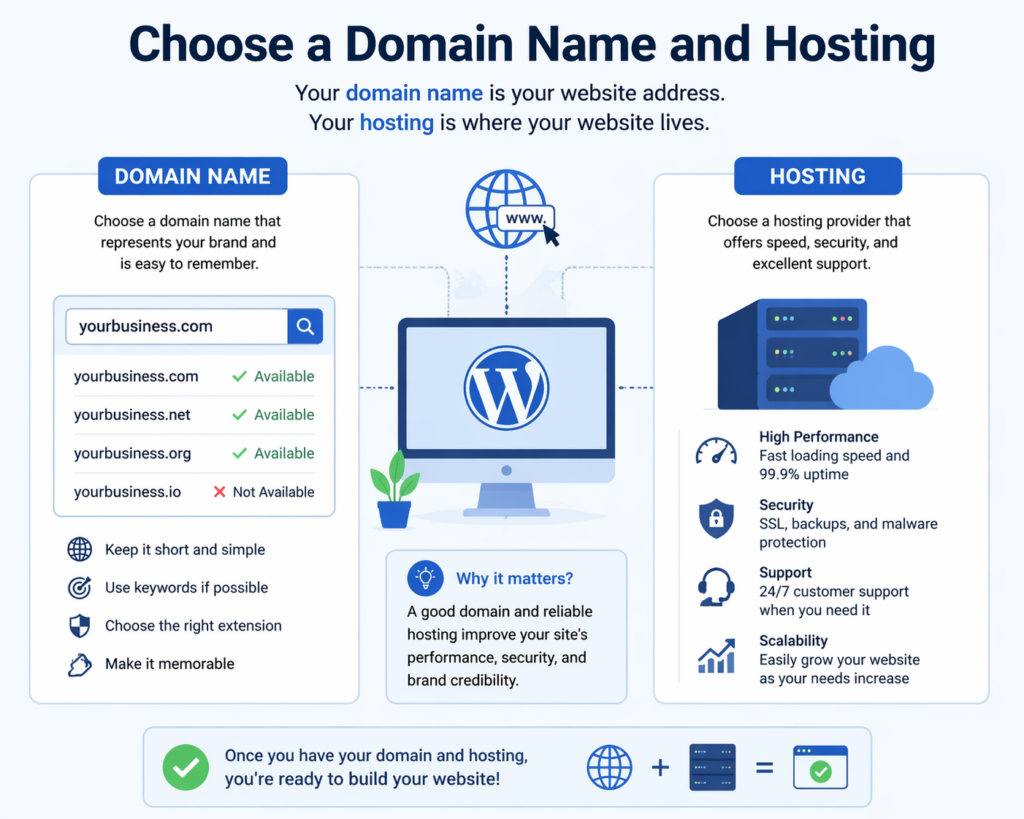
To make your website accessible online, you need two essential elements:
Domain Name
This is your website’s address (e.g., yourwebsite.com). Choose something:
- Short and memorable
- Relevant to your brand or niche
- Easy to spell
Web Hosting
Hosting is where your website files are stored. When selecting a hosting provider, consider:
- Speed and performance
- Uptime reliability
- Customer support
- Scalability options
Many hosting providers offer one-click WordPress installation, simplifying the setup process significantly.
Step 3: Install WordPress
Once your domain and hosting are ready, the next step is installation.
Most hosting platforms provide automatic installation tools. Alternatively, you can manually install WordPress by:
- Downloading WordPress from the official website
- Uploading files to your server
- Creating a database
- Running the installation script
After installation, you’ll gain access to the WordPress dashboard—the central control panel for managing your site.
Step 4: Understand the WordPress Dashboard
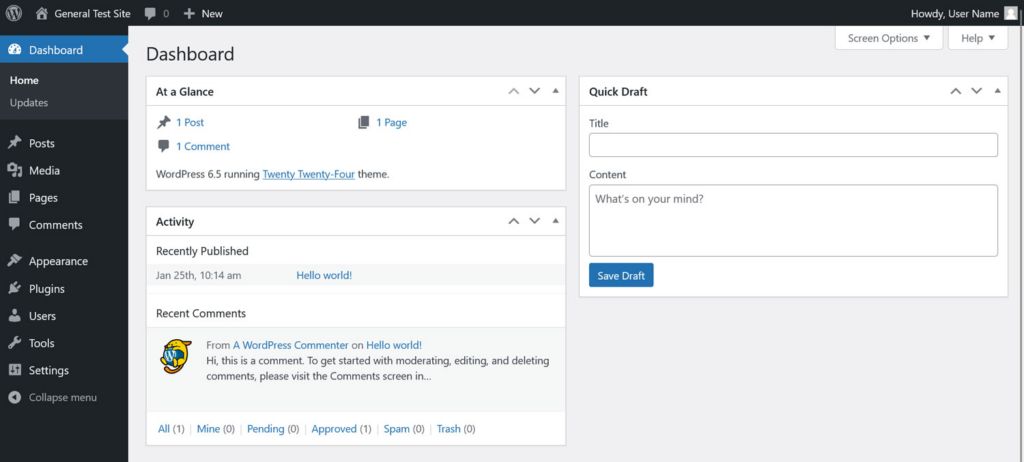
The dashboard is where all your website management happens.
Key sections include:
- Posts – for blog articles
- Pages – for static content (e.g., About, Contact)
- Appearance – for themes and design customization
- Plugins – for adding functionality
- Settings – for configuring site behavior
Familiarizing yourself with this interface is essential when learning how to develop a WordPress site effectively.
Step 5: Choose and Customize a Theme
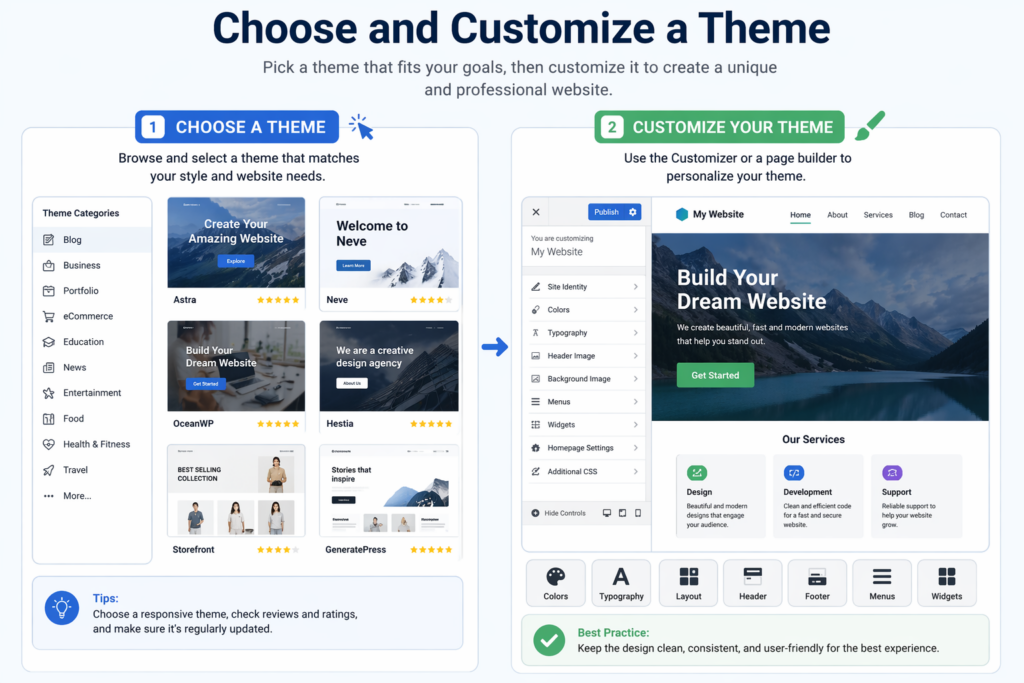
A theme controls the visual appearance of your website.
Selecting a Theme
When choosing a theme, consider:
- Design style (minimal, modern, corporate, etc.)
- Responsiveness (mobile-friendly design)
- Customization options
- Performance and speed
There are both free and premium themes available. Premium themes often offer more advanced features and better support.
Customization
You can customize your theme through the WordPress Customizer or page builders. Common adjustments include:
- Colors and typography
- Layout structure
- Header and footer design
- Homepage sections
A clean and user-friendly design improves both user experience and conversion rates.
Step 6: Install Essential Plugins
Plugins extend the functionality of your website.
Here are some key categories to consider:
SEO Plugins
Help optimize your site for search engines by managing meta tags, sitemaps, and keywords.
Security Plugins
Protect your website from malware and unauthorized access.
Performance Plugins
Improve loading speed through caching and optimization.
Backup Plugins
Ensure your data is safe by creating regular backups.
eCommerce Plugins
If you plan to sell products, plugins like WooCommerce allow you to build a full online store.
Be cautious not to install too many plugins, as this can affect performance.
Step 7: Create Core Pages
Every website needs a set of essential pages.
Homepage
The first impression of your website. It should clearly communicate your value and guide users to key sections.
About Page
Tells your story, builds trust, and explains your mission.
Services or Products Page
Highlights what you offer with clear descriptions and visuals.
Contact Page
Provides ways for users to reach you, often including a form, email, or phone number.
Blog Section
Optional but valuable for content marketing and SEO.
Organizing your content effectively is a crucial part of how to develop a WordPress site that performs well.
Step 8: Structure Navigation and User Experience
Navigation plays a major role in usability.
Tips for effective navigation:
- Keep menus simple and intuitive
- Limit the number of menu items
- Use clear labels
- Ensure mobile compatibility
A well-structured site helps users find information quickly and improves engagement.
Step 9: Optimize for Mobile and Performance
Today, most users browse on mobile devices. Your site must be responsive and fast.
Mobile Optimization
- Use responsive themes
- Test layouts on different devices
- Ensure buttons and text are easy to interact with
Performance Optimization
- Compress images
- Use caching tools
- Minimize unnecessary scripts
Fast-loading websites not only improve user experience but also rank better in search engines.
Step 10: Implement Basic SEO Practices
Search engine optimization (SEO) helps your site get discovered.
Key SEO Elements
- Use relevant keywords naturally
- Write clear meta titles and descriptions
- Structure content with headings (H1, H2, H3)
- Optimize images with alt text
- Create internal links
Understanding SEO is essential when learning how to develop a WordPress site that attracts traffic.
Step 11: Add Content and Media
Content is the core of your website.
Writing Content
- Keep it clear and engaging
- Focus on user needs
- Use short paragraphs and headings
Using Media
- High-quality images enhance visual appeal
- Videos can improve engagement
- Infographics help explain complex ideas
Consistency in style and tone builds a strong brand identity.
Step 12: Test Your Website
Before launching, thoroughly test your site.
Check:
- All links and buttons
- Page loading speed
- Mobile responsiveness
- Form functionality
- Browser compatibility
Testing ensures a smooth user experience and prevents potential issues after launch.
Step 13: Launch Your Website
Once everything is ready, it’s time to go live.
Make sure:
- Your domain is properly connected
- SSL certificate is installed (for security)
- Search engines can index your site
After launch, monitor performance and user behavior to identify areas for improvement.
Step 14: Maintain and Update Regularly
Website development doesn’t end after launch.
Ongoing maintenance includes:
- Updating WordPress core, themes, and plugins
- Monitoring security
- Backing up data
- Adding fresh content
Regular updates keep your site secure, fast, and relevant.
Common Mistakes to Avoid
When learning how to develop a WordPress site, beginners often make these mistakes:
- Choosing overly complex themes
- Installing too many plugins
- Ignoring mobile optimization
- Neglecting SEO
- Skipping backups
Avoiding these pitfalls can save time and improve results.
Conclusion
Learning how to develop a WordPress site is a valuable skill that combines creativity, structure, and strategy. From defining your website’s purpose to launching and maintaining it, each step plays a critical role in building a successful online presence.
By understanding the fundamentals—such as choosing the right hosting, designing user-friendly layouts, optimizing for performance, and implementing SEO—you can create a website that not only looks professional but also delivers real results.
With the right approach and continuous improvement, WordPress becomes more than just a tool—it becomes a powerful platform for growth, communication, and long-term success.
FAQ
To develop a WordPress site, you need a domain name, web hosting, and a WordPress installation. Once set up, you can start building your site using themes and plugins.
No, coding is not required for most WordPress websites. You can use themes, page builders, and plugins to create and customize your site without technical knowledge.
The timeline depends on the complexity. A basic site can be built in a few hours or days, while a more advanced website may take several weeks.
A theme controls the design and layout of your website, while plugins add functionality such as SEO tools, contact forms, or eCommerce features.
You can improve speed and security by using reliable hosting, installing caching plugins, optimizing images, keeping everything updated, and adding security plugins.


Design and build a WordPress website or corporate site with a full eCommerce system for you.
Price range: $200.00 through $2,500.00custom-requirements-or-special-quotations
Original price was: $2.00.$1.00Current price is: $1.00. Are 50 Plugins Too Many for a WordPress eCommerce Store?
Understanding the Real Performance Impact Having 50 plugins on a WordPress eCommerce site isn’t automatically a problem. In fact, the number alone rarely determines performance....

Main Image Design for Amazon Home Physiotherapy Device Explained
Introduction: Building a Trustworthy Image for Home Therapy Devices on Amazon When designing the main image for a home therapy device on Amazon, our primary...

Main Image Design for Amazon Lipstick Conversion
Introduction: Designing a Lipstick Main Image That Sells on Amazon When we design a Main image for an Amazon lipstick, our responsibility goes far beyond...

How Hackers Steal WordPress Admin Emails (And How to Stop Them)
Let’s start with an uncomfortable truth: Your WordPress admin email is probably way more public than you think.And hackers? They love that. To them, your...

What Makes an Amazon Liquid Foundation Main Image Convert
Introduction Designing a Main image design for Amazon Liquid foundation is never just about making a product look beautiful. On Amazon, the main image and...

Designing an Effective Amazon Main Image for Filter Cartridges
Introduction Designing a Main image for Amazon is never just about making a product look attractive. It is about clarity, trust, and instant understanding—especially for...

Replay Attacks on WordPress: Real Threat or Overhyped Myth?
Let’s clear something up first. Replay attacks don’t look scary.They don’t smash passwords.They don’t inject evil code with green hacker text flying everywhere. They’re sneaky....

How to Duplicate WordPress Pages Without Breaking Anything
Let’s face it. Sometimes you don’t want to create a new page.You just want the same page… but slightly different. Same layout.Same blocks.Same settings. Because...

Five Pet WordPress Themes Compared
Introduction Choosing the right pet-related WordPress theme is more than a design decision—it directly affects usability, scalability, and long-term business growth. Pet care and pet...

Comparing Five Swimwear eCommerce Themes
Introduction Choosing the right theme for a swimwear or lingerie independent store is not just a visual decision—it directly affects conversion rates, scalability, and long-term...

How to Turn Off Comments in WordPress (Without Losing Your Mind)
Let’s talk about WordPress comments. In theory, comments are great.They encourage discussion.They build community.They make your website feel “alive.” In reality? They’re often a magnet...

WordPress 500 Error: When Your Website Decides to Panic
Your WordPress site was fine a minute ago.You refreshed the page.And suddenly—boom 💥—500 Internal Server Error. No explanation.No apology.Just a cold, confusing message that basically...

Building a Scalable WordPress Website for a Science-Driven Brand: The AminoUSA Project
Introduction In today’s digital landscape, a website is more than a place to list products. For science-driven brands operating in regulated or research-focused industries, a...

Building a Scalable Shopify Store for a Global Blade Brand: The CoolKatana Project
Introduction In cross-border eCommerce, a Shopify website is more than a storefront.For brands operating in niche, culture-driven categories, the website must do far more than...

Designing a High-Conversion Shopify Store for Pokémon Cards
Introduction In the world of collectible eCommerce, especially within the Pokémon Trading Card Game (TCG) market, a website must do more than simply list products....

High-Converting Shopify Design for a Custom Brick Brand
Introduction In today’s competitive eCommerce landscape, especially in the personalized gift and collectible space, a Shopify website must do far more than display products. It...

How to Contact Shopify Support: Simple, Stress-Free Guide
Running a Shopify store should feel exciting—not confusing. When questions pop up or issues slow you down, Shopify offers several support paths depending on what...

How to Deactivate a Shopify Store: A Clear, Practical Guide
Deactivating a Shopify store isn’t complicated, but it does come with consequences many merchants overlook. This guide breaks the process down in a simple, educational...