











 Japanese
導入
If you’re looking to build a website without diving deep into complex coding, learning how to develop a ワードプレス site is one of the most practical and efficient paths. WordPress powers a significant portion of the internet, from small personal blogs to large-scale business platforms. Its flexibility, ease of use, and massive ecosystem make it an ideal choice for beginners and professionals alike.
This guide explains the full process in a clear, educational way—breaking down each stage so you can understand not just what to do, but why it matters.
WordPressとは何か?そして、なぜWordPressを使うべきなのか?
Before diving into development, it’s important to understand what WordPress actually is.
WordPress is an open-source content management system (CMS) that allows users to create, manage, and publish websites without needing advanced technical knowledge. There are two main versions:
- WordPress.com – a hosted solution with limited customization
- WordPress.org – a self-hosted version offering full control and flexibility
When discussing how to develop a WordPress site, most professionals refer to the self-hosted version because it provides complete ownership and customization options.
主な利点
- Easy-to-use interface
- Thousands of themes and plugins
- SEOに適した構造
- Scalable for any type of website
- Strong community support
Step 1: Define Your Website Purpose
Every successful website starts with a clear goal.
自分自身に問いかけてみましょう:
- Is this a business website, blog, or eCommerce store?
- Who is your target audience?
- What actions do you want users to take?
Defining your purpose helps guide decisions around structure, design, and functionality. For example, an online store will require product pages and checkout flows, while a blog focuses on content organization.
Step 2: Choose a Domain Name and Hosting
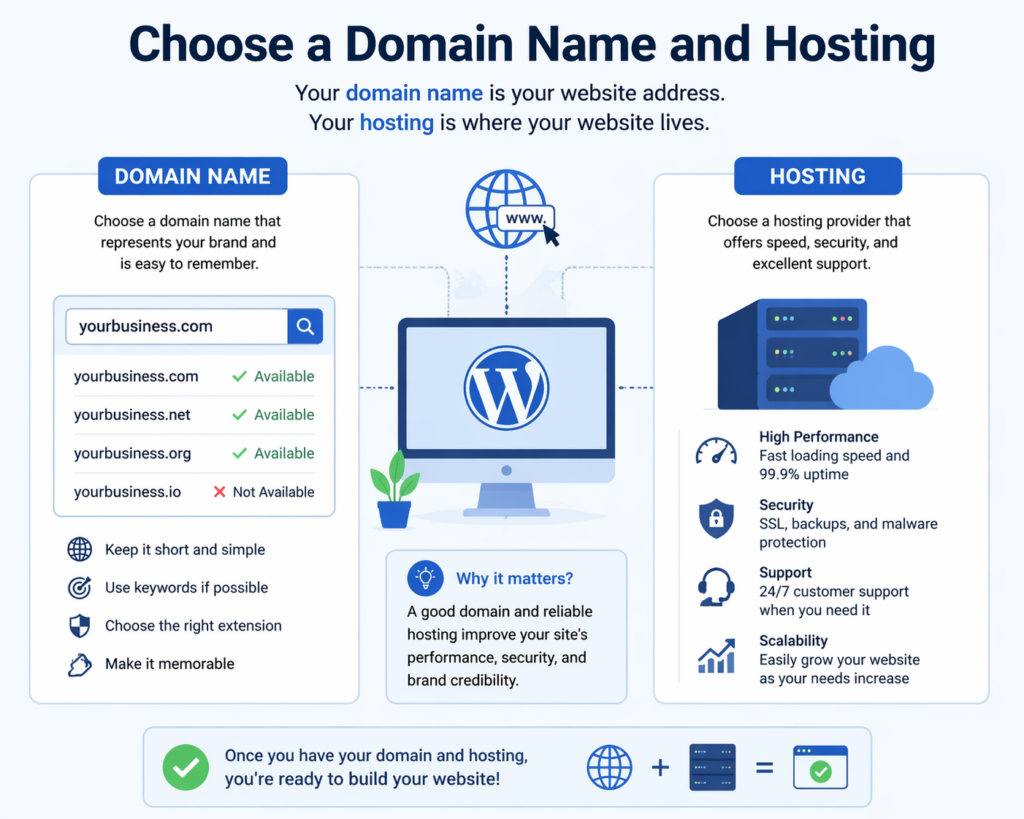
To make your website accessible online, you need two essential elements:
Domain Name
This is your website’s address (e.g., yourwebsite.com). Choose something:
- Short and memorable
- Relevant to your brand or niche
- Easy to spell
Web Hosting
Hosting is where your website files are stored. When selecting a hosting provider, consider:
- スピードとパフォーマンス
- Uptime reliability
- カスタマーサポート
- Scalability options
Many hosting providers offer one-click WordPress installation, simplifying the setup process significantly.
ステップ3:WordPressをインストールする
Once your domain and hosting are ready, the next step is installation.
Most hosting platforms provide automatic installation tools. Alternatively, you can manually install WordPress by:
- Downloading WordPress from the official website
- Uploading files to your server
- Creating a database
- Running the installation script
After installation, you’ll gain access to the WordPress dashboard—the central control panel for managing your site.
ステップ4:WordPressダッシュボードを理解する
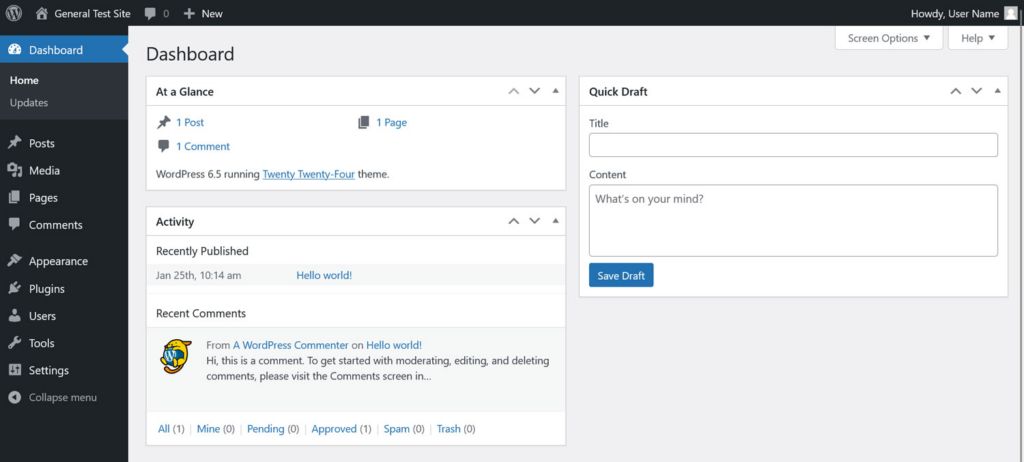
The dashboard is where all your website management happens.
Key sections include:
- 投稿 – for blog articles
- ページ – for static content (e.g., About, Contact)
- 外観 – for themes and design customization
- プラグイン – for adding functionality
- 設定 – for configuring site behavior
Familiarizing yourself with this interface is essential when learning how to develop a WordPress site effectively.
Step 5: Choose and Customize a Theme
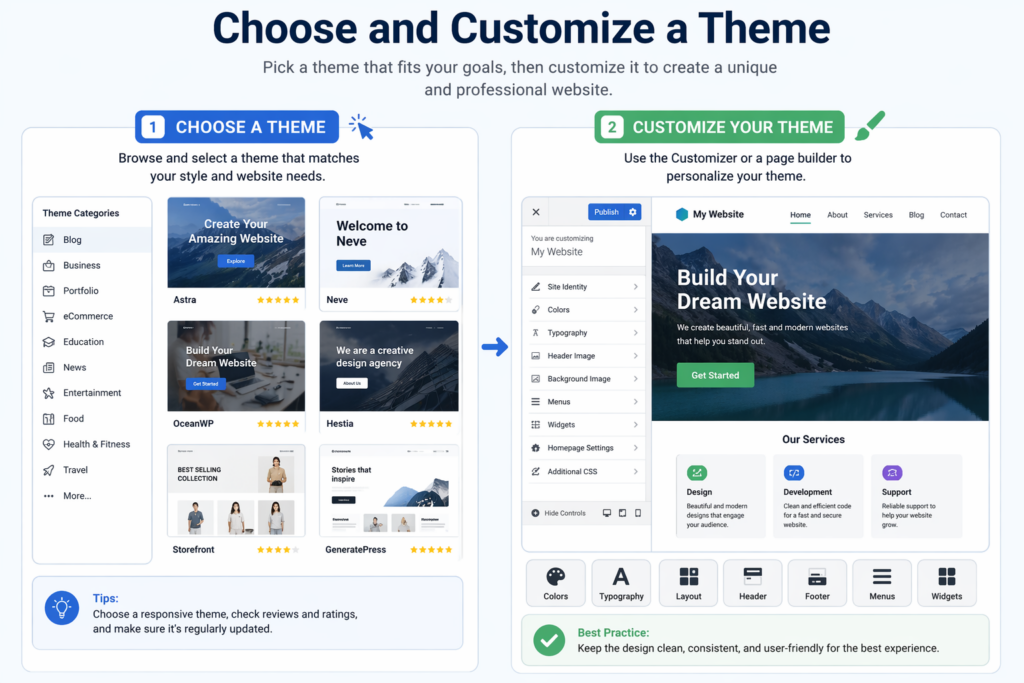
A theme controls the visual appearance of your website.
Selecting a Theme
When choosing a theme, consider:
- Design style (minimal, modern, corporate, etc.)
- Responsiveness (mobile-friendly design)
- Customization options
- Performance and speed
There are both free and premium themes available. Premium themes often offer more advanced features and better support.
カスタマイズ
You can customize your theme through the WordPress Customizer or page builders. Common adjustments include:
- Colors and typography
- レイアウト構造
- Header and footer design
- Homepage sections
A clean and user-friendly design improves both user experience and conversion rates.
Step 6: Install Essential Plugins
Plugins extend the functionality of your website.
Here are some key categories to consider:
SEO Plugins
Help optimize your site for search engines by managing meta tags, sitemaps, and keywords.
Security Plugins
Protect your website from malware and unauthorized access.
Performance Plugins
Improve loading speed through caching and optimization.
Backup Plugins
Ensure your data is safe by creating regular backups.
eCommerce Plugins
If you plan to sell products, plugins like WooCommerce allow you to build a full online store.
Be cautious not to install too many plugins, as this can affect performance.
Step 7: Create Core Pages
Every website needs a set of essential pages.
ホームページ
The first impression of your website. It should clearly communicate your value and guide users to key sections.
About Page
Tells your story, builds trust, and explains your mission.
Services or Products Page
Highlights what you offer with clear descriptions and visuals.
お問い合わせページ
Provides ways for users to reach you, often including a form, email, or phone number.
Blog Section
Optional but valuable for content marketing and SEO.
Organizing your content effectively is a crucial part of how to develop a WordPress site that performs well.
Step 8: Structure Navigation and User Experience
Navigation plays a major role in usability.
Tips for effective navigation:
- Keep menus simple and intuitive
- Limit the number of menu items
- 透明なラベルを使用してください
- Ensure mobile compatibility
A well-structured site helps users find information quickly and improves engagement.
Step 9: Optimize for Mobile and Performance
Today, most users browse on mobile devices. Your site must be responsive and fast.
Mobile Optimization
- Use responsive themes
- Test layouts on different devices
- Ensure buttons and text are easy to interact with
パフォーマンスの最適化
- Compress images
- Use caching tools
- Minimize unnecessary scripts
Fast-loading websites not only improve user experience but also rank better in search engines.
Step 10: Implement Basic SEO Practices
Search engine optimization (SEO) helps your site get discovered.
主要なSEO要素
- Use relevant keywords naturally
- Write clear meta titles and descriptions
- Structure content with headings (H1, H2, H3)
- Optimize images with alt text
- Create internal links
Understanding SEO is essential when learning how to develop a WordPress site that attracts traffic.
Step 11: Add Content and Media
Content is the core of your website.
Writing Content
- Keep it clear and engaging
- Focus on user needs
- Use short paragraphs and headings
Using Media
- High-quality images enhance visual appeal
- Videos can improve engagement
- Infographics help explain complex ideas
Consistency in style and tone builds a strong brand identity.
Step 12: Test Your Website
Before launching, thoroughly test your site.
チェック:
- All links and buttons
- Page loading speed
- モバイル対応
- Form functionality
- Browser compatibility
Testing ensures a smooth user experience and prevents potential issues after launch.
Step 13: Launch Your Website
Once everything is ready, it’s time to go live.
確認する:
- Your domain is properly connected
- SSL certificate is installed (for security)
- Search engines can index your site
After launch, monitor performance and user behavior to identify areas for improvement.
Step 14: Maintain and Update Regularly
Website development doesn’t end after launch.
Ongoing maintenance includes:
- Updating WordPress core, themes, and plugins
- Monitoring security
- Backing up data
- Adding fresh content
Regular updates keep your site secure, fast, and relevant.
避けるべきよくある間違い
When learning how to develop a WordPress site, beginners often make these mistakes:
- Choosing overly complex themes
- Installing too many plugins
- Ignoring mobile optimization
- Neglecting SEO
- Skipping backups
Avoiding these pitfalls can save time and improve results.
結論
Learning how to develop a ワードプレス site is a valuable skill that combines creativity, structure, and strategy. From defining your website’s purpose to launching and maintaining it, each step plays a critical role in building a successful online presence.
By understanding the fundamentals—such as choosing the right hosting, designing user-friendly layouts, optimizing for performance, and implementing SEO—you can create a website that not only looks professional but also delivers real results.
With the right approach and continuous improvement, WordPress becomes more than just a tool—it becomes a powerful platform for growth, communication, and long-term success.
よくある質問
To develop a WordPress site, you need a domain name, web hosting, and a WordPress installation. Once set up, you can start building your site using themes and plugins.
No, coding is not required for most WordPress websites. You can use themes, page builders, and plugins to create and customize your site without technical knowledge.
The timeline depends on the complexity. A basic site can be built in a few hours or days, while a more advanced website may take several weeks.
A theme controls the design and layout of your website, while plugins add functionality such as SEO tools, contact forms, or eCommerce features.
You can improve speed and security by using reliable hosting, installing caching plugins, optimizing images, keeping everything updated, and adding security plugins.


WordPressのウェブサイトや、完全なeコマースシステムを備えたコーポレートサイトをデザイン・構築します。.
価格帯$200.00~$2,500.00custom-requirements-or-special-quotations
元価格は$2.00。.$1.00現在の価格は$1.00。. WordPress の電子商取引ストアに 50 個のプラグインは多すぎますか?
WordPressのeコマースサイトに50個のプラグインがあるからといって、それが自動的に問題になるわけではありません。実際、数だけでパフォーマンスが決まることはほとんどありません。.

Amazonホーム理学療法機器のメイン画像デザイン解説
はじめにAmazonで家庭用治療器の信頼できるイメージを構築する Amazonで家庭用治療器のメインイメージをデザインする際、私たちが最も重視するのは...

Amazon リップスティックコンバージョンのメイン画像デザイン
はじめにアマゾンで売れる口紅のメイン画像をデザインする アマゾンの口紅のメイン画像をデザインするとき、私たちの責任は...

ハッカーがWordPress管理者のメールアドレスを盗む方法(そしてそれを阻止する方法)
WordPressの管理者メールアドレスは、あなたが思っている以上に公開されているのです。ハッカーはそれが大好きです。彼らにとって、あなたの...

Amazonのリキッドファンデーションのメイン画像がコンバージョンにつながる理由
はじめに Amazonリキッドファンデーションのメイン画像デザインは、単に商品を美しく見せるだけではありません。Amazonでは、メイン画像と….

フィルターカートリッジの効果的なAmazonメインイメージのデザイン
はじめに Amazonのメイン画像をデザインする上で、商品を魅力的に見せることは決して重要ではありません。明確さ、信頼性、そして瞬時に理解できることが何よりも重要です。特に….

WordPress へのリプレイ攻撃: 本当の脅威か、それとも誇張された神話か?
まず最初に明確にしておきましょう。リプレイ攻撃は見た目には怖くありません。パスワードを破壊したり、緑色のハッカーテキストが飛び交うような悪質なコードを挿入したりもしません。彼らは狡猾なのです…。.

WordPressページを何も壊さずに複製する方法
正直に言って、新しいページを作りたくない時もあるでしょう。同じページを少しだけ変えたいだけなのに。レイアウトもブロックも設定も全部同じ。なぜなら….

ペット向けWordPressテーマ5選を比較
はじめに ペット関連のWordPressテーマを適切に選ぶことは、単なるデザイン上の決定ではありません。使いやすさ、拡張性、そして長期的なビジネスの成長に直接影響します。ペットケアとペット...

5つの水着eコマーステーマを比較
はじめに 水着やランジェリーの独立ストアに適切なテーマを選択することは、見た目だけの問題ではなく、コンバージョン率、拡張性、長期的な効果に直接影響します...

WordPressでコメント機能をオフにする方法(気が狂わずに)
WordPressのコメントについてお話しましょう。理論上は、コメントは素晴らしいものです。議論を促し、コミュニティを築き、ウェブサイトに「活気」を与えてくれます。しかし実際にはどうでしょうか?コメントはしばしば人を惹きつけ….

WordPress 500エラー:ウェブサイトがパニックに陥ったとき
WordPressサイトはほんの少し前までは問題ありませんでした。ページを更新した途端、突然…ドカーン💥…500 内部サーバーエラーが発生してしまいました。説明も謝罪もありませんでした。ただ冷たく、混乱を招くメッセージが表示され、その内容は….

科学主導のブランドのためのスケーラブルなWordPressウェブサイトの構築:AminoUSAプロジェクト
はじめに 今日のデジタル環境において、ウェブサイトは単なる製品リストを掲載する場所ではありません。規制の厳しい業界や研究重視の業界で事業を展開する科学主導のブランドにとって、ウェブサイトは….

グローバルブレードブランドのためのスケーラブルなShopifyストアの構築:CoolKatanaプロジェクト
はじめに 越境電子商取引において、Shopify の Web サイトは単なる店舗ではありません。ニッチで文化主導のカテゴリーで活動するブランドにとって、Web サイトは単なる店舗以上のものを実現する必要があります...

ポケモンカード向け高コンバージョンShopifyストアの設計
はじめに 収集可能な電子商取引の世界、特にポケモン トレーディング カード ゲーム (TCG) 市場では、Web サイトは単に製品をリストするだけでは不十分です。...

カスタムレンガブランドのための高コンバージョンShopifyデザイン
はじめに 今日の競争の激しいeコマース市場、特にパーソナライズされたギフトやコレクターズアイテムの分野では、Shopifyのウェブサイトは商品を展示する以上の機能を提供する必要があります。それは….

Shopifyサポートへの問い合わせ方法:シンプルでストレスフリーなガイド
Shopifyストアの運営は、混乱するのではなく、ワクワクするものであるべきです。疑問が生じたり、問題が発生して作業が滞ったりした場合でも、Shopifyは状況に応じて複数のサポートパスをご用意しています。.

Shopifyストアを非アクティブ化する方法:分かりやすく実践的なガイド
Shopifyストアの無効化はそれほど複雑ではありませんが、多くのマーチャントが見落としている影響があります。このガイドでは、そのプロセスを分かりやすく解説します。.