












การแนะนำ
If you’re looking to build a website without diving deep into complex coding, learning how to develop a วordpress site is one of the most practical and efficient paths. WordPress powers a significant portion of the internet, from small personal blogs to large-scale business platforms. Its flexibility, ease of use, and massive ecosystem make it an ideal choice for beginners and professionals alike.
This guide explains the full process in a clear, educational way—breaking down each stage so you can understand not just what to do, but why it matters.
What Is WordPress and Why Use It?
Before diving into development, it’s important to understand what WordPress actually is.
WordPress is an open-source content management system (CMS) that allows users to create, manage, and publish websites without needing advanced technical knowledge. There are two main versions:
- ดับเบิลยูดับเบิ้ลยู – a hosted solution with limited customization
- วordPress.org – a self-hosted version offering full control and flexibility
When discussing how to develop a WordPress site, most professionals refer to the self-hosted version because it provides complete ownership and customization options.
ข้อได้เปรียบที่สำคัญ
- Easy-to-use interface
- Thousands of themes and plugins
- โครงสร้างที่เป็นมิตรต่อ SEO
- Scalable for any type of website
- Strong community support
Step 1: Define Your Website Purpose
Every successful website starts with a clear goal.
ลองถามตัวเองดูว่า:
- Is this a business website, blog, or eCommerce store?
- Who is your target audience?
- What actions do you want users to take?
Defining your purpose helps guide decisions around structure, design, and functionality. For example, an online store will require product pages and checkout flows, while a blog focuses on content organization.
Step 2: Choose a Domain Name and Hosting
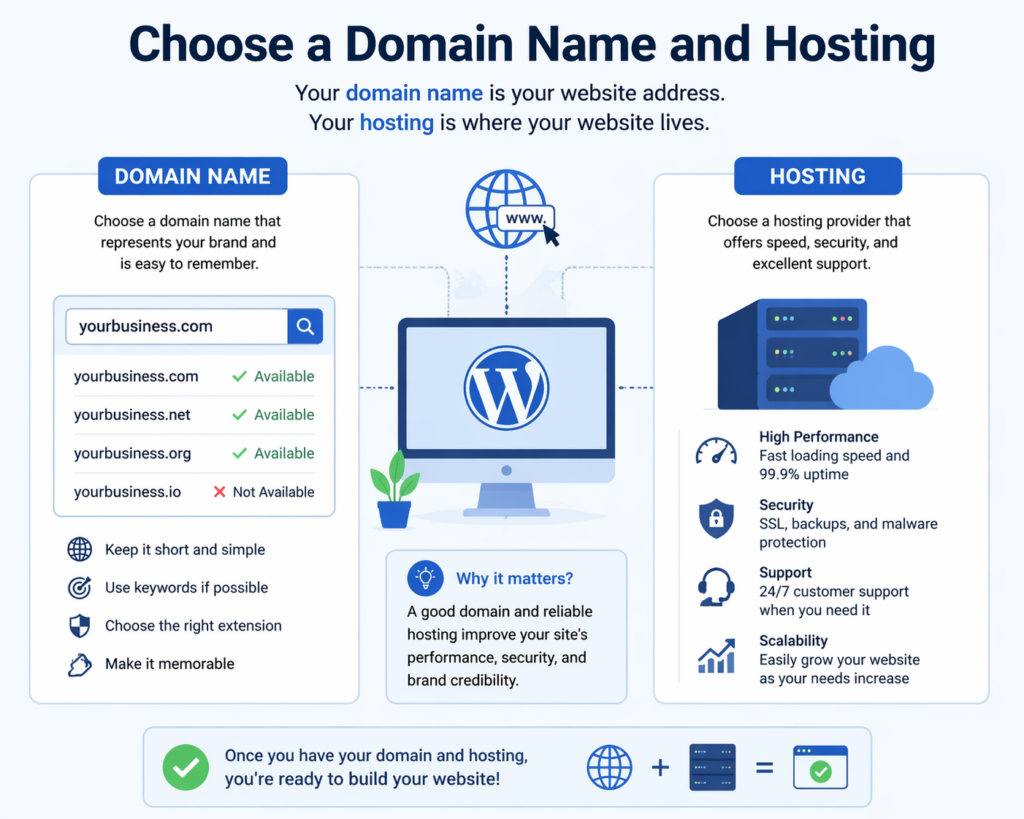
To make your website accessible online, you need two essential elements:
Domain Name
This is your website’s address (e.g., yourwebsite.com). Choose something:
- Short and memorable
- Relevant to your brand or niche
- Easy to spell
Web Hosting
Hosting is where your website files are stored. When selecting a hosting provider, consider:
- ความเร็วและประสิทธิภาพ
- Uptime reliability
- ฝ่ายบริการลูกค้า
- Scalability options
Many hosting providers offer one-click WordPress installation, simplifying the setup process significantly.
Step 3: Install WordPress
Once your domain and hosting are ready, the next step is installation.
Most hosting platforms provide automatic installation tools. Alternatively, you can manually install WordPress by:
- Downloading WordPress from the official website
- Uploading files to your server
- Creating a database
- Running the installation script
After installation, you’ll gain access to the WordPress dashboard—the central control panel for managing your site.
Step 4: Understand the WordPress Dashboard
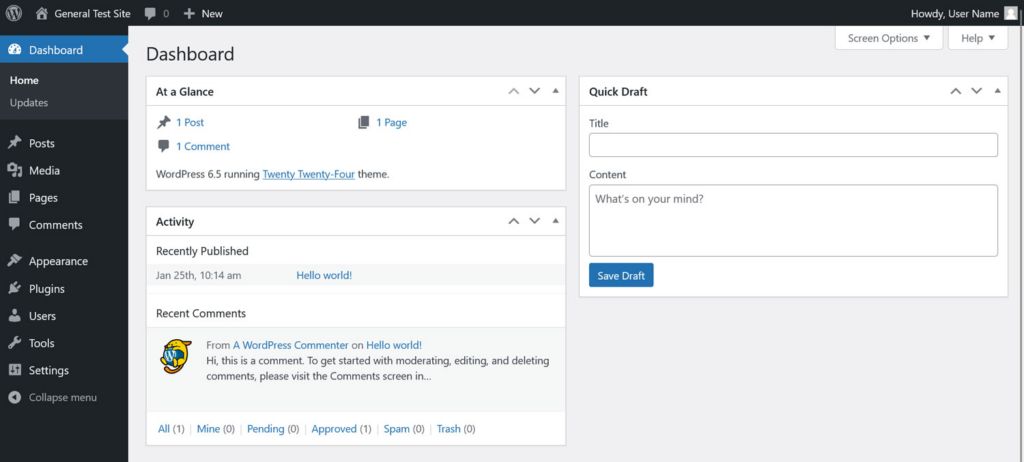
The dashboard is where all your website management happens.
Key sections include:
- โพสต์ – for blog articles
- หน้า – for static content (e.g., About, Contact)
- รูปร่าง – for themes and design customization
- ปลั๊กอิน – for adding functionality
- การตั้งค่า – for configuring site behavior
Familiarizing yourself with this interface is essential when learning how to develop a WordPress site effectively.
Step 5: Choose and Customize a Theme
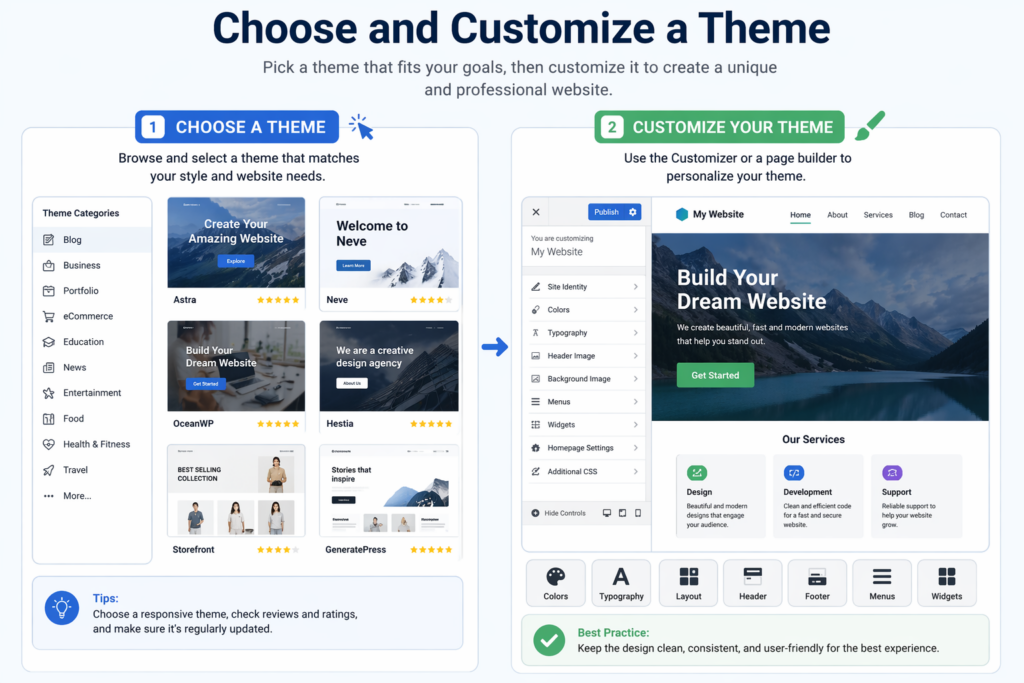
A theme controls the visual appearance of your website.
Selecting a Theme
When choosing a theme, consider:
- Design style (minimal, modern, corporate, etc.)
- Responsiveness (mobile-friendly design)
- Customization options
- Performance and speed
There are both free and premium themes available. Premium themes often offer more advanced features and better support.
การปรับแต่ง
You can customize your theme through the WordPress Customizer or page builders. Common adjustments include:
- Colors and typography
- Layout structure
- Header and footer design
- Homepage sections
A clean and user-friendly design improves both user experience and conversion rates.
Step 6: Install Essential Plugins
Plugins extend the functionality of your website.
Here are some key categories to consider:
SEO Plugins
Help optimize your site for search engines by managing meta tags, sitemaps, and keywords.
Security Plugins
Protect your website from malware and unauthorized access.
Performance Plugins
Improve loading speed through caching and optimization.
Backup Plugins
Ensure your data is safe by creating regular backups.
eCommerce Plugins
If you plan to sell products, plugins like WooCommerce allow you to build a full online store.
Be cautious not to install too many plugins, as this can affect performance.
Step 7: Create Core Pages
Every website needs a set of essential pages.
หน้าแรก
The first impression of your website. It should clearly communicate your value and guide users to key sections.
About Page
Tells your story, builds trust, and explains your mission.
Services or Products Page
Highlights what you offer with clear descriptions and visuals.
หน้าติดต่อ
Provides ways for users to reach you, often including a form, email, or phone number.
Blog Section
Optional but valuable for content marketing and SEO.
Organizing your content effectively is a crucial part of how to develop a WordPress site that performs well.
Step 8: Structure Navigation and User Experience
Navigation plays a major role in usability.
Tips for effective navigation:
- Keep menus simple and intuitive
- Limit the number of menu items
- Use clear labels
- Ensure mobile compatibility
A well-structured site helps users find information quickly and improves engagement.
Step 9: Optimize for Mobile and Performance
Today, most users browse on mobile devices. Your site must be responsive and fast.
Mobile Optimization
- Use responsive themes
- Test layouts on different devices
- Ensure buttons and text are easy to interact with
การเพิ่มประสิทธิภาพการทำงาน
- Compress images
- Use caching tools
- Minimize unnecessary scripts
Fast-loading websites not only improve user experience but also rank better in search engines.
Step 10: Implement Basic SEO Practices
Search engine optimization (SEO) helps your site get discovered.
Key SEO Elements
- Use relevant keywords naturally
- Write clear meta titles and descriptions
- Structure content with headings (H1, H2, H3)
- Optimize images with alt text
- Create internal links
Understanding SEO is essential when learning how to develop a WordPress site that attracts traffic.
Step 11: Add Content and Media
Content is the core of your website.
Writing Content
- Keep it clear and engaging
- Focus on user needs
- Use short paragraphs and headings
Using Media
- High-quality images enhance visual appeal
- Videos can improve engagement
- Infographics help explain complex ideas
Consistency in style and tone builds a strong brand identity.
Step 12: Test Your Website
Before launching, thoroughly test your site.
ตรวจสอบ:
- All links and buttons
- Page loading speed
- การตอบสนองต่ออุปกรณ์เคลื่อนที่
- Form functionality
- Browser compatibility
Testing ensures a smooth user experience and prevents potential issues after launch.
Step 13: Launch Your Website
Once everything is ready, it’s time to go live.
โปรดตรวจสอบให้แน่ใจว่า:
- Your domain is properly connected
- SSL certificate is installed (for security)
- Search engines can index your site
After launch, monitor performance and user behavior to identify areas for improvement.
Step 14: Maintain and Update Regularly
Website development doesn’t end after launch.
Ongoing maintenance includes:
- Updating WordPress core, themes, and plugins
- Monitoring security
- Backing up data
- Adding fresh content
Regular updates keep your site secure, fast, and relevant.
ข้อผิดพลาดทั่วไปที่ควรหลีกเลี่ยง
When learning how to develop a WordPress site, beginners often make these mistakes:
- Choosing overly complex themes
- Installing too many plugins
- Ignoring mobile optimization
- Neglecting SEO
- Skipping backups
Avoiding these pitfalls can save time and improve results.
บทสรุป
Learning how to develop a วordpress site is a valuable skill that combines creativity, structure, and strategy. From defining your website’s purpose to launching and maintaining it, each step plays a critical role in building a successful online presence.
By understanding the fundamentals—such as choosing the right hosting, designing user-friendly layouts, optimizing for performance, and implementing SEO—you can create a website that not only looks professional but also delivers real results.
With the right approach and continuous improvement, WordPress becomes more than just a tool—it becomes a powerful platform for growth, communication, and long-term success.
คำถามที่พบบ่อย
To develop a WordPress site, you need a domain name, web hosting, and a WordPress installation. Once set up, you can start building your site using themes and plugins.
No, coding is not required for most WordPress websites. You can use themes, page builders, and plugins to create and customize your site without technical knowledge.
The timeline depends on the complexity. A basic site can be built in a few hours or days, while a more advanced website may take several weeks.
A theme controls the design and layout of your website, while plugins add functionality such as SEO tools, contact forms, or eCommerce features.
You can improve speed and security by using reliable hosting, installing caching plugins, optimizing images, keeping everything updated, and adding security plugins.


ออกแบบและสร้างเว็บไซต์ WordPress หรือเว็บไซต์องค์กรพร้อมระบบอีคอมเมิร์ซครบวงจรสำหรับคุณ.
ช่วงราคา: $200.00 ถึง $2,500.00custom-requirements-or-special-quotations
ราคาเดิมคือ: $2.00.$1.00ราคาปัจจุบันคือ: $1.00. การใช้ปลั๊กอิน 50 ตัวมากเกินไปสำหรับร้านค้าออนไลน์ที่ใช้ WordPress หรือไม่?
การเข้าใจผลกระทบที่แท้จริงต่อประสิทธิภาพ การมีปลั๊กอิน 50 ตัวบนเว็บไซต์อีคอมเมิร์ซ WordPress ไม่ใช่ปัญหาโดยอัตโนมัติ จริงๆ แล้ว จำนวนเพียงอย่างเดียวแทบจะไม่สามารถกำหนดประสิทธิภาพได้....

ภาพหลักสำหรับการออกแบบอุปกรณ์กายภาพบำบัดที่บ้านของ Amazon (อธิบายรายละเอียด)
บทนำ: การสร้างภาพลักษณ์ที่น่าเชื่อถือสำหรับอุปกรณ์บำบัดที่บ้านบน Amazon เมื่อออกแบบภาพหลักสำหรับอุปกรณ์บำบัดที่บ้านบน Amazon สิ่งสำคัญอันดับแรกของเราคือ...

ภาพหลักสำหรับการแปลงลิปสติกเป็นสินค้าสำหรับ Amazon
บทนำ: การออกแบบภาพหลักลิปสติกที่ขายได้บน Amazon เมื่อเราออกแบบภาพหลักสำหรับลิปสติกบน Amazon ความรับผิดชอบของเราไม่ได้จำกัดอยู่แค่...

แฮกเกอร์ขโมยอีเมลผู้ดูแลระบบ WordPress ได้อย่างไร (และวิธีป้องกัน)
มาเริ่มกันด้วยความจริงที่ไม่น่าสบายใจ: อีเมลแอดมิน WordPress ของคุณอาจเปิดเผยต่อสาธารณะมากกว่าที่คุณคิด และแฮกเกอร์? พวกเขาชอบมาก สำหรับพวกเขา...

อะไรทำให้รองพื้นชนิดเหลวของ Amazon (ภาพหลัก) ขายดี?
บทนำ การออกแบบภาพหลักสำหรับรองพื้นชนิดเหลวบน Amazon ไม่ใช่แค่การทำให้ผลิตภัณฑ์ดูสวยงามเท่านั้น บน Amazon ภาพหลักและ...

การออกแบบภาพหลัก Amazon ที่มีประสิทธิภาพสำหรับตลับกรอง
บทนำ การออกแบบภาพหลักสำหรับ Amazon ไม่ใช่แค่การทำให้สินค้าดูน่าดึงดูดเท่านั้น แต่ยังเกี่ยวกับความชัดเจน ความน่าเชื่อถือ และความเข้าใจได้ในทันที โดยเฉพาะอย่างยิ่งสำหรับ...

การโจมตีแบบ Replay Attack บน WordPress: ภัยคุกคามจริงหรือแค่เรื่องที่ถูกพูดเกินจริง?
ก่อนอื่นขอชี้แจงให้ชัดเจนก่อน การโจมตีแบบ Replay Attack นั้นดูไม่น่ากลัว มันไม่ได้ทำลายรหัสผ่าน มันไม่ได้แทรกโค้ดที่เป็นอันตรายพร้อมข้อความแฮ็กเกอร์สีเขียวกระจัดกระจายไปทั่ว มันแนบเนียนกว่า...

วิธีคัดลอกหน้าเว็บ WordPress โดยไม่ทำให้ระบบเสียหาย
ยอมรับกันเถอะ บางครั้งคุณอาจไม่อยากสร้างหน้าเว็บใหม่ คุณแค่อยากได้หน้าเว็บเดิม...แต่แตกต่างไปเล็กน้อย รูปแบบเหมือนเดิม บล็อกเหมือนเดิม การตั้งค่าเหมือนเดิม เพราะ...

เปรียบเทียบธีม WordPress สำหรับสัตว์เลี้ยง 5 แบบ
บทนำ การเลือกธีม WordPress ที่เหมาะสมสำหรับธุรกิจเกี่ยวกับสัตว์เลี้ยงนั้นไม่ใช่แค่เรื่องของการออกแบบเท่านั้น แต่ยังส่งผลโดยตรงต่อการใช้งาน ความสามารถในการขยายขนาด และการเติบโตของธุรกิจในระยะยาว การดูแลสัตว์เลี้ยงและ...

เปรียบเทียบธีมอีคอมเมิร์ซชุดว่ายน้ำ 5 แบบ
บทนำ การเลือกธีมที่เหมาะสมสำหรับร้านค้าอิสระที่จำหน่ายชุดว่ายน้ำหรือชุดชั้นในนั้นไม่ใช่แค่การตัดสินใจด้านภาพลักษณ์เท่านั้น แต่ยังส่งผลโดยตรงต่ออัตราการเปลี่ยนลูกค้าให้เป็นผู้ซื้อ ความสามารถในการขยายธุรกิจ และความยั่งยืนในระยะยาว...

วิธีปิดการแสดงความคิดเห็นใน WordPress (โดยไม่ต้องเสียสติ)
มาพูดถึงระบบแสดงความคิดเห็นของ WordPress กันดีกว่า ในทางทฤษฎีแล้ว ความคิดเห็นนั้นยอดเยี่ยมมาก มันช่วยกระตุ้นการสนทนา สร้างชุมชน และทำให้เว็บไซต์ของคุณดูมีชีวิตชีวา แต่ในความเป็นจริงแล้ว มันมักจะเป็นเหมือนแม่เหล็กดึงดูด...

ข้อผิดพลาด WordPress 500: เมื่อเว็บไซต์ของคุณเกิดอาการผิดปกติ
เว็บไซต์ WordPress ของคุณยังใช้งานได้ปกติดีเมื่อสักครู่ คุณรีเฟรชหน้าเว็บ แล้วจู่ๆ ก็เกิดข้อผิดพลาด 500 Internal Server Error ขึ้นมา ไม่มีคำอธิบาย ไม่มีคำขอโทษ มีเพียงข้อความที่เย็นชาและสับสนซึ่งโดยพื้นฐานแล้ว...

การสร้างเว็บไซต์ WordPress ที่ปรับขนาดได้สำหรับแบรนด์ที่ขับเคลื่อนด้วยวิทยาศาสตร์: โครงการ AminoUSA
บทนำ ในยุคดิจิทัลปัจจุบัน เว็บไซต์เป็นมากกว่าแค่สถานที่สำหรับแสดงรายการสินค้า สำหรับแบรนด์ที่ขับเคลื่อนด้วยวิทยาศาสตร์ซึ่งดำเนินงานในอุตสาหกรรมที่มีการควบคุมหรือเน้นการวิจัย...

สร้างร้านค้า Shopify ที่ปรับขนาดได้สำหรับแบรนด์ใบมีดระดับโลก: โครงการ CoolKatana
บทนำ ในธุรกิจอีคอมเมิร์ซข้ามพรมแดน เว็บไซต์ Shopify เป็นมากกว่าแค่หน้าร้าน สำหรับแบรนด์ที่ดำเนินธุรกิจในกลุ่มเฉพาะหรือกลุ่มที่ขับเคลื่อนด้วยวัฒนธรรม เว็บไซต์ต้องทำมากกว่านั้น...

การออกแบบร้านค้า Shopify ที่มีอัตราการแปลงสูงสำหรับขายการ์ดโปเกมอน
บทนำ ในโลกของอีคอมเมิร์ซสินค้าสะสม โดยเฉพาะอย่างยิ่งในตลาดเกมการ์ดโปเกมอน (TCG) เว็บไซต์จะต้องทำมากกว่าแค่แสดงรายการสินค้า...

ดีไซน์ Shopify ที่เพิ่มยอดขายสำหรับแบรนด์อิฐสั่งทำพิเศษ
บทนำ ในสภาพแวดล้อมการแข่งขันอีคอมเมิร์ซในปัจจุบัน โดยเฉพาะอย่างยิ่งในตลาดของขวัญส่วนบุคคลและของสะสม เว็บไซต์ Shopify ต้องทำมากกว่าแค่แสดงสินค้า...

วิธีติดต่อฝ่ายสนับสนุนของ Shopify: คู่มือที่ง่ายและไม่ยุ่งยาก
การบริหารร้านค้า Shopify ควรเป็นเรื่องที่น่าตื่นเต้น ไม่ใช่เรื่องที่ทำให้สับสน เมื่อมีคำถามหรือปัญหาเกิดขึ้น Shopify มีช่องทางการสนับสนุนหลายช่องทาง ขึ้นอยู่กับสถานการณ์...

วิธีปิดใช้งานร้านค้า Shopify: คู่มือที่ชัดเจนและใช้งานได้จริง
การปิดใช้งานร้านค้า Shopify นั้นไม่ซับซ้อน แต่ก็มีผลกระทบหลายอย่างที่ผู้ขายหลายรายมองข้ามไป คู่มือนี้จะอธิบายขั้นตอนอย่างละเอียดและเข้าใจง่าย...