How to Backup WordPress Site on IONOS Easily

การแนะนำ

Backing up a วordpress website isn’t just a technical task—it’s a critical safety net for your entire online business. Whether you’re running an eCommerce store, a service-based website, or a content platform, data loss can happen at any time due to server issues, hacking, plugin conflicts, or human error.

If you’re hosting your website on ไอโอโนส, understanding how to properly back up your WordPress site becomes even more important—especially if you’re planning a migration, redesign, or performance upgrade.

In this guide, we’ll break down everything you need to know about how to backup WordPress site IONOS, using simple, practical explanations. Whether you’re a beginner or managing multiple sites, this article will give you a clear, structured approach to protect your data and ensure a smooth workflow.

How to Backup WordPress Site on IONOS Easily

Why Backing Up Your WordPress Site Matters

How to Backup WordPress Site on IONOS Easily-Why Backing Up Your WordPress Site Matters

Before diving into the “how,” let’s first understand the “why.”

A WordPress website is made up of two core components:

  • Files (themes, plugins, media uploads, core files)
  • Database (posts, pages, user data, settings)

If either of these gets corrupted or lost, your site can break entirely.

Here are the most common scenarios where backups save you:

  • Server crashes or hosting failures
  • Malware or hacking attacks
  • Plugin/theme conflicts after updates
  • Accidental deletions or misconfigurations
  • Website migration or redesign

Without a backup, recovery can be time-consuming—or impossible.

Understanding IONOS Hosting and Backup Options

IONOS provides hosting infrastructure with built-in tools, but not all plans include automatic WordPress backups. That’s why you often need to create manual backups or use additional tools.

There are generally three ways to back up a WordPress site on IONOS:

  1. Manual backup (files + database)
  2. Backup via plugins
  3. Hosting-level backup (if available in your plan)

Let’s break each method down.

Method 1: Manual Backup via IONOS (Files + Database)

How to Backup WordPress Site on IONOS Easily-Manual Backup via IONOS

This is the most complete and reliable method, especially for migration or full-site recovery.

Step 1: Back Up Website Files

Your WordPress files are stored on your server. To download them:

  • Log in to your IONOS account
  • Access the File Manager or connect via FTP (e.g., FileZilla)
  • Navigate to your WordPress root directory (usually /htdocs หรือ /public_html)
  • Download all files to your local computer

These files include:

  • wp-content (themes, plugins, uploads)
  • wp-config.php
  • core WordPress files

👉 Tip: Always ensure the download is complete and not interrupted.

Step 2: Back Up the Database

Your database stores all dynamic content.

To export it:

  • Go to your IONOS dashboard
  • Open phpMyAdmin
  • Select your WordPress database
  • Click Export
  • Choose “Quick” export (or “Custom” for advanced options)
  • Download the SQL file

This file contains:

  • Posts and pages
  • User accounts
  • Settings and configurations

When to Use Manual Backups

Manual backups are best when:

  • Migrating your website to another host
  • Performing major redesigns
  • Creating a full snapshot before risky changes

Method 2: Using WordPress Backup Plugins

If you prefer automation, plugins are the easiest solution.

Popular backup plugins include:

  • UpdraftPlus
  • All-in-One WP Migration
  • BackupBuddy

วิธีการทำงาน

Once installed:

  • The plugin creates backups of your files and database
  • You can store backups in cloud services (Google Drive, Dropbox, etc.)
  • You can schedule automatic backups

Advantages

  • เหมาะสำหรับผู้เริ่มต้น
  • No need for FTP or database access
  • Quick restore options

ข้อจำกัด

  • Some features require paid versions
  • Large websites may need server optimization
  • Less control compared to manual backups

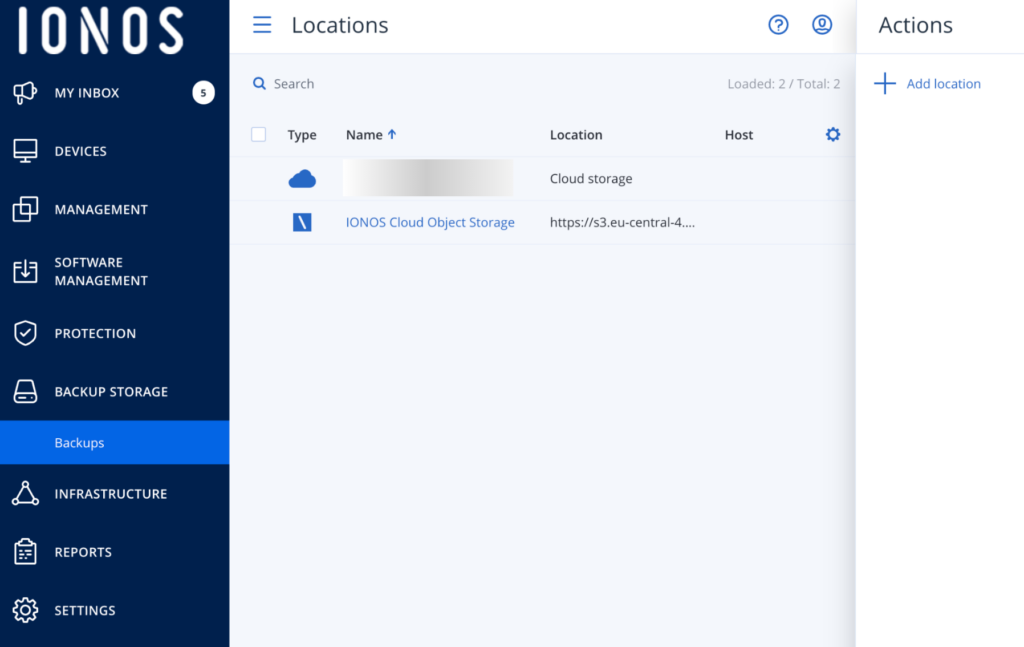
Method 3: IONOS Backup Features (If Available)

Some IONOS hosting plans include automatic backups.

These backups:

  • Run daily or periodically
  • Can be restored via the dashboard
  • Are stored on the hosting server

However, there are limitations:

  • Limited retention period
  • May not include full WordPress customization
  • Not always available on all plans

👉 Recommendation: Never rely on a single backup source. Always keep at least one external backup.

Best Practices for Backing Up WordPress on IONOS

To ensure your backups are reliable, follow these best practices:

1. Use Multiple Backup Methods

Combine:

  • Plugin backups
  • Manual backups
  • Hosting backups

This creates redundancy.

2. Store Backups Offsite

Never store backups only on your server.

ใช้:

  • Google Drive
  • Dropbox
  • External hard drives

This protects your data from server failure.

3. Schedule Regular Backups

Recommended frequency:

  • Daily (for active eCommerce sites)
  • Weekly (for smaller sites)

4. Test Your Backups

A backup is useless if it doesn’t work.

  • Try restoring on a staging environment
  • Verify files and database integrity

5. Keep Version History

Don’t overwrite old backups.

Maintain:

  • Multiple versions
  • Different restore points

How to Restore a WordPress Backup on IONOS

Backing up is only half the process—you also need to know how to restore.

Manual Restore Process

  1. Upload files via FTP
  2. Import database via phpMyAdmin
  3. Update wp-config.php (if needed)
  4. Check domain and URL settings

Plugin-Based Restore

Most plugins offer:

  • One-click restore
  • Automatic database replacement
  • File synchronization

This is the easiest method for beginners.

WordPress Migration: Why Backup Is the First Step

If you’re planning to move your site (e.g., to improve speed or scalability), backups are essential.

Migration involves:

  • Transferring files
  • Moving databases
  • Updating URLs and configurations

Without a proper backup:

  • You risk downtime
  • Data may be lost
  • SEO rankings can drop

A complete backup ensures:

  • Safe rollback
  • Smooth transition
  • Zero data loss

ข้อผิดพลาดทั่วไปที่ควรหลีกเลี่ยง

Even experienced users make these mistakes:

❌ Relying Only on Hosting Backups

These can fail or be incomplete.

❌ Not Backing Up Before Updates

Plugin or theme updates can break your site.

❌ Ignoring Database Backups

Files alone are not enough.

❌ No Backup Testing

Unverified backups may not restore correctly.

FAQ

To manually back up your WordPress site on IONOS, download all website files via FTP or File Manager and export your database using phpMyAdmin. This ensures you have a complete copy of both files and content.

The easiest way is by using a backup plugin like UpdraftPlus or All-in-One WP Migration. These tools automate the process and allow you to store backups in cloud services like Google Drive.

Some IONOS hosting plans include automatic backups, but they may have limitations such as short retention periods. It’s recommended to use additional backup methods for full security.

For active websites, especially eCommerce stores, daily backups are recommended. For smaller or less frequently updated sites, weekly backups may be sufficient.

Advanced Tip: Backup Strategy for eCommerce Sites

If you’re running a Shopify-like WordPress setup (WooCommerce), backups are even more critical.

Why?

  • Orders and customer data change frequently
  • Losing data impacts revenue directly

Recommended setup:

  • Daily automated backups
  • Real-time database backups (if possible)
  • Cloud storage integration

บทสรุป

Understanding how to backup WordPress site IONOS is not just a technical skill—it’s a fundamental part of running a secure and scalable online business.

From manual backups to plugin automation and hosting-level solutions, each method plays a role in protecting your data. The key is to build a reliable system that combines multiple approaches, stores backups safely, and ensures you can restore your site anytime.

Need Help with Website Design or Migration?

If you’re planning to:

  • Redesign your website
  • Migrate to a faster hosting environment
  • Improve conversion and user experience

This is exactly what we specialize in.

ที่ AIRSANG, we focus on cross-border eCommerce website design and high-conversion page structures. From visual design to user journey optimization, we help brands build websites that not only look premium—but also perform.

If you need help with วordpress backups, migration, or full-site redesign, feel free to reach out.


จัดส่งทั่วโลก

AIRSANG ให้บริการออกแบบเว็บไซต์ สร้างเอกลักษณ์แบรนด์ และโซลูชันอีคอมเมิร์ซที่คุ้มค่า ตั้งแต่ Shopify และ WordPress ไปจนถึงภาพสินค้าสำหรับ Amazon, เราช่วยแบรนด์ระดับโลกสร้าง พัฒนา และขยายธุรกิจออนไลน์ของพวกเขา.

ออกแบบและสร้างเว็บไซต์ WordPress หรือเว็บไซต์องค์กรพร้อมระบบอีคอมเมิร์ซครบวงจรสำหรับคุณ.
ข้อกำหนดเฉพาะหรือใบเสนอราคาพิเศษ

ข้อกำหนดเฉพาะหรือใบเสนอราคาพิเศษ

ราคาเดิมคือ: $2.00.ราคาปัจจุบันคือ: $1.00.
การใช้ปลั๊กอิน 50 ตัวมากเกินไปสำหรับร้านค้าออนไลน์ที่ใช้ WordPress หรือไม่?
การเข้าใจผลกระทบที่แท้จริงต่อประสิทธิภาพ การมีปลั๊กอิน 50 ตัวบนเว็บไซต์อีคอมเมิร์ซ WordPress ไม่ใช่ปัญหาโดยอัตโนมัติ จริงๆ แล้ว จำนวนเพียงอย่างเดียวแทบจะไม่สามารถกำหนดประสิทธิภาพได้....
ภาพหลักสำหรับการออกแบบอุปกรณ์กายภาพบำบัดที่บ้านของ Amazon (อธิบายรายละเอียด)
บทนำ: การสร้างภาพลักษณ์ที่น่าเชื่อถือสำหรับอุปกรณ์บำบัดที่บ้านบน Amazon เมื่อออกแบบภาพหลักสำหรับอุปกรณ์บำบัดที่บ้านบน Amazon สิ่งสำคัญอันดับแรกของเราคือ...
ภาพหลักสำหรับการแปลงลิปสติกเป็นสินค้าสำหรับ Amazon
บทนำ: การออกแบบภาพหลักลิปสติกที่ขายได้บน Amazon เมื่อเราออกแบบภาพหลักสำหรับลิปสติกบน Amazon ความรับผิดชอบของเราไม่ได้จำกัดอยู่แค่...
แฮกเกอร์ขโมยอีเมลผู้ดูแลระบบ WordPress ได้อย่างไร (และวิธีป้องกัน)
มาเริ่มกันด้วยความจริงที่ไม่น่าสบายใจ: อีเมลแอดมิน WordPress ของคุณอาจเปิดเผยต่อสาธารณะมากกว่าที่คุณคิด และแฮกเกอร์? พวกเขาชอบมาก สำหรับพวกเขา...
การออกแบบภาพหลัก Amazon ที่มีประสิทธิภาพสำหรับตลับกรอง
บทนำ การออกแบบภาพหลักสำหรับ Amazon ไม่ใช่แค่การทำให้สินค้าดูน่าดึงดูดเท่านั้น แต่ยังเกี่ยวกับความชัดเจน ความน่าเชื่อถือ และความเข้าใจได้ในทันที โดยเฉพาะอย่างยิ่งสำหรับ...
การโจมตีแบบ Replay Attack บน WordPress: ภัยคุกคามจริงหรือแค่เรื่องที่ถูกพูดเกินจริง?
ก่อนอื่นขอชี้แจงให้ชัดเจนก่อน การโจมตีแบบ Replay Attack นั้นดูไม่น่ากลัว มันไม่ได้ทำลายรหัสผ่าน มันไม่ได้แทรกโค้ดที่เป็นอันตรายพร้อมข้อความแฮ็กเกอร์สีเขียวกระจัดกระจายไปทั่ว มันแนบเนียนกว่า...
วิธีคัดลอกหน้าเว็บ WordPress โดยไม่ทำให้ระบบเสียหาย
ยอมรับกันเถอะ บางครั้งคุณอาจไม่อยากสร้างหน้าเว็บใหม่ คุณแค่อยากได้หน้าเว็บเดิม...แต่แตกต่างไปเล็กน้อย รูปแบบเหมือนเดิม บล็อกเหมือนเดิม การตั้งค่าเหมือนเดิม เพราะ...
เปรียบเทียบธีม WordPress สำหรับสัตว์เลี้ยง 5 แบบ
บทนำ การเลือกธีม WordPress ที่เหมาะสมสำหรับธุรกิจเกี่ยวกับสัตว์เลี้ยงนั้นไม่ใช่แค่เรื่องของการออกแบบเท่านั้น แต่ยังส่งผลโดยตรงต่อการใช้งาน ความสามารถในการขยายขนาด และการเติบโตของธุรกิจในระยะยาว การดูแลสัตว์เลี้ยงและ...
เปรียบเทียบธีมอีคอมเมิร์ซชุดว่ายน้ำ 5 แบบ
บทนำ การเลือกธีมที่เหมาะสมสำหรับร้านค้าอิสระที่จำหน่ายชุดว่ายน้ำหรือชุดชั้นในนั้นไม่ใช่แค่การตัดสินใจด้านภาพลักษณ์เท่านั้น แต่ยังส่งผลโดยตรงต่ออัตราการเปลี่ยนลูกค้าให้เป็นผู้ซื้อ ความสามารถในการขยายธุรกิจ และความยั่งยืนในระยะยาว...
วิธีปิดการแสดงความคิดเห็นใน WordPress (โดยไม่ต้องเสียสติ)
มาพูดถึงระบบแสดงความคิดเห็นของ WordPress กันดีกว่า ในทางทฤษฎีแล้ว ความคิดเห็นนั้นยอดเยี่ยมมาก มันช่วยกระตุ้นการสนทนา สร้างชุมชน และทำให้เว็บไซต์ของคุณดูมีชีวิตชีวา แต่ในความเป็นจริงแล้ว มันมักจะเป็นเหมือนแม่เหล็กดึงดูด...
ข้อผิดพลาด WordPress 500: เมื่อเว็บไซต์ของคุณเกิดอาการผิดปกติ
เว็บไซต์ WordPress ของคุณยังใช้งานได้ปกติดีเมื่อสักครู่ คุณรีเฟรชหน้าเว็บ แล้วจู่ๆ ก็เกิดข้อผิดพลาด 500 Internal Server Error ขึ้นมา ไม่มีคำอธิบาย ไม่มีคำขอโทษ มีเพียงข้อความที่เย็นชาและสับสนซึ่งโดยพื้นฐานแล้ว...
การสร้างเว็บไซต์ WordPress ที่ปรับขนาดได้สำหรับแบรนด์ที่ขับเคลื่อนด้วยวิทยาศาสตร์: โครงการ AminoUSA
บทนำ ในยุคดิจิทัลปัจจุบัน เว็บไซต์เป็นมากกว่าแค่สถานที่สำหรับแสดงรายการสินค้า สำหรับแบรนด์ที่ขับเคลื่อนด้วยวิทยาศาสตร์ซึ่งดำเนินงานในอุตสาหกรรมที่มีการควบคุมหรือเน้นการวิจัย...
สร้างร้านค้า Shopify ที่ปรับขนาดได้สำหรับแบรนด์ใบมีดระดับโลก: โครงการ CoolKatana
บทนำ ในธุรกิจอีคอมเมิร์ซข้ามพรมแดน เว็บไซต์ Shopify เป็นมากกว่าแค่หน้าร้าน สำหรับแบรนด์ที่ดำเนินธุรกิจในกลุ่มเฉพาะหรือกลุ่มที่ขับเคลื่อนด้วยวัฒนธรรม เว็บไซต์ต้องทำมากกว่านั้น...
การออกแบบร้านค้า Shopify ที่มีอัตราการแปลงสูงสำหรับขายการ์ดโปเกมอน
บทนำ ในโลกของอีคอมเมิร์ซสินค้าสะสม โดยเฉพาะอย่างยิ่งในตลาดเกมการ์ดโปเกมอน (TCG) เว็บไซต์จะต้องทำมากกว่าแค่แสดงรายการสินค้า...
ดีไซน์ Shopify ที่เพิ่มยอดขายสำหรับแบรนด์อิฐสั่งทำพิเศษ
บทนำ ในสภาพแวดล้อมการแข่งขันอีคอมเมิร์ซในปัจจุบัน โดยเฉพาะอย่างยิ่งในตลาดของขวัญส่วนบุคคลและของสะสม เว็บไซต์ Shopify ต้องทำมากกว่าแค่แสดงสินค้า...
วิธีติดต่อฝ่ายสนับสนุนของ Shopify: คู่มือที่ง่ายและไม่ยุ่งยาก
การบริหารร้านค้า Shopify ควรเป็นเรื่องที่น่าตื่นเต้น ไม่ใช่เรื่องที่ทำให้สับสน เมื่อมีคำถามหรือปัญหาเกิดขึ้น Shopify มีช่องทางการสนับสนุนหลายช่องทาง ขึ้นอยู่กับสถานการณ์...
วิธีปิดใช้งานร้านค้า Shopify: คู่มือที่ชัดเจนและใช้งานได้จริง
การปิดใช้งานร้านค้า Shopify นั้นไม่ซับซ้อน แต่ก็มีผลกระทบหลายอย่างที่ผู้ขายหลายรายมองข้ามไป คู่มือนี้จะอธิบายขั้นตอนอย่างละเอียดและเข้าใจง่าย...

พร้อมที่จะเปลี่ยนแปลงธุรกิจของคุณหรือไม่?

จองการโทรเพื่อเรียนรู้เพิ่มเติมเกี่ยวกับวิธีที่เอเจนซี่การตลาดดิจิทัลของเราสามารถยกระดับธุรกิจของคุณไปอีกขั้น.