การแนะนำ
ช็อปฟี่ สร้างขึ้นมาเพื่อขาย — นั่นเป็นสิ่งที่ชัดเจน.
โดยปกติแล้ว สินค้าทุกชิ้นที่คุณเพิ่มลงในร้านค้าของคุณถูกออกแบบมาเพื่อกระตุ้นให้ผู้เข้าชมตัดสินใจซื้อสินค้า.
แต่ถ้าเป็นอย่างนั้นล่ะ ไม่ คุณต้องการอะไร?
ผู้ขาย Shopify หลายรายมักเจอปัญหาที่สินค้าควรแสดงให้เห็นแต่ไม่สามารถซื้อได้ อาจเป็นเพราะคุณกำลังเตรียมเปิดตัวสินค้า นำเสนอแคตตาล็อก ขายสินค้าแบบขายส่ง หรือเพียงแค่แสดงสินค้าเพื่อเป็นข้อมูลอ้างอิง.
นี่คือจุดที่แนวคิดของผลิตภัณฑ์ที่ดูได้อย่างเดียวกลายเป็นสิ่งสำคัญ.
ในคู่มือนี้ เราจะอธิบายวิธีการตั้งค่าสินค้าให้เป็นแบบดูได้อย่างเดียวบน Shopify เหตุผลที่ผู้ขายเลือกทำเช่นนี้ และวิธีการใดที่เหมาะสมที่สุดขึ้นอยู่กับโครงสร้างร้านค้า ระดับความชำนาญทางเทคนิค และเป้าหมายระยะยาวของคุณ.
ไม่มีศัพท์เฉพาะทาง ไม่มีข้อสันนิษฐาน มีแต่คำอธิบายที่ชัดเจนและคำแนะนำที่นำไปใช้ได้จริง.
“ดูได้อย่างเดียว” บน Shopify หมายความว่าอย่างไร?
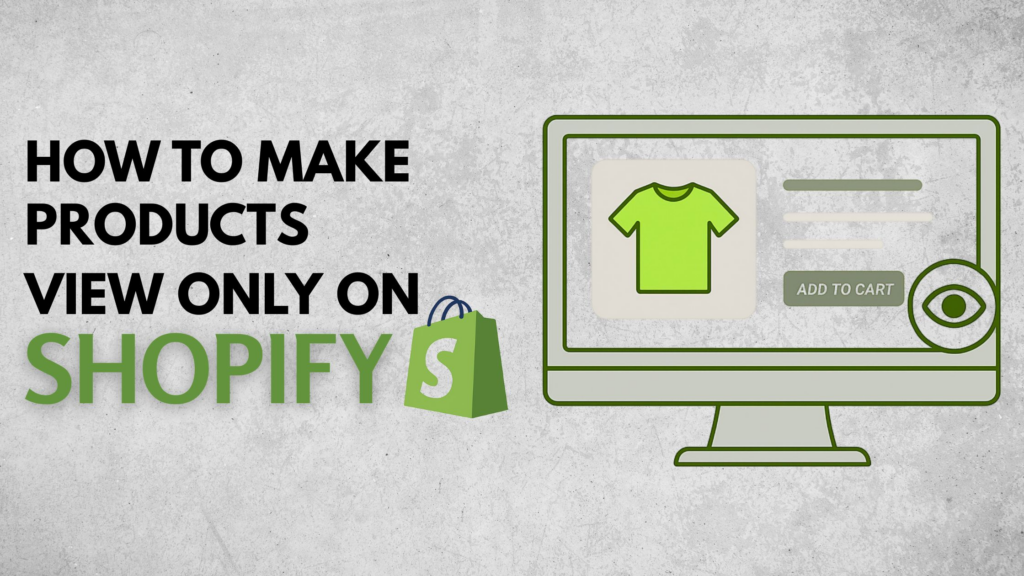
สินค้าแบบดูอย่างเดียว คือสินค้าที่ลูกค้าสามารถดูข้อมูลต่างๆ ได้ เช่น รูปภาพ คำอธิบาย ราคา และรายละเอียดต่างๆ แต่ไม่สามารถเพิ่มลงในตะกร้าหรือทำการสั่งซื้อได้.
โดยส่วนใหญ่แล้ว หมายความว่า:
- ปุ่ม "เพิ่มลงในตะกร้า" ถูกซ่อน ปิดใช้งาน หรือถูกแทนที่
- ไม่สามารถดำเนินการชำระเงินสำหรับสินค้าชิ้นนั้นได้
- หน้ารายละเอียดสินค้ายังคงทำหน้าที่เป็นหน้าเนื้อหาหรือหน้าอ้างอิง
ที่สำคัญคือ Shopify ไม่มีตัวเลือก "ดูอย่างเดียว" ในตัว.
ดังนั้น การจะบรรลุเป้าหมายนี้จึงต้องอาศัยการกำหนดค่าอย่างตั้งใจ.
ทำไมคุณถึงต้องการให้สินค้าแสดงได้อย่างเดียว?
ก่อนที่จะเริ่มลงมือใช้วิธีการต่างๆ สิ่งสำคัญคือต้องเข้าใจก่อน ทำไม ผู้ค้าใช้สินค้าแบบดูได้อย่างเดียว เหตุผลจะเป็นตัวกำหนดวิธีแก้ปัญหาที่ดีที่สุด.
กรณีการใช้งานทั่วไป
1. ผลิตภัณฑ์ก่อนเปิดตัว
คุณต้องการโปรโมตสินค้าใหม่ที่จะวางจำหน่ายในอนาคต โดยยังไม่เปิดให้ซื้อในตอนนี้.
2. แคตตาล็อกขายส่งหรือแคตตาล็อกธุรกิจแบบ B2B
สินค้าสามารถมองเห็นได้ แต่การกำหนดราคาหรือการสั่งซื้อต้องได้รับการอนุมัติก่อน.
3. สินค้าสั่งทำพิเศษหรือสินค้าที่เสนอราคาตามใบเสนอราคา
สินค้าที่ต้องปรึกษาก่อนสั่งซื้อ.
4. สินค้าหมดสต็อกหรือเลิกจำหน่าย
คุณยังคงต้องการให้ข้อมูลเหล่านั้นถูกจัดทำดัชนี ค้นหาได้ หรืออ้างอิงได้อยู่ดี.
5. ผลงานหรือการนำเสนอแบรนด์
ใช้ Shopify เป็นเหมือนแคตตาล็อกสินค้า แทนที่จะเป็นร้านค้าที่เน้นการชำระเงินเป็นหลัก.
แต่ละสถานการณ์เหล่านี้ต้องการการตั้งค่าที่แตกต่างกันเล็กน้อย.
หลักการสำคัญก่อนเริ่มต้น
เมื่อเรียนรู้วิธีการตั้งค่าสินค้าให้แสดงผลแบบดูอย่างเดียวบน Shopify โปรดคำนึงถึงหลักการเหล่านี้:
- โดยค่าเริ่มต้น Shopify จะแสดงขั้นตอนการชำระเงินก่อน
- ไม่มีปุ่ม "ปิดการซื้อ" ที่ใช้ได้กับทุกกรณี
- โซลูชันมีตั้งแต่การตั้งค่าผู้ดูแลระบบแบบง่ายๆ ไปจนถึงตรรกะระดับธีม
- วิธีการที่ดีที่สุดนั้นขึ้นอยู่กับ:
- ความยืดหยุ่นของธีม
- ทักษะทางเทคนิค
- เครื่องชั่งร้านค้า
- ข้อควรพิจารณาด้าน SEO
เรามาดูแนวทางปฏิบัติที่ได้ผลดีที่สุดกันดีกว่า.
วิธีที่ 1: การลบปุ่ม "เพิ่มลงในตะกร้า" (ขึ้นอยู่กับธีม)
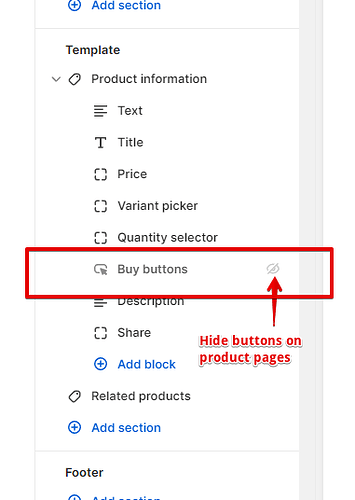
นี่เป็นวิธีการที่พบได้บ่อยที่สุดและมีความยืดหยุ่นมากที่สุด.
วิธีการทำงาน
คุณปรับแต่งธีมของคุณเพื่อให้:
- ปุ่ม "เพิ่มลงในตะกร้า" ถูกซ่อนหรือปิดใช้งานอยู่
- หน้าสินค้ายังคงโหลดได้ตามปกติ
- ลูกค้าสามารถดูรายละเอียดผลิตภัณฑ์ทั้งหมดได้
เมื่อใดที่วิธีการนี้เหมาะสมที่สุด
- คุณต้องการควบคุมการนำเสนออย่างเต็มที่
- คุณใส่ใจเรื่อง SEO และการจัดทำดัชนีหน้าเว็บ
- คุณต้องการให้สินค้าบางรายการแสดงเฉพาะเนื้อหาภายในร้านเท่านั้น ไม่ใช่ทั้งร้าน
ตรรกะการใช้งานทั่วไป
ธีม Shopify ส่วนใหญ่จะมีตรรกะแบบมีเงื่อนไข เช่น:
- ความพร้อมของสินค้า
- ป้ายสินค้า
- ประเภทผลิตภัณฑ์
- เมตาฟิลด์
โดยใช้เงื่อนไขเหล่านี้ คุณสามารถกล่าวได้ว่า:
“หากสินค้าชิ้นนี้ถูกตั้งค่าให้ดูได้อย่างเดียว ให้ซ่อนปุ่ม ”เพิ่มลงในตะกร้า’”
สิ่งนี้จะช่วยให้คุณสามารถ:
- รักษาให้สินค้าปกติยังคงสามารถซื้อได้ตามปกติ
- เลือกกำหนดสถานะให้ดูได้อย่างเดียว
ข้อดี
- ประสบการณ์ลูกค้าที่สะอาดหมดจด
- ไม่ต้องใช้แอปเพิ่มเติม
- เป็นมิตรต่อ SEO
- ปรับแต่งได้เต็มที่
ข้อเสีย
- จำเป็นต้องแก้ไขธีมหรือขอความช่วยเหลือจากนักพัฒนา
- ธีมแต่ละแบบมีการจัดโครงสร้างปุ่มแตกต่างกัน
วิธีที่ 2: การใช้การตั้งค่าความพร้อมใช้งานของผลิตภัณฑ์
นี่เป็นวิธีการที่ง่ายที่สุด แต่ก็มีข้อจำกัดมากที่สุดเช่นกัน.
วิธีการทำงาน
คุณ:
- นำสินค้าคงคลังทั้งหมดออก
- ปิดการแสดงสินค้าในทุกช่องทางการขาย
หน้ารายละเอียดสินค้ายังคงแสดงอยู่ แต่ไม่สามารถดำเนินการชำระเงินได้.
เมื่อวิธีนี้ได้ผลดี
- สถานการณ์ชั่วคราว
- จอแสดงผลสินค้าหมด
- ไม่จำเป็นต้องปรับแต่งมากนัก
ข้อจำกัด
- “อาจมีข้อความ "สินค้าหมด" ปรากฏขึ้น
- ไม่เหมาะสำหรับการนำเสนอในแค็ตตาล็อกโดยตั้งใจ
- การควบคุมการส่งข้อความของผู้ใช้มีจำกัด
วิธีการนี้ใช้ได้ผลในทางเทคนิค แต่บ่อยครั้งกลับสร้างความสับสนมากกว่าความชัดเจน.
วิธีที่ 3: แทนที่ปุ่ม "เพิ่มลงในตะกร้า" ด้วยข้อความที่กำหนดเอง
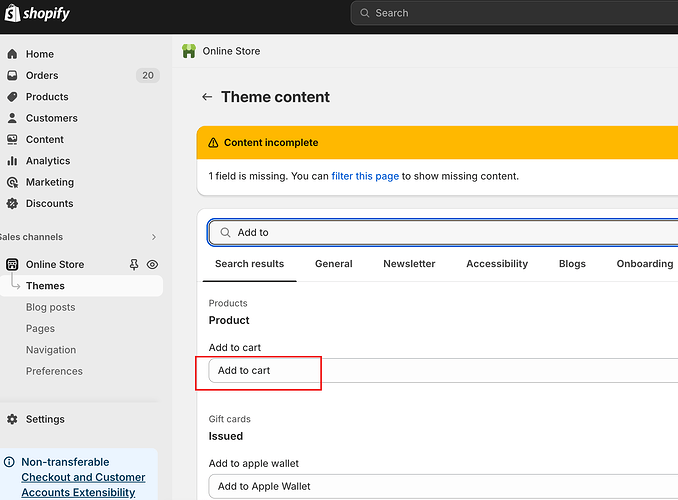
แทนที่จะซ่อนการกระทำในการซื้อ คุณจะแทนที่การกระทำเหล่านั้นด้วยการกระทำใหม่.
ตัวอย่าง
- “ติดต่อเราเพื่อสอบถามราคา”
- “ต้องมีสิทธิ์เข้าถึงในระดับค้าส่ง”
- “เตรียมเปิดตัวเร็วๆ นี้”
- “ขอใบเสนอราคา”
โดยทั่วไปแล้วจะทำดังนี้
- ซ่อนปุ่ม "เพิ่มลงในตะกร้า"
- แทรกปุ่มหรือข้อความที่กำหนดเอง
- ลิงก์ไปยัง:
- แบบฟอร์มติดต่อ
- ลงทะเบียนขายส่ง
- สอบถามทางอีเมล
เหตุใดวิธีการนี้จึงเป็นที่นิยม
มันไม่ได้แค่ตัดโอกาสในการซื้อออกไปเท่านั้น แต่ยังเปลี่ยนทิศทางความตั้งใจในการซื้ออีกด้วย.
ผู้เยี่ยมชมเข้าใจ ทำไม พวกเขาซื้ออะไรไม่ได้และจะทำอย่างไรต่อไป.
วิธีที่ 4: การใช้แอป Shopify
มีแอปพลิเคชันที่ออกแบบมาโดยเฉพาะเพื่อจัดการการแสดงสินค้าและข้อจำกัดในการซื้อ.
คุณสมบัติแอปทั่วไป
- ซ่อนปุ่ม "เพิ่มลงในตะกร้า"
- ล็อกสินค้าหลังจากเข้าสู่ระบบ
- จำกัดการซื้อสินค้าตามกลุ่มลูกค้า
- แสดงแคตตาล็อกแบบดูอย่างเดียว
เมื่อแอปพลิเคชันมีความสมเหตุสมผล
- ร้านค้าแบบ B2B หรือร้านค้าส่ง
- พ่อค้าที่ไม่เชี่ยวชาญด้านเทคนิค
- แคตตาล็อกสินค้าขนาดใหญ่
- การแบ่งกลุ่มลูกค้าที่ซับซ้อน
การแลกเปลี่ยนผลประโยชน์
- ค่าธรรมเนียมรายเดือน
- ผลกระทบต่อประสิทธิภาพ
- การพึ่งพาการอัปเดตจากบุคคลที่สาม
แอปพลิเคชันอาจมีประสิทธิภาพ แต่ก็ไม่ได้จำเป็นเสมอไป.
วิธีที่ 5: การสร้างโครงสร้างร้านค้าแบบแคตตาล็อกอย่างเดียว
ผู้ค้าบางรายก้าวไปอีกขั้นด้วยการออกแบบร้านค้า Shopify ของตนให้เน้นประสบการณ์การดูแคตตาล็อกเป็นหลัก.
สิ่งนี้หมายความว่าอย่างไร
- หน้ารายละเอียดสินค้าทำงานคล้ายกับหน้า Landing Page
- เน้นที่:
- ภาพประกอบ
- ข้อมูลจำเพาะ
- กรณีศึกษา
- การซื้อขายเกิดขึ้นแบบออฟไลน์หรือผ่านการสอบถาม
วิธีการนี้พบได้ทั่วไปใน:
- ผลิตภัณฑ์สั่งทำพิเศษมูลค่าสูง
- แบรนด์ผู้ผลิตหรือ OEM
- สถานการณ์ B2B ข้ามพรมแดน
มันต้องอาศัยการออกแบบอย่างรอบคอบ ไม่ใช่แค่สวิตช์ทางเทคนิคเพียงอย่างเดียว.
ข้อควรพิจารณาด้าน SEO สำหรับสินค้าที่แสดงเฉพาะภาพ

หนึ่งในความผิดพลาดที่ใหญ่ที่สุดของพ่อค้าแม่ค้าคือการคิดว่าสินค้าที่แสดงภาพได้อย่างเดียวจะส่งผลเสียต่อ SEO.
ในความเป็นจริงแล้ว สิ่งเหล่านี้สามารถช่วยได้หากทำอย่างถูกวิธี.
แนวปฏิบัติที่ดีที่สุด
- รักษาความสามารถในการค้นหาของหน้าสินค้า
- ใช้เนื้อหารายละเอียดสินค้าที่ละเอียด
- หลีกเลี่ยงทางตันที่ "ขายหมดแล้ว"
- แทนที่ปุ่มกระตุ้นการซื้อ (CTA) ด้วยปุ่มกระตุ้นการให้ข้อมูลหรือการสร้างลูกค้าเป้าหมาย
เครื่องมือค้นหาไม่สนใจว่าสินค้าชิ้นนั้นจะหาซื้อได้หรือไม่ แต่สนใจว่าสินค้าชิ้นนั้นมีประโยชน์หรือไม่.
การเลือกวิธีการที่เหมาะสมสำหรับร้านค้าของคุณ
นี่คือคำแนะนำในการตัดสินใจแบบย่อ:
- ชั่วคราวใช่ไหม? → การตั้งค่าความพร้อมใช้งาน
- ต้องการการควบคุมแบบเลือกเฉพาะหรือไม่? → ตรรกะของธีม
- ขายส่งหรือแบบจำกัดการเข้าถึง? → แอปพลิเคชันหรือการติดแท็กลูกค้า
- แคตตาล็อกแบรนด์หรือ B2B? → ออกแบบเฉพาะสำหรับดูอย่างเดียว
ไม่มีวิธีแก้ปัญหาใดที่ดีที่สุดเพียงวิธีเดียว มีแต่เพียงวิธีที่เหมาะสมกับเป้าหมายของคุณเท่านั้น.
ข้อผิดพลาดทั่วไปที่ควรหลีกเลี่ยง
- ลบตัวเลือก "เพิ่มลงในตะกร้า" ออกโดยไม่มีคำอธิบาย
- ปิดกั้นขั้นตอนการชำระเงิน แต่ยังคงทิ้งปุ่มกระตุ้นการดำเนินการ (CTA) ที่สร้างความสับสนไว้
- ใช้แอปพลิเคชันทั้งๆ ที่ใช้ตรรกะง่ายๆ ก็เพียงพอแล้ว
- ไม่สนใจเลย์เอาต์สำหรับอุปกรณ์มือถือ
- การลืมผลกระทบของ SEO
โหมดดูอย่างเดียวควรให้ความรู้สึกว่าตั้งใจทำ ไม่ใช่ว่าใช้งานไม่ได้.
ข้อคิดส่งท้าย
การเรียนรู้วิธีตั้งค่าสินค้าให้ดูได้อย่างเดียวบน Shopify ไม่ได้หมายความว่าเป็นการปิดกั้นการขาย แต่เป็นการควบคุมเส้นทางการซื้อขายต่างหาก.
ไม่ว่าคุณจะเตรียมเปิดตัวสินค้า สร้างแคตตาล็อกขายส่ง หรือปรับตำแหน่งแบรนด์ของคุณให้แตกต่างออกไป Shopify ก็มีความยืดหยุ่นเพียงพอที่จะรองรับได้ — หากตั้งค่าอย่างถูกต้อง.
หัวใจสำคัญคือการจัดวางให้สอดคล้องกัน:
- การตั้งค่าทางเทคนิค
- ประสบการณ์ด้านการออกแบบ
- เจตนาทางธุรกิจ
เราสามารถช่วยเหลือคุณได้อย่างไร
ที่ AIRSANG, นี่คือความท้าทายประเภทหนึ่งที่เรากำลังแก้ไขอยู่.
เราทำงานร่วมกับแบรนด์ข้ามชาติเพื่อ:
- ออกแบบร้านค้า Shopify ที่สอดคล้องกับโมเดลธุรกิจจริง
- นำโครงสร้างแบบดูอย่างเดียว แบบขายส่ง และแบบเน้นแคตตาล็อกมาใช้
- สร้างสมดุลระหว่างการแปลงข้อมูล ความคมชัด และความสามารถในการขยายขนาดในระยะยาว
ถ้าคุณ ช็อปฟี่ หากร้านค้าของคุณต้องการแสดงสินค้าโดยไม่ทำการขาย หรือต้องการขายสินค้าในรูปแบบที่แตกต่างออกไป เรายินดีให้ความช่วยเหลือในการออกแบบโซลูชันที่เหมาะสม.