How to Call Shopify Support and Get Help Fast

If you run an online store, sooner or later you’ll need help. Whether it’s a billing question, a technical glitch, or confusion about settings, knowing how to call Shopify support (or reach the right support channel) can save you hours of frustration.

In this guide, we’ll walk through everything you need to know about how support works at ช็อปฟี่, when you can actually call Shopify support, what alternatives are available, and how to get the fastest resolution possible. We’ll also break down common mistakes merchants make when trying to contact support—and how to avoid them.

If you’re new to Shopify or scaling an established brand, this article will help you navigate the support system like a pro.

Understanding Shopify Support: How It Really Works

How to Call Shopify Support and Get Help Fast-Understanding Shopify Support: How It Really Works

Before you try to call Shopify support, it’s important to understand how their customer service structure works.

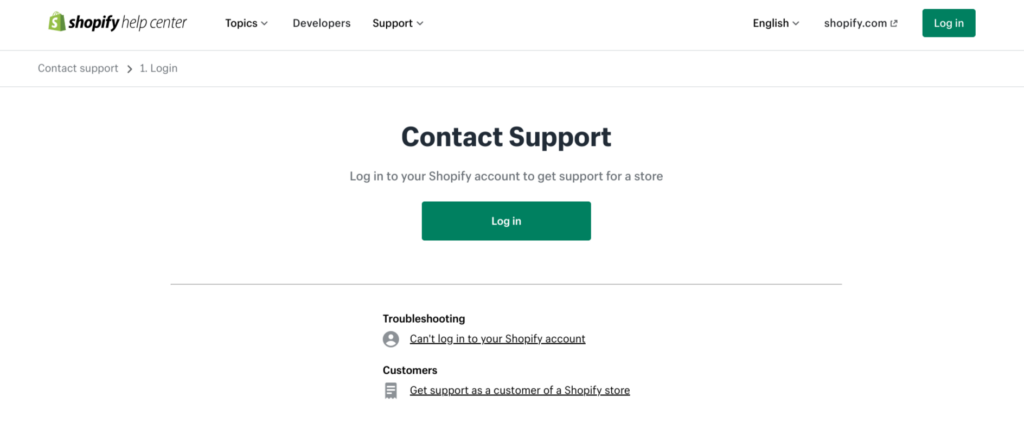
Shopify operates as a global SaaS platform, meaning their support system is centralized and ticket-driven. Unlike traditional companies that publish a direct customer service phone number, Shopify routes all support requests through their Help Center first.

หมายความว่า:

  • There is no public phone number you can simply dial.
  • You must log in to your account to access personalized support.
  • The contact options available to you may vary depending on your issue and region.

So when people search for “call Shopify support,” what they’re really looking for is:

  • A direct phone number
  • Live assistance
  • Fast escalation for urgent issues

The reality is that Shopify does offer phone support in some cases—but only after you go through the proper channels.

มาวิเคราะห์กันทีละส่วนดีกว่า.
Step-by-Step: How to Call Shopify Support

How to Call Shopify Support and Get Help Fast-Step-by-Step: How to Call Shopify Support

If your goal is to call Shopify support, follow this process carefully.

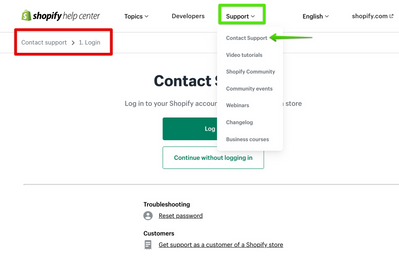
Step 1: Go to the Shopify Help Center

Start by visiting the official Shopify Help Center. From there, you’ll need to:

  • Log into your Shopify account
  • Select your store (if you manage multiple)
  • Choose the topic related to your issue

Shopify uses a guided system. Instead of immediately offering a contact method, it will first suggest help articles related to your problem.

Step 2: Describe Your Issue

You’ll be prompted to type in your problem.

ตัวอย่างเช่น:

  • “Billing issue”
  • “App not working”
  • “Domain not connecting”
  • “Store locked”

Based on your description, Shopify will display recommended solutions.

If those don’t solve your problem, you’ll see contact options.

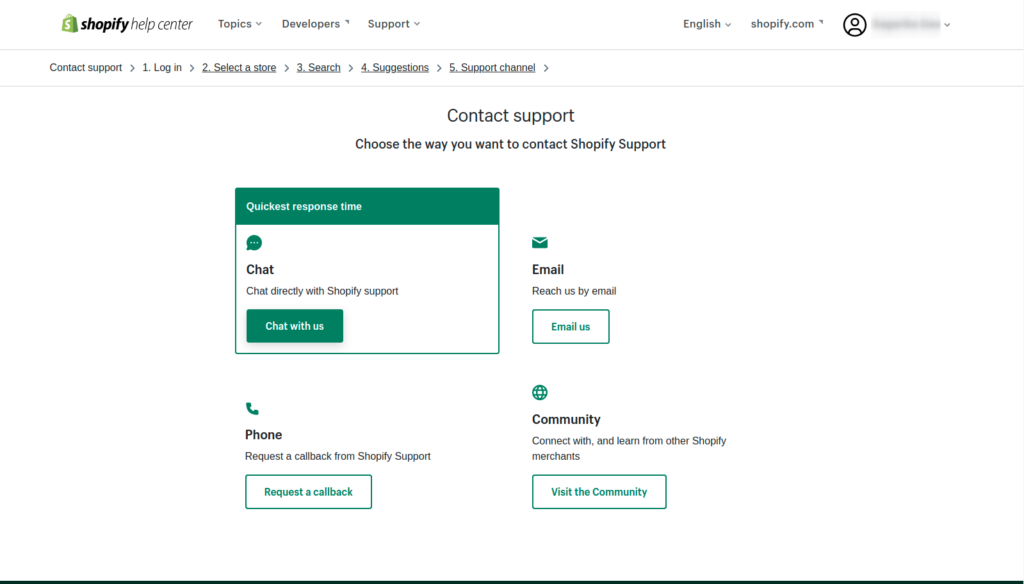
Step 3: Choose a Contact Method

Depending on your situation, you may see:

  • แชทสด
  • Email support
  • Request a callback (phone support)

This is where “call Shopify support” becomes possible.

In some regions and cases, Shopify allows you to request a callback instead of directly dialing a number. A support advisor will then call you.

Important note:
Phone support availability may depend on:

  • Your subscription plan
  • Your country
  • Time zone
  • Type of issue

If phone support isn’t available, live chat is usually the fastest alternative.
When Should You Call Shopify Support?

How to Call Shopify Support and Get Help Fast-When Should You Call Shopify Support?

Not every issue requires you to call Shopify support. In fact, many problems can be solved faster using documentation or chat.

However, calling (or requesting a callback) makes sense in these scenarios:

1. Account Access Issues

If:

  • Your store is locked
  • You can’t log in
  • Two-factor authentication fails

These are time-sensitive and may require identity verification. Phone support can speed things up.

2. Billing Disputes

If you notice:

  • Unexpected charges
  • Subscription confusion
  • Double billing

Speaking to a human can clarify details quickly.

3. Store Suspension or Policy Violations

If your store is paused or flagged, documentation alone may not be enough. Direct communication helps you understand the next steps clearly.

4. Critical Checkout Errors

If customers cannot complete purchases, this is revenue-impacting. You should escalate immediately.

When You Don’t Need to Call Shopify Support

Sometimes merchants search “call Shopify support” out of habit—but calling may not be necessary.

Here’s when self-service works better:

Theme Customization Questions

Most theme-related adjustments are handled by:

  • Theme documentation
  • Theme developers
  • Designers (not Shopify core support)

Shopify support does not modify your design or custom code.

App Issues

If a third-party app is malfunctioning, you must contact the app developer directly. Shopify support cannot fix third-party apps.

Custom Code Problems

If you’ve edited Liquid, CSS, or JavaScript, Shopify support generally won’t debug your custom code. You’ll need a developer or design partner.

Understanding this saves time and frustration.

Why You Can’t Find a Direct Shopify Phone Number

Many users are surprised that Shopify doesn’t display a public phone number.

Here’s why:

  1. Security: Account verification must happen inside your logged-in session.
  2. Scalability: Shopify serves millions of merchants globally.
  3. Structured Support: Routing requests ensures proper categorization.

By guiding you through the Help Center first, Shopify ensures that:

  • Simple issues are resolved instantly
  • Complex issues reach the correct department
  • Identity verification is secure

So if you’re searching “call Shopify support phone number,” remember: access is account-based, not public.

How to Get Faster Help Without Calling

Even if your goal is to call Shopify support, you can speed up the process by preparing properly.

Have These Ready:

  • Your store URL
  • Store ID
  • Screenshots of the issue
  • Exact error messages
  • Timeline of when the issue started

The clearer you explain your problem, the faster support can assist you.

Common Mistakes When Trying to Call Shopify Support

Mistake 1: Not Logging In First

You cannot access contact options without logging in.

Mistake 2: Choosing the Wrong Issue Category

If you select the wrong topic, you may be routed to irrelevant documentation.

Mistake 3: Expecting Design Services

Shopify support is technical and account-focused. They do not redesign stores or improve conversion layouts.

Mistake 4: Contacting Support for Third-Party App Problems

Always verify whether your issue is platform-related or app-related.

Shopify Support Channels Explained

To better understand your options beyond “call Shopify support,” here’s a breakdown.

Live Chat

  • Fastest response
  • Real-time troubleshooting
  • Available in many regions

Email Support

  • Best for non-urgent matters
  • Detailed documentation
  • Slower turnaround

Callback / Phone Support

  • Available in selected regions
  • Good for complex discussions
  • Must be requested through Help Center

How Support Differs by Shopify Plan

Although Shopify provides support to all plans, response priority may vary.

Basic Plan:

  • Access to chat and email
  • Standard response times

Shopify Plan:

  • Same channels
  • Potentially faster resolution

Advanced / Plus:

  • Dedicated support options
  • Account managers (in some cases)

If you’re running a high-volume store, you may qualify for enhanced support pathways.

What Shopify Support Does NOT Cover

Understanding boundaries helps you avoid disappointment.

Shopify support does not:

  • Write custom code
  • Redesign your homepage
  • Optimize your conversion funnel
  • Create product photography
  • Run marketing campaigns
  • Manage ads
  • Configure complex third-party systems

They help with:

  • Platform functionality
  • Account settings
  • Billing
  • การแก้ไขปัญหาเบื้องต้น

This distinction is critical.

Why Many Merchants Confuse Support With Strategy

When people search “call Shopify support,” they often expect:

  • UX guidance
  • Branding advice
  • Store structure optimization
  • Conversion rate suggestions

But Shopify support is technical, not strategic.

If your store isn’t converting, it’s rarely a platform problem—it’s usually a design, positioning, or user experience issue.

That’s where professional design expertise comes in.

When Your Problem Isn’t Technical—It’s Structural

Here are real examples of issues merchants often blame on Shopify:

  • “My checkout is confusing.”
  • “My bounce rate is high.”
  • “Customers don’t trust my site.”
  • “My product pages look messy.”
  • “Traffic isn’t converting.”

These are not support issues.
They are design and positioning issues.

Calling Shopify support won’t solve:

  • Weak visual hierarchy
  • Poor branding consistency
  • Cluttered layouts
  • Lack of trust signals
  • Unclear value propositions

That requires strategic design thinking.

The Smarter Approach: Combine Support + Design Strategy

If you truly want to grow your store, here’s the better path:

  1. Use Shopify support for technical issues.
  2. Work with professional designers for structural improvements.
  3. Invest in UX-driven layouts.
  4. Optimize for clarity and trust.

Support keeps your platform running.
Design drives revenue.

Both matter—but they serve different roles.

Final Thoughts: When to Call Shopify Support—and When to Go Further

Knowing how to call Shopify support is important for every merchant. It ensures your store stays operational and your account issues get resolved quickly.

But remember:

ช็อปฟี่ support solves platform problems.
It does not solve business strategy problems.

If your issue is technical—log in, go through the Help Center, and request the appropriate contact method, including phone support when available.

If your issue is growth-related—design, structure, positioning, user experience—then what you need isn’t support.

You need strategy.

That’s exactly where we come in.

ที่ AIRSANG, we specialize in cross-border eCommerce strategy and Shopify-focused website design. We help brands build conversion-driven layouts, strengthen visual hierarchy, and create premium brand experiences that turn traffic into revenue.

If you’re struggling with more than just technical errors—if you’re ready to elevate your store’s performance—we’re here to help.


จัดส่งทั่วโลก

AIRSANG ให้บริการออกแบบเว็บไซต์ สร้างเอกลักษณ์แบรนด์ และโซลูชันอีคอมเมิร์ซที่คุ้มค่า ตั้งแต่ Shopify และ WordPress ไปจนถึงภาพสินค้าสำหรับ Amazon, เราช่วยแบรนด์ระดับโลกสร้าง พัฒนา และขยายธุรกิจออนไลน์ของพวกเขา.

ออกแบบและสร้างเว็บไซต์ WordPress หรือเว็บไซต์องค์กรพร้อมระบบอีคอมเมิร์ซครบวงจรสำหรับคุณ.
ข้อกำหนดเฉพาะหรือใบเสนอราคาพิเศษ

ข้อกำหนดเฉพาะหรือใบเสนอราคาพิเศษ

ราคาเดิมคือ: $2.00.ราคาปัจจุบันคือ: $1.00.
การใช้ปลั๊กอิน 50 ตัวมากเกินไปสำหรับร้านค้าออนไลน์ที่ใช้ WordPress หรือไม่?
การเข้าใจผลกระทบที่แท้จริงต่อประสิทธิภาพ การมีปลั๊กอิน 50 ตัวบนเว็บไซต์อีคอมเมิร์ซ WordPress ไม่ใช่ปัญหาโดยอัตโนมัติ จริงๆ แล้ว จำนวนเพียงอย่างเดียวแทบจะไม่สามารถกำหนดประสิทธิภาพได้....
ภาพหลักสำหรับการออกแบบอุปกรณ์กายภาพบำบัดที่บ้านของ Amazon (อธิบายรายละเอียด)
บทนำ: การสร้างภาพลักษณ์ที่น่าเชื่อถือสำหรับอุปกรณ์บำบัดที่บ้านบน Amazon เมื่อออกแบบภาพหลักสำหรับอุปกรณ์บำบัดที่บ้านบน Amazon สิ่งสำคัญอันดับแรกของเราคือ...
ภาพหลักสำหรับการแปลงลิปสติกเป็นสินค้าสำหรับ Amazon
บทนำ: การออกแบบภาพหลักลิปสติกที่ขายได้บน Amazon เมื่อเราออกแบบภาพหลักสำหรับลิปสติกบน Amazon ความรับผิดชอบของเราไม่ได้จำกัดอยู่แค่...
แฮกเกอร์ขโมยอีเมลผู้ดูแลระบบ WordPress ได้อย่างไร (และวิธีป้องกัน)
มาเริ่มกันด้วยความจริงที่ไม่น่าสบายใจ: อีเมลแอดมิน WordPress ของคุณอาจเปิดเผยต่อสาธารณะมากกว่าที่คุณคิด และแฮกเกอร์? พวกเขาชอบมาก สำหรับพวกเขา...
การออกแบบภาพหลัก Amazon ที่มีประสิทธิภาพสำหรับตลับกรอง
บทนำ การออกแบบภาพหลักสำหรับ Amazon ไม่ใช่แค่การทำให้สินค้าดูน่าดึงดูดเท่านั้น แต่ยังเกี่ยวกับความชัดเจน ความน่าเชื่อถือ และความเข้าใจได้ในทันที โดยเฉพาะอย่างยิ่งสำหรับ...
การโจมตีแบบ Replay Attack บน WordPress: ภัยคุกคามจริงหรือแค่เรื่องที่ถูกพูดเกินจริง?
ก่อนอื่นขอชี้แจงให้ชัดเจนก่อน การโจมตีแบบ Replay Attack นั้นดูไม่น่ากลัว มันไม่ได้ทำลายรหัสผ่าน มันไม่ได้แทรกโค้ดที่เป็นอันตรายพร้อมข้อความแฮ็กเกอร์สีเขียวกระจัดกระจายไปทั่ว มันแนบเนียนกว่า...
วิธีคัดลอกหน้าเว็บ WordPress โดยไม่ทำให้ระบบเสียหาย
ยอมรับกันเถอะ บางครั้งคุณอาจไม่อยากสร้างหน้าเว็บใหม่ คุณแค่อยากได้หน้าเว็บเดิม...แต่แตกต่างไปเล็กน้อย รูปแบบเหมือนเดิม บล็อกเหมือนเดิม การตั้งค่าเหมือนเดิม เพราะ...
เปรียบเทียบธีม WordPress สำหรับสัตว์เลี้ยง 5 แบบ
บทนำ การเลือกธีม WordPress ที่เหมาะสมสำหรับธุรกิจเกี่ยวกับสัตว์เลี้ยงนั้นไม่ใช่แค่เรื่องของการออกแบบเท่านั้น แต่ยังส่งผลโดยตรงต่อการใช้งาน ความสามารถในการขยายขนาด และการเติบโตของธุรกิจในระยะยาว การดูแลสัตว์เลี้ยงและ...
เปรียบเทียบธีมอีคอมเมิร์ซชุดว่ายน้ำ 5 แบบ
บทนำ การเลือกธีมที่เหมาะสมสำหรับร้านค้าอิสระที่จำหน่ายชุดว่ายน้ำหรือชุดชั้นในนั้นไม่ใช่แค่การตัดสินใจด้านภาพลักษณ์เท่านั้น แต่ยังส่งผลโดยตรงต่ออัตราการเปลี่ยนลูกค้าให้เป็นผู้ซื้อ ความสามารถในการขยายธุรกิจ และความยั่งยืนในระยะยาว...
วิธีปิดการแสดงความคิดเห็นใน WordPress (โดยไม่ต้องเสียสติ)
มาพูดถึงระบบแสดงความคิดเห็นของ WordPress กันดีกว่า ในทางทฤษฎีแล้ว ความคิดเห็นนั้นยอดเยี่ยมมาก มันช่วยกระตุ้นการสนทนา สร้างชุมชน และทำให้เว็บไซต์ของคุณดูมีชีวิตชีวา แต่ในความเป็นจริงแล้ว มันมักจะเป็นเหมือนแม่เหล็กดึงดูด...
ข้อผิดพลาด WordPress 500: เมื่อเว็บไซต์ของคุณเกิดอาการผิดปกติ
เว็บไซต์ WordPress ของคุณยังใช้งานได้ปกติดีเมื่อสักครู่ คุณรีเฟรชหน้าเว็บ แล้วจู่ๆ ก็เกิดข้อผิดพลาด 500 Internal Server Error ขึ้นมา ไม่มีคำอธิบาย ไม่มีคำขอโทษ มีเพียงข้อความที่เย็นชาและสับสนซึ่งโดยพื้นฐานแล้ว...
การสร้างเว็บไซต์ WordPress ที่ปรับขนาดได้สำหรับแบรนด์ที่ขับเคลื่อนด้วยวิทยาศาสตร์: โครงการ AminoUSA
บทนำ ในยุคดิจิทัลปัจจุบัน เว็บไซต์เป็นมากกว่าแค่สถานที่สำหรับแสดงรายการสินค้า สำหรับแบรนด์ที่ขับเคลื่อนด้วยวิทยาศาสตร์ซึ่งดำเนินงานในอุตสาหกรรมที่มีการควบคุมหรือเน้นการวิจัย...
สร้างร้านค้า Shopify ที่ปรับขนาดได้สำหรับแบรนด์ใบมีดระดับโลก: โครงการ CoolKatana
บทนำ ในธุรกิจอีคอมเมิร์ซข้ามพรมแดน เว็บไซต์ Shopify เป็นมากกว่าแค่หน้าร้าน สำหรับแบรนด์ที่ดำเนินธุรกิจในกลุ่มเฉพาะหรือกลุ่มที่ขับเคลื่อนด้วยวัฒนธรรม เว็บไซต์ต้องทำมากกว่านั้น...
การออกแบบร้านค้า Shopify ที่มีอัตราการแปลงสูงสำหรับขายการ์ดโปเกมอน
บทนำ ในโลกของอีคอมเมิร์ซสินค้าสะสม โดยเฉพาะอย่างยิ่งในตลาดเกมการ์ดโปเกมอน (TCG) เว็บไซต์จะต้องทำมากกว่าแค่แสดงรายการสินค้า...
ดีไซน์ Shopify ที่เพิ่มยอดขายสำหรับแบรนด์อิฐสั่งทำพิเศษ
บทนำ ในสภาพแวดล้อมการแข่งขันอีคอมเมิร์ซในปัจจุบัน โดยเฉพาะอย่างยิ่งในตลาดของขวัญส่วนบุคคลและของสะสม เว็บไซต์ Shopify ต้องทำมากกว่าแค่แสดงสินค้า...
วิธีติดต่อฝ่ายสนับสนุนของ Shopify: คู่มือที่ง่ายและไม่ยุ่งยาก
การบริหารร้านค้า Shopify ควรเป็นเรื่องที่น่าตื่นเต้น ไม่ใช่เรื่องที่ทำให้สับสน เมื่อมีคำถามหรือปัญหาเกิดขึ้น Shopify มีช่องทางการสนับสนุนหลายช่องทาง ขึ้นอยู่กับสถานการณ์...
วิธีปิดใช้งานร้านค้า Shopify: คู่มือที่ชัดเจนและใช้งานได้จริง
การปิดใช้งานร้านค้า Shopify นั้นไม่ซับซ้อน แต่ก็มีผลกระทบหลายอย่างที่ผู้ขายหลายรายมองข้ามไป คู่มือนี้จะอธิบายขั้นตอนอย่างละเอียดและเข้าใจง่าย...

พร้อมที่จะเปลี่ยนแปลงธุรกิจของคุณหรือไม่?

จองการโทรเพื่อเรียนรู้เพิ่มเติมเกี่ยวกับวิธีที่เอเจนซี่การตลาดดิจิทัลของเราสามารถยกระดับธุรกิจของคุณไปอีกขั้น.