












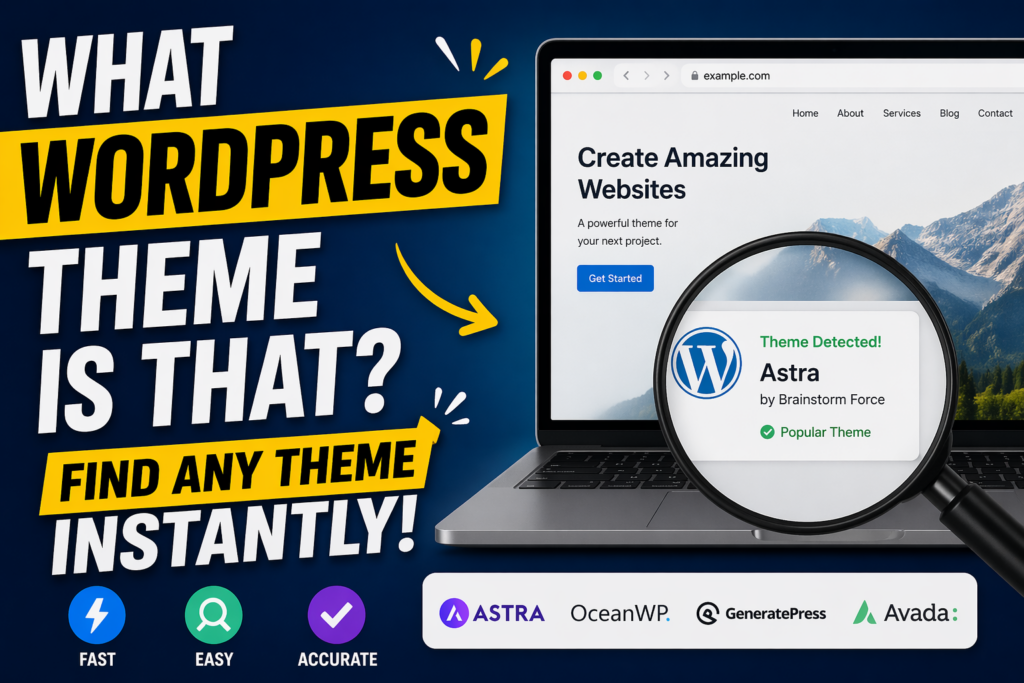
การแนะนำ
หากคุณเคยเข้าชมเว็บไซต์แล้วคิดว่า “นี่คือธีม WordPress อะไรนะ?” คุณไม่ใช่คนเดียว ไม่ว่าคุณจะสร้างเว็บไซต์ของตัวเองหรือวิเคราะห์คู่แข่ง การระบุธีม WordPress สามารถให้ข้อมูลเชิงลึกที่มีค่าเกี่ยวกับดีไซน์ ฟังก์ชันการทำงาน และประสบการณ์ของผู้ใช้ได้.
ในคู่มือนี้ เราจะอธิบายอย่างละเอียดถึงวิธีการค้นหาสิ่งนั้น วordpress วิธีการใช้งานธีมต่างๆ บนเว็บไซต์ทีละขั้นตอน บทความนี้เขียนด้วยภาษาที่เข้าใจง่ายและให้ความรู้ แม้แต่ผู้เริ่มต้นก็สามารถทำตามได้ ในขณะเดียวกันก็ยังให้ข้อมูลเชิงลึกที่เป็นประโยชน์สำหรับผู้ใช้ที่มีประสบการณ์มากกว่า.
เหตุใดการเลือกธีม WordPress จึงมีความสำคัญ
ก่อนที่จะลงลึกไปถึง "วิธีการ" นั้น สิ่งสำคัญคือต้องเข้าใจ "เหตุผล" ก่อน“
การทราบว่าเว็บไซต์นั้นใช้ธีม WordPress ใด จะช่วยคุณได้ดังนี้:
- เลียนแบบสไตล์การออกแบบที่คุณชื่นชอบ
- เข้าใจโครงสร้างเลย์เอาต์ที่ช่วยเพิ่มอัตราการแปลง
- วิเคราะห์เว็บไซต์ของคู่แข่งอย่างมีประสิทธิภาพยิ่งขึ้น
- เลือกธีมที่เหมาะสมสำหรับโปรเจ็กต์ของคุณเอง
- ค้นพบปลั๊กอินหรือเครื่องมือต่างๆ ที่มักแถมมากับธีม
แทนที่จะเดาหรือเริ่มต้นจากศูนย์ การระบุธีมจะช่วยให้คุณเข้าถึงโซลูชันการออกแบบที่ได้รับการพิสูจน์แล้วได้อย่างรวดเร็ว.
ธีม WordPress คืออะไร?
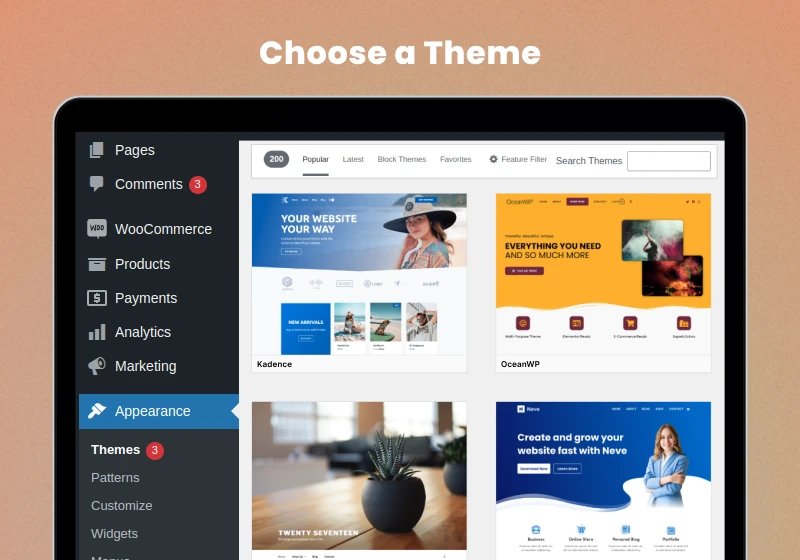
ธีม WordPress ควบคุมรูปลักษณ์และเค้าโครงของเว็บไซต์ โดยกำหนดองค์ประกอบต่างๆ เช่น:
- การจัดวางตัวอักษรและรูปแบบตัวอักษร
- สีและระยะห่าง
- เค้าโครงและโครงสร้างของหน้าเว็บ
- การออกแบบส่วนหัว ส่วนท้าย และระบบนำทาง
- การจัดรูปแบบหน้าบล็อกและหน้าสินค้า
ธีมอาจเป็นแบบฟรีหรือแบบเสียเงิน และหลายธีมมีตัวเลือกการปรับแต่งในตัว หรือสามารถทำงานร่วมกับโปรแกรมสร้างหน้าเว็บ เช่น Elementor หรือ Gutenberg ได้.
วิธีตรวจสอบว่าเว็บไซต์นั้นใช้ WordPress หรือไม่
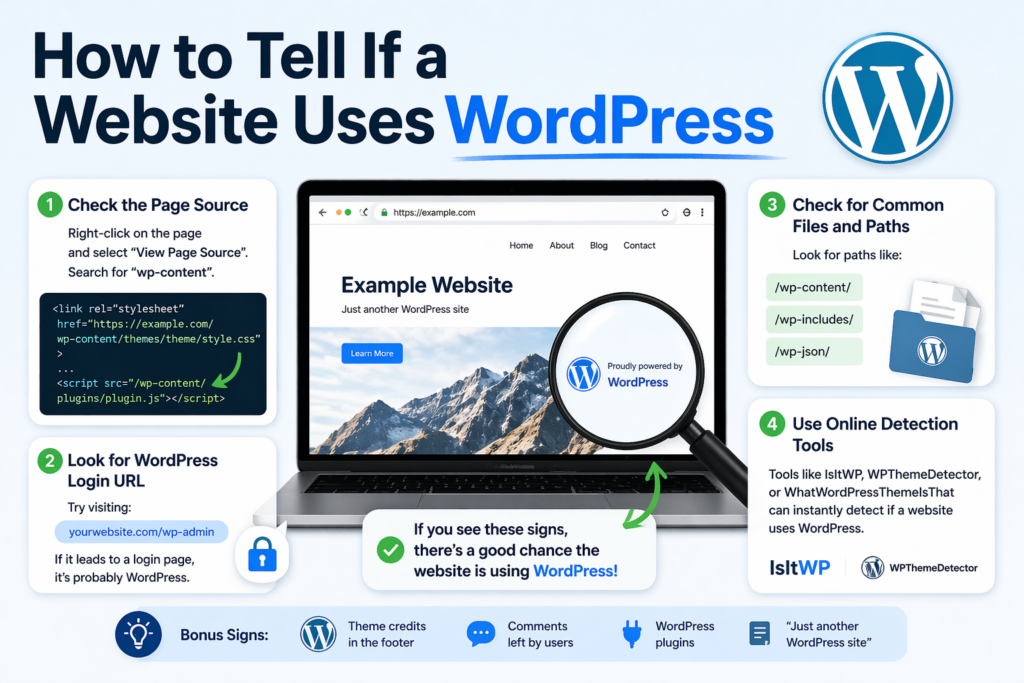
ก่อนที่จะถามว่า “ธีม WordPress นั้นคืออะไร?” คุณต้องตรวจสอบให้แน่ใจก่อนว่าเว็บไซต์นั้นสร้างด้วย WordPress จริงๆ.
นี่คือวิธีง่ายๆ สองสามวิธี:
1. ตรวจสอบซอร์สโค้ดของหน้าเว็บ
คลิกขวาบนหน้าเว็บแล้วเลือก “ดูซอร์สโค้ดของหน้าเว็บ” จากนั้นค้นหา:
เนื้อหา wp
หากคุณเห็นเว็บไซต์ดังกล่าว ก็เกือบจะแน่นอนว่าเว็บไซต์นั้นใช้ WordPress.
2. มองหา URL สำหรับเข้าสู่ระบบ WordPress
ลองเข้าไปชมที่:
example.com/wp-admin
หากนำไปสู่หน้าล็อกอิน นั่นเป็นสัญญาณบ่งชี้ที่ชัดเจน.
3. ใช้เครื่องมือตรวจจับ
มีเครื่องมือออนไลน์ที่สามารถบอกได้ทันทีว่าเว็บไซต์นั้นใช้แพลตฟอร์มใด รวมถึง WordPress ด้วย.
วิธีที่ 1: ใช้เครื่องมือตรวจจับธีมออนไลน์
วิธีที่เร็วและง่ายที่สุดในการตอบคำถาม “ธีม WordPress นั้นคืออะไร” คือการใช้โปรแกรมตรวจจับธีม.
วิธีการทำงาน
คุณเพียงแค่คัดลอก URL ของเว็บไซต์แล้ววางลงในเครื่องมือ เครื่องมือก็จะสแกนโค้ดของเว็บไซต์เพื่อระบุ:
- ชื่อธีม
- ผู้เขียนธีม
- ปลั๊กอินที่ใช้
- บางครั้งอาจมีการปรับแต่งเพิ่มเติมด้วย
เครื่องมือตรวจจับธีมยอดนิยม
- ธีม WordPress นั้นคืออะไร
- เครื่องตรวจจับธีม WP
- IsItWP
ข้อดี
- รวดเร็วและเหมาะสำหรับมือใหม่
- ไม่จำเป็นต้องมีความรู้ทางเทคนิค
- มักแสดงข้อมูลปลั๊กอินด้วยเช่นกัน
ข้อเสีย
- อาจใช้งานไม่ได้กับธีมที่ปรับแต่งอย่างมาก
- ไม่สามารถตรวจจับธีมที่สร้างขึ้นเองได้เสมอไป
วิธีที่ 2: ตรวจสอบซอร์สโค้ดของเว็บไซต์

หากเครื่องมือตรวจจับใช้งานไม่ได้ คุณสามารถค้นหาธีมด้วยตนเองได้.
คู่มือทีละขั้นตอน
- คลิกขวาบนหน้าเว็บ
- คลิก “ดูซอร์สโค้ดของหน้าเว็บ”
- กด Ctrl + F (หรือ Cmd + F)
- ค้นหา:
wp-content/themes/
คุณจะเห็นข้อความประมาณนี้:
wp-content/themes/astra/style.css
ในตัวอย่างนี้ ธีมคือ แอสตรา (Astra).
การอ่านไฟล์ Style.css
เมื่อคุณพบโฟลเดอร์ธีมแล้ว ให้เปิด:
สไตล์.css
โดยปกติแล้ว คุณจะเห็นสิ่งต่อไปนี้ที่ด้านบน:
ชื่อธีม: แอสตรา
ผู้เขียน: Brainstorm Force
เวอร์ชัน: 4.x
สิ่งนี้ยืนยันถึงธีมที่ถูกต้องแล้ว.
วิธีที่ 3: ใช้เครื่องมือสำหรับนักพัฒนาเบราว์เซอร์
เบราว์เซอร์สมัยใหม่มีเครื่องมือตรวจสอบที่มีประสิทธิภาพสูง.
ขั้นตอน
- คลิกขวา → ตรวจสอบ
- ไปที่แท็บองค์ประกอบ
- มองหาไฟล์ CSS หรือ JS
- ค้นหาลิงก์ที่มีเนื้อหาดังต่อไปนี้:
/wp-content/themes/
วิธีนี้มีประโยชน์อย่างยิ่งเมื่อโค้ดต้นฉบับมีความซับซ้อนหรือถูกย่อขนาดลง.
วิธีที่ 4: ตรวจสอบเครดิตธีมในส่วนท้ายของเว็บไซต์
บางเว็บไซต์จะระบุที่มาของธีมไว้ในส่วนท้ายของเว็บไซต์.
ตัวอย่าง:
- “ขับเคลื่อนโดยแอสตรา”
- “ธีมโดย StudioPress”
อย่างไรก็ตาม เว็บไซต์หลายแห่งมักลบส่วนนี้ออก โดยเฉพาะเว็บไซต์ที่มีการสร้างเว็บไซต์แบบพรีเมียมหรือแบบกำหนดเอง.
วิธีที่ 5: ระบุธีมที่กำหนดเองหรือดัดแปลง
บางครั้ง คุณอาจไม่พบคำตอบที่ชัดเจน.
ทำไม
เนื่องจากเว็บไซต์อาจใช้:
- ธีมที่ปรับแต่งอย่างมาก
- ธีมสำหรับเด็ก
- ธีมที่สร้างขึ้นเองโดยเฉพาะ
วิธีสังเกตสิ่งนี้
- ชื่อธีมมักเป็นชื่อทั่วไป (เช่น “custom-theme”)
- ไม่มีธีมสาธารณะใดที่ตรงกับการออกแบบนี้
- เครื่องมือตรวจจับล้มเหลว
ในกรณีเหล่านี้ เว็บไซต์อาจไม่ได้ใช้ธีมที่เปิดให้ใช้งานได้ทั่วไป.
แล้วโปรแกรมสร้างหน้าเว็บล่ะ?
ถึงแม้คุณจะพบธีมแล้ว แต่การออกแบบที่คุณเห็นอาจไม่ได้มาจากธีมนั้นทั้งหมดก็ได้.
เว็บไซต์ WordPress จำนวนมากใช้เครื่องมือสร้างหน้าเว็บ เช่น:
- เอเลเมนเตอร์
- ดับเบิลยูพีเบเกอรี่
- ดิวิ บิลเดอร์
เครื่องมือเหล่านี้ช่วยให้นักออกแบบสามารถสร้างเลย์เอาต์แบบกำหนดเองได้โดยไม่ขึ้นอยู่กับธีม.
เหตุใดเรื่องนี้จึงสำคัญ
เว็บไซต์สองแห่งสามารถใช้ธีมเดียวกันได้ แต่กลับมีรูปลักษณ์ที่แตกต่างกันอย่างสิ้นเชิง.
ดังนั้นเมื่อถามว่า “ธีม WordPress นั้นคืออะไร?” โปรดจำไว้ว่า:
แนวคิดหลักเป็นพื้นฐาน แต่ผู้สร้างจะเป็นผู้กำหนดรูปลักษณ์สุดท้าย.
ปลั๊กอินส่งผลต่อการตรวจจับธีมอย่างไร
ปลั๊กอินยังสามารถส่งผลต่อรูปลักษณ์และการทำงานของเว็บไซต์ได้อีกด้วย.
ตัวอย่างเช่น:
- สไลเดอร์
- ป๊อปอัป
- รูปแบบอีคอมเมิร์ซ
- แอนิเมชัน
เครื่องมือตรวจจับหลายอย่างจะแสดงปลั๊กอินด้วย ทำให้คุณเห็นภาพรวมที่สมบูรณ์ยิ่งขึ้นว่าเว็บไซต์นั้นสร้างขึ้นอย่างไร.
ข้อจำกัดของการตรวจจับธีม
ไม่ใช่ทุกธีมที่จะระบุได้ง่ายๆ.
ต่อไปนี้คือปัญหาที่พบได้ทั่วไป:
1. การพัฒนาแบบกำหนดเอง
บางธุรกิจสร้างธีมขึ้นมาใหม่ทั้งหมด.
2. ธีมที่เปลี่ยนชื่อใหม่
นักพัฒนาสามารถเปลี่ยนชื่อโฟลเดอร์ธีมได้ ทำให้ตรวจจับได้ยากขึ้น.
3. โค้ดที่ถูกย่อขนาด
เว็บไซต์ที่ปรับแต่งมาเป็นพิเศษอาจซ่อนข้อมูลที่เป็นประโยชน์ไว้.
4. CDN หรือชั้นความปลอดภัย
บางเว็บไซต์บล็อกเครื่องมือตรวจจับโดยสิ้นเชิง.
เคล็ดลับเพื่อผลลัพธ์ที่ดีขึ้น
หากคุณหาธีมหลักไม่เจอ ลองใช้กลยุทธ์เหล่านี้ดู:
- ใช้เครื่องมือตรวจจับหลายชนิด
- ตรวจสอบทั้งหน้าแรกและหน้าภายใน
- ตรวจสอบไฟล์ CSS และ JS
- มองหาชื่อคลาสที่เกี่ยวข้องกับธีม
- ผสมผสานวิธีการแบบใช้แรงงานคนและแบบอัตโนมัติเข้าด้วยกัน
ความพยายามอย่างต่อเนื่องมักนำไปสู่ผลลัพธ์.
วิธีเลือกธีมที่คล้ายกัน
ถ้าหาธีมที่ตรงเป๊ะไม่เจอ ก็ไม่ต้องกังวลไปค่ะ.
แต่ให้เน้นที่:
1. โครงสร้างเค้าโครง
- ตารางเทียบกับรายการ
- แบบเต็มความกว้างเทียบกับแบบมีกรอบ
2. สไตล์การออกแบบ
- มินิมอลลิสต์
- โดดเด่นและมีสีสัน
- บทบรรณาธิการ
3. ฟังก์ชันการทำงาน
- การสนับสนุนอีคอมเมิร์ซ
- บทความในบล็อก
- รูปแบบพอร์ตโฟลิโอ
จากนั้นคุณสามารถค้นหาธีมที่มีลักษณะคล้ายคลึงกันได้.
แนวทางปฏิบัติที่ดีที่สุดเมื่อใช้ธีมอื่นเป็นแรงบันดาลใจ
การนำแรงบันดาลใจมาใช้เป็นเรื่องที่ทำได้ แต่ควรหลีกเลี่ยงการคัดลอกโดยตรง.
ทำ:
- ศึกษารูปแบบการจัดวางและรูปแบบ UX
- ปรับดีไซน์ให้เข้ากับแบรนด์ของคุณ
- ปรับปรุงการใช้งานให้ดียิ่งขึ้น
อย่า:
- โคลนดีไซน์แบบพิกเซลต่อพิกเซล
- คัดลอกทรัพย์สินที่มีลิขสิทธิ์
- บิดเบือนภาพลักษณ์ของแบรนด์อื่น
ความคิดริเริ่มสร้างสรรค์ย่อมนำมาซึ่งชัยชนะในระยะยาวเสมอ.
ธีมฟรีกับธีมพรีเมียม: ต่างกันอย่างไร?
เมื่อคุณระบุธีมได้แล้ว คุณอาจสงสัยว่าควรใช้ธีมนั้นหรือไม่.
ธีมฟรี
- คุ้มค่า
- คุณสมบัติพื้นฐาน
- การปรับแต่งมีจำกัด
ธีมพรีเมียม
- ตัวเลือกการออกแบบขั้นสูง
- การสนับสนุนที่ดีกว่า
- ความยืดหยุ่นมากขึ้น
การเลือกสิ่งที่เหมาะสมนั้นขึ้นอยู่กับเป้าหมายและงบประมาณของคุณ.
ธีม WordPress ยอดนิยมทั่วไป
ในระหว่างการระบุธีม คุณมักจะพบเจอสิ่งต่อไปนี้:
- แอสตรา
- โอเชียนดับเบิลยูพี
- ดิวิ
- เจนเนอเรทเพรส
- อาวาดา
สิ่งเหล่านี้ถูกนำมาใช้กันอย่างแพร่หลายเนื่องจากมีความยืดหยุ่นและสามารถปรับแต่งได้.
เมื่อใดที่คุณควรใช้ธีมแบบกำหนดเอง
บางครั้งธีมสำเร็จรูปก็อาจไม่เพียงพอ.
คุณอาจพิจารณาใช้ธีมแบบกำหนดเองหาก:
- คุณต้องการแบรนด์ที่เป็นเอกลักษณ์
- คุณต้องการคุณสมบัติเฉพาะ
- คุณต้องการควบคุมการออกแบบอย่างเต็มที่
อย่างไรก็ตาม การสร้างธีมแบบกำหนดเองนั้นต้องใช้เวลาและทรัพยากรมากกว่า.
ข้อคิดส่งท้าย
หากคุณเคยสงสัยว่า “ธีม WordPress นั้นคืออะไร?” ข่าวดีก็คือมีหลายวิธีที่จะหาคำตอบได้ ตั้งแต่เครื่องมือออนไลน์ง่ายๆ ไปจนถึงการตรวจสอบโค้ดด้วยตนเอง คุณสามารถค้นพบข้อมูลเชิงลึกที่มีค่าเกี่ยวกับธีมเกือบทุกธีมได้ วordpress เว็บไซต์.
แม้ว่าจะไม่สามารถระบุธีมทั้งหมดได้ โดยเฉพาะอย่างยิ่งในกรณีของการสร้างเว็บไซต์แบบกำหนดเอง แต่การเข้าใจวิธีการทำงานของธีมและวิธีการตรวจจับธีมจะช่วยให้คุณได้เปรียบอย่างมาก มันช่วยให้คุณเรียนรู้จากเว็บไซต์ที่ประสบความสำเร็จ ตัดสินใจด้านการออกแบบได้ดีขึ้น และสร้างประสบการณ์ออนไลน์ที่มีประสิทธิภาพมากขึ้น.
สุดท้ายแล้ว การระบุธีมหลักเป็นเพียงจุดเริ่มต้น สิ่งที่สำคัญอย่างแท้จริงคือวิธีการที่คุณนำข้อมูลเชิงลึกเหล่านั้นไปประยุกต์ใช้เพื่อสร้างเว็บไซต์ที่ดูดี มีประสิทธิภาพ และมอบมูลค่าที่แท้จริงให้กับกลุ่มเป้าหมายของคุณ.
คำถามที่พบบ่อย
คุณสามารถระบุธีม WordPress ได้โดยใช้เครื่องมือตรวจจับธีมออนไลน์ ตรวจสอบซอร์สโค้ดของหน้าเว็บในส่วน “wp-content/themes” หรือตรวจสอบเว็บไซต์ด้วยเครื่องมือสำหรับนักพัฒนาของเบราว์เซอร์.
เครื่องมือตรวจจับธีมส่วนใหญ่มีความแม่นยำสำหรับธีมมาตรฐาน แต่พวกมันอาจทำงานได้ไม่ดีนักกับธีมที่ปรับแต่งอย่างมากหรือธีมที่สร้างขึ้นเอง.
ใช่ คุณสามารถตรวจสอบซอร์สโค้ดของเว็บไซต์ด้วยตนเอง หรือตรวจสอบไฟล์ CSS เพื่อค้นหาชื่อธีม ซึ่งมักจะอยู่ในไฟล์ “style.css”.
บางเว็บไซต์ใช้ธีมที่กำหนดเอง เปลี่ยนชื่อโฟลเดอร์ธีม หรือปรับแต่งโค้ดเพื่อซ่อนรายละเอียดของธีม ทำให้ตรวจจับได้ยากขึ้น.
ใช่แล้ว ปลั๊กอินและโปรแกรมสร้างหน้าเว็บสามารถเปลี่ยนแปลงดีไซน์ของเว็บไซต์ได้อย่างมาก ดังนั้นรูปลักษณ์สุดท้ายอาจไม่สะท้อนถึงธีมดั้งเดิมอย่างสมบูรณ์.
ใช่ การใช้ธีมเดียวกันนั้นถูกกฎหมายอย่างสมบูรณ์ แต่คุณควรหลีกเลี่ยงการคัดลอกเนื้อหาหรือดีไซน์โดยตรงเพื่อรักษาความเป็นเอกลักษณ์และหลีกเลี่ยงปัญหาเรื่องลิขสิทธิ์.


ออกแบบและสร้างเว็บไซต์ WordPress หรือเว็บไซต์องค์กรพร้อมระบบอีคอมเมิร์ซครบวงจรสำหรับคุณ.
ช่วงราคา: $200.00 ถึง $2,500.00custom-requirements-or-special-quotations
ราคาเดิมคือ: $2.00.$1.00ราคาปัจจุบันคือ: $1.00. การใช้ปลั๊กอิน 50 ตัวมากเกินไปสำหรับร้านค้าออนไลน์ที่ใช้ WordPress หรือไม่?
การเข้าใจผลกระทบที่แท้จริงต่อประสิทธิภาพ การมีปลั๊กอิน 50 ตัวบนเว็บไซต์อีคอมเมิร์ซ WordPress ไม่ใช่ปัญหาโดยอัตโนมัติ จริงๆ แล้ว จำนวนเพียงอย่างเดียวแทบจะไม่สามารถกำหนดประสิทธิภาพได้....

ภาพหลักสำหรับการออกแบบอุปกรณ์กายภาพบำบัดที่บ้านของ Amazon (อธิบายรายละเอียด)
บทนำ: การสร้างภาพลักษณ์ที่น่าเชื่อถือสำหรับอุปกรณ์บำบัดที่บ้านบน Amazon เมื่อออกแบบภาพหลักสำหรับอุปกรณ์บำบัดที่บ้านบน Amazon สิ่งสำคัญอันดับแรกของเราคือ...

ภาพหลักสำหรับการแปลงลิปสติกเป็นสินค้าสำหรับ Amazon
บทนำ: การออกแบบภาพหลักลิปสติกที่ขายได้บน Amazon เมื่อเราออกแบบภาพหลักสำหรับลิปสติกบน Amazon ความรับผิดชอบของเราไม่ได้จำกัดอยู่แค่...

แฮกเกอร์ขโมยอีเมลผู้ดูแลระบบ WordPress ได้อย่างไร (และวิธีป้องกัน)
มาเริ่มกันด้วยความจริงที่ไม่น่าสบายใจ: อีเมลแอดมิน WordPress ของคุณอาจเปิดเผยต่อสาธารณะมากกว่าที่คุณคิด และแฮกเกอร์? พวกเขาชอบมาก สำหรับพวกเขา...

อะไรทำให้รองพื้นชนิดเหลวของ Amazon (ภาพหลัก) ขายดี?
บทนำ การออกแบบภาพหลักสำหรับรองพื้นชนิดเหลวบน Amazon ไม่ใช่แค่การทำให้ผลิตภัณฑ์ดูสวยงามเท่านั้น บน Amazon ภาพหลักและ...

การออกแบบภาพหลัก Amazon ที่มีประสิทธิภาพสำหรับตลับกรอง
บทนำ การออกแบบภาพหลักสำหรับ Amazon ไม่ใช่แค่การทำให้สินค้าดูน่าดึงดูดเท่านั้น แต่ยังเกี่ยวกับความชัดเจน ความน่าเชื่อถือ และความเข้าใจได้ในทันที โดยเฉพาะอย่างยิ่งสำหรับ...

การโจมตีแบบ Replay Attack บน WordPress: ภัยคุกคามจริงหรือแค่เรื่องที่ถูกพูดเกินจริง?
ก่อนอื่นขอชี้แจงให้ชัดเจนก่อน การโจมตีแบบ Replay Attack นั้นดูไม่น่ากลัว มันไม่ได้ทำลายรหัสผ่าน มันไม่ได้แทรกโค้ดที่เป็นอันตรายพร้อมข้อความแฮ็กเกอร์สีเขียวกระจัดกระจายไปทั่ว มันแนบเนียนกว่า...

วิธีคัดลอกหน้าเว็บ WordPress โดยไม่ทำให้ระบบเสียหาย
ยอมรับกันเถอะ บางครั้งคุณอาจไม่อยากสร้างหน้าเว็บใหม่ คุณแค่อยากได้หน้าเว็บเดิม...แต่แตกต่างไปเล็กน้อย รูปแบบเหมือนเดิม บล็อกเหมือนเดิม การตั้งค่าเหมือนเดิม เพราะ...

เปรียบเทียบธีม WordPress สำหรับสัตว์เลี้ยง 5 แบบ
บทนำ การเลือกธีม WordPress ที่เหมาะสมสำหรับธุรกิจเกี่ยวกับสัตว์เลี้ยงนั้นไม่ใช่แค่เรื่องของการออกแบบเท่านั้น แต่ยังส่งผลโดยตรงต่อการใช้งาน ความสามารถในการขยายขนาด และการเติบโตของธุรกิจในระยะยาว การดูแลสัตว์เลี้ยงและ...

เปรียบเทียบธีมอีคอมเมิร์ซชุดว่ายน้ำ 5 แบบ
บทนำ การเลือกธีมที่เหมาะสมสำหรับร้านค้าอิสระที่จำหน่ายชุดว่ายน้ำหรือชุดชั้นในนั้นไม่ใช่แค่การตัดสินใจด้านภาพลักษณ์เท่านั้น แต่ยังส่งผลโดยตรงต่ออัตราการเปลี่ยนลูกค้าให้เป็นผู้ซื้อ ความสามารถในการขยายธุรกิจ และความยั่งยืนในระยะยาว...

วิธีปิดการแสดงความคิดเห็นใน WordPress (โดยไม่ต้องเสียสติ)
มาพูดถึงระบบแสดงความคิดเห็นของ WordPress กันดีกว่า ในทางทฤษฎีแล้ว ความคิดเห็นนั้นยอดเยี่ยมมาก มันช่วยกระตุ้นการสนทนา สร้างชุมชน และทำให้เว็บไซต์ของคุณดูมีชีวิตชีวา แต่ในความเป็นจริงแล้ว มันมักจะเป็นเหมือนแม่เหล็กดึงดูด...

ข้อผิดพลาด WordPress 500: เมื่อเว็บไซต์ของคุณเกิดอาการผิดปกติ
เว็บไซต์ WordPress ของคุณยังใช้งานได้ปกติดีเมื่อสักครู่ คุณรีเฟรชหน้าเว็บ แล้วจู่ๆ ก็เกิดข้อผิดพลาด 500 Internal Server Error ขึ้นมา ไม่มีคำอธิบาย ไม่มีคำขอโทษ มีเพียงข้อความที่เย็นชาและสับสนซึ่งโดยพื้นฐานแล้ว...

การสร้างเว็บไซต์ WordPress ที่ปรับขนาดได้สำหรับแบรนด์ที่ขับเคลื่อนด้วยวิทยาศาสตร์: โครงการ AminoUSA
บทนำ ในยุคดิจิทัลปัจจุบัน เว็บไซต์เป็นมากกว่าแค่สถานที่สำหรับแสดงรายการสินค้า สำหรับแบรนด์ที่ขับเคลื่อนด้วยวิทยาศาสตร์ซึ่งดำเนินงานในอุตสาหกรรมที่มีการควบคุมหรือเน้นการวิจัย...

สร้างร้านค้า Shopify ที่ปรับขนาดได้สำหรับแบรนด์ใบมีดระดับโลก: โครงการ CoolKatana
บทนำ ในธุรกิจอีคอมเมิร์ซข้ามพรมแดน เว็บไซต์ Shopify เป็นมากกว่าแค่หน้าร้าน สำหรับแบรนด์ที่ดำเนินธุรกิจในกลุ่มเฉพาะหรือกลุ่มที่ขับเคลื่อนด้วยวัฒนธรรม เว็บไซต์ต้องทำมากกว่านั้น...

การออกแบบร้านค้า Shopify ที่มีอัตราการแปลงสูงสำหรับขายการ์ดโปเกมอน
บทนำ ในโลกของอีคอมเมิร์ซสินค้าสะสม โดยเฉพาะอย่างยิ่งในตลาดเกมการ์ดโปเกมอน (TCG) เว็บไซต์จะต้องทำมากกว่าแค่แสดงรายการสินค้า...

ดีไซน์ Shopify ที่เพิ่มยอดขายสำหรับแบรนด์อิฐสั่งทำพิเศษ
บทนำ ในสภาพแวดล้อมการแข่งขันอีคอมเมิร์ซในปัจจุบัน โดยเฉพาะอย่างยิ่งในตลาดของขวัญส่วนบุคคลและของสะสม เว็บไซต์ Shopify ต้องทำมากกว่าแค่แสดงสินค้า...

วิธีติดต่อฝ่ายสนับสนุนของ Shopify: คู่มือที่ง่ายและไม่ยุ่งยาก
การบริหารร้านค้า Shopify ควรเป็นเรื่องที่น่าตื่นเต้น ไม่ใช่เรื่องที่ทำให้สับสน เมื่อมีคำถามหรือปัญหาเกิดขึ้น Shopify มีช่องทางการสนับสนุนหลายช่องทาง ขึ้นอยู่กับสถานการณ์...

วิธีปิดใช้งานร้านค้า Shopify: คู่มือที่ชัดเจนและใช้งานได้จริง
การปิดใช้งานร้านค้า Shopify นั้นไม่ซับซ้อน แต่ก็มีผลกระทบหลายอย่างที่ผู้ขายหลายรายมองข้ามไป คู่มือนี้จะอธิบายขั้นตอนอย่างละเอียดและเข้าใจง่าย...