












การแนะนำ
Many beginners who want to create วordpress plugins often ask one simple question: can replit build a wordpress plugins project from start to finish? The answer is yes, but with an important explanation. Replit can help you write, organize, edit, and share WordPress plugin code. However, it is not a complete WordPress testing environment by default. That means you can use Replit as a convenient coding workspace, but you still need a real WordPress website, local WordPress setup, or staging site to fully test your plugin.
This topic matters because WordPress plugins are one of the main reasons WordPress is so flexible. A plugin can add contact forms, SEO tools, payment features, custom layouts, membership systems, security tools, or small custom functions. Instead of changing WordPress core files, developers use plugins to extend a site safely and cleanly.
Replit, on the other hand, is a browser-based coding platform. It lets users write code without installing a full development environment on their computer. For students, beginners, freelancers, and small teams, this can make the coding process much easier. You can open your browser, create a project, write PHP, add CSS or JavaScript, and save everything in the cloud.
So, when people ask can replit build a wordpress plugins, the better question is this: Can Replit help you create the files and code for a WordPress plugin? Yes. Can Replit replace a full WordPress development environment? Not completely. To understand why, let’s look at how Replit works, how WordPress plugins are built, and where Replit fits into the plugin development process.
What Is Replit?
Replit is an online coding platform that works directly in a web browser. Instead of downloading a code editor, installing programming languages, setting up folders, and configuring local tools, users can create a coding project online and start writing code quickly.
This makes Replit especially friendly for beginners. A traditional development setup can feel confusing because you may need to install PHP, Node.js, Git, a database, a local server, and a code editor. Replit removes much of that early setup. You log in, choose a language or project type, and begin coding.
Replit supports many programming languages, including PHP, JavaScript, HTML, CSS, Python, and more. Since WordPress plugins are mainly written in PHP, with optional CSS and JavaScript, Replit can be used to write the core files of a plugin.
Replit also includes useful tools for coding. You can create files and folders, edit code, use a terminal, work with version control, and collaborate with other people. Some users also use Replit’s AI features to help understand code, generate examples, or debug simple issues.
For WordPress plugin development, this makes Replit useful as a lightweight coding workspace. You can create a plugin folder, write your main PHP file, organize supporting files, and prepare the plugin for upload. This is why the question can replit build a wordpress plugins has become popular among beginners.
What Is a WordPress Plugin?
A WordPress plugin is a package of code that adds new features to a WordPress website. Plugins can be very small or very large. A simple plugin might add a message to the footer of a website. A larger plugin might create a booking system, online store feature, customer dashboard, or advanced SEO tool.
The main idea behind plugins is extension. WordPress gives you a core website system, but plugins allow you to customize that system without editing WordPress itself. This is important because editing core WordPress files can cause problems during updates. A plugin keeps your custom feature separate, easier to manage, and easier to remove if needed.
Most WordPress plugins include a main PHP file. Some plugins also include CSS files for styling, JavaScript files for interactive features, language files for translation, templates, images, and additional PHP files for organization.
At the top of the main PHP file, every WordPress plugin needs a special plugin header. This header tells WordPress the plugin name, description, version, author, and other basic information. Once WordPress reads this header, it can display the plugin inside the WordPress dashboard.
A basic plugin may only need a few lines of PHP. A professional plugin may include many files, security checks, database functions, admin settings, front-end display logic, and compatibility testing. Because of this, Replit can be useful for writing plugin code, but testing must happen in a real WordPress environment.
Can Replit Build a WordPress Plugin?
Yes, Replit can help build a WordPress plugin, but it is best to understand what “build” means in this situation.
If by “build” you mean writing the plugin files, organizing the code, creating PHP functions, adding CSS, adding JavaScript, and preparing the plugin as a downloadable package, then Replit can do that. It gives you a browser-based place to create and edit the plugin code.
However, if by “build” you mean fully installing, activating, testing, and debugging the plugin inside a live WordPress dashboard, Replit is not the complete answer by default. WordPress normally needs a web server, PHP, a database such as MySQL or MariaDB, and the WordPress file system. A normal Replit project does not automatically include a full WordPress installation with a database and dashboard ready for plugin testing.
This is the key point behind the keyword can replit build a wordpress plugins. Replit can build the code, but it does not fully replace WordPress as the testing environment.
The practical workflow is simple. You write the plugin in Replit. Then you download the plugin files as a zip package. After that, you upload the zip file to a WordPress website through the Plugins section. Once activated, you test whether the plugin works correctly.
This makes Replit a helpful part of the process, especially for learning, planning, and early development. But for final testing, you still need WordPress.
How WordPress Plugin Development Usually Works
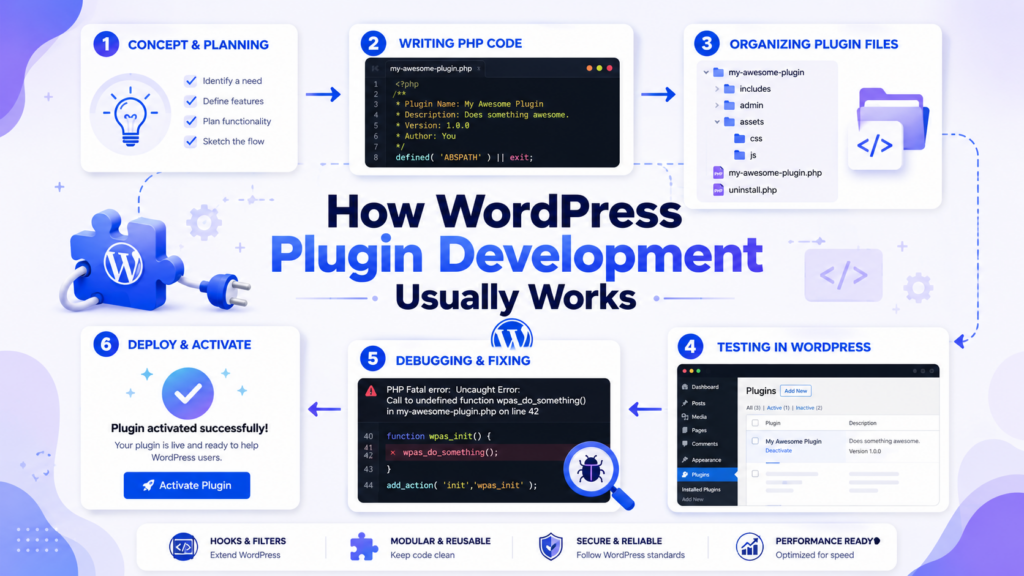
To understand Replit’s role better, it helps to know the normal plugin development process.
First, a developer creates a plugin folder. This folder usually has the same name as the plugin. For example, if the plugin is called “Simple Footer Message,” the folder may be named simple-footer-message.
Inside that folder, the developer creates a main PHP file. This file often has the same name as the folder, such as simple-footer-message.php.
Next, the developer adds the plugin header. This is a comment block that WordPress reads. It includes basic details such as plugin name, description, version, and author.
After that, the developer writes the actual plugin code. WordPress plugins often use hooks. Hooks allow plugin code to run at specific moments. For example, a hook can add content to a page, load a script, change a title, create a shortcode, add an admin menu, or process form data.
Then the developer tests the plugin. This is one of the most important steps. A plugin may look correct in a code editor but still fail inside WordPress because of PHP errors, theme conflicts, plugin conflicts, database issues, missing security checks, or incorrect WordPress function usage.
Finally, the developer improves the plugin, fixes bugs, and prepares it for real use. If the plugin is for public release, the developer may also add documentation, translation support, security hardening, and compatibility checks.
Replit can help with the early and middle parts of this workflow, especially file creation and code writing. But the testing stage requires WordPress.
Why Replit Is Useful for WordPress Plugin Beginners
Replit is useful because it lowers the starting barrier. Many beginners feel stuck before writing their first line of plugin code because they do not know how to set up a local development environment. Replit makes the beginning easier.
You can create a PHP project and start writing your plugin files right away. This is helpful when you are still learning what a plugin header looks like, how PHP functions work, how hooks are written, and how WordPress reads plugin files.
Replit also keeps projects in the cloud. This means you can access your plugin code from different devices. If you start writing code on one computer, you can continue from another computer later. For learners, this flexibility is valuable.
Collaboration is another advantage. If you are working with a classmate, teammate, or client, Replit makes it easier to share a project. Multiple people can look at the same files, review changes, and discuss improvements.
Replit can also help with quick experiments. For example, you may want to draft a shortcode function, organize CSS, or write a simple admin page. You can do this in Replit before moving the files into WordPress.
So, for beginners asking can replit build a wordpress plugins, Replit is a good place to start learning the structure of plugin development. It lets you focus on the code before worrying about advanced local setup.
The Main Limitation: Testing
The biggest limitation is testing. WordPress plugins are designed to run inside WordPress. This means the code depends on WordPress functions, WordPress hooks, WordPress settings, user roles, database tables, themes, and other plugins.
If your plugin uses a function like add_action, add_shortcode, หรือ wp_enqueue_script, that function belongs to WordPress. In a normal Replit PHP project, those WordPress functions may not exist unless you have installed and configured WordPress inside the environment.
Because of this, a plugin file that looks fine in Replit may not be fully testable there. You may be able to check basic PHP syntax, but you cannot fully confirm how the plugin behaves inside WordPress unless you upload it to a WordPress site or run it in a WordPress development environment.
This is why professional developers usually test plugins in one of three places: a local WordPress installation, a staging website, or a dedicated development server.
A local WordPress installation runs on your own computer. Tools such as LocalWP, MAMP, XAMPP, or similar software can create a full WordPress environment with a server and database. A staging site is a private copy of a real website used for testing before changes go live. A development server is a separate online server created for building and testing projects.
Replit can still be part of this workflow, but it should not be the only tool if you want reliable plugin testing.
A Simple Replit-to-WordPress Workflow
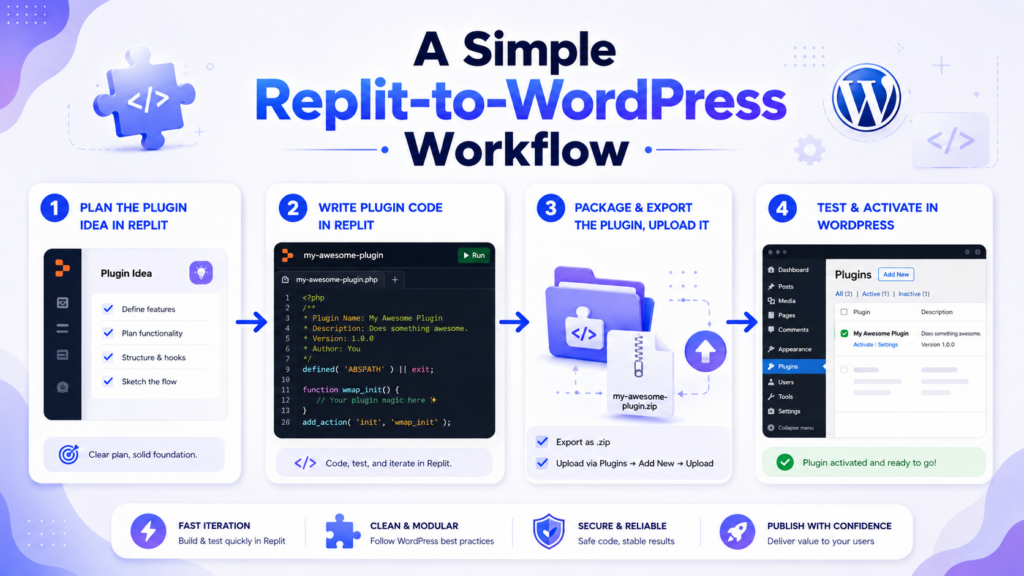
A beginner-friendly workflow can look like this.
Start by creating a new project in Replit. Choose a PHP-based project or a general coding project where you can create PHP files. Then create a folder for your plugin. Give it a clean, lowercase name with hyphens, such as simple-custom-plugin.
Inside that folder, create the main PHP file. Add the plugin header at the top. This allows WordPress to recognize the plugin later.
Next, write a small feature. For example, you might create a shortcode, add a footer message, enqueue a stylesheet, or add a simple admin notice. Keep the first version small. A small plugin is easier to debug.
After writing the code, organize your files. If you need CSS, create an assets folder. If you need JavaScript, place it in a clear folder structure. Good organization becomes more important as the plugin grows.
Then download the plugin folder from Replit. Compress it into a zip file if needed. Go to your WordPress dashboard, open the Plugins section, choose Add New, upload the zip file, install it, and activate it.
Once activated, test the feature on your WordPress site. Check the front end, the dashboard, and any page where the plugin should appear. If something breaks, return to Replit, adjust the code, download the updated files, and test again.
This workflow is not as smooth as developing directly inside a local WordPress environment, but it works well for learning and simple projects.
What Types of Plugins Can You Start in Replit?
Replit is best for simple or medium-level plugin projects. For example, you can use it to create a custom shortcode plugin, a small content display plugin, a simple styling helper, a custom footer message, a basic admin notice, or a lightweight feature that does not need complex database work.
You can also use Replit to plan larger plugins. It can help you write the file structure, draft functions, prepare templates, and organize code before moving the project into a more complete WordPress environment.
However, Replit may not be ideal as the only workspace for advanced plugins. If your plugin needs custom database tables, WooCommerce integration, payment processing, user account logic, REST API testing, security workflows, or heavy compatibility testing, you should use a full WordPress development environment.
This does not mean Replit is bad. It simply means every tool has a proper role. Replit is excellent for writing and learning. WordPress is necessary for real testing.
Best Practices When Using Replit for Plugin Development
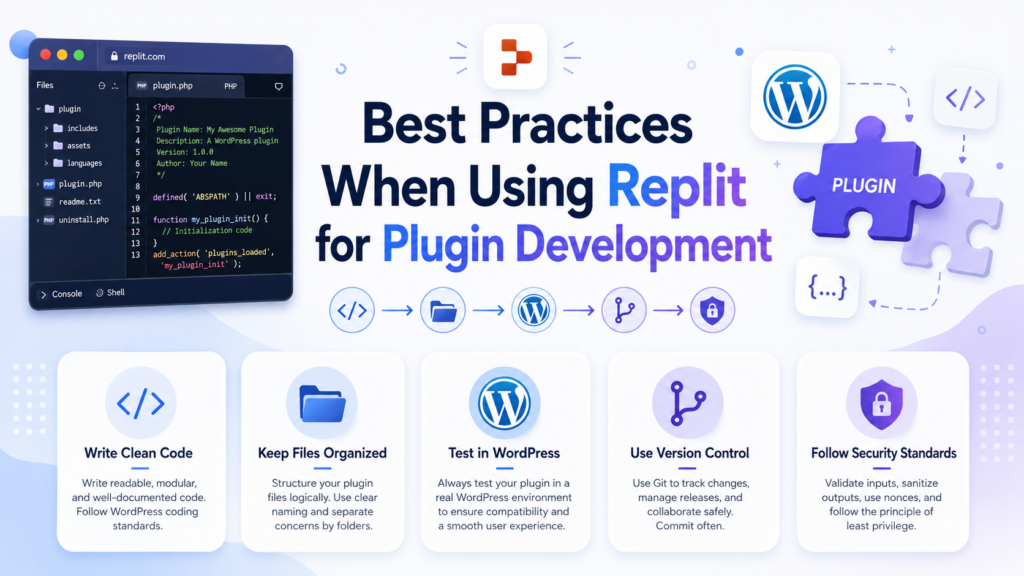
When using Replit for WordPress plugin development, keep your code clean and simple. Start with one feature at a time. Do not try to build a large plugin before you understand the basics.
Use clear file names. A plugin with organized folders is easier to maintain. Avoid placing every piece of code into one huge file if the plugin becomes larger. Separate styles, scripts, includes, and templates when needed.
Follow WordPress coding habits. Use WordPress hooks properly. Sanitize user input, escape output, and avoid unsafe code. Even small plugins should be written with security in mind.
Add comments where helpful, but do not over-comment every line. Comments should explain why something exists, not just repeat what the code already says.
Test often. Do not wait until the whole plugin is complete before uploading it to WordPress. Build a small feature, test it, fix it, and continue.
Also, keep backups or version history. Replit can work with GitHub, which is useful if you want to track changes. Version control helps you recover older code if something goes wrong.
Should Beginners Use Replit for WordPress Plugins?
Yes, beginners can use Replit to learn WordPress plugin development. It is especially useful for people who want to understand plugin structure before setting up local development tools.
Replit gives beginners a clean place to practice PHP, create files, and experiment with plugin ideas. It also makes sharing easier, which is helpful for learning with others.
However, beginners should not assume that Replit alone is enough. The most important lesson is that WordPress plugins must be tested inside WordPress. A plugin is not finished just because the code exists. It must be activated, tested, and checked for errors.
For a beginner, the best path is to use Replit for writing and learning, then use a WordPress test site for activation and debugging. This balanced approach keeps the process simple while still teaching the correct development workflow.
บทสรุป
So, can replit build a wordpress plugins project? Yes, Replit can help you create, write, organize, and prepare WordPress plugin code. It is a useful browser-based coding tool for beginners, students, and teams who want a simple way to start plugin development without a complicated setup.
However, Replit is not a complete วordpress testing environment by default. WordPress plugins need to run inside WordPress, so you still need a local WordPress setup, staging site, or real WordPress website to install, activate, and test the plugin properly.
In simple terms, Replit is a strong place to write the plugin, but WordPress is the place where you prove the plugin works. For small plugins, learning projects, and early development, Replit is a practical choice. For serious or complex plugins, it should be combined with a full WordPress testing environment.
คำถามที่พบบ่อย
1. Can Replit build WordPress plugins?
Yes. Replit can help you write and organize WordPress plugin code, especially PHP, CSS, and JavaScript files. However, you still need a real WordPress environment to install, activate, and fully test the plugin.
2. Is Replit good for WordPress plugin beginners?
Yes. Replit is beginner-friendly because it works in a browser and does not require a complicated local setup. It is a good place to learn plugin structure, write basic code, and practice simple WordPress plugin development.
3. Can I test a WordPress plugin directly in Replit?
Not completely. Replit can help you check and edit code, but WordPress plugins rely on WordPress functions, hooks, themes, and database behavior. For proper testing, you should use a local WordPress site, staging site, or live test website.
4. What files does a basic WordPress plugin need?
A basic WordPress plugin usually needs a plugin folder and a main PHP file. The main PHP file must include a plugin header with details like plugin name, description, version, and author so WordPress can recognize it.
5. How do I move a plugin from Replit to WordPress?
You can create the plugin files in Replit, download the plugin folder, compress it into a ZIP file, and upload it through the WordPress dashboard under Plugins > Add New > Upload Plugin. Then you can install and activate it.
6. Is Replit enough for advanced WordPress plugin development?
Replit can help with code writing and early planning, but advanced plugins usually need a full WordPress development environment. If your plugin uses custom database tables, WooCommerce features, user accounts, payment systems, or complex integrations, full WordPress testing is necessary.


ออกแบบและสร้างเว็บไซต์ WordPress หรือเว็บไซต์องค์กรพร้อมระบบอีคอมเมิร์ซครบวงจรสำหรับคุณ.
ช่วงราคา: $200.00 ถึง $2,500.00custom-requirements-or-special-quotations
ราคาเดิมคือ: $2.00.$1.00ราคาปัจจุบันคือ: $1.00. การใช้ปลั๊กอิน 50 ตัวมากเกินไปสำหรับร้านค้าออนไลน์ที่ใช้ WordPress หรือไม่?
การเข้าใจผลกระทบที่แท้จริงต่อประสิทธิภาพ การมีปลั๊กอิน 50 ตัวบนเว็บไซต์อีคอมเมิร์ซ WordPress ไม่ใช่ปัญหาโดยอัตโนมัติ จริงๆ แล้ว จำนวนเพียงอย่างเดียวแทบจะไม่สามารถกำหนดประสิทธิภาพได้....

ภาพหลักสำหรับการออกแบบอุปกรณ์กายภาพบำบัดที่บ้านของ Amazon (อธิบายรายละเอียด)
บทนำ: การสร้างภาพลักษณ์ที่น่าเชื่อถือสำหรับอุปกรณ์บำบัดที่บ้านบน Amazon เมื่อออกแบบภาพหลักสำหรับอุปกรณ์บำบัดที่บ้านบน Amazon สิ่งสำคัญอันดับแรกของเราคือ...

ภาพหลักสำหรับการแปลงลิปสติกเป็นสินค้าสำหรับ Amazon
บทนำ: การออกแบบภาพหลักลิปสติกที่ขายได้บน Amazon เมื่อเราออกแบบภาพหลักสำหรับลิปสติกบน Amazon ความรับผิดชอบของเราไม่ได้จำกัดอยู่แค่...

แฮกเกอร์ขโมยอีเมลผู้ดูแลระบบ WordPress ได้อย่างไร (และวิธีป้องกัน)
มาเริ่มกันด้วยความจริงที่ไม่น่าสบายใจ: อีเมลแอดมิน WordPress ของคุณอาจเปิดเผยต่อสาธารณะมากกว่าที่คุณคิด และแฮกเกอร์? พวกเขาชอบมาก สำหรับพวกเขา...

อะไรทำให้รองพื้นชนิดเหลวของ Amazon (ภาพหลัก) ขายดี?
บทนำ การออกแบบภาพหลักสำหรับรองพื้นชนิดเหลวบน Amazon ไม่ใช่แค่การทำให้ผลิตภัณฑ์ดูสวยงามเท่านั้น บน Amazon ภาพหลักและ...

การออกแบบภาพหลัก Amazon ที่มีประสิทธิภาพสำหรับตลับกรอง
บทนำ การออกแบบภาพหลักสำหรับ Amazon ไม่ใช่แค่การทำให้สินค้าดูน่าดึงดูดเท่านั้น แต่ยังเกี่ยวกับความชัดเจน ความน่าเชื่อถือ และความเข้าใจได้ในทันที โดยเฉพาะอย่างยิ่งสำหรับ...

การโจมตีแบบ Replay Attack บน WordPress: ภัยคุกคามจริงหรือแค่เรื่องที่ถูกพูดเกินจริง?
ก่อนอื่นขอชี้แจงให้ชัดเจนก่อน การโจมตีแบบ Replay Attack นั้นดูไม่น่ากลัว มันไม่ได้ทำลายรหัสผ่าน มันไม่ได้แทรกโค้ดที่เป็นอันตรายพร้อมข้อความแฮ็กเกอร์สีเขียวกระจัดกระจายไปทั่ว มันแนบเนียนกว่า...

วิธีคัดลอกหน้าเว็บ WordPress โดยไม่ทำให้ระบบเสียหาย
ยอมรับกันเถอะ บางครั้งคุณอาจไม่อยากสร้างหน้าเว็บใหม่ คุณแค่อยากได้หน้าเว็บเดิม...แต่แตกต่างไปเล็กน้อย รูปแบบเหมือนเดิม บล็อกเหมือนเดิม การตั้งค่าเหมือนเดิม เพราะ...

เปรียบเทียบธีม WordPress สำหรับสัตว์เลี้ยง 5 แบบ
บทนำ การเลือกธีม WordPress ที่เหมาะสมสำหรับธุรกิจเกี่ยวกับสัตว์เลี้ยงนั้นไม่ใช่แค่เรื่องของการออกแบบเท่านั้น แต่ยังส่งผลโดยตรงต่อการใช้งาน ความสามารถในการขยายขนาด และการเติบโตของธุรกิจในระยะยาว การดูแลสัตว์เลี้ยงและ...

เปรียบเทียบธีมอีคอมเมิร์ซชุดว่ายน้ำ 5 แบบ
บทนำ การเลือกธีมที่เหมาะสมสำหรับร้านค้าอิสระที่จำหน่ายชุดว่ายน้ำหรือชุดชั้นในนั้นไม่ใช่แค่การตัดสินใจด้านภาพลักษณ์เท่านั้น แต่ยังส่งผลโดยตรงต่ออัตราการเปลี่ยนลูกค้าให้เป็นผู้ซื้อ ความสามารถในการขยายธุรกิจ และความยั่งยืนในระยะยาว...

วิธีปิดการแสดงความคิดเห็นใน WordPress (โดยไม่ต้องเสียสติ)
มาพูดถึงระบบแสดงความคิดเห็นของ WordPress กันดีกว่า ในทางทฤษฎีแล้ว ความคิดเห็นนั้นยอดเยี่ยมมาก มันช่วยกระตุ้นการสนทนา สร้างชุมชน และทำให้เว็บไซต์ของคุณดูมีชีวิตชีวา แต่ในความเป็นจริงแล้ว มันมักจะเป็นเหมือนแม่เหล็กดึงดูด...

ข้อผิดพลาด WordPress 500: เมื่อเว็บไซต์ของคุณเกิดอาการผิดปกติ
เว็บไซต์ WordPress ของคุณยังใช้งานได้ปกติดีเมื่อสักครู่ คุณรีเฟรชหน้าเว็บ แล้วจู่ๆ ก็เกิดข้อผิดพลาด 500 Internal Server Error ขึ้นมา ไม่มีคำอธิบาย ไม่มีคำขอโทษ มีเพียงข้อความที่เย็นชาและสับสนซึ่งโดยพื้นฐานแล้ว...

การสร้างเว็บไซต์ WordPress ที่ปรับขนาดได้สำหรับแบรนด์ที่ขับเคลื่อนด้วยวิทยาศาสตร์: โครงการ AminoUSA
บทนำ ในยุคดิจิทัลปัจจุบัน เว็บไซต์เป็นมากกว่าแค่สถานที่สำหรับแสดงรายการสินค้า สำหรับแบรนด์ที่ขับเคลื่อนด้วยวิทยาศาสตร์ซึ่งดำเนินงานในอุตสาหกรรมที่มีการควบคุมหรือเน้นการวิจัย...

สร้างร้านค้า Shopify ที่ปรับขนาดได้สำหรับแบรนด์ใบมีดระดับโลก: โครงการ CoolKatana
บทนำ ในธุรกิจอีคอมเมิร์ซข้ามพรมแดน เว็บไซต์ Shopify เป็นมากกว่าแค่หน้าร้าน สำหรับแบรนด์ที่ดำเนินธุรกิจในกลุ่มเฉพาะหรือกลุ่มที่ขับเคลื่อนด้วยวัฒนธรรม เว็บไซต์ต้องทำมากกว่านั้น...

การออกแบบร้านค้า Shopify ที่มีอัตราการแปลงสูงสำหรับขายการ์ดโปเกมอน
บทนำ ในโลกของอีคอมเมิร์ซสินค้าสะสม โดยเฉพาะอย่างยิ่งในตลาดเกมการ์ดโปเกมอน (TCG) เว็บไซต์จะต้องทำมากกว่าแค่แสดงรายการสินค้า...

ดีไซน์ Shopify ที่เพิ่มยอดขายสำหรับแบรนด์อิฐสั่งทำพิเศษ
บทนำ ในสภาพแวดล้อมการแข่งขันอีคอมเมิร์ซในปัจจุบัน โดยเฉพาะอย่างยิ่งในตลาดของขวัญส่วนบุคคลและของสะสม เว็บไซต์ Shopify ต้องทำมากกว่าแค่แสดงสินค้า...

วิธีติดต่อฝ่ายสนับสนุนของ Shopify: คู่มือที่ง่ายและไม่ยุ่งยาก
การบริหารร้านค้า Shopify ควรเป็นเรื่องที่น่าตื่นเต้น ไม่ใช่เรื่องที่ทำให้สับสน เมื่อมีคำถามหรือปัญหาเกิดขึ้น Shopify มีช่องทางการสนับสนุนหลายช่องทาง ขึ้นอยู่กับสถานการณ์...

วิธีปิดใช้งานร้านค้า Shopify: คู่มือที่ชัดเจนและใช้งานได้จริง
การปิดใช้งานร้านค้า Shopify นั้นไม่ซับซ้อน แต่ก็มีผลกระทบหลายอย่างที่ผู้ขายหลายรายมองข้ามไป คู่มือนี้จะอธิบายขั้นตอนอย่างละเอียดและเข้าใจง่าย...