












Introduction
Many WordPress users spend hours writing blog posts, designing pages, uploading images, and adjusting layouts, but they often overlook one small line of text that can strongly affect search visibility: the SEO title.
So, what is SEO title in WordPress? In simple terms, an SEO title is the title that appears in Google search results when someone finds your page, blog post, product page, or category page. It is not always the same as the title visitors see after clicking into your website. Instead, it is a search-focused title created to help search engines understand your page and encourage users to click.
For example, your WordPress post title might be:
How to Improve Your Website
But your SEO title could be:
How to Improve Your Website SEO in 2026
The second version is more specific, keyword-focused, and attractive for people searching online.
The reference article explains that an SEO title is also commonly called a meta title or the HTML <title> tag. It appears inside the <head> area of a webpage and gives search engines a clear signal about the topic of that page.
This guide will explain what an SEO title is, why it matters, how it works in WordPress, how to edit it, and how to write better titles for both search engines and real readers.
What Is SEO Title in WordPress?
An SEO title in WordPress is the search engine title assigned to a page or post. It is the clickable headline that users usually see on Google, Bing, and other search engines.
In WordPress, every post or page has a regular title. This is the title displayed on the page itself, often as the main H1 heading. However, the SEO title is different. It is designed mainly for search results.
Here is the easiest way to understand the difference:
The page title is for people who are already on your website.
The SEO title is for people who are still deciding whether to click your result in search engines.
For example:
Page title:
Beginner’s Guide to WordPress SEO
SEO title:
WordPress SEO Guide for Beginners: Simple Steps to Rank Better
The page title can be clean and simple. The SEO title can include stronger keywords, benefits, and a clearer promise.
WordPress can automatically generate an SEO title from your page title. However, automatic titles are not always the best choice. They may be too short, too vague, too long, or not optimized for the keyword you want to rank for.
That is why many WordPress site owners use SEO plugins such as Yoast SEO, Rank Math, or All in One SEO to manually customize their SEO titles.
Why SEO Titles Matter
SEO titles matter because they influence both search engines and human behavior.
Search engines use the SEO title to understand what your page is about. If your title clearly matches the topic of your content, search engines can more easily connect your page with relevant search queries.
Users also rely on SEO titles when choosing which result to click. On a search results page, people often scan titles quickly. If your title looks clear, useful, and relevant, it has a better chance of earning clicks.
A strong SEO title can help with:
1. Search Relevance
When someone searches for “what is seo title in wordpress,” Google wants to show pages that directly answer that question. If your SEO title includes the phrase naturally, it tells search engines that your page is highly relevant to that query.
This does not mean you should stuff the keyword unnaturally. Instead, you should place the keyword in a clear and readable way.
Good example:
What Is SEO Title in WordPress? A Complete Beginner Guide
Bad example:
What Is SEO Title in WordPress SEO Title WordPress SEO Guide
The first title is natural. The second title feels forced and spammy.
2. Click-Through Rate
Click-through rate, often called CTR, means the percentage of people who click your page after seeing it in search results.
If 1,000 people see your page in Google and 80 people click it, your CTR is 8%.
A better SEO title can increase your CTR because it gives users a stronger reason to choose your page. A title that is specific, helpful, and easy to understand usually performs better than a vague title.
Compare these two examples:
SEO Title Guide
What Is SEO Title in WordPress? Simple Guide for Beginners
The second title is stronger because it tells users exactly what they will learn and who the guide is for.
3. User Expectations
An SEO title sets expectations before someone visits your website. If the title promises a beginner guide, the content should actually be beginner-friendly. If the title says “step-by-step,” the article should include clear steps.
When the title and content match, visitors are more likely to stay, read, and trust the page.
When the title feels misleading, users may leave quickly. That can hurt the overall user experience.
4. Social Sharing
SEO titles can also affect how your page appears when shared on social media platforms, messaging apps, or other websites. Many platforms pull the page title into the preview card.
A clear title can make shared links look more professional and clickable.
SEO Title vs WordPress Post Title
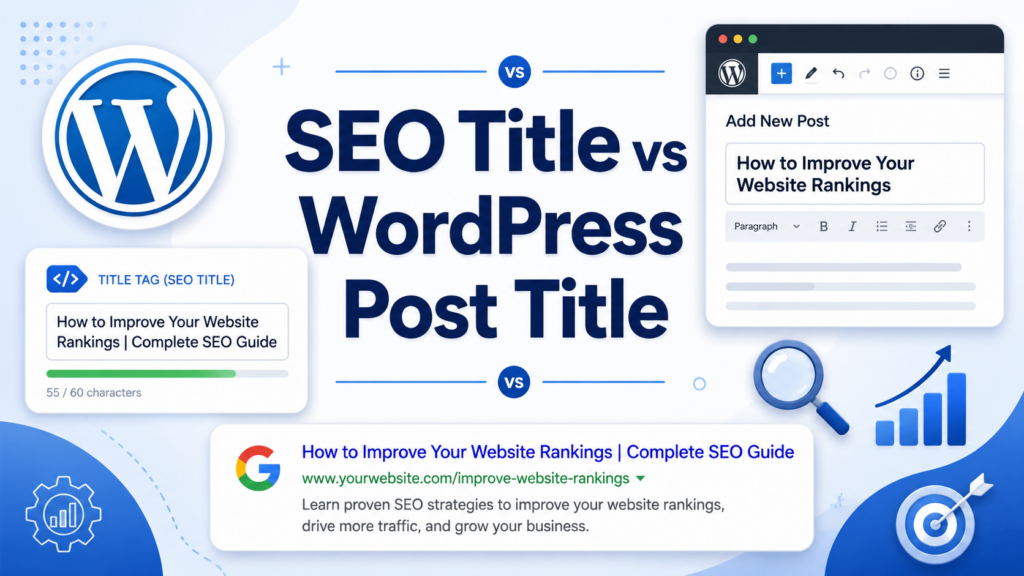
One common mistake is thinking the WordPress post title and SEO title must always be identical. They can be the same, but they do not have to be.
Your WordPress post title is usually shown at the top of the article. It is part of the visible page design. It may be shorter, more creative, or more brand-focused.
Your SEO title is written for search engines and search users. It may include the primary keyword, a benefit, a year, a number, or a clearer explanation.
For example:
WordPress post title:
Understanding SEO Titles
SEO title:
What Is SEO Title in WordPress? A Simple Explanation
The SEO title is better for search because it matches the exact question people may type into Google.
Where Does the SEO Title Appear?
The SEO title can appear in several places:
First, it appears in search engine results as the clickable headline.
Second, it appears in the browser tab when someone opens your page.
Third, it may appear in social media previews when your link is shared.
Fourth, it appears in the HTML source code inside the <title> tag.
Most visitors will not look at the HTML code, but search engines read it carefully.
How WordPress Creates SEO Titles by Default
By default, WordPress usually uses your page or post title as the SEO title. Depending on your theme and settings, it may also add your site name.
For example:
What Is SEO Title in WordPress – My Website Name
This is convenient, but it is not always ideal.
Sometimes the title becomes too long. Sometimes the site name takes up valuable space. Sometimes the title does not include the right keyword. Sometimes it does not sound attractive enough to earn clicks.
That is why manually editing your SEO title is often better.
How to Edit an SEO Title in WordPress
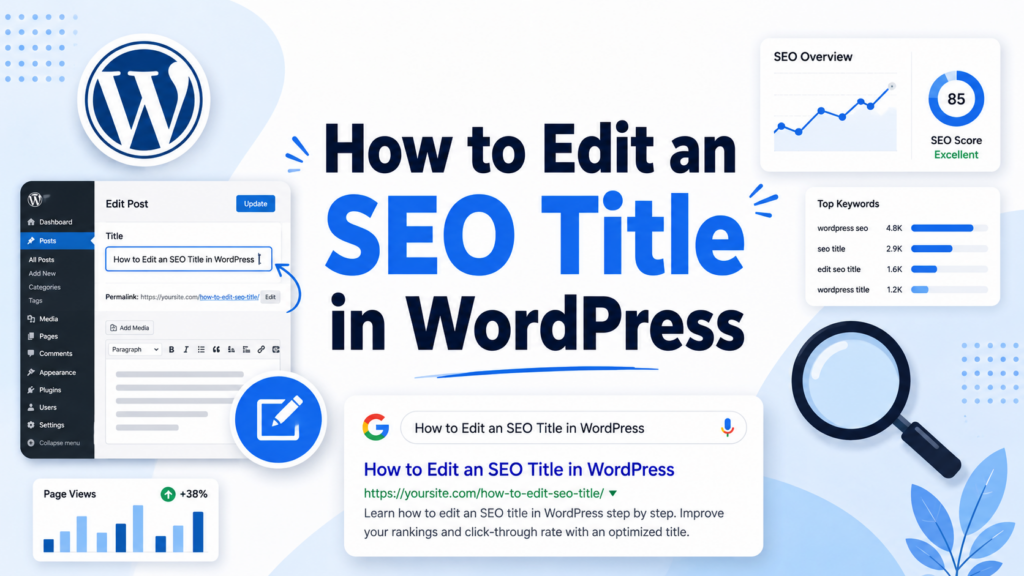
The easiest way to edit an SEO title in WordPress is by using an SEO plugin. Most popular SEO plugins add an SEO settings box inside the page or post editor.
Using Yoast SEO
Yoast SEO is one of the most well-known WordPress SEO plugins. After installing it, you can open a page or post and find the Yoast SEO section.
There, you can enter a custom SEO title. Yoast also shows a preview of how your title may appear in search results.
This makes it easier to see whether the title is too long, too short, or missing important keywords.
Using Rank Math
Rank Math is another popular SEO plugin. It also lets you edit the SEO title directly inside the WordPress editor.
Rank Math provides a preview and scoring system to help you understand whether your title is optimized. You can include your focus keyword and adjust the title length.
Using All in One SEO
All in One SEO, often called AIOSEO, is useful for blogs, business websites, and larger sites with many pages.
It lets you customize SEO titles for posts, pages, categories, products, and other content types. This can be especially helpful for eCommerce websites or large content websites.
How Long Should an SEO Title Be?
A good SEO title is usually short enough to display properly in search results but long enough to explain the page clearly.
Many SEO professionals recommend keeping titles around 50 to 60 characters. The reference article also mentions this common range because longer titles may be cut off in search results.
However, character count is not the only thing that matters. Google displays titles based on pixel width, not just the number of characters. Some letters take up more space than others.
For example, “W” is wider than “i.”
That means a 58-character title may display fully, while another 55-character title may still get cut off.
A good rule is to keep the title clear, focused, and not overloaded.
How to Write a Good SEO Title
Writing a strong SEO title is not about adding as many keywords as possible. It is about balancing search intent, clarity, and click appeal.
Here are practical tips.
1. Put the Main Keyword Near the Beginning
If your target keyword is “what is seo title in wordpress,” try to place it close to the beginning of the title.
Example:
What Is SEO Title in WordPress? Beginner SEO Guide
This helps both users and search engines quickly understand the topic.
2. Make the Title Match the Content
Do not promise something the article does not deliver.
If your title says “Complete Guide,” the content should be detailed. If your title says “Quick Explanation,” the content should be simple and brief.
A mismatch between title and content can disappoint readers.
3. Use Clear Language
Avoid confusing or overly clever titles. Search users want fast answers. If they cannot understand your title immediately, they may skip it.
Good:
What Is SEO Title in WordPress? Easy Guide for Beginners
Less effective:
The Hidden Title Strategy Behind WordPress Visibility
The second title sounds interesting, but it is less direct.
4. Include a Benefit
A benefit tells users why they should click.
Examples:
What Is SEO Title in WordPress? Learn How to Rank Better
SEO Title in WordPress Explained: Improve Your Search Clicks
These titles suggest a useful outcome.
5. Avoid Keyword Stuffing
Keyword stuffing means repeating the same keyword too many times.
Bad example:
What Is SEO Title in WordPress: WordPress SEO Title Tips
This sounds unnatural.
Better example:
What Is SEO Title in WordPress? Simple Tips for Better Rankings
The keyword appears once, and the title still reads smoothly.
6. Use Numbers When Helpful
Numbers can make titles feel more specific.
Examples:
7 SEO Title Tips for WordPress Beginners
What Is SEO Title in WordPress? 9 Things to Know
Numbers are not required, but they can help when the article has a list-based structure.
7. Add the Year Only When Relevant
Adding a year can make a title feel fresh.
Example:
What Is SEO Title in WordPress? 2026 Beginner Guide
However, only use the year if you plan to update the content. An outdated year can make your article look old.
Should You Add Your Brand Name?
Many websites add the brand name at the end of the SEO title.
Example:
What Is SEO Title in WordPress? Beginner Guide | Site Name
This can be useful if your brand is known or if you want consistent branding across search results.
However, adding a brand name also takes up title space. For smaller websites, it may be better to focus on the keyword and benefit first.
For important pages like the homepage, service pages, and product pages, brand names can be useful. For blog posts, they are optional.
Why Google May Rewrite Your SEO Title
Sometimes you write a custom SEO title, but Google shows a different title in search results.
This can be frustrating, but it is common.
Google may rewrite your title if it thinks your title does not match the search query, does not describe the page well, is too long, is too short, or includes too much repeated wording.
For example, if your SEO title is:
Best WordPress Tips
But your article is mainly about SEO titles, Google may rewrite it to better match the page content.
To reduce the chance of title rewriting, make sure your SEO title accurately reflects the page, includes the main topic, and matches the visible content.
Common SEO Title Mistakes
Many WordPress users make the same SEO title mistakes. Avoiding these can quickly improve your site’s search presentation.
Mistake 1: Using the Same Title on Multiple Pages
Every important page should have a unique SEO title.
If several pages use the same title, search engines may struggle to understand which page is most relevant.
Mistake 2: Making the Title Too Generic
A title like “Home” or “Blog Post” does not explain anything.
Better titles are specific.
Instead of:
Services
Use:
WordPress SEO Services for Small Business Websites
Mistake 3: Writing Only for Search Engines
SEO titles should include keywords, but they still need to attract real people.
A title that sounds robotic may rank poorly because users do not want to click it.
Mistake 4: Making the Title Too Long
Long titles can be cut off in search results. When that happens, users may not see the most important part.
Try to place the most valuable words near the beginning.
Mistake 5: Forgetting Search Intent
Search intent means what the user wants to find.
Someone searching “what is seo title in wordpress” likely wants a simple explanation. They may not be ready for advanced technical SEO.
Your title should match that beginner-friendly intent.
SEO Title Examples for WordPress
Here are some examples of better SEO titles:
What Is SEO Title in WordPress? Beginner Guide
SEO Title in WordPress Explained for Website Owners
How to Write Better SEO Titles in WordPress
WordPress SEO Title Tips to Improve Search Clicks
What Is SEO Title in WordPress and Why It Matters
Each title is clear, keyword-focused, and easy to understand.
A Simple SEO Title Formula
You can use this simple formula:
Main Keyword + Clear Benefit + Optional Detail
Example:
What Is SEO Title in WordPress? Simple Guide for Beginners
Main keyword: What Is SEO Title in WordPress
Benefit: Simple Guide
Detail: For Beginners
Another formula is:
Question + Answer Style Benefit
Example:
What Is SEO Title in WordPress? Learn How It Works
This works well for educational blog posts.
Final Checklist Before Publishing
Before publishing a WordPress post or page, ask yourself these questions:
Does the SEO title include the main keyword?
Is the title easy to understand?
Does it match the actual content?
Is it likely to attract clicks?
Is it different from other page titles on the site?
Is it short enough to display well?
Does it avoid keyword stuffing?
If the answer is yes, your SEO title is probably in good shape.
Conclusion
An SEO title in WordPress is the title that search engines and users often see before visiting your page. It helps explain what your content is about, improves search relevance, and can influence whether people click your result.
The main difference between a WordPress post title and an SEO title is purpose. The post title is for people already reading your page, while the SEO title is for people discovering your page through search engines.
A strong SEO title should be clear, relevant, keyword-focused, and written for real users. It should include the main keyword naturally, match the page content, and stay concise enough to display properly in search results.
For the keyword “what is seo title in wordpress,” the best approach is to write a title that answers the question directly while giving readers a reason to click. When used correctly, SEO titles can make your WordPress content easier to understand, easier to find, and more appealing in search results.
FAQ
1: What is SEO title in WordPress?
An SEO title in WordPress is the title that appears in search engine results. It helps Google understand your page topic and helps users decide whether to click your page.
2: Is the SEO title the same as the WordPress post title?
Not always. The WordPress post title appears on the page itself, while the SEO title is mainly written for search results. They can be the same, but the SEO title is often more keyword-focused.
3: Why is an SEO title important for WordPress SEO?
An SEO title helps search engines understand your content and can improve click-through rate. A clear and relevant title may make your page more attractive in search results.
4: How long should a WordPress SEO title be?
A good WordPress SEO title is usually around 50–60 characters. This helps prevent the title from being cut off in search results while still giving enough space for the main keyword.
5: How do I edit an SEO title in WordPress?
You can edit an SEO title by using SEO plugins such as Yoast SEO, Rank Math, or All in One SEO. These plugins usually add an SEO title field inside the WordPress editor.
6: What makes a good SEO title in WordPress?
A good SEO title should include the main keyword, clearly describe the page content, attract clicks, and avoid keyword stuffing. It should sound natural and match what users are searching for.


Design and build a WordPress website or corporate site with a full eCommerce system for you.
Price range: $200.00 through $2,500.00custom-requirements-or-special-quotations
Original price was: $2.00.$1.00Current price is: $1.00. Are 50 Plugins Too Many for a WordPress eCommerce Store?
Understanding the Real Performance Impact Having 50 plugins on a WordPress eCommerce site isn’t automatically a problem. In fact, the number alone rarely determines performance....

Main Image Design for Amazon Home Physiotherapy Device Explained
Introduction: Building a Trustworthy Image for Home Therapy Devices on Amazon When designing the main image for a home therapy device on Amazon, our primary...

Main Image Design for Amazon Lipstick Conversion
Introduction: Designing a Lipstick Main Image That Sells on Amazon When we design a Main image for an Amazon lipstick, our responsibility goes far beyond...

How Hackers Steal WordPress Admin Emails (And How to Stop Them)
Let’s start with an uncomfortable truth: Your WordPress admin email is probably way more public than you think.And hackers? They love that. To them, your...

What Makes an Amazon Liquid Foundation Main Image Convert
Introduction Designing a Main image design for Amazon Liquid foundation is never just about making a product look beautiful. On Amazon, the main image and...

Designing an Effective Amazon Main Image for Filter Cartridges
Introduction Designing a Main image for Amazon is never just about making a product look attractive. It is about clarity, trust, and instant understanding—especially for...

Replay Attacks on WordPress: Real Threat or Overhyped Myth?
Let’s clear something up first. Replay attacks don’t look scary.They don’t smash passwords.They don’t inject evil code with green hacker text flying everywhere. They’re sneaky....

How to Duplicate WordPress Pages Without Breaking Anything
Let’s face it. Sometimes you don’t want to create a new page.You just want the same page… but slightly different. Same layout.Same blocks.Same settings. Because...

Five Pet WordPress Themes Compared
Introduction Choosing the right pet-related WordPress theme is more than a design decision—it directly affects usability, scalability, and long-term business growth. Pet care and pet...

Comparing Five Swimwear eCommerce Themes
Introduction Choosing the right theme for a swimwear or lingerie independent store is not just a visual decision—it directly affects conversion rates, scalability, and long-term...

How to Turn Off Comments in WordPress (Without Losing Your Mind)
Let’s talk about WordPress comments. In theory, comments are great.They encourage discussion.They build community.They make your website feel “alive.” In reality? They’re often a magnet...

WordPress 500 Error: When Your Website Decides to Panic
Your WordPress site was fine a minute ago.You refreshed the page.And suddenly—boom 💥—500 Internal Server Error. No explanation.No apology.Just a cold, confusing message that basically...

Building a Scalable WordPress Website for a Science-Driven Brand: The AminoUSA Project
Introduction In today’s digital landscape, a website is more than a place to list products. For science-driven brands operating in regulated or research-focused industries, a...

Building a Scalable Shopify Store for a Global Blade Brand: The CoolKatana Project
Introduction In cross-border eCommerce, a Shopify website is more than a storefront.For brands operating in niche, culture-driven categories, the website must do far more than...

Designing a High-Conversion Shopify Store for Pokémon Cards
Introduction In the world of collectible eCommerce, especially within the Pokémon Trading Card Game (TCG) market, a website must do more than simply list products....

High-Converting Shopify Design for a Custom Brick Brand
Introduction In today’s competitive eCommerce landscape, especially in the personalized gift and collectible space, a Shopify website must do far more than display products. It...

How to Contact Shopify Support: Simple, Stress-Free Guide
Running a Shopify store should feel exciting—not confusing. When questions pop up or issues slow you down, Shopify offers several support paths depending on what...

How to Deactivate a Shopify Store: A Clear, Practical Guide
Deactivating a Shopify store isn’t complicated, but it does come with consequences many merchants overlook. This guide breaks the process down in a simple, educational...