How to Install WordPress: A Beginner-Friendly Complete Guide

การแนะนำ

If you’re planning to build a website, blog, or online store, learning how to install วordpress is one of the most important first steps. WordPress powers a huge portion of the internet thanks to its flexibility, scalability, and ease of use. Whether you’re a beginner or someone looking to improve your website-building workflow, understanding the installation process will give you full control over your online presence.

In this guide, we’ll break down everything you need to know in a simple, easy-to-follow way—from preparation to installation methods and post-installation setup. By the end, you’ll clearly understand how to get your WordPress site up and running.
What Is WordPress and Why Use It?

How to Install WordPress: A Beginner-Friendly Complete Guide-What Is WordPress and Why Use It?

Before diving into how to install WordPress, it’s helpful to understand why it’s so widely used.

WordPress is an open-source content management system (CMS) that allows you to build and manage websites without needing advanced coding skills. It’s highly customizable, with thousands of themes and plugins that enable you to create anything from blogs to eCommerce stores.

Key reasons people choose WordPress include:
  • Easy to use, even for beginners
  • Highly customizable with themes and plugins
  • โครงสร้างที่เป็นมิตรต่อ SEO
  • Large community and support ecosystem
  • Scalable for both small and large websites

What You Need Before Installing WordPress

How to Install WordPress: A Beginner-Friendly Complete Guide-What You Need Before Installing WordPress

To successfully install WordPress, you’ll need a few essentials in place:

1. A Domain Name

Your domain is your website’s address (e.g., yoursite.com). Choose something memorable and relevant to your brand.

2. Web Hosting

Hosting is where your website’s files are stored. A reliable hosting provider ensures your site loads quickly and stays online.

3. A Database

WordPress uses a database (usually MySQL) to store your content, settings, and user data.

Most modern hosting providers include domain registration, hosting, and database setup in one package, making the process easier.
Different Ways to Install WordPress

How to Install WordPress: A Beginner-Friendly Complete Guide-Different Ways to Install WordPress

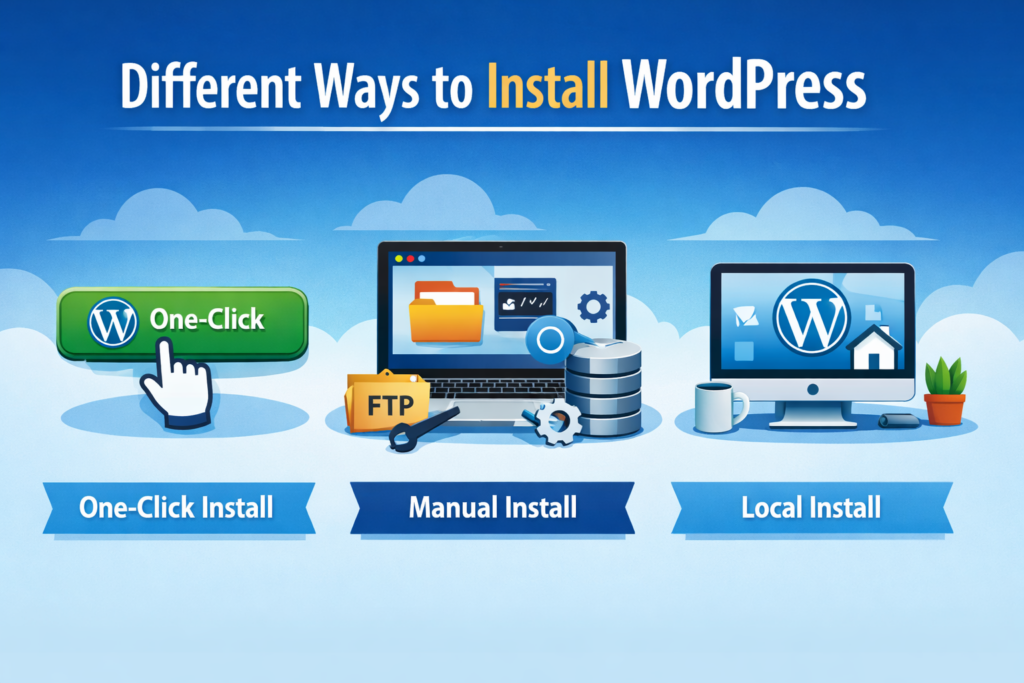
There are several methods available when learning how to install WordPress, depending on your technical level and hosting provider.

1. One-Click Installation (Recommended for Beginners)

Most hosting providers offer a one-click WordPress installation feature. This is the easiest and fastest way to get started.

วิธีการทำงาน:

  • Log into your hosting dashboard
  • Find the WordPress installer (often under “Website” or “Apps”)
  • Enter basic details like site name, username, and password
  • Click install

Within minutes, your WordPress site will be live.

เหมาะสำหรับ: Beginners who want a quick setup without technical steps.

2. Manual Installation (More Control)

If you want more control or your hosting provider doesn’t offer one-click installs, you can manually install WordPress.

Steps include:

  1. Download WordPress from the official website
  2. Upload files to your hosting server via FTP or file manager
  3. Create a MySQL database
  4. Configure the wp-config.php ไฟล์
  5. Run the WordPress installation script

This method requires more technical knowledge but gives you a deeper understanding of how WordPress works.

3. Local Installation (For Testing and Development)

If you want to experiment without publishing your site online, you can install WordPress locally on your computer.

Tools like local development environments allow you to simulate a server setup.

เหมาะสำหรับ:

  • Developers
  • Designers testing themes
  • Beginners who want to practice

Step-by-Step: How to Install WordPress Manually

Let’s go deeper into the manual method, as it helps you fully understand the process.

Step 1: Download WordPress

Go to the official WordPress website and download the latest version.

Step 2: Upload Files to Server

Use FTP software or your hosting file manager to upload WordPress files to your root directory (usually public_html).

Step 3: Create a Database

Access your hosting control panel and create a new MySQL database. Save the database name, username, and password.

Step 4: Configure wp-config.php

Rename the sample config file and input your database credentials.

Step 5: Run Installation

Visit your domain in a browser. WordPress will guide you through the final setup:

  • Site title
  • Admin username
  • Password
  • อีเมล

Once completed, your website is ready.

FAQ

The easiest way to install WordPress is by using a one-click installation feature provided by most hosting providers. It allows beginners to set up a website in just a few minutes without needing technical knowledge.

Yes, you can install WordPress locally on your computer using tools like local development environments. However, to make your website accessible online, you will still need hosting and a domain.

With a one-click installation, WordPress can be set up in less than 5 minutes. Manual installation may take 10–20 minutes depending on your experience.

No, you don’t need coding skills to install WordPress. Most installation methods are beginner-friendly, especially the one-click option provided by hosting platforms.

ข้อผิดพลาดทั่วไปที่ควรหลีกเลี่ยง

When learning how to install WordPress, beginners often run into these issues:

  • Using weak admin passwords
  • Forgetting to update WordPress after installation
  • Choosing unreliable hosting
  • Skipping backups
  • Installing too many plugins too early

Avoiding these mistakes will help keep your website secure and fast.

What to Do After Installing WordPress

Installing WordPress is just the beginning. To build a successful site, you should take a few important next steps.

1. Choose a Theme

Your theme controls your website’s design and layout. Pick one that matches your brand and is mobile-friendly.

2. Install Essential Plugins

Plugins extend functionality. Some must-haves include:

  • SEO optimization tools
  • Security plugins
  • Caching/performance plugins

3. Set Up Basic Pages

Create core pages like:

  • หน้าแรก
  • About
  • Contact
  • นโยบายความเป็นส่วนตัว

4. Optimize for Speed and SEO

Improve loading speed and search visibility by optimizing images, enabling caching, and using SEO best practices.

WordPress Installation for eCommerce

If your goal is to build an online store, WordPress can be paired with plugins like WooCommerce.

This allows you to:

  • Add products
  • Manage inventory
  • Process payments
  • Track orders

Understanding how to install WordPress properly ensures a strong foundation for your online business.

Choosing the Right Installation Method

Each method has its pros and cons:

MethodDifficultyเหมาะสำหรับ
One-click installEasyBeginners
Manual installปานกลางAdvanced users
Local installปานกลางTesting & development

If you’re just starting, the one-click method is usually the best choice.

ข้อคิดส่งท้าย

Learning how to install WordPress is a foundational skill that opens the door to building powerful, flexible websites. Whether you choose a simple one-click setup or a manual installation, the key is understanding the process and making informed decisions.

As your website grows, WordPress gives you the tools to scale, customize, and optimize your online presence.

Need Help Building a Professional Website?

At the end of the day, installing วordpress is only the first step. Designing a high-converting, visually appealing, and fully optimized website requires experience in UX design, branding, and performance optimization.

That’s where AIRSANG เข้ามาแล้ว.

เรามีความเชี่ยวชาญในด้าน:

  • Cross-border eCommerce website design
  • WordPress and Shopify development
  • Conversion-focused landing pages
  • Product image and visual design

If you’re looking to build or upgrade your website, our team can help you turn your ideas into a high-performing digital experience.


จัดส่งทั่วโลก

AIRSANG ให้บริการออกแบบเว็บไซต์ สร้างเอกลักษณ์แบรนด์ และโซลูชันอีคอมเมิร์ซที่คุ้มค่า ตั้งแต่ Shopify และ WordPress ไปจนถึงภาพสินค้าสำหรับ Amazon, เราช่วยแบรนด์ระดับโลกสร้าง พัฒนา และขยายธุรกิจออนไลน์ของพวกเขา.

ออกแบบและสร้างเว็บไซต์ WordPress หรือเว็บไซต์องค์กรพร้อมระบบอีคอมเมิร์ซครบวงจรสำหรับคุณ.
ข้อกำหนดเฉพาะหรือใบเสนอราคาพิเศษ

ข้อกำหนดเฉพาะหรือใบเสนอราคาพิเศษ

ราคาเดิมคือ: $2.00.ราคาปัจจุบันคือ: $1.00.
การใช้ปลั๊กอิน 50 ตัวมากเกินไปสำหรับร้านค้าออนไลน์ที่ใช้ WordPress หรือไม่?
การเข้าใจผลกระทบที่แท้จริงต่อประสิทธิภาพ การมีปลั๊กอิน 50 ตัวบนเว็บไซต์อีคอมเมิร์ซ WordPress ไม่ใช่ปัญหาโดยอัตโนมัติ จริงๆ แล้ว จำนวนเพียงอย่างเดียวแทบจะไม่สามารถกำหนดประสิทธิภาพได้....
ภาพหลักสำหรับการออกแบบอุปกรณ์กายภาพบำบัดที่บ้านของ Amazon (อธิบายรายละเอียด)
บทนำ: การสร้างภาพลักษณ์ที่น่าเชื่อถือสำหรับอุปกรณ์บำบัดที่บ้านบน Amazon เมื่อออกแบบภาพหลักสำหรับอุปกรณ์บำบัดที่บ้านบน Amazon สิ่งสำคัญอันดับแรกของเราคือ...
ภาพหลักสำหรับการแปลงลิปสติกเป็นสินค้าสำหรับ Amazon
บทนำ: การออกแบบภาพหลักลิปสติกที่ขายได้บน Amazon เมื่อเราออกแบบภาพหลักสำหรับลิปสติกบน Amazon ความรับผิดชอบของเราไม่ได้จำกัดอยู่แค่...
แฮกเกอร์ขโมยอีเมลผู้ดูแลระบบ WordPress ได้อย่างไร (และวิธีป้องกัน)
มาเริ่มกันด้วยความจริงที่ไม่น่าสบายใจ: อีเมลแอดมิน WordPress ของคุณอาจเปิดเผยต่อสาธารณะมากกว่าที่คุณคิด และแฮกเกอร์? พวกเขาชอบมาก สำหรับพวกเขา...
การออกแบบภาพหลัก Amazon ที่มีประสิทธิภาพสำหรับตลับกรอง
บทนำ การออกแบบภาพหลักสำหรับ Amazon ไม่ใช่แค่การทำให้สินค้าดูน่าดึงดูดเท่านั้น แต่ยังเกี่ยวกับความชัดเจน ความน่าเชื่อถือ และความเข้าใจได้ในทันที โดยเฉพาะอย่างยิ่งสำหรับ...
การโจมตีแบบ Replay Attack บน WordPress: ภัยคุกคามจริงหรือแค่เรื่องที่ถูกพูดเกินจริง?
ก่อนอื่นขอชี้แจงให้ชัดเจนก่อน การโจมตีแบบ Replay Attack นั้นดูไม่น่ากลัว มันไม่ได้ทำลายรหัสผ่าน มันไม่ได้แทรกโค้ดที่เป็นอันตรายพร้อมข้อความแฮ็กเกอร์สีเขียวกระจัดกระจายไปทั่ว มันแนบเนียนกว่า...
วิธีคัดลอกหน้าเว็บ WordPress โดยไม่ทำให้ระบบเสียหาย
ยอมรับกันเถอะ บางครั้งคุณอาจไม่อยากสร้างหน้าเว็บใหม่ คุณแค่อยากได้หน้าเว็บเดิม...แต่แตกต่างไปเล็กน้อย รูปแบบเหมือนเดิม บล็อกเหมือนเดิม การตั้งค่าเหมือนเดิม เพราะ...
เปรียบเทียบธีม WordPress สำหรับสัตว์เลี้ยง 5 แบบ
บทนำ การเลือกธีม WordPress ที่เหมาะสมสำหรับธุรกิจเกี่ยวกับสัตว์เลี้ยงนั้นไม่ใช่แค่เรื่องของการออกแบบเท่านั้น แต่ยังส่งผลโดยตรงต่อการใช้งาน ความสามารถในการขยายขนาด และการเติบโตของธุรกิจในระยะยาว การดูแลสัตว์เลี้ยงและ...
เปรียบเทียบธีมอีคอมเมิร์ซชุดว่ายน้ำ 5 แบบ
บทนำ การเลือกธีมที่เหมาะสมสำหรับร้านค้าอิสระที่จำหน่ายชุดว่ายน้ำหรือชุดชั้นในนั้นไม่ใช่แค่การตัดสินใจด้านภาพลักษณ์เท่านั้น แต่ยังส่งผลโดยตรงต่ออัตราการเปลี่ยนลูกค้าให้เป็นผู้ซื้อ ความสามารถในการขยายธุรกิจ และความยั่งยืนในระยะยาว...
วิธีปิดการแสดงความคิดเห็นใน WordPress (โดยไม่ต้องเสียสติ)
มาพูดถึงระบบแสดงความคิดเห็นของ WordPress กันดีกว่า ในทางทฤษฎีแล้ว ความคิดเห็นนั้นยอดเยี่ยมมาก มันช่วยกระตุ้นการสนทนา สร้างชุมชน และทำให้เว็บไซต์ของคุณดูมีชีวิตชีวา แต่ในความเป็นจริงแล้ว มันมักจะเป็นเหมือนแม่เหล็กดึงดูด...
ข้อผิดพลาด WordPress 500: เมื่อเว็บไซต์ของคุณเกิดอาการผิดปกติ
เว็บไซต์ WordPress ของคุณยังใช้งานได้ปกติดีเมื่อสักครู่ คุณรีเฟรชหน้าเว็บ แล้วจู่ๆ ก็เกิดข้อผิดพลาด 500 Internal Server Error ขึ้นมา ไม่มีคำอธิบาย ไม่มีคำขอโทษ มีเพียงข้อความที่เย็นชาและสับสนซึ่งโดยพื้นฐานแล้ว...
การสร้างเว็บไซต์ WordPress ที่ปรับขนาดได้สำหรับแบรนด์ที่ขับเคลื่อนด้วยวิทยาศาสตร์: โครงการ AminoUSA
บทนำ ในยุคดิจิทัลปัจจุบัน เว็บไซต์เป็นมากกว่าแค่สถานที่สำหรับแสดงรายการสินค้า สำหรับแบรนด์ที่ขับเคลื่อนด้วยวิทยาศาสตร์ซึ่งดำเนินงานในอุตสาหกรรมที่มีการควบคุมหรือเน้นการวิจัย...
สร้างร้านค้า Shopify ที่ปรับขนาดได้สำหรับแบรนด์ใบมีดระดับโลก: โครงการ CoolKatana
บทนำ ในธุรกิจอีคอมเมิร์ซข้ามพรมแดน เว็บไซต์ Shopify เป็นมากกว่าแค่หน้าร้าน สำหรับแบรนด์ที่ดำเนินธุรกิจในกลุ่มเฉพาะหรือกลุ่มที่ขับเคลื่อนด้วยวัฒนธรรม เว็บไซต์ต้องทำมากกว่านั้น...
การออกแบบร้านค้า Shopify ที่มีอัตราการแปลงสูงสำหรับขายการ์ดโปเกมอน
บทนำ ในโลกของอีคอมเมิร์ซสินค้าสะสม โดยเฉพาะอย่างยิ่งในตลาดเกมการ์ดโปเกมอน (TCG) เว็บไซต์จะต้องทำมากกว่าแค่แสดงรายการสินค้า...
ดีไซน์ Shopify ที่เพิ่มยอดขายสำหรับแบรนด์อิฐสั่งทำพิเศษ
บทนำ ในสภาพแวดล้อมการแข่งขันอีคอมเมิร์ซในปัจจุบัน โดยเฉพาะอย่างยิ่งในตลาดของขวัญส่วนบุคคลและของสะสม เว็บไซต์ Shopify ต้องทำมากกว่าแค่แสดงสินค้า...
วิธีติดต่อฝ่ายสนับสนุนของ Shopify: คู่มือที่ง่ายและไม่ยุ่งยาก
การบริหารร้านค้า Shopify ควรเป็นเรื่องที่น่าตื่นเต้น ไม่ใช่เรื่องที่ทำให้สับสน เมื่อมีคำถามหรือปัญหาเกิดขึ้น Shopify มีช่องทางการสนับสนุนหลายช่องทาง ขึ้นอยู่กับสถานการณ์...
วิธีปิดใช้งานร้านค้า Shopify: คู่มือที่ชัดเจนและใช้งานได้จริง
การปิดใช้งานร้านค้า Shopify นั้นไม่ซับซ้อน แต่ก็มีผลกระทบหลายอย่างที่ผู้ขายหลายรายมองข้ามไป คู่มือนี้จะอธิบายขั้นตอนอย่างละเอียดและเข้าใจง่าย...

พร้อมที่จะเปลี่ยนแปลงธุรกิจของคุณหรือไม่?

จองการโทรเพื่อเรียนรู้เพิ่มเติมเกี่ยวกับวิธีที่เอเจนซี่การตลาดดิจิทัลของเราสามารถยกระดับธุรกิจของคุณไปอีกขั้น.