












If you’ve decided that ช็อปฟี่ is no longer the right platform for your online store, you’re not alone — many e-commerce owners reassess their tools as their business evolves. Whatever your reason for wanting to cancel your Shopify subscription and close your store, this guide breaks down exactly what that means, how to do it step-by-step, and what to think about before you click that final button.
Understanding What “Cancel Shopify Subscription” Really Means
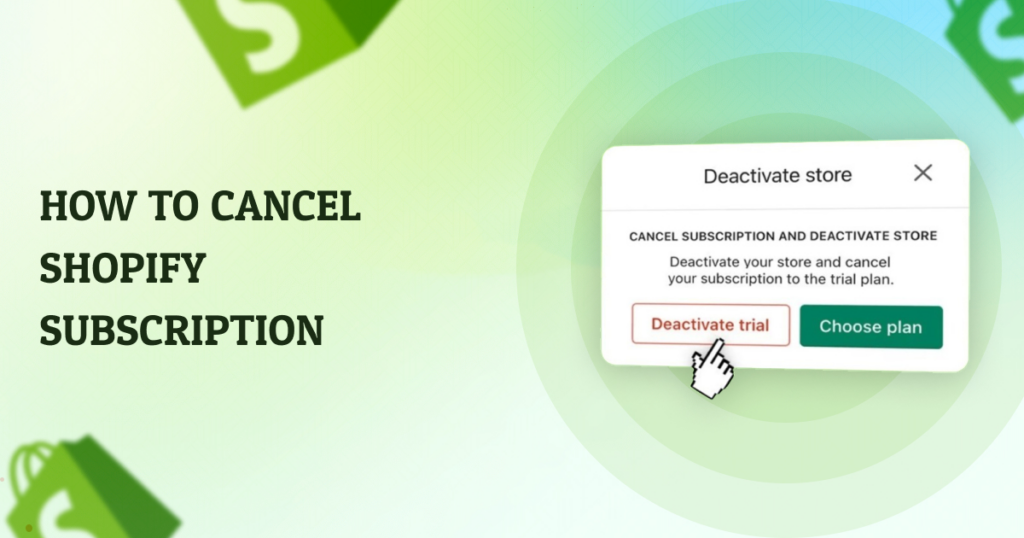
When people talk about canceling a Shopify subscription, they’re usually referring either to deactivating their entire store or simply stopping the monthly billing. These are related but slightly different actions:
- Deactivate your store / cancel subscription – Ends future billing and prevents access to your Shopify admin once your current billing cycle ends.
- Pause your store instead of canceling – If you aren’t sure you want to leave Shopify forever, you can reduce costs by pausing with lower fees.
- Delete your store permanently – After cancellation, you can also choose to delete your store and data completely, but this is irreversible.
Before you take action, it’s important to understand the implications. Shopify retains your store data for up to two years after deactivation, so you can reopen within that time without rebuilding from scratch. After two years, your store and its data may be removed.
Before You Cancel: Essential Preparations
1. Backup Your Store Data
If keeping any part of your store is important — like products, orders, customer lists, or images — export everything before canceling. Shopify won’t keep your data forever once the grace period passes. You can export product and order data as CSV files from your Shopify admin.
2. Uninstall Paid Apps
Many Shopify stores connect to third-party apps for marketing, shipping, subscriptions, and more. If you cancel your Shopify plan without uninstalling these apps, you could still be billed for them separately. Make sure to go to Apps in your admin panel and remove or downgrade any paid services.
3. Handle Your Custom Domain
If you used a custom domain instead of the default มายshopify.com address, you might want to transfer it to another platform before your Shopify subscription ends. Domains purchased through Shopify can be transferred after 60 days, or removed if purchased elsewhere.
4. Notify Your Customers
Especially if you’re closing your business or changing platforms, your customers deserve a heads-up. Send an email or post an announcement on social media and your website explaining changes so they aren’t surprised by sudden downtime.
Step-by-Step: How to Cancel Shopify Subscription
Here is the basic process to cancel your Shopify monthly subscription and deactivate your store:
- Log in to your Shopify admin dashboard.
This requires your store owner credentials. - Navigate to Settings > Plan (or Billing).
Shopify labels these slightly differently depending on updates or UI changes. - Choose “Deactivate store” or “Cancel plan.”
Shopify will ask you whether you want to pause the store instead (like Pause and Build) or continue with full cancellation. - Select a reason for canceling.
Shopify asks for a cancellation reason — this feedback helps them improve their platform. - Enter your password to confirm.
This is a security step that ensures it’s you making the change. - Finalize the cancellation.
Once you confirm, your store remains active until the end of your current billing cycle, then it’s deactivated and billing stops.
Tip: If you’re still in Shopify’s free trial and never started a paid plan, you may not need to take additional steps other than letting the trial expire.
What Happens After You Cancel
Here’s what to expect once you finish canceling your Shopify subscription:
- You lose access to your store admin.
You can’t log in to make changes or view orders once the billing cycle ends. - Your storefront goes offline.
Customers can’t browse or purchase anything — the website becomes inactive. - Data may still be available for up to 2 years.
Shopify retains your store data so you can reactivate if you change your mind during that window. - Third-party app charges must be separately canceled.
Canceling Shopify does not automatically cancel every individual app subscription.
Alternative Options to Canceling
If you’re not fully sure that you want to leave Shopify forever, here are a few other options:
Pause and Build Plan
Instead of canceling, Shopify offers a low-cost Pause and Build plan that lets you access your admin and update content, but customers can’t check out. This is ideal if you’re redesigning your store or planning a relaunch.
Temporary Vacation Mode
For store owners who are taking a break — for seasonal business or personal reasons — Shopify sometimes lets you put a store into a sort of vacation mode so customers see a message but can’t buy products temporarily.
Final Thoughts: Is Canceling Right for You?
Deciding to cancel your Shopify subscription isn’t something to rush into. It affects your online presence, your data access, and your business continuity. Make sure you consider exporting your data, handling domains, disconnecting apps, and notifying customers before going forward. But when the time comes, Shopify makes canceling a clear process that you can complete from the admin dashboard.
Need Help With E-Commerce Transitions or Website Design?
If you’re thinking about canceling ช็อปฟี่ because you’re unhappy with your current store setup, or you want to migrate to another platform with better performance and design, we can help.
ที่ AIRSANG, we specialize in cross-border e-commerce solutions and professional website design that help brands grow globally. Whether you need help optimizing your current store, migrating platforms, or building a brand-new e-commerce site that converts, our team has the experience and creativity to support your vision. If you have questions about canceling Shopify or want to explore better alternatives, feel free to reach out — we’d love to help you take the next step in your e-commerce journey.


ออกแบบและสร้างเว็บไซต์ WordPress หรือเว็บไซต์องค์กรพร้อมระบบอีคอมเมิร์ซครบวงจรสำหรับคุณ.
ช่วงราคา: $200.00 ถึง $2,500.00ข้อกำหนดเฉพาะหรือใบเสนอราคาพิเศษ
ราคาเดิมคือ: $2.00.$1.00ราคาปัจจุบันคือ: $1.00. การใช้ปลั๊กอิน 50 ตัวมากเกินไปสำหรับร้านค้าออนไลน์ที่ใช้ WordPress หรือไม่?
การเข้าใจผลกระทบที่แท้จริงต่อประสิทธิภาพ การมีปลั๊กอิน 50 ตัวบนเว็บไซต์อีคอมเมิร์ซ WordPress ไม่ใช่ปัญหาโดยอัตโนมัติ จริงๆ แล้ว จำนวนเพียงอย่างเดียวแทบจะไม่สามารถกำหนดประสิทธิภาพได้....

ภาพหลักสำหรับการแปลงลิปสติกเป็นสินค้าสำหรับ Amazon
บทนำ: การออกแบบภาพหลักลิปสติกที่ขายได้บน Amazon เมื่อเราออกแบบภาพหลักสำหรับลิปสติกบน Amazon ความรับผิดชอบของเราไม่ได้จำกัดอยู่แค่...

แฮกเกอร์ขโมยอีเมลผู้ดูแลระบบ WordPress ได้อย่างไร (และวิธีป้องกัน)
มาเริ่มกันด้วยความจริงที่ไม่น่าสบายใจ: อีเมลแอดมิน WordPress ของคุณอาจเปิดเผยต่อสาธารณะมากกว่าที่คุณคิด และแฮกเกอร์? พวกเขาชอบมาก สำหรับพวกเขา...

อะไรทำให้รองพื้นชนิดเหลวของ Amazon (ภาพหลัก) ขายดี?
บทนำ การออกแบบภาพหลักสำหรับรองพื้นชนิดเหลวบน Amazon ไม่ใช่แค่การทำให้ผลิตภัณฑ์ดูสวยงามเท่านั้น บน Amazon ภาพหลักและ...

การออกแบบภาพหลัก Amazon ที่มีประสิทธิภาพสำหรับตลับกรอง
บทนำ การออกแบบภาพหลักสำหรับ Amazon ไม่ใช่แค่การทำให้สินค้าดูน่าดึงดูดเท่านั้น แต่ยังเกี่ยวกับความชัดเจน ความน่าเชื่อถือ และความเข้าใจได้ในทันที โดยเฉพาะอย่างยิ่งสำหรับ...

การโจมตีแบบ Replay Attack บน WordPress: ภัยคุกคามจริงหรือแค่เรื่องที่ถูกพูดเกินจริง?
ก่อนอื่นขอชี้แจงให้ชัดเจนก่อน การโจมตีแบบ Replay Attack นั้นดูไม่น่ากลัว มันไม่ได้ทำลายรหัสผ่าน มันไม่ได้แทรกโค้ดที่เป็นอันตรายพร้อมข้อความแฮ็กเกอร์สีเขียวกระจัดกระจายไปทั่ว มันแนบเนียนกว่า...

วิธีคัดลอกหน้าเว็บ WordPress โดยไม่ทำให้ระบบเสียหาย
ยอมรับกันเถอะ บางครั้งคุณอาจไม่อยากสร้างหน้าเว็บใหม่ คุณแค่อยากได้หน้าเว็บเดิม...แต่แตกต่างไปเล็กน้อย รูปแบบเหมือนเดิม บล็อกเหมือนเดิม การตั้งค่าเหมือนเดิม เพราะ...

เปรียบเทียบธีม WordPress สำหรับสัตว์เลี้ยง 5 แบบ
บทนำ การเลือกธีม WordPress ที่เหมาะสมสำหรับธุรกิจเกี่ยวกับสัตว์เลี้ยงนั้นไม่ใช่แค่เรื่องของการออกแบบเท่านั้น แต่ยังส่งผลโดยตรงต่อการใช้งาน ความสามารถในการขยายขนาด และการเติบโตของธุรกิจในระยะยาว การดูแลสัตว์เลี้ยงและ...

เปรียบเทียบธีมอีคอมเมิร์ซชุดว่ายน้ำ 5 แบบ
บทนำ การเลือกธีมที่เหมาะสมสำหรับร้านค้าอิสระที่จำหน่ายชุดว่ายน้ำหรือชุดชั้นในนั้นไม่ใช่แค่การตัดสินใจด้านภาพลักษณ์เท่านั้น แต่ยังส่งผลโดยตรงต่ออัตราการเปลี่ยนลูกค้าให้เป็นผู้ซื้อ ความสามารถในการขยายธุรกิจ และความยั่งยืนในระยะยาว...

วิธีปิดการแสดงความคิดเห็นใน WordPress (โดยไม่ต้องเสียสติ)
มาพูดถึงระบบแสดงความคิดเห็นของ WordPress กันดีกว่า ในทางทฤษฎีแล้ว ความคิดเห็นนั้นยอดเยี่ยมมาก มันช่วยกระตุ้นการสนทนา สร้างชุมชน และทำให้เว็บไซต์ของคุณดูมีชีวิตชีวา แต่ในความเป็นจริงแล้ว มันมักจะเป็นเหมือนแม่เหล็กดึงดูด...

ข้อผิดพลาด WordPress 500: เมื่อเว็บไซต์ของคุณเกิดอาการผิดปกติ
เว็บไซต์ WordPress ของคุณยังใช้งานได้ปกติดีเมื่อสักครู่ คุณรีเฟรชหน้าเว็บ แล้วจู่ๆ ก็เกิดข้อผิดพลาด 500 Internal Server Error ขึ้นมา ไม่มีคำอธิบาย ไม่มีคำขอโทษ มีเพียงข้อความที่เย็นชาและสับสนซึ่งโดยพื้นฐานแล้ว...

วิธีติดต่อฝ่ายสนับสนุนของ Shopify: คู่มือที่ง่ายและไม่ยุ่งยาก
การบริหารร้านค้า Shopify ควรเป็นเรื่องที่น่าตื่นเต้น ไม่ใช่เรื่องที่ทำให้สับสน เมื่อมีคำถามหรือปัญหาเกิดขึ้น Shopify มีช่องทางการสนับสนุนหลายช่องทาง ขึ้นอยู่กับสถานการณ์...

วิธีปิดใช้งานร้านค้า Shopify: คู่มือที่ชัดเจนและใช้งานได้จริง
การปิดใช้งานร้านค้า Shopify นั้นไม่ซับซ้อน แต่ก็มีผลกระทบหลายอย่างที่ผู้ขายหลายรายมองข้ามไป คู่มือนี้จะอธิบายขั้นตอนอย่างละเอียดและเข้าใจง่าย...

เปรียบเทียบธีมร้านขายรองเท้า 5 แบบ
บทนำ การเลือกธีมที่เหมาะสมสำหรับร้านค้าอิสระที่เน้นจำหน่ายรองเท้าไม่ใช่แค่การตัดสินใจด้านภาพลักษณ์เท่านั้น แต่ยังส่งผลโดยตรงต่อความสามารถในการขยายธุรกิจ การดำเนินงานประจำวัน และประสิทธิภาพการแปลงลูกค้าในระยะยาว...

Shopify ปะทะ Etsy: การประลองการขายออนไลน์ครั้งยิ่งใหญ่
บทนำ: สองแพลตฟอร์มเดินเข้าไปในบาร์… ถ้า Shopify และ Etsy เป็นคน Etsy ก็คงเป็นเพื่อนที่น่ารักคนนั้นที่มีบูธอยู่ที่….

เว็บไซต์ Shopify หรือ WordPress ของคุณถูกแฮ็กหรือไม่? นี่คือสิ่งที่คุณควรทำ
บทนำ: เปรียบเสมือนการตื่นขึ้นมาพบกับหน้าต่างที่แตกในโลกดิจิทัล ลองนึกภาพว่าคุณตื่นนอน หยิบกาแฟยามเช้า เปิดแล็ปท็อป… แล้วพบว่าเว็บไซต์ของคุณ….

วิธีเริ่มต้นร้านค้า Shopify โดยไม่เสียสติ
การเริ่มต้นร้านค้าบน Shopify ฟังดูหรูหรา คุณนึกภาพตัวเองกำลังจิบกาแฟตอนเที่ยง ตรวจสอบการแจ้งเตือนยอดขาย และบอกเพื่อน ๆ อย่างสบาย ๆ ว่า “ใช่ ร้านค้าของฉันทำได้ดีทีเดียว...”.

Shopify น่าเชื่อถือหรือไม่? คู่มือฉบับสมบูรณ์สำหรับผู้ขายออนไลน์มือใหม่
หากคุณกำลังค้นหาข้อมูลเกี่ยวกับแพลตฟอร์มอีคอมเมิร์ซ คุณอาจพิมพ์คำถามเฉพาะเจาะจงข้อหนึ่งลงใน Google ว่า Shopify น่าเชื่อถือหรือไม่? คำถามนั้นสมเหตุสมผลอย่างยิ่ง การเปิดตัว...