












การเพิ่มประสิทธิภาพกลไกค้นหา (SEO) คือสิ่งที่ช่วยให้เว็บไซต์ของคุณ วordpress เว็บไซต์จะปรากฏอยู่ในอันดับที่สูงขึ้นในผลการค้นหา เช่น Google หากคุณต้องการให้ผู้คนค้นพบเนื้อหาของคุณมากขึ้น เพิ่มปริมาณการเข้าชมแบบออร์แกนิค และขยายการปรากฏตัวออนไลน์ของคุณ การเข้าใจวิธีการปรับปรุง SEO สำหรับ WordPress นั้นเป็นสิ่งสำคัญ WordPress มีฟีเจอร์ที่เป็นมิตรกับ SEO อยู่แล้ว แต่เพื่อให้สามารถแข่งขันในผลการค้นหาได้อย่างแท้จริง คุณจำเป็นต้องมีกลยุทธ์ที่ชาญฉลาดซึ่งผสมผสานการตั้งค่าทางเทคนิค การเพิ่มประสิทธิภาพเนื้อหา และการปรับปรุงอย่างต่อเนื่อง.
คู่มือนี้จะอธิบายขั้นตอนที่สำคัญที่สุดที่คุณสามารถทำได้ ไม่ว่าคุณจะเป็นมือใหม่หรือกำลังพัฒนาทักษะ SEO ของคุณ เพื่อช่วยให้เว็บไซต์ WordPress ของคุณติดอันดับสูงขึ้นและเข้าถึงผู้ใช้ได้มากขึ้น.
เหตุใด SEO จึงมีความสำคัญสำหรับเว็บไซต์ WordPress
SEO ช่วยให้เครื่องมือค้นหาเข้าใจเว็บไซต์ของคุณและแสดงผลให้ผู้ใช้เห็นเมื่อพวกเขากำลังค้นหาคำที่เกี่ยวข้อง หากไม่มี SEO แม้แต่เนื้อหาที่ดีเยี่ยมก็อาจไม่ได้รับการสังเกต ลองคิดว่า SEO คือการทำให้เว็บไซต์ของคุณอ่าน เข้าใจ และน่าเชื่อถือได้ง่ายทั้งสำหรับผู้ใช้และเครื่องมือค้นหา SEO ส่งผลกระทบต่อทุกสิ่ง ตั้งแต่ความเร็วในการโหลดหน้าเว็บ ไปจนถึงความสามารถของเนื้อหาในการตอบสนองความต้องการของการค้นหา ตั้งแต่การมองเห็นไปจนถึงการมีส่วนร่วมของผู้ใช้.
1. เลือกธีมที่เป็นมิตรกับ SEO
ธีมของคุณคือรากฐานของเว็บไซต์ WordPress ของคุณ ธีมที่ได้รับการปรับแต่งเพื่อ SEO จะมีคุณสมบัติดังนี้:
- รวดเร็ว — ธีมที่มีน้ำหนักเบาจะโหลดได้อย่างรวดเร็วและช่วยปรับปรุงประสบการณ์การใช้งานของผู้ใช้.
- เว็บไซต์ต้องแสดงผลได้ดีบนโทรศัพท์มือถือและแท็บเล็ต.
- การเขียนโค้ดอย่างสะอาดตา — สคริปต์น้อยลงและ HTML/CSS ที่สะอาดตาช่วยให้เครื่องมือค้นหาสามารถรวบรวมข้อมูลหน้าเว็บของคุณได้ง่ายขึ้น.
การเลือกธีมคุณภาพสูงที่ปรับแต่งให้เหมาะสมกับ SEO จะช่วยให้เว็บไซต์ของคุณประสบความสำเร็จก่อนที่คุณจะเริ่มเขียนเนื้อหาเสียอีก.
2. ตรวจสอบให้แน่ใจว่าเครื่องมือค้นหาสามารถจัดทำดัชนีเว็บไซต์ของคุณได้
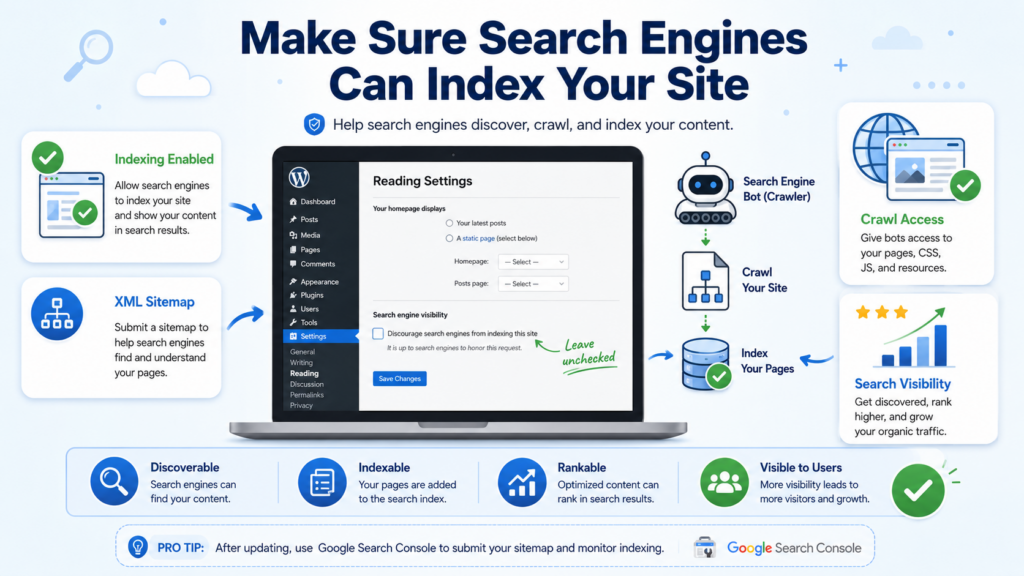
WordPress มีการตั้งค่าที่ช่วยให้คุณซ่อนเว็บไซต์จากเครื่องมือค้นหาได้ การตั้งค่านี้มีประโยชน์ในระหว่างการพัฒนา แต่หากเปิดใช้งานไว้หลังจากเปิดตัว เว็บไซต์ของคุณจะไม่ปรากฏในผลการค้นหาเลย.
✔ ไปที่ การตั้งค่า → การอ่าน ในแดชบอร์ด WordPress ของคุณ และตรวจสอบให้แน่ใจว่าตัวเลือก “ห้ามเครื่องมือค้นหาจัดทำดัชนีเว็บไซต์นี้” ไม่ได้ถูกเลือกไว้.
3. ปรับโครงสร้าง URL (Permalink) ให้เหมาะสม
ลิงก์ถาวร (Permalink) คือ URL ที่ใช้ถาวรสำหรับบทความและหน้าเว็บของคุณ URL เริ่มต้นของ WordPress ไม่ได้ถูกปรับให้เหมาะสมกับ SEO แต่คุณสามารถเปลี่ยนได้:
✔ ไปที่ การตั้งค่า → ลิงก์ถาวร
✔ เลือก “ชื่อบทความ” หรือโครงสร้างแบบกำหนดเองที่มีคำที่อ่านง่าย.
URL ที่สะอาดตา เช่น yourwebsite.com/how-to-improve-wordpress-seo ทำให้ผู้คนและเครื่องมือค้นหาเข้าใจได้ง่ายขึ้น.
4. ใช้ปลั๊กอิน SEO ที่มีประสิทธิภาพ
ปลั๊กอิน SEO ช่วยให้การปรับแต่งเว็บไซต์ง่ายขึ้น และมีเครื่องมือในการแก้ไขปัญหาโดยไม่ต้องเขียนโค้ด ตัวเลือกยอดนิยม ได้แก่:
- โยสต์ SEO
- คณิตศาสตร์อันดับ
- แพ็กเกจ SEO แบบครบวงจร
ปลั๊กอินเหล่านี้ช่วยคุณได้:
- ตั้งค่าเมตาไทเทิลและคำอธิบาย
- สร้างแผนผังเว็บไซต์ XML
- วิเคราะห์เนื้อหาเพื่อค้นหาคำหลักเป้าหมาย
- เพิ่มเส้นทางนำทางและข้อมูลโครงสร้างข้อมูล
การใช้ปลั๊กอินเป็นหนึ่งในวิธีที่รวดเร็วที่สุดในการปรับปรุง SEO ทางเทคนิคและ SEO บนหน้าเว็บ.
5. ดำเนินการวิจัยคำหลักอย่างละเอียดถี่ถ้วน
การเลือกคีย์เวิร์ดที่เหมาะสมเป็นหัวใจสำคัญของ SEO คีย์เวิร์ดคือคำที่ผู้ใช้พิมพ์ลงในเครื่องมือค้นหา เป้าหมายของคุณคือการทำความเข้าใจว่ากลุ่มเป้าหมายของคุณกำลังค้นหาอะไร และสร้างเนื้อหาที่ตรงกับคำค้นหาเหล่านั้น.
เคล็ดลับการค้นหาคำหลัก:
- ใช้เครื่องมือต่างๆ เช่น Google Keyword Planner, Ahrefs หรือ SEMrush.
- กำหนดเป้าหมายด้วยคีย์เวิร์ดแบบยาว (เช่น "วิธีปรับปรุง SEO ของ WordPress สำหรับผู้เริ่มต้น").
- ระบุคำค้นหาที่เกี่ยวข้องเพื่อให้เนื้อหามีความครอบคลุมมากขึ้น.
ใส่คำหลักและคำที่เกี่ยวข้องอย่างเป็นธรรมชาติในชื่อเรื่อง หัวข้อ คำอธิบายเมตา และเนื้อหาหลัก.
6. เขียนให้ตรงกับความตั้งใจในการค้นหา
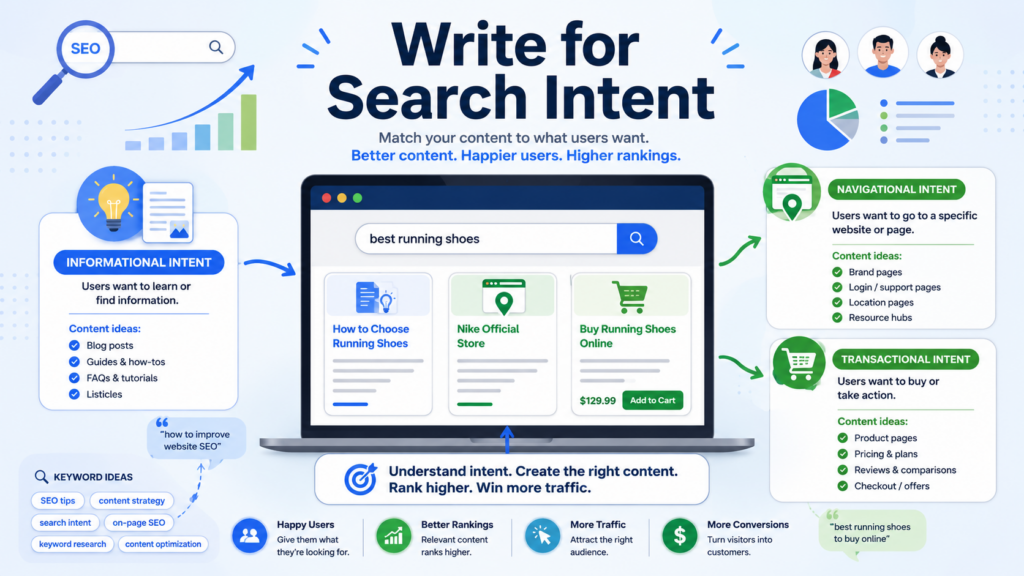
เจตนาในการค้นหาคือ ทำไม ผู้คนกำลังค้นหา: เพื่อเรียนรู้บางสิ่ง ค้นหาเว็บไซต์ หรือทำการซื้อสินค้า.
- จุดประสงค์เพื่อการให้ข้อมูล: ผู้ใช้ต้องการคำตอบหรือคำแนะนำ.
- ความตั้งใจในการนำทาง: ผู้ใช้ต้องการไปยังหน้าเว็บเฉพาะหน้าหนึ่ง.
- ความตั้งใจในการทำธุรกรรม: ผู้ใช้พร้อมที่จะดำเนินการ (เช่น ซื้อ ลงทะเบียน).
เนื้อหาของคุณควรสอดคล้องกับสิ่งที่ผู้ใช้พยายามจะทำเมื่อค้นหาคำหลักของคุณ ตัวอย่างเช่น หากมีคนค้นหา "วิธีปรับปรุง SEO ของ WordPress" พวกเขามักจะมองหาเคล็ดลับที่ชัดเจนและนำไปปฏิบัติได้จริง ดังนั้นจงนำเสนอเนื้อหาที่มีโครงสร้างและเป็นประโยชน์.
7. จัดโครงสร้างเนื้อหาของคุณด้วยแท็กส่วนหัว
แท็กหัวเรื่อง (H1, H2, H3 ฯลฯ) ช่วยจัดระเบียบเนื้อหาของคุณ:
- H1: ควรใส่คำหลักของคุณและอธิบายหัวข้อของหน้าเว็บ.
- H2: ใช้สำหรับกำหนดหัวข้อส่วนต่างๆ.
- H3/H4: แบ่งส่วนหลักออกเป็นส่วนย่อยๆ.
การใช้หัวข้อที่เหมาะสมจะช่วยให้ผู้อ่านอ่านเนื้อหาได้ง่ายขึ้น และช่วยให้เครื่องมือค้นหาเข้าใจว่าหน้าเว็บของคุณกล่าวถึงอะไร.
8. ปรับปรุงความเร็วในการโหลดหน้าเว็บและประสิทธิภาพการใช้งานบนมือถือ
ความเร็วในการโหลดและดีไซน์ที่เหมาะสำหรับมือถือเป็นสิ่งสำคัญ Google ใช้ความเร็วในการโหลดหน้าเว็บเป็นปัจจัยหนึ่งในการจัดอันดับ และผู้ใช้ส่วนใหญ่จะออกจากเว็บไซต์ที่ใช้เวลานานเกินไปในการโหลด.
วิธีเพิ่มความเร็ว:
- ใช้โปรแกรมแคช (เช่นปลั๊กอิน WP Super Cache).
- บีบอัดภาพโดยไม่สูญเสียคุณภาพ.
- ลดขนาดไฟล์ CSS และ JavaScript.
- ใช้เครือข่ายส่งเนื้อหา (CDN) เพื่อส่งไฟล์ได้เร็วขึ้นทั่วโลก.
นอกจากนี้ ตรวจสอบให้แน่ใจว่าเค้าโครงเว็บไซต์ของคุณปรับได้อย่างราบรื่นบนโทรศัพท์และแท็บเล็ต เพื่อตอบสนองความต้องการของผู้ใช้มือถือ.
9. เพิ่มลิงก์ภายในและภายนอก
ลิงก์ภายในเชื่อมโยงเนื้อหาของคุณเอง ช่วยให้ผู้อ่านนำทางได้ง่ายขึ้น และช่วยให้เครื่องมือค้นหาเข้าใจโครงสร้างเนื้อหาของคุณได้ดียิ่งขึ้น.
ลิงก์ภายนอกเชื่อมโยงไปยังแหล่งข้อมูลที่มีความน่าเชื่อถือสูงซึ่งสนับสนุนเนื้อหาของคุณ ลิงก์ทั้งสองประเภทช่วยเพิ่มความน่าเชื่อถือและประสิทธิภาพ SEO.
✔ ตัวอย่าง: เชื่อมโยงบทความบล็อกที่เกี่ยวข้องเข้าด้วยกันโดยใช้คำหลักที่เหมาะสม.
10. สร้างแบ็กลิงก์คุณภาพสูง
แบ็กลิงก์—ลิงก์จากเว็บไซต์ที่มีชื่อเสียงอื่นๆ มายังเว็บไซต์ของคุณ—เป็นหนึ่งในปัจจัยการจัดอันดับที่แข็งแกร่งที่สุด พวกมันบ่งบอกถึงความน่าเชื่อถือและอำนาจในการจัดอันดับต่อเครื่องมือค้นหา.
วิธีการสร้างแบ็กลิงก์:
- เขียนบทความรับเชิญในเว็บไซต์ที่เกี่ยวข้อง.
- สร้างเนื้อหาที่สามารถแชร์ได้ เช่น คู่มือหรืออินโฟกราฟิก.
- ติดต่อเว็บไซต์ในอุตสาหกรรมที่อาจอ้างอิงถึงเนื้อหาของคุณ.
เน้นความเกี่ยวข้องและคุณภาพมากกว่าปริมาณ.
11. ติดตามประสิทธิภาพ SEO ของคุณ
SEO ไม่มีวันสิ้นสุด—มันจะพัฒนาไปเรื่อย ๆ ตามการอัปเดตอัลกอริทึมของเครื่องมือค้นหาและการเติบโตของเนื้อหาของคุณ.
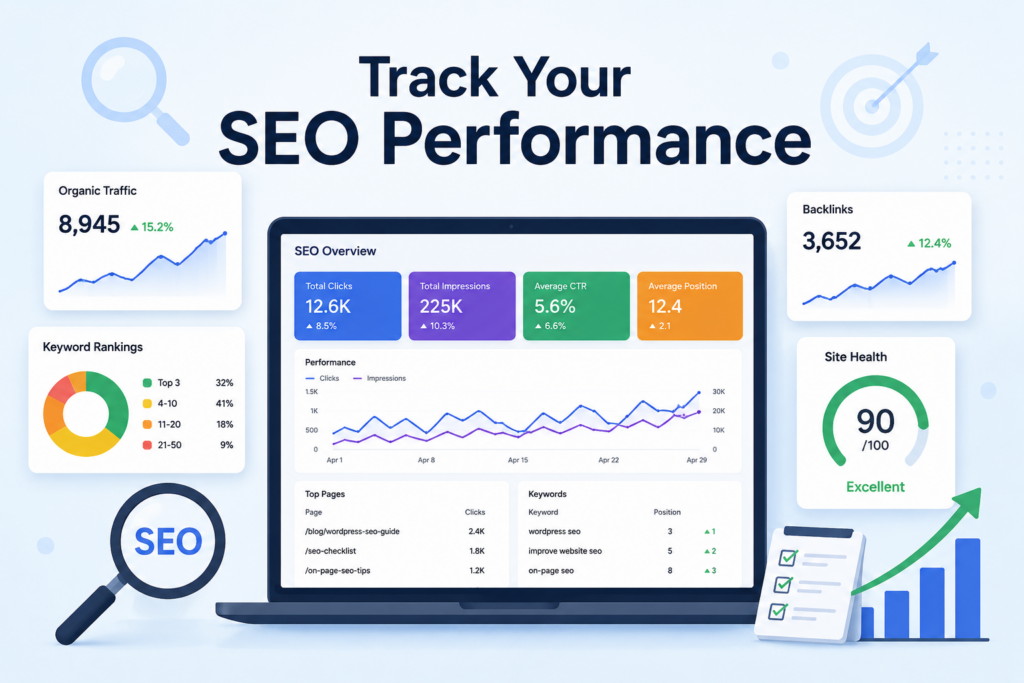
ติดตามตัวชี้วัดสำคัญโดยใช้เครื่องมือต่างๆ เช่น Google Analytics และ Google Search Console:
- ปริมาณการเข้าชมจากผลการค้นหา (Organic traffic): จำนวนผู้เข้าชมเว็บไซต์ที่มาจากผลการค้นหา.
- อันดับคีย์เวิร์ด: หน้าเว็บของคุณอยู่ในอันดับใดสำหรับคีย์เวิร์ดเป้าหมาย.
- อัตราการออกจากเว็บไซต์: ระดับการมีส่วนร่วมของผู้เข้าชมเว็บไซต์.
- อัตราการคลิกผ่าน (CTR): เว็บไซต์ของคุณปรากฏและถูกคลิกในผลการค้นหาบ่อยแค่ไหน.
การติดตามตรวจสอบประสิทธิภาพอย่างสม่ำเสมอจะช่วยให้คุณปรับปรุงกลยุทธ์และมุ่งเน้นการปรับปรุงในจุดที่สำคัญที่สุด.
สรุป
การปรับปรุงของคุณ วordpress SEO ต้องอาศัยการผสมผสานระหว่างการตั้งค่าทางเทคนิค การวางแผนเนื้อหาอย่างชาญฉลาด และการเพิ่มประสิทธิภาพอย่างต่อเนื่อง เริ่มต้นด้วยรากฐานที่มั่นคง—เลือกธีมและปลั๊กอินที่เป็นมิตรกับ SEO ตั้งค่า URL ที่สะอาดตา และตรวจสอบให้แน่ใจว่าเครื่องมือค้นหาสามารถจัดทำดัชนีเว็บไซต์ของคุณได้ จากนั้นจึงมุ่งเน้นไปที่กลยุทธ์ด้านเนื้อหาโดยการวิจัยคำหลัก จัดให้สอดคล้องกับความตั้งใจในการค้นหา และจัดโครงสร้างเนื้อหาอย่างมีประสิทธิภาพ.
เพิ่มประสิทธิภาพด้วยการปรับปรุงความเร็วในการโหลดหน้าเว็บและการใช้งานบนมือถือ ใช้ลิงก์ภายในและภายนอกอย่างชาญฉลาด และสร้างความน่าเชื่อถือผ่านแบ็กลิงก์คุณภาพสูง สุดท้าย ติดตามประสิทธิภาพของคุณและปรับวิธีการตามข้อมูลที่ได้.
ด้วยการนำขั้นตอนเหล่านี้มาผสมผสานกันอย่างรอบคอบ คุณจะสามารถปรับปรุงประสิทธิภาพของเว็บไซต์ WordPress ของคุณในผลการค้นหา และสร้างปริมาณการเข้าชมแบบออร์แกนิคที่ยั่งยืนได้.
คำถามที่พบบ่อย
1. SEO สำหรับ WordPress คืออะไร และทำไมจึงสำคัญ?
SEO สำหรับ WordPress หมายถึงการปรับแต่งเว็บไซต์ WordPress ของคุณเพื่อให้ติดอันดับสูงขึ้นในเครื่องมือค้นหา ช่วยเพิ่มการมองเห็น ดึงดูดการเข้าชมจากผลการค้นหาแบบธรรมชาติ และปรับปรุงการมีส่วนร่วมของผู้ใช้.
2. ฉันจะมั่นใจได้อย่างไรว่าเครื่องมือค้นหาสามารถจัดทำดัชนีเว็บไซต์ WordPress ของฉันได้?
ตรวจสอบการตั้งค่าการอ่านของ WordPress และตรวจสอบให้แน่ใจว่าตัวเลือก “ห้ามเครื่องมือค้นหาจัดทำดัชนีเว็บไซต์นี้” ไม่ได้ถูกเลือกไว้ นอกจากนี้ โปรดส่งแผนผังเว็บไซต์ XML เพื่อช่วยให้เครื่องมือค้นหาสามารถรวบรวมข้อมูลหน้าเว็บของคุณได้.
3. ปลั๊กอิน SEO ใดบ้างที่แนะนำสำหรับ WordPress?
ปลั๊กอิน SEO ยอดนิยม ได้แก่ Yoast SEO, Rank Math และ All in One SEO Pack เครื่องมือเหล่านี้ช่วยปรับแต่งเมตาไทเทิล คำอธิบาย แผนผังเว็บไซต์ สคีมา และเนื้อหา เพื่อให้ได้อันดับที่ดีขึ้น.
4. ฉันจะปรับปรุงเนื้อหาเว็บไซต์ WordPress ของฉันให้เหมาะกับ SEO ได้อย่างไร?
มุ่งเน้นไปที่ การวิจัยคำหลัก, รวมถึงการเขียนเนื้อหาคุณภาพสูง การใช้หัวข้อ (H1–H3) การใส่ลิงก์ภายในและภายนอก และการปรับเนื้อหาให้ตรงกับความตั้งใจในการค้นหา.
5. ฉันจะเพิ่มความเร็วและประสิทธิภาพของเว็บไซต์ WordPress ของฉันได้อย่างไร?
ใช้ปลั๊กอินแคช บีบอัดรูปภาพ ลดขนาดไฟล์ CSS/JS และใช้งานเครือข่ายส่งเนื้อหา (CDN) เว็บไซต์ที่รวดเร็วและใช้งานง่ายบนมือถือจะช่วยเพิ่มอันดับการค้นหาและประสบการณ์ผู้ใช้.
6. ฉันจะติดตามและวัดผลประสิทธิภาพ SEO ของ WordPress ได้อย่างไร?
ใช้ Google Analytics และ Google Search Console เพื่อตรวจสอบปริมาณการเข้าชมจากผลการค้นหาแบบทั่วไป อันดับคำค้นหา อัตราการคลิก (CTR) และสุขภาพโดยรวมของเว็บไซต์ ปรับกลยุทธ์ตามข้อมูลเชิงลึกเหล่านี้.


ออกแบบและสร้างเว็บไซต์ WordPress หรือเว็บไซต์องค์กรพร้อมระบบอีคอมเมิร์ซครบวงจรสำหรับคุณ.
ช่วงราคา: $200.00 ถึง $2,500.00custom-requirements-or-special-quotations
ราคาเดิมคือ: $2.00.$1.00ราคาปัจจุบันคือ: $1.00. การใช้ปลั๊กอิน 50 ตัวมากเกินไปสำหรับร้านค้าออนไลน์ที่ใช้ WordPress หรือไม่?
การเข้าใจผลกระทบที่แท้จริงต่อประสิทธิภาพ การมีปลั๊กอิน 50 ตัวบนเว็บไซต์อีคอมเมิร์ซ WordPress ไม่ใช่ปัญหาโดยอัตโนมัติ จริงๆ แล้ว จำนวนเพียงอย่างเดียวแทบจะไม่สามารถกำหนดประสิทธิภาพได้....

ภาพหลักสำหรับการออกแบบอุปกรณ์กายภาพบำบัดที่บ้านของ Amazon (อธิบายรายละเอียด)
บทนำ: การสร้างภาพลักษณ์ที่น่าเชื่อถือสำหรับอุปกรณ์บำบัดที่บ้านบน Amazon เมื่อออกแบบภาพหลักสำหรับอุปกรณ์บำบัดที่บ้านบน Amazon สิ่งสำคัญอันดับแรกของเราคือ...

ภาพหลักสำหรับการแปลงลิปสติกเป็นสินค้าสำหรับ Amazon
บทนำ: การออกแบบภาพหลักลิปสติกที่ขายได้บน Amazon เมื่อเราออกแบบภาพหลักสำหรับลิปสติกบน Amazon ความรับผิดชอบของเราไม่ได้จำกัดอยู่แค่...

แฮกเกอร์ขโมยอีเมลผู้ดูแลระบบ WordPress ได้อย่างไร (และวิธีป้องกัน)
มาเริ่มกันด้วยความจริงที่ไม่น่าสบายใจ: อีเมลแอดมิน WordPress ของคุณอาจเปิดเผยต่อสาธารณะมากกว่าที่คุณคิด และแฮกเกอร์? พวกเขาชอบมาก สำหรับพวกเขา...

อะไรทำให้รองพื้นชนิดเหลวของ Amazon (ภาพหลัก) ขายดี?
บทนำ การออกแบบภาพหลักสำหรับรองพื้นชนิดเหลวบน Amazon ไม่ใช่แค่การทำให้ผลิตภัณฑ์ดูสวยงามเท่านั้น บน Amazon ภาพหลักและ...

การออกแบบภาพหลัก Amazon ที่มีประสิทธิภาพสำหรับตลับกรอง
บทนำ การออกแบบภาพหลักสำหรับ Amazon ไม่ใช่แค่การทำให้สินค้าดูน่าดึงดูดเท่านั้น แต่ยังเกี่ยวกับความชัดเจน ความน่าเชื่อถือ และความเข้าใจได้ในทันที โดยเฉพาะอย่างยิ่งสำหรับ...

การโจมตีแบบ Replay Attack บน WordPress: ภัยคุกคามจริงหรือแค่เรื่องที่ถูกพูดเกินจริง?
ก่อนอื่นขอชี้แจงให้ชัดเจนก่อน การโจมตีแบบ Replay Attack นั้นดูไม่น่ากลัว มันไม่ได้ทำลายรหัสผ่าน มันไม่ได้แทรกโค้ดที่เป็นอันตรายพร้อมข้อความแฮ็กเกอร์สีเขียวกระจัดกระจายไปทั่ว มันแนบเนียนกว่า...

วิธีคัดลอกหน้าเว็บ WordPress โดยไม่ทำให้ระบบเสียหาย
ยอมรับกันเถอะ บางครั้งคุณอาจไม่อยากสร้างหน้าเว็บใหม่ คุณแค่อยากได้หน้าเว็บเดิม...แต่แตกต่างไปเล็กน้อย รูปแบบเหมือนเดิม บล็อกเหมือนเดิม การตั้งค่าเหมือนเดิม เพราะ...

เปรียบเทียบธีม WordPress สำหรับสัตว์เลี้ยง 5 แบบ
บทนำ การเลือกธีม WordPress ที่เหมาะสมสำหรับธุรกิจเกี่ยวกับสัตว์เลี้ยงนั้นไม่ใช่แค่เรื่องของการออกแบบเท่านั้น แต่ยังส่งผลโดยตรงต่อการใช้งาน ความสามารถในการขยายขนาด และการเติบโตของธุรกิจในระยะยาว การดูแลสัตว์เลี้ยงและ...

เปรียบเทียบธีมอีคอมเมิร์ซชุดว่ายน้ำ 5 แบบ
บทนำ การเลือกธีมที่เหมาะสมสำหรับร้านค้าอิสระที่จำหน่ายชุดว่ายน้ำหรือชุดชั้นในนั้นไม่ใช่แค่การตัดสินใจด้านภาพลักษณ์เท่านั้น แต่ยังส่งผลโดยตรงต่ออัตราการเปลี่ยนลูกค้าให้เป็นผู้ซื้อ ความสามารถในการขยายธุรกิจ และความยั่งยืนในระยะยาว...

วิธีปิดการแสดงความคิดเห็นใน WordPress (โดยไม่ต้องเสียสติ)
มาพูดถึงระบบแสดงความคิดเห็นของ WordPress กันดีกว่า ในทางทฤษฎีแล้ว ความคิดเห็นนั้นยอดเยี่ยมมาก มันช่วยกระตุ้นการสนทนา สร้างชุมชน และทำให้เว็บไซต์ของคุณดูมีชีวิตชีวา แต่ในความเป็นจริงแล้ว มันมักจะเป็นเหมือนแม่เหล็กดึงดูด...

ข้อผิดพลาด WordPress 500: เมื่อเว็บไซต์ของคุณเกิดอาการผิดปกติ
เว็บไซต์ WordPress ของคุณยังใช้งานได้ปกติดีเมื่อสักครู่ คุณรีเฟรชหน้าเว็บ แล้วจู่ๆ ก็เกิดข้อผิดพลาด 500 Internal Server Error ขึ้นมา ไม่มีคำอธิบาย ไม่มีคำขอโทษ มีเพียงข้อความที่เย็นชาและสับสนซึ่งโดยพื้นฐานแล้ว...

การสร้างเว็บไซต์ WordPress ที่ปรับขนาดได้สำหรับแบรนด์ที่ขับเคลื่อนด้วยวิทยาศาสตร์: โครงการ AminoUSA
บทนำ ในยุคดิจิทัลปัจจุบัน เว็บไซต์เป็นมากกว่าแค่สถานที่สำหรับแสดงรายการสินค้า สำหรับแบรนด์ที่ขับเคลื่อนด้วยวิทยาศาสตร์ซึ่งดำเนินงานในอุตสาหกรรมที่มีการควบคุมหรือเน้นการวิจัย...

สร้างร้านค้า Shopify ที่ปรับขนาดได้สำหรับแบรนด์ใบมีดระดับโลก: โครงการ CoolKatana
บทนำ ในธุรกิจอีคอมเมิร์ซข้ามพรมแดน เว็บไซต์ Shopify เป็นมากกว่าแค่หน้าร้าน สำหรับแบรนด์ที่ดำเนินธุรกิจในกลุ่มเฉพาะหรือกลุ่มที่ขับเคลื่อนด้วยวัฒนธรรม เว็บไซต์ต้องทำมากกว่านั้น...

การออกแบบร้านค้า Shopify ที่มีอัตราการแปลงสูงสำหรับขายการ์ดโปเกมอน
บทนำ ในโลกของอีคอมเมิร์ซสินค้าสะสม โดยเฉพาะอย่างยิ่งในตลาดเกมการ์ดโปเกมอน (TCG) เว็บไซต์จะต้องทำมากกว่าแค่แสดงรายการสินค้า...

ดีไซน์ Shopify ที่เพิ่มยอดขายสำหรับแบรนด์อิฐสั่งทำพิเศษ
บทนำ ในสภาพแวดล้อมการแข่งขันอีคอมเมิร์ซในปัจจุบัน โดยเฉพาะอย่างยิ่งในตลาดของขวัญส่วนบุคคลและของสะสม เว็บไซต์ Shopify ต้องทำมากกว่าแค่แสดงสินค้า...

วิธีติดต่อฝ่ายสนับสนุนของ Shopify: คู่มือที่ง่ายและไม่ยุ่งยาก
การบริหารร้านค้า Shopify ควรเป็นเรื่องที่น่าตื่นเต้น ไม่ใช่เรื่องที่ทำให้สับสน เมื่อมีคำถามหรือปัญหาเกิดขึ้น Shopify มีช่องทางการสนับสนุนหลายช่องทาง ขึ้นอยู่กับสถานการณ์...

วิธีปิดใช้งานร้านค้า Shopify: คู่มือที่ชัดเจนและใช้งานได้จริง
การปิดใช้งานร้านค้า Shopify นั้นไม่ซับซ้อน แต่ก็มีผลกระทบหลายอย่างที่ผู้ขายหลายรายมองข้ามไป คู่มือนี้จะอธิบายขั้นตอนอย่างละเอียดและเข้าใจง่าย...