












Introdução
Search engine optimization (SEO) is one of the most powerful ways to grow a WordPress website. Whether you run a blog, an eCommerce store, or a business site, improving your SEO helps you attract more organic traffic, increase visibility, and ultimately drive conversions.
In this guide, we’ll break down how to improve SEO on WordPress in a clear, practical, and beginner-friendly way. Instead of focusing on technical complexity, this article explains the core principles, tools, and strategies you need to succeed.
What Is WordPress SEO?
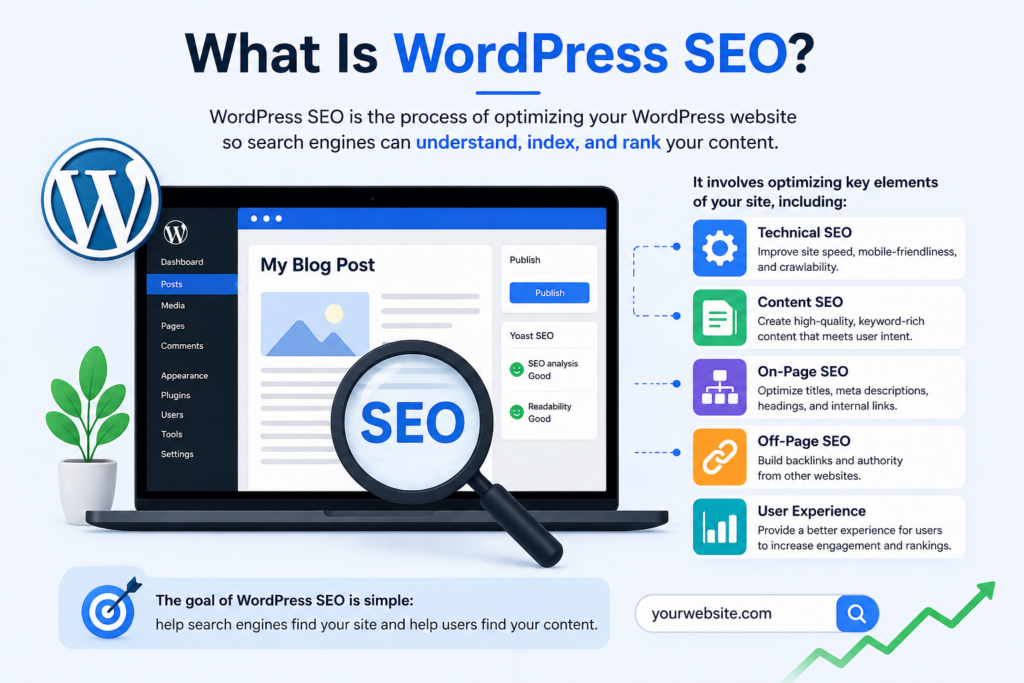
WordPress SEO refers to the process of optimizing your website so that search engines like Google can easily understand, index, and rank your content.
It involves multiple elements, including:
- Technical performance (site speed, mobile optimization)
- Content quality and keyword usage
- Site structure and navigation
- Backlinks and authority signals
The good news is that WordPress is already SEO-friendly by default. However, to truly compete in search rankings, you need to actively optimize your site.
Why SEO Matters for WordPress Websites
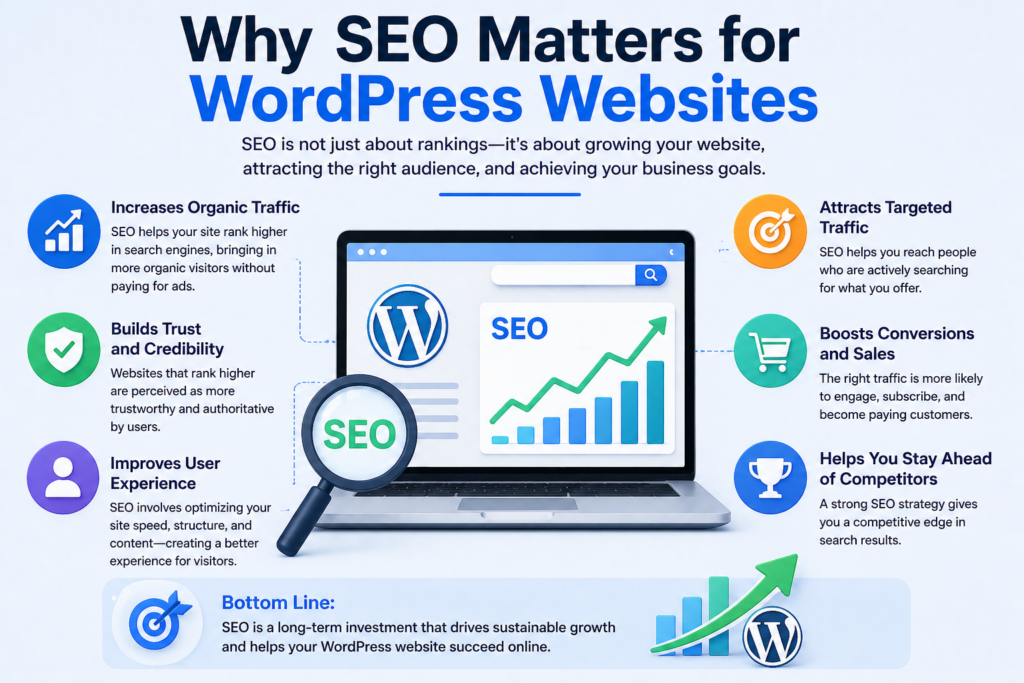
SEO is not just about rankings—it directly impacts your business growth.
Here’s why improving SEO on WordPress is essential:
- Increases organic traffic without paid ads
- Builds trust and credibility with users
- Improves user experience and site usability
- Boosts conversions through targeted traffic
Without SEO, even a well-designed website can remain invisible to potential visitors.
Step 1: Choose an SEO-Friendly WordPress Setup
Before diving into optimization, your foundation matters.
Select a Reliable Hosting Provider
A fast and stable hosting provider ensures:
- Faster page load times
- Better uptime
- Improved crawlability
Performance is a ranking factor, so hosting quality directly affects SEO.
Use a Lightweight Theme
Choose a theme that is:
- Fast-loading
- Mobile responsive
- Cleanly coded
Avoid overly complex themes with unnecessary features that slow down your site.
Step 2: Install an SEO Plugin
WordPress does not handle advanced SEO settings by default. That’s where SEO plugins come in.
As opções mais populares incluem:
- Yoast SEO
- Rank Math
- All in One SEO
These tools help you:
- Optimize meta titles and descriptions
- Generate XML sitemaps
- Analyze on-page SEO
- Control indexing settings
Using an SEO plugin simplifies many technical tasks.
Step 3: Set Up Proper Permalink Structure
Permalinks are your page URLs, and they play a big role in SEO.
Best Practice
Go to Settings → Permalinks and choose:
/post-name/
This format is:
- Clean and readable
- Keyword-friendly
- Preferred by search engines
Avoid URLs with numbers or random parameters.
Step 4: Conduct Keyword Research
Keywords are the foundation of SEO.
How to Find Keywords
Utilize ferramentas como:
- Google Keyword Planner
- Ahrefs
- SEMrush
- Ubersuggest
Focus on:
- Search volume
- Competition level
- User intent
Types of Keywords
- Short-tail: broad (e.g., “WordPress SEO”)
- Long-tail: specific (e.g., “how to improve seo on wordpress”)
Long-tail keywords are easier to rank for and often bring higher-quality traffic.
Step 5: Optimize Your Content
Content is one of the most important ranking factors.
Use Keywords Naturally
Place your target keyword:
- In the title
- In the introduction
- In headings (H2, H3)
- Throughout the content
Avoid keyword stuffing—write naturally for users first.
Write High-Quality Content
Search engines prioritize content that:
- Solves problems
- Provides value
- Is easy to read
Usar:
- Short paragraphs
- Bullet points
- Clear structure
Add Internal Links
Link to other relevant pages on your site to:
- Improve navigation
- Distribute link authority
- Increase time on site
Step 6: Optimize Meta Titles and Descriptions
Meta tags are what users see in search results.
Meta Title Tips
- Include your main keyword
- Keep it under 60 characters
- Make it compelling
Meta Description Tips
- Summarize the content clearly
- Include keywords naturally
- Keep it under 155 characters
Well-written meta tags improve click-through rates.
Etapa 7: Melhorar a velocidade do site
Site speed is a confirmed ranking factor.
Ways to Improve Speed
- Use caching plugins (e.g., WP Rocket)
- Optimize images (compress without losing quality)
- Use a Content Delivery Network (CDN)
- Minimize CSS and JavaScript files
Why Speed Matters
- Faster sites rank higher
- Users stay longer
- Bounce rates decrease
Even a 1-second delay can impact conversions.
Step 8: Make Your Site Mobile-Friendly
Most users browse on mobile devices, and Google uses mobile-first indexing.
Key Requirements
- Conceção reactiva
- Fast loading on mobile
- Easy navigation
Test your site using Google’s Mobile-Friendly Test tool.
Step 9: Optimize Images for SEO
Images enhance user experience, but they also need optimization.
Best Practices
- Use descriptive file names (e.g., wordpress-seo-guide.jpg)
- Add alt text with keywords
- Compress images for faster loading
Alt text helps search engines understand your images and improves accessibility.
Step 10: Create an XML Sitemap
An XML sitemap helps search engines find and index your pages.
How to Generate One
Most SEO plugins automatically create sitemaps.
Submit to Google
- Use Google Search Console
- Submit your sitemap URL
This ensures your content gets indexed faster.
Step 11: Fix Technical SEO Issues
Technical SEO ensures your site is easy to crawl and index.
Key Areas to Check
- Links quebrados
- Duplicate content
- Crawl errors
- Redirect issues
Utilize ferramentas como:
- Google Search Console
- Screaming Frog
Regular audits keep your site healthy.
Step 12: Build High-Quality Backlinks
Backlinks are one of the strongest ranking signals.
What Are Backlinks?
Links from other websites pointing to your site.
How to Get Them
- Guest blogging
- Creating shareable content
- Outreach to industry websites
- Publishing data-driven articles
Focus on quality over quantity.
Step 13: Use Structured Data (Schema Markup)
Schema markup helps search engines understand your content better.
Benefícios
- Rich snippets in search results
- Higher click-through rates
- Better visibility
Exemplos incluem:
- Avaliações
- Perguntas frequentes
- Articles
Many SEO plugins support schema integration.
Step 14: Optimize for User Experience (UX)
SEO is not just about search engines—it’s about users.
Key UX Factors
- Easy navigation
- Clear layout
- Fast loading
- Engaging design
A good user experience leads to:
- Lower bounce rates
- Higher engagement
- Better rankings
Step 15: Update Content Regularly
Fresh content signals relevance to search engines.
Por que as atualizações são importantes
- Keeps information accurate
- Improves rankings
- Attracts returning visitors
Update old posts with:
- New data
- Improved structure
- Additional keywords
Erros comuns a evitar
When learning how to improve SEO on WordPress, avoid these pitfalls:
- Keyword stuffing
- Ignoring mobile optimization
- Using slow, heavy themes
- Not optimizing images
- Skipping meta tags
- Forgetting internal links
Fixing these issues can quickly improve performance.
How Long Does SEO Take to Work?
SEO is a long-term strategy.
Typical Timeline
- 1–3 months: initial improvements
- 3–6 months: noticeable growth
- 6–12 months: strong results
Consistency is key. The more you optimize, the better your results over time.
Considerações finais
Improving SEO on WordPress doesn’t require advanced technical skills—it requires consistency, strategy, and attention to detail. By focusing on strong content, proper structure, fast performance, and user experience, you can significantly increase your visibility in search engines.
From choosing the right setup to optimizing content and building backlinks, every step contributes to better rankings. SEO is not a one-time task but an ongoing process that evolves with your website.
Start with the basics, apply these best practices, and continue refining your approach. Over time, your WordPress site will become more discoverable, more authoritative, and more successful in attracting organic traffic.
Perguntas frequentes
1. How can I improve SEO on WordPress for beginners?
Start by installing an SEO plugin, choosing a clean permalink structure, and creating high-quality content with targeted keywords. Also, focus on site speed and mobile responsiveness.
2. What is the best SEO plugin for WordPress?
Popular options include Yoast SEO, Rank Math, and All in One SEO. Each helps optimize meta tags, sitemaps, and on-page SEO without needing technical skills.
3. How important is site speed for WordPress SEO?
Site speed is a major ranking factor. Faster websites improve user experience, reduce bounce rates, and help your pages rank higher in search results.
4. How do I optimize WordPress content for SEO?
Use relevant keywords naturally, structure content with headings, add internal links, and ensure your content provides real value to readers.
5. Do I need backlinks for WordPress SEO?
Yes, backlinks are essential. They signal authority and trust to search engines, helping your website rank higher over time.
6. How long does it take to see SEO results on WordPress?
SEO is a long-term strategy. You may see initial improvements in 1–3 months, but strong results typically take 3–6 months or longer depending on competition.


Conceber e construir um sítio Web WordPress ou um sítio empresarial com um sistema de comércio eletrónico completo para si.
Faixa de preço: $200.00 a $2,500.00custom-requirements-or-special-quotations
O preço original era: $2.00.$1.00O preço atual é: $1.00. 50 plugins são demais para uma loja virtual WordPress?
Entendendo o Impacto Real no Desempenho Ter 50 plugins em um site de eCommerce WordPress não é automaticamente um problema. Na verdade, o número por si só raramente determina o desempenho....

Explicação do design da imagem principal para o dispositivo de fisioterapia doméstica da Amazon
Introdução: Construindo uma imagem confiável para dispositivos de terapia doméstica na Amazon Ao projetar a imagem principal de um dispositivo de terapia doméstica na Amazon, nosso principal...

Design da imagem principal para conversão de batom da Amazon
Introdução: Conceber uma imagem principal de batom que vende na Amazon Quando concebemos uma imagem principal para um batom da Amazon, a nossa responsabilidade vai muito além...

Como os hackers roubam e-mails de administradores do WordPress (e como impedi-los)
Vamos começar com uma verdade incómoda: o seu e-mail de administrador do WordPress é provavelmente muito mais público do que pensa e os hackers? Eles adoram isso. Para eles, o seu...

O que faz uma base líquida da Amazon converter a imagem principal?
Introdução: Criar uma imagem principal para a base líquida da Amazon não se resume apenas a deixar o produto bonito. Na Amazon, a imagem principal e...

Como projetar uma imagem principal eficaz para cartuchos de filtro Amazon
Introdução: Criar uma imagem principal para a Amazon nunca se resume apenas a tornar um produto atraente. Trata-se de clareza, confiança e compreensão imediata — especialmente para...

Ataques de repetição no WordPress: ameaça real ou mito exagerado?
Vamos esclarecer uma coisa primeiro. Ataques de repetição não parecem assustadores. Eles não quebram senhas. Eles não injetam código malicioso com texto verde de hacker voando por toda parte. Eles são sorrateiros...

Como duplicar páginas do WordPress sem danificar nada
Vamos ser sinceros. Às vezes você não quer criar uma página nova. Você só quer a mesma página… mas um pouco diferente. Mesmo layout. Mesmos blocos. Mesmas configurações. Porque….

Comparativo de cinco temas WordPress para animais de estimação
Introdução Escolher o tema WordPress certo para o seu negócio de animais de estimação é mais do que uma decisão de design — afeta diretamente a usabilidade, a escalabilidade e o crescimento a longo prazo. Cuidados com animais de estimação e...

Comparando cinco temas de e-commerce de moda praia
Introdução: Escolher o tema certo para uma loja independente de moda praia ou lingerie não é apenas uma decisão visual — afeta diretamente as taxas de conversão, a escalabilidade e o sucesso a longo prazo...

Como desativar os comentários no WordPress (sem enlouquecer)
Vamos falar sobre os comentários do WordPress. Em teoria, os comentários são ótimos. Eles incentivam a discussão, constroem comunidade e dão vida ao seu site. Na prática? Muitas vezes, eles atraem...

Erro 500 do WordPress: Quando seu site decide entrar em pânico
Seu site WordPress estava funcionando perfeitamente até um minuto atrás. Você atualizou a página. E de repente — bum 💥 — Erro Interno do Servidor 500. Sem explicação. Sem pedido de desculpas. Apenas uma mensagem fria e confusa que basicamente...

Criando um site WordPress escalável para uma marca voltada para a ciência: o projeto AminoUSA
Introdução No cenário digital atual, um website é mais do que um lugar para listar produtos. Para marcas com foco em ciência que atuam em setores regulamentados ou voltados para pesquisa, um...

Construindo uma loja Shopify escalável para uma marca global de lâminas: O Projeto CoolKatana
Introdução No comércio eletrônico internacional, um site Shopify é muito mais do que uma vitrine. Para marcas que atuam em nichos de mercado e categorias culturais específicas, o site precisa fazer muito mais do que...

Criando uma loja Shopify de alta conversão para cartas Pokémon.
Introdução No mundo do comércio eletrônico de itens colecionáveis, especialmente no mercado do Pokémon Trading Card Game (TCG), um site precisa fazer mais do que simplesmente listar produtos...

Design Shopify de alta conversão para uma marca de tijolos personalizada.
Introdução No cenário competitivo do comércio eletrônico atual, especialmente no segmento de presentes personalizados e itens colecionáveis, um site Shopify precisa fazer muito mais do que simplesmente exibir produtos. Ele...

Como entrar em contato com o suporte da Shopify: um guia simples e sem complicações.
Gerir uma loja Shopify deve ser uma experiência empolgante, não confusa. Quando surgem dúvidas ou problemas que atrapalham o seu trabalho, a Shopify oferece diversas opções de suporte, dependendo da situação.

Como desativar uma loja Shopify: um guia claro e prático
Desativar uma loja Shopify não é complicado, mas acarreta consequências que muitos lojistas ignoram. Este guia explica o processo de forma simples e didática...