











لا توجد منتجات في سلة التسوق.


When building a modern website, user experience is everything. Visitors expect clean layouts, fast loading times, and intuitive navigation. One small but powerful design trick that can dramatically improve usability is hiding the header when users scroll down—and revealing it again when they scroll up.
If you’re using Elementor on a ووردبريس website, you already have a flexible design system. But by default, Elementor doesn’t provide a simple toggle for scroll-based header behavior. That’s why many designers look for ways to implement this feature manually.
In this guide, we’ll explain how to hide header in Elementor WordPress, why it matters, and the different ways you can implement it—even if you’re not a developer.
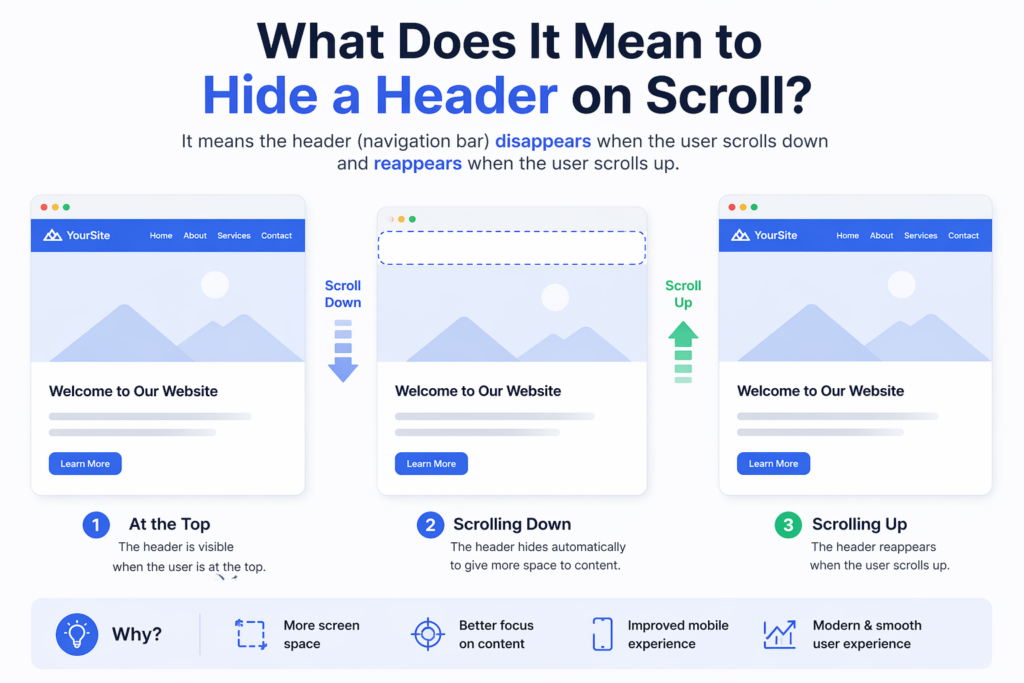
Before diving into the steps, it’s important to understand the concept.
A “hide on scroll” header is a navigation bar that:
This behavior helps reduce visual clutter and gives more space to content, especially on smaller screens.

When users scroll through content, the header can become a distraction. Hiding it allows the content to take center stage.
This is especially useful on mobile devices, where screen space is limited.
Many high-performing websites adopt this interaction pattern to create a smooth, app-like experience.
By removing unnecessary elements during scrolling, users are more likely to stay engaged with your content.
In Elementor, headers are typically created using:
The header section is usually:
To hide it dynamically, we need to add custom behavior using CSS and JavaScript.
This is the most common and flexible approach.
In Elementor:
This ensures the header stays fixed before we add scroll behavior.
Assign a class to your header section, for example:
header-hide
This class will be used to control visibility.
Add the following CSS to your site (via Customizer or Elementor Custom CSS):
.header-hide {
    transition: transform 0.3s ease-in-out;
}.header-hide.hide {
    transform: translateY(-100%);
}
What this does:
Now we need logic to detect scroll direction.
Add this script to your site (via footer script or plugin):
let lastScrollTop = 0;
const header = document.querySelector('.header-hide');window.addEventListener('scroll', function () {
    let scrollTop = window.pageYOffset || document.documentElement.scrollTop;    if (scrollTop > lastScrollTop) {
        // scrolling down
        header.classList.add('hide');
    } else {
        // scrolling up
        header.classList.remove('hide');
    }    lastScrollTop = scrollTop;
});
.hide.hideIf you are using Elementor Pro, you can:
This method avoids external plugins and keeps everything centralized.
If you prefer a no-code approach, some plugins can help.
ومن الأمثلة على ذلك:
However, keep in mind:
Avoid abrupt movements. Use transitions between 0.3s–0.5s.
Make sure users can still easily access navigation when scrolling up.
Mobile behavior should feel natural and responsive.
If you’re using other sticky or scroll scripts, test for conflicts.
Example improvement:
if (Math.abs(scrollTop - lastScrollTop) > 10) {
    // trigger only when meaningful scroll happens
}
Once you’ve implemented the basic version, you can improve it further.
.header-hide.scrolled {
    box-shadow: 0 2px 10px rgba(0,0,0,0.1);
}
You can modify:
Based on scroll position.
While this feature is useful, it’s not always appropriate.
Avoid it when:
This technique is commonly used in:
It helps create a more immersive browsing experience.
Efficient code ensures smooth scrolling and better user experience.
Learning how to hide header in Elementor ووردبريس is a simple yet powerful way to improve your website’s usability and design. By combining Elementor’s sticky header feature with custom CSS and JavaScript, you can create a smooth, modern scrolling experience that keeps users focused on your content.
Whether you choose a manual coding approach or a plugin-based solution, the key is to ensure smooth behavior, responsiveness, and usability across devices. With the right implementation, this small interaction can make a big difference in how your website feels and performs.
You can hide the header on scroll by making it sticky in Elementor, then adding custom CSS and JavaScript to detect scroll direction and toggle visibility.
Yes, you can use third-party plugins that offer sticky header effects and scroll-based animations, but they may have limited customization compared to custom code.
This usually happens if the header is not set to sticky, the CSS class is missing, or the JavaScript is not properly loaded on the page.
Yes, it can improve user experience by reducing distractions, increasing screen space, and creating a cleaner, more modern browsing experience.
If implemented correctly, it can enhance mobile usability by freeing up space, but you should test carefully to ensure navigation remains easy to access.
A sticky header stays visible at the top at all times, while a hide-on-scroll header disappears when scrolling down and reappears when scrolling up.


















