












Introduction
If you’re planning to build a website, blog, or online store, learning how to install WordPress is one of the most important first steps. WordPress powers a huge portion of the internet thanks to its flexibility, scalability, and ease of use. Whether you’re a beginner or someone looking to improve your website-building workflow, understanding the installation process will give you full control over your online presence.
In this guide, we’ll break down everything you need to know in a simple, easy-to-follow way—from preparation to installation methods and post-installation setup. By the end, you’ll clearly understand how to get your WordPress site up and running.
What Is WordPress and Why Use It?

Before diving into how to install WordPress, it’s helpful to understand why it’s so widely used.
WordPress is an open-source content management system (CMS) that allows you to build and manage websites without needing advanced coding skills. It’s highly customizable, with thousands of themes and plugins that enable you to create anything from blogs to eCommerce stores.
Key reasons people choose WordPress include:
- Easy to use, even for beginners
- Highly customizable with themes and plugins
- SEO-friendly structure
- Large community and support ecosystem
- Scalable for both small and large websites
What You Need Before Installing WordPress
To successfully install WordPress, you’ll need a few essentials in place:
1. A Domain Name
Your domain is your website’s address (e.g., yoursite.com). Choose something memorable and relevant to your brand.
2. Web Hosting
Hosting is where your website’s files are stored. A reliable hosting provider ensures your site loads quickly and stays online.
3. A Database
WordPress uses a database (usually MySQL) to store your content, settings, and user data.
Most modern hosting providers include domain registration, hosting, and database setup in one package, making the process easier.
Different Ways to Install WordPress
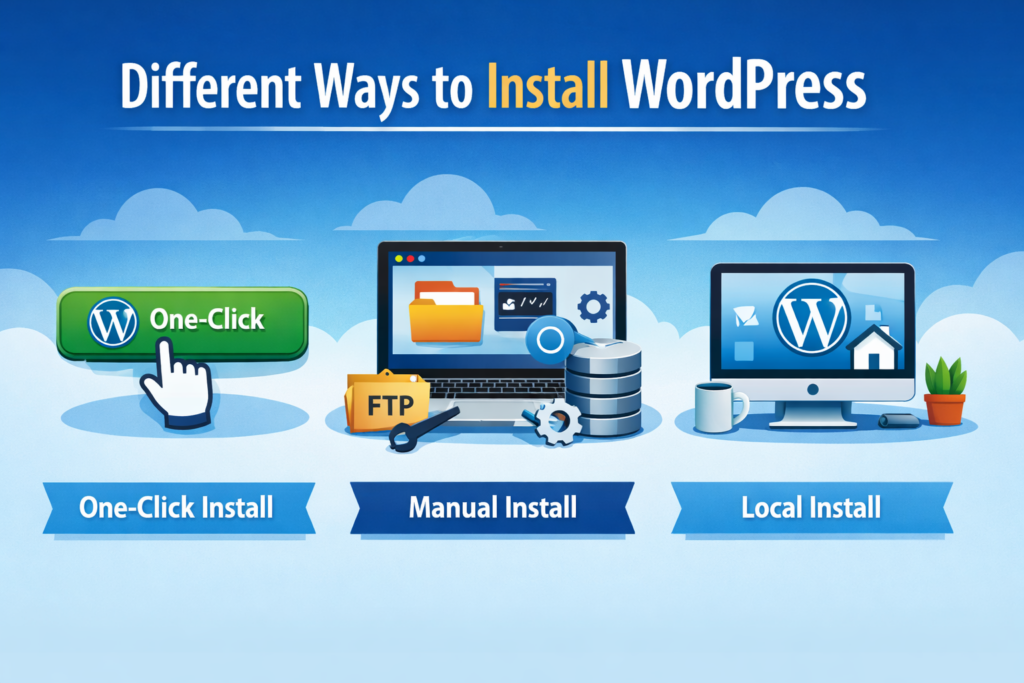
There are several methods available when learning how to install WordPress, depending on your technical level and hosting provider.
1. One-Click Installation (Recommended for Beginners)
Most hosting providers offer a one-click WordPress installation feature. This is the easiest and fastest way to get started.
How it works:
- Log into your hosting dashboard
- Find the WordPress installer (often under “Website” or “Apps”)
- Enter basic details like site name, username, and password
- Click install
Within minutes, your WordPress site will be live.
Best for: Beginners who want a quick setup without technical steps.
2. Manual Installation (More Control)
If you want more control or your hosting provider doesn’t offer one-click installs, you can manually install WordPress.
Steps include:
- Download WordPress from the official website
- Upload files to your hosting server via FTP or file manager
- Create a MySQL database
- Configure the
wp-config.phpfile - Run the WordPress installation script
This method requires more technical knowledge but gives you a deeper understanding of how WordPress works.
3. Local Installation (For Testing and Development)
If you want to experiment without publishing your site online, you can install WordPress locally on your computer.
Tools like local development environments allow you to simulate a server setup.
Best for:
- Developers
- Designers testing themes
- Beginners who want to practice
Step-by-Step: How to Install WordPress Manually
Let’s go deeper into the manual method, as it helps you fully understand the process.
Step 1: Download WordPress
Go to the official WordPress website and download the latest version.
Step 2: Upload Files to Server
Use FTP software or your hosting file manager to upload WordPress files to your root directory (usually public_html).
Step 3: Create a Database
Access your hosting control panel and create a new MySQL database. Save the database name, username, and password.
Step 4: Configure wp-config.php
Rename the sample config file and input your database credentials.
Step 5: Run Installation
Visit your domain in a browser. WordPress will guide you through the final setup:
- Site title
- Admin username
- Password
Once completed, your website is ready.
FAQ
The easiest way to install WordPress is by using a one-click installation feature provided by most hosting providers. It allows beginners to set up a website in just a few minutes without needing technical knowledge.
Yes, you can install WordPress locally on your computer using tools like local development environments. However, to make your website accessible online, you will still need hosting and a domain.
With a one-click installation, WordPress can be set up in less than 5 minutes. Manual installation may take 10–20 minutes depending on your experience.
No, you don’t need coding skills to install WordPress. Most installation methods are beginner-friendly, especially the one-click option provided by hosting platforms.
Common Mistakes to Avoid
When learning how to install WordPress, beginners often run into these issues:
- Using weak admin passwords
- Forgetting to update WordPress after installation
- Choosing unreliable hosting
- Skipping backups
- Installing too many plugins too early
Avoiding these mistakes will help keep your website secure and fast.
What to Do After Installing WordPress
Installing WordPress is just the beginning. To build a successful site, you should take a few important next steps.
1. Choose a Theme
Your theme controls your website’s design and layout. Pick one that matches your brand and is mobile-friendly.
2. Install Essential Plugins
Plugins extend functionality. Some must-haves include:
- SEO optimization tools
- Security plugins
- Caching/performance plugins
3. Set Up Basic Pages
Create core pages like:
- Home
- About
- Contact
- Privacy Policy
4. Optimize for Speed and SEO
Improve loading speed and search visibility by optimizing images, enabling caching, and using SEO best practices.
WordPress Installation for eCommerce
If your goal is to build an online store, WordPress can be paired with plugins like WooCommerce.
This allows you to:
- Add products
- Manage inventory
- Process payments
- Track orders
Understanding how to install WordPress properly ensures a strong foundation for your online business.
Choosing the Right Installation Method
Each method has its pros and cons:
| Method | Difficulty | Best For |
|---|---|---|
| One-click install | Easy | Beginners |
| Manual install | Medium | Advanced users |
| Local install | Medium | Testing & development |
If you’re just starting, the one-click method is usually the best choice.
Final Thoughts
Learning how to install WordPress is a foundational skill that opens the door to building powerful, flexible websites. Whether you choose a simple one-click setup or a manual installation, the key is understanding the process and making informed decisions.
As your website grows, WordPress gives you the tools to scale, customize, and optimize your online presence.
Need Help Building a Professional Website?
At the end of the day, installing WordPress is only the first step. Designing a high-converting, visually appealing, and fully optimized website requires experience in UX design, branding, and performance optimization.
That’s where AIRSANG comes in.
We specialize in:
- Cross-border eCommerce website design
- WordPress and Shopify development
- Conversion-focused landing pages
- Product image and visual design
If you’re looking to build or upgrade your website, our team can help you turn your ideas into a high-performing digital experience.


Design and build a WordPress website or corporate site with a full eCommerce system for you.
Price range: $200.00 through $2,500.00custom-requirements-or-special-quotations
Original price was: $2.00.$1.00Current price is: $1.00. Are 50 Plugins Too Many for a WordPress eCommerce Store?
Understanding the Real Performance Impact Having 50 plugins on a WordPress eCommerce site isn’t automatically a problem. In fact, the number alone rarely determines performance....

Main Image Design for Amazon Home Physiotherapy Device Explained
Introduction: Building a Trustworthy Image for Home Therapy Devices on Amazon When designing the main image for a home therapy device on Amazon, our primary...

Main Image Design for Amazon Lipstick Conversion
Introduction: Designing a Lipstick Main Image That Sells on Amazon When we design a Main image for an Amazon lipstick, our responsibility goes far beyond...

How Hackers Steal WordPress Admin Emails (And How to Stop Them)
Let’s start with an uncomfortable truth: Your WordPress admin email is probably way more public than you think.And hackers? They love that. To them, your...

What Makes an Amazon Liquid Foundation Main Image Convert
Introduction Designing a Main image design for Amazon Liquid foundation is never just about making a product look beautiful. On Amazon, the main image and...

Designing an Effective Amazon Main Image for Filter Cartridges
Introduction Designing a Main image for Amazon is never just about making a product look attractive. It is about clarity, trust, and instant understanding—especially for...

Replay Attacks on WordPress: Real Threat or Overhyped Myth?
Let’s clear something up first. Replay attacks don’t look scary.They don’t smash passwords.They don’t inject evil code with green hacker text flying everywhere. They’re sneaky....

How to Duplicate WordPress Pages Without Breaking Anything
Let’s face it. Sometimes you don’t want to create a new page.You just want the same page… but slightly different. Same layout.Same blocks.Same settings. Because...

Five Pet WordPress Themes Compared
Introduction Choosing the right pet-related WordPress theme is more than a design decision—it directly affects usability, scalability, and long-term business growth. Pet care and pet...

Comparing Five Swimwear eCommerce Themes
Introduction Choosing the right theme for a swimwear or lingerie independent store is not just a visual decision—it directly affects conversion rates, scalability, and long-term...

How to Turn Off Comments in WordPress (Without Losing Your Mind)
Let’s talk about WordPress comments. In theory, comments are great.They encourage discussion.They build community.They make your website feel “alive.” In reality? They’re often a magnet...

WordPress 500 Error: When Your Website Decides to Panic
Your WordPress site was fine a minute ago.You refreshed the page.And suddenly—boom 💥—500 Internal Server Error. No explanation.No apology.Just a cold, confusing message that basically...

Building a Scalable WordPress Website for a Science-Driven Brand: The AminoUSA Project
Introduction In today’s digital landscape, a website is more than a place to list products. For science-driven brands operating in regulated or research-focused industries, a...

Building a Scalable Shopify Store for a Global Blade Brand: The CoolKatana Project
Introduction In cross-border eCommerce, a Shopify website is more than a storefront.For brands operating in niche, culture-driven categories, the website must do far more than...

Designing a High-Conversion Shopify Store for Pokémon Cards
Introduction In the world of collectible eCommerce, especially within the Pokémon Trading Card Game (TCG) market, a website must do more than simply list products....

High-Converting Shopify Design for a Custom Brick Brand
Introduction In today’s competitive eCommerce landscape, especially in the personalized gift and collectible space, a Shopify website must do far more than display products. It...

How to Contact Shopify Support: Simple, Stress-Free Guide
Running a Shopify store should feel exciting—not confusing. When questions pop up or issues slow you down, Shopify offers several support paths depending on what...

How to Deactivate a Shopify Store: A Clear, Practical Guide
Deactivating a Shopify store isn’t complicated, but it does come with consequences many merchants overlook. This guide breaks the process down in a simple, educational...