
Should your product pages display real customer reviews? If feedback relates to the item and its source can be verified, prospective buyers should be able to see it. For newly launched products without reviews, establish collection and moderation first. Never invent ratings to suggest sales or substitute praise for another product.
Buyers typically consult reviews for questions the description has not answered: whether the size fits, how materials feel, or whether the delivered color matches the photos. Reviews help decisions but cannot replace clear specifications, shipping, and return information. This article covers authenticity, placement, mobile usability, and ongoing maintenance.
First Ask Whether the Review Explains This Product
A specific comment such as ‘I bought the large and it fits slightly loose’ is often more useful than ‘Great, recommended.’ Check the product and variant before displaying feedback. Variants are colors, sizes, or specifications of the same product; experience with a small red version should not appear beside a large blue one without explanation.
Distinguish sources as well. Feedback following an order on your site, third-party reviews quoted with permission, and your own product descriptions require different labels. Shopify’s Shop product review guidance describes that channel’s review process. Those are Shop rules, not evidence that every standalone website uses the same verification method.
- Check the product: does the review concern this item, version, or a relevant variant?
- Check the source: keep order links or original submissions and explain how feedback was obtained.
- Check the content: retain details of actual use rather than reducing feedback to stars.
- Check permission: confirm consent before publishing buyer photos, names, or social accounts.
Handle unfavorable feedback carefully too. If a buyer reports damaged packaging, verify the order and after-sales response before deciding how to reply publicly. Do not erase a real issue simply because it might hurt sales. Unanimous praise can make it harder for readers to identify useful information.

How to Fill a Product Page When There Are No Reviews
New products naturally lack feedback. Provide specific materials, dimensions, use cases, dispatch times, and return conditions, with a clear inquiry option. An understandable size guide may be more useful than an empty rating area, especially for products with multiple variants. Use our color and size presentation recommendations to check each item.
Establish an unobtrusive collection process: after fulfillment and enough time to use the product, invite buyers to describe their experience with fit, quality, and use cases. Do not solicit only positive feedback or tie compensation to a particular score. Moderation should remove advertising, sensitive personal information, and content whose relevance cannot be confirmed, while retaining handling records.
For buyer photos, disclose cropping and whether they show the current model. Brand-created illustrations can appear among product images if labeled as illustrations, rather than resembling unedited customer photographs.
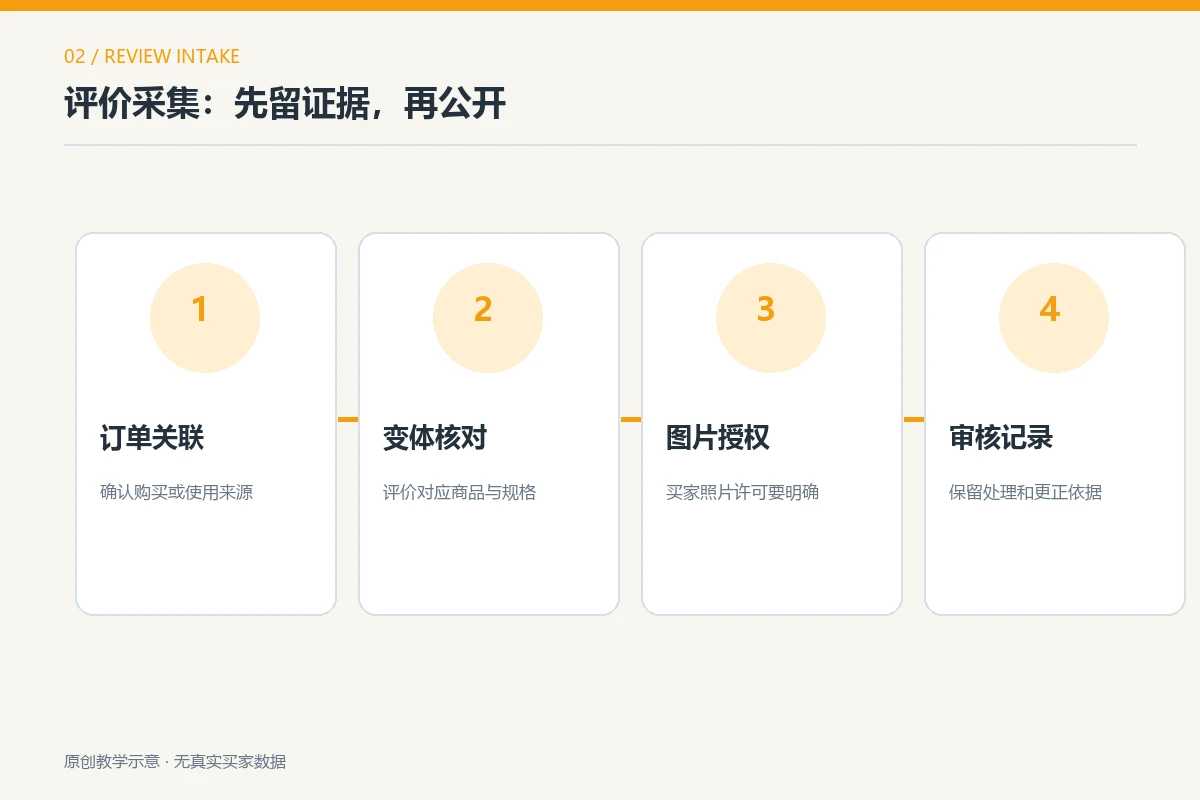
Different Review Volumes Need Different Presentations
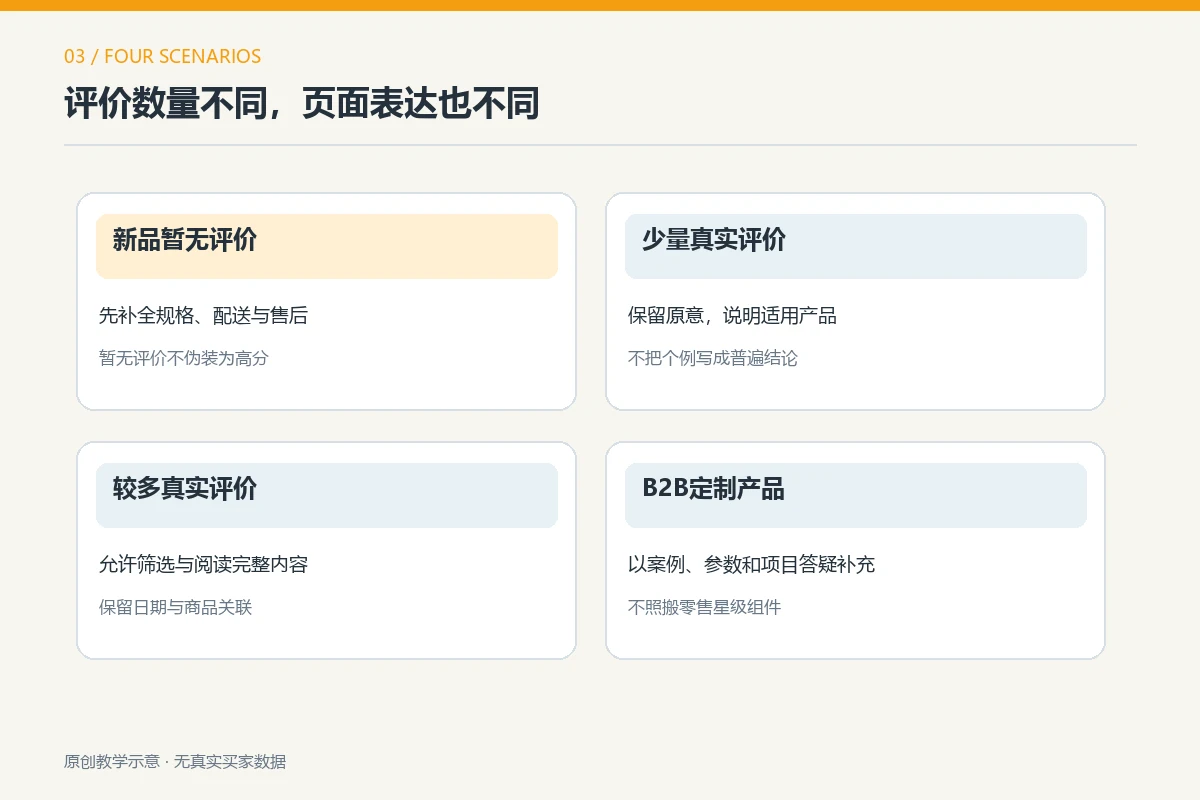
The decision is not simply about counts. A few specific, authentic comments can explain a product; dozens of vague remarks may not help. The quantities below illustrate page states for teaching purposes, not platform thresholds or conversion statistics.
| Product Stage | What the Page Can Do | What to Avoid |
|---|---|---|
| New Product with No Reviews | Complete specifications, real photos, shipping, and support information; establish review invitations | Empty ratings dominating the first screen or invented bestseller feedback |
| A Few Reviews Available | Highlight specific feedback on fit, materials, and use, identifying its source | Presenting a few reviews as the consensus of all buyers |
| A Growing Review Collection | Offer variant or topic filters and access to complete feedback | Showing only high scores while hiding useful questions or support replies |
| Custom B2B Products | Prioritize authorized use cases, project scope, and inquiry answers | Presenting unverifiable project testimonials as reviews from buyers of stocked products |
For example, fit descriptions are valuable in a retail shoe store with standard sizes. Buyers of custom B2B equipment care more about specifications and delivery capabilities, so authorized cases and inquiry guidance may replace a conventional review area. Both businesses need credible evidence, but its form and placement differ. For B2B page structure, see our article on product details and inquiry journeys .
Place Reviews Without Overshadowing Product Information
Buyers first need to understand the item, price or quote process, key specifications, and next action. A review link can sit near this decision-making information to indicate that real experience is available. Put complete reviews farther down for deeper reading. Do not push long comment lists ahead of sizes, materials, or shipping times.
Make Summaries Lead to Complete Reviews
A rating or count near the top should link to readable reviews, not open a decorative number. With few reviews, show concrete comments and dates directly; add topic filtering as volume grows. Dates, variants, and source labels should be understandable rather than internal field codes.
Treat Replies as Information, Not Advertising
For comments about small sizing or slow dispatch, a brand can explain its response or clarify fit and delivery. Address the buyer’s actual question instead of pasting a generic thank-you. If questions recur, improve the product description rather than repeating support explanations under every review.
Keep visuals restrained: sufficient text contrast, photos that do not overwhelm copy, and more than stars as readable signals. Dates, variants, and brand replies can form clear secondary information so readers distinguish customer statements from merchant responses.

Check Mobile: Read Reviews and Still Complete the Purchase
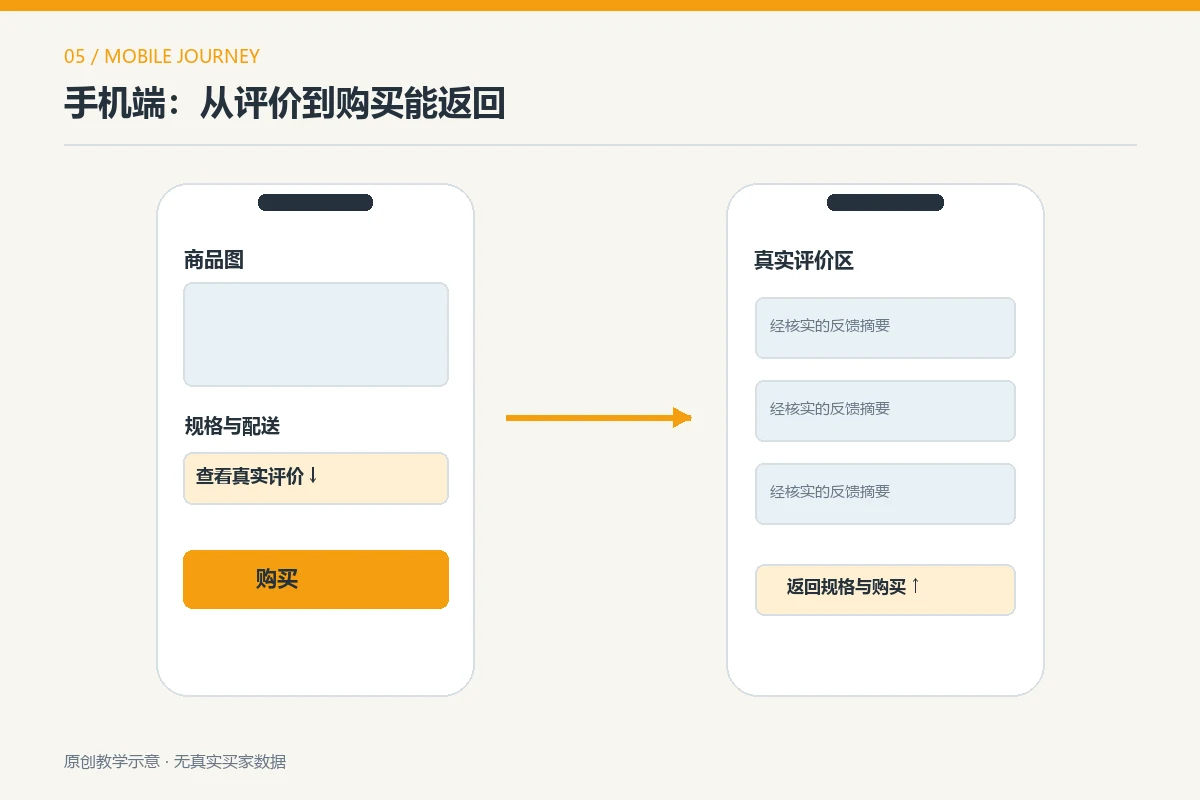
On a narrow screen, full reviews may be many scrolls away. Provide a short link near product information and an easy return to options or purchase controls. A review dialog that covers size choices or cannot be closed obstructs ordering, however authentic its content.
Test on an ordinary phone: after the product images, can you find reviews, identify feedback relevant to your color or size, and return to a usable purchase button? Do not rely on design screenshots; live fonts, image loading, and collapsed states may differ.
- Start at the main image and title, then find specifications, price, or the quote option.
- Open the review summary and confirm that complete, untruncated text is available.
- Check variant and photo labels to ensure feedback matches the product.
- Return to buying or inquiry and check that dialogs and fixed buttons do not obstruct it.
Mobile need not reproduce every desktop visual level. It should let readers identify the product, review evidence, and act in a natural order. For broader mobile checks, see our website design considerations .
Structured Data Helps Interpretation, Not Invented Reviews
Some merchants add structured data to seek stars in search results. These standardized fields explain products, prices, or reviews to search engines. The corresponding content must actually exist on the page and meet the engine’s requirements. Google’s product snippet documentation lists eligibility conditions. Eligibility creates an opportunity for rich results, not a guarantee.
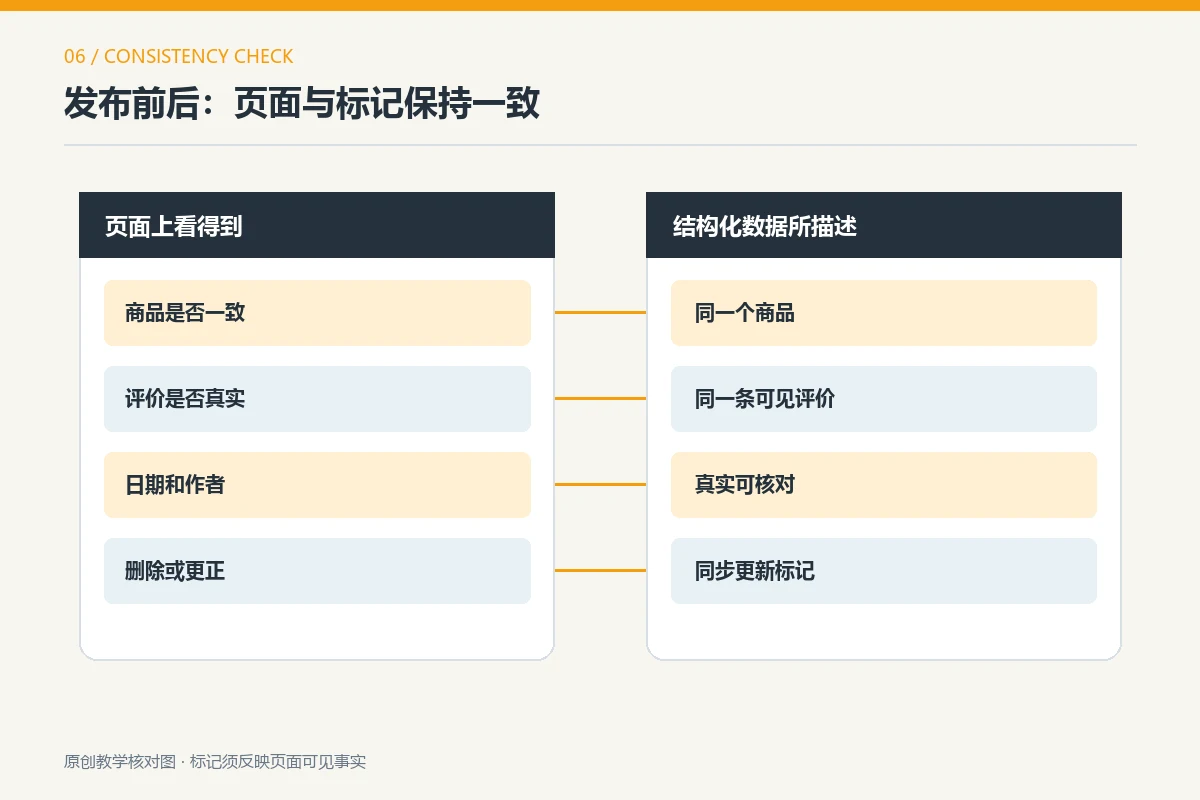
Technical staff should check that review data concerns the current product, that the same review is visible, and that markup changes when reviews change. Copying another platform’s feedback does not automatically make it a verified purchase on your site. Never give an unreviewed product a fictitious average rating. Local rules depend on the audience; for the US market, the FTC’s consumer review rule questions and answers can inform checks on authenticity and material connections. This is not universal legal advice.
If source records, visible content, and markup cannot be kept consistent, omit rating markup for now. Clear product information and authentic feedback matter more than a search enhancement that may never appear.
Conclusion: Publish Reviews That Are Authentic, Useful, and Maintainable
Real customer reviews belong on product pages when they match the item, have traceable sources, are understandable, and the business will handle new feedback and issues. Without reviews, complete product information and establish invitation and moderation processes; do not fill the gap with fake stars. On mobile, test the full sequence of viewing products, reading reviews, choosing options, and purchasing or inquiring, then fix each obstacle.
A useful review section depends on relevant details, not attractive numbers. Authentic feedback is decision-supporting content that should work alongside images, specifications, and after-sales information.