Giới thiệu
Learning how to develop wordpress website can feel confusing at first because WordPress includes many moving parts: hosting, domains, themes, plugins, pages, menus, SEO, security, backups, and ongoing maintenance. However, when you break the process into clear steps, WordPress website development becomes much easier to understand.
Think of WordPress as the engine of your website. Your hosting is the land where the website lives. Your domain name is the address people type to find it. Your theme controls the visual style. Your plugins add extra features. Your content gives the website meaning. Once you understand how these parts work together, building a WordPress site becomes less mysterious and more manageable.
This guide explains the full process in a simple, educational way. It is written for beginners, small business owners, bloggers, marketers, and anyone who wants to understand how a WordPress website is planned, built, optimized, and maintained.
What Is WordPress?
WordPress is a content management system, often called a CMS. A CMS lets you create, edit, organize, and publish website content without needing to write every page from scratch.
Instead of manually coding every blog post, image gallery, service page, or contact form, WordPress gives you a dashboard where you can manage most things visually. This is one reason WordPress is so popular for business websites, blogs, portfolios, online stores, learning platforms, and content-based websites.
There are two main versions people often confuse:
WordPress.com
WordPress.com is a hosted website service. It handles much of the technical setup for you, but it may limit your control depending on the plan you choose. For simple personal blogs or hobby projects, it can be convenient.
WordPress.org
WordPress.org provides the free WordPress software that you install on your own hosting. This is called self-hosted WordPress. It gives you more control over themes, plugins, customization, monetization, SEO, and overall website structure.
For a professional website, self-hosted WordPress is usually the better choice because it gives you more freedom to build a site that fits your brand, audience, and business goals.
Why Choose WordPress for Website Development?
Before learning how to develop wordpress website, it helps to understand why so many people choose WordPress in the first place.
WordPress is flexible. You can use it for a simple blog, a service business website, a product catalog, an eCommerce store, a membership site, or a large content hub. This flexibility comes from its theme and plugin ecosystem.
WordPress is also beginner-friendly. You do not need to be a professional developer to publish pages, upload images, write blog posts, create menus, or update basic settings. At the same time, it is powerful enough for designers and developers who want deeper customization.
Another major advantage is ownership. With self-hosted WordPress, you control your hosting, your files, your content, and your website structure. You are not locked into one closed platform in the same way you might be with some website builders.
WordPress also works well for SEO when it is set up correctly. Clean URLs, optimized page titles, meta descriptions, internal links, image alt text, and structured content can all help search engines understand your site.
Step 1: Plan the Purpose of Your Website
A successful WordPress website starts before installation. The first step is planning.
Ask yourself what the website needs to accomplish. Is it meant to generate leads? Sell products? Educate readers? Showcase a portfolio? Build trust for a service business? Support an existing brand?
Your goal will influence every design and development decision. For example, a local service website may need strong contact buttons, service pages, testimonials, and location-based SEO. An online store needs product pages, payment options, shipping rules, trust badges, and a smooth checkout flow. A blog needs strong categories, readable article layouts, and a clear content strategy.
At this stage, you should also identify your target audience. A website for corporate buyers should look different from a lifestyle blog or creative portfolio. Good WordPress development is not only about installing tools. It is about building the right structure for the people who will actually use the site.
Step 2: Choose a Domain Name
Your domain name is your website address, such as example.com. It should be short, memorable, easy to spell, and connected to your brand or topic.
A good domain name should avoid unnecessary numbers, confusing hyphens, or words that are easy to misspell. If your website serves a business, the domain should ideally match or closely relate to the business name.
The domain also affects trust. Visitors are more likely to remember a clean, professional domain than a long or confusing one. For SEO, the domain name itself is not the only factor, but a clear and relevant name can support branding and user recognition.
Step 3: Select Reliable Web Hosting
Hosting is where your website files and database are stored. When someone visits your domain, the hosting server delivers your website to their browser.
Choosing reliable hosting is one of the most important decisions in WordPress development. Poor hosting can lead to slow loading, downtime, security issues, and frustrating management problems.
When comparing hosting providers, look for:
Hiệu suất
Fast servers help your website load quickly. Speed matters for user experience and can also affect search performance.
Uptime
Good hosting should keep your site online consistently. Frequent downtime can hurt your business and make your site look unreliable.
WordPress Compatibility
Your host should support modern PHP versions, MySQL or MariaDB databases, SSL certificates, and WordPress installation tools.
Ủng hộ
Helpful customer support is important, especially if you are not technical. When something breaks, responsive support can save time.
Khả năng mở rộng
Your website may start small, but it could grow. A good host should allow you to upgrade when your traffic, storage, or performance needs increase.
Many beginners start with shared hosting because it is affordable. As the website grows, they may move to managed WordPress hosting, VPS hosting, or cloud hosting for better performance and control.
Step 4: Install WordPress
After choosing a domain and hosting plan, the next step is installing WordPress.
Many hosting companies offer one-click WordPress installation. This is the easiest option for beginners. You usually choose your domain, create an admin username and password, and let the host complete the setup.
You can also install WordPress manually by downloading the WordPress software, uploading it to your server, creating a database, and connecting the files to that database. Manual installation gives more control, but it requires more technical knowledge.
For learning and testing, some users install WordPress on a local computer using tools such as local development environments. A local setup lets you experiment without affecting a live website. This is useful for testing themes, plugins, layouts, and design changes before publishing anything online.
Step 5: Understand the WordPress Dashboard
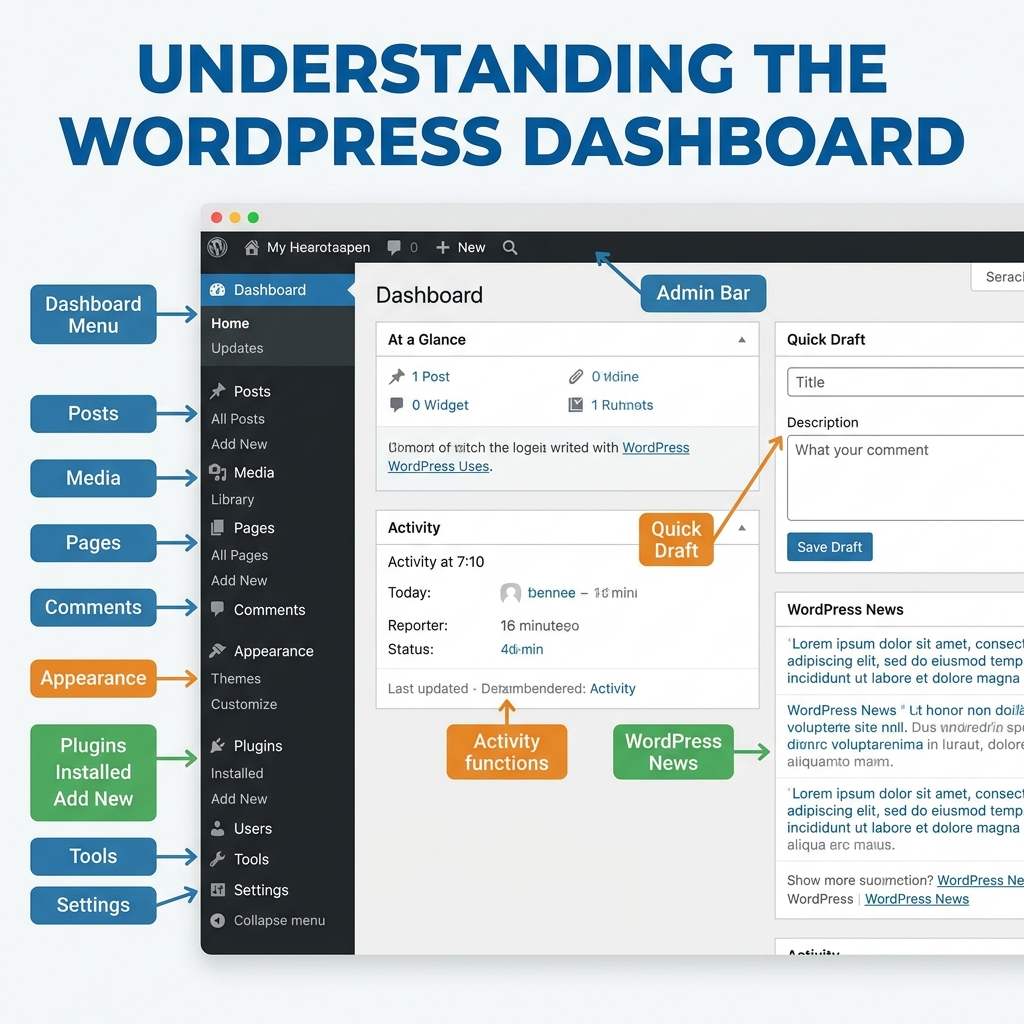
Once WordPress is installed, you can access the admin dashboard. This is the control center of your website.
The dashboard lets you manage pages, posts, images, comments, themes, plugins, users, settings, and more. At first, it may look busy, but the main sections are easy to understand.
Bài đăng
Posts are usually used for blog articles, news updates, guides, or time-based content. They can be organized with categories and tags.
Trang
Pages are used for more permanent content, such as Home, About, Services, Contact, Privacy Policy, or FAQ pages.
Phương tiện truyền thông
The Media Library stores images, videos, PDFs, and other uploaded files.
Appearance
This area controls themes, menus, widgets, and some visual customization options.
Plugin
Plugins add extra features to your website, such as contact forms, SEO tools, security features, page builders, backups, analytics, or eCommerce functions.
Cài đặt
The Settings area controls important website basics, including site title, tagline, permalink structure, reading options, comments, and general behavior.
Understanding the dashboard helps you manage the website confidently after it goes live.
Step 6: Choose the Right Theme
A WordPress theme controls the look and layout of your website. It affects typography, spacing, page structure, header design, footer design, blog layout, and overall visual style.
When choosing a theme, do not only focus on appearance. A theme should also be lightweight, responsive, regularly updated, compatible with important plugins, and easy to customize.
A good theme should support your website’s purpose. For example, a consulting website needs strong service sections and clear calls to action. A photography site needs beautiful image layouts. A store needs product-friendly design and WooCommerce compatibility.
Avoid installing a theme just because the demo looks impressive. Demo content often uses perfect images and polished layouts. Instead, ask whether the theme will work well with your real content, brand style, and long-term website needs.
Step 7: Install Essential Plugins
Plugins are one of WordPress’s biggest strengths. They allow you to add features without building everything manually.
However, more plugins do not always mean a better website. Too many plugins can slow down your site, create conflicts, or increase security risks. The goal is to install only what you truly need.
Common plugin categories include:
SEO Plugins
SEO plugins help you manage meta titles, meta descriptions, XML sitemaps, schema settings, and content optimization.
Security Plugins
Security plugins can help with login protection, malware scanning, firewall rules, and suspicious activity monitoring.
Backup Plugins
Backup plugins create copies of your website files and database. This is essential in case your site breaks, gets hacked, or loses data.
Contact Form Plugins
Contact form plugins let visitors send inquiries directly through your website.
Performance Plugins
Caching, image optimization, and database cleanup plugins can improve loading speed.
Page Builder Plugins
Page builders allow users to create custom layouts visually. They are useful for landing pages, service pages, and more advanced designs.
Before installing any plugin, check its reviews, update history, compatibility, and support quality. A plugin that has not been updated in a long time may create problems later.
Step 8: Create the Main Website Pages
Once the foundation is ready, start creating your core pages.
Most websites need several essential pages:
Home Page
The home page introduces your brand, explains what you offer, and guides visitors toward the next action. It should quickly answer three questions: Who are you? What do you provide? Why should visitors trust you?
About Page
The About page builds credibility. It can include your story, mission, values, team, experience, or brand background.
Services or Products Page
This page explains what you offer in detail. It should be clear, organized, and focused on customer benefits.
Trang Liên hệ
The Contact page should make communication easy. Include a form, email address, phone number, location, business hours, or other relevant contact details.
Blog Page
A blog can help you publish educational content, answer customer questions, and support SEO.
Legal Pages
Depending on your website, you may need Privacy Policy, Terms of Service, Cookie Policy, Refund Policy, or Shipping Policy pages.
The goal is to create a structure that helps users find information easily.
Step 9: Set Up Website Navigation
Navigation affects how visitors move through your website. A confusing menu can make users leave quickly, even if your content is good.
Your main menu should be simple and logical. Common menu items include Home, About, Services, Blog, and Contact. For larger websites, you may use dropdown menus, category pages, or footer navigation.
Avoid placing too many items in the main menu. Too many choices can overwhelm visitors. Keep the most important pages visible and easy to reach.
Footer navigation is also useful. It can include secondary links, legal pages, social media links, contact information, and newsletter signup options.
Step 10: Customize the Design
Design customization makes your website feel unique and professional.
Start with the basics: logo, colors, typography, spacing, buttons, image style, and page layout. These visual choices should support your brand identity and make the website easy to read.
Good WordPress design is not only about making a site look attractive. It should also improve usability. Text should be readable. Buttons should stand out. Images should support the message. Sections should have enough spacing. Mobile layouts should be clean and easy to scroll.
You can customize design through your theme settings, the WordPress Customizer, block editor, page builder, or custom CSS. For small design adjustments, custom CSS can be useful. For larger layout changes, a page builder or custom theme approach may be better.
Always test your design on desktop, tablet, and mobile. A website that looks good on a large screen may not work well on a phone unless it is carefully adjusted.
Step 11: Configure Important Settings
Before launching, review key WordPress settings.
Set your site title and tagline. Choose a permalink structure that uses readable URLs, such as post names. Configure the homepage display so WordPress knows which page should appear as the front page. Adjust comment settings if you have a blog. Set the correct time zone, language, and user roles.
These settings may seem small, but they affect SEO, user experience, and site management.
Step 12: Optimize for SEO
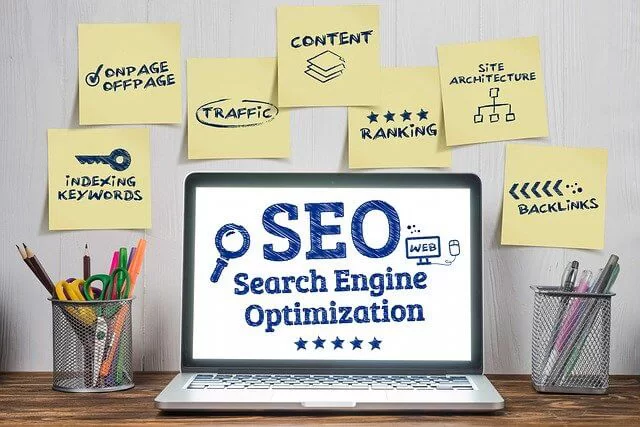
SEO helps search engines understand your website and helps users find your content.
Start with keyword research. For example, this article focuses on the keyword how to develop wordpress website. A keyword should appear naturally in the title, introduction, headings, and body content. Avoid forcing the keyword too many times.
Each important page should have a unique SEO title and meta description. Your URLs should be short and readable. Images should have descriptive file names and alt text. Internal links should connect related pages. Blog content should answer real questions from your audience.
Technical SEO is also important. Your site should load quickly, work on mobile, use HTTPS, avoid broken links, and have a sitemap.
SEO is not a one-time task. It improves over time as you publish useful content, refine pages, and build authority.
Step 13: Improve Website Speed
Website speed affects both user experience and search performance. Visitors may leave if a page takes too long to load.
To improve speed, use optimized images, reliable hosting, caching, lightweight themes, and only necessary plugins. Large images are one of the most common causes of slow WordPress websites. Compress images before uploading or use an image optimization plugin.
Caching stores parts of your website so pages can load faster for returning visitors. A content delivery network, or CDN, can also help deliver content faster to users in different regions.
Avoid installing too many heavy design effects, sliders, scripts, or plugins that add unnecessary load.
Step 14: Secure Your WordPress Website
Security should be part of every WordPress development process.
Start with strong passwords and unique admin usernames. Keep WordPress core, themes, and plugins updated. Delete unused themes and plugins. Use SSL so your website runs on HTTPS. Install a trusted security plugin if needed.
Limit login attempts, monitor suspicious activity, and create regular backups. Security does not guarantee that nothing will ever go wrong, but it greatly reduces risk.
Step 15: Create a Backup System
Backups protect your website from mistakes, hacks, server problems, plugin conflicts, and accidental deletion.
A complete backup should include both website files and the database. Files contain your themes, plugins, images, and uploads. The database contains posts, pages, settings, users, and other important content.
You can create backups through your hosting provider or with a backup plugin. Ideally, backups should be automatic and stored in a safe location outside the main website server.
Before making major updates or design changes, create a fresh backup. This gives you a restore point if something breaks.
Step 16: Test Before Launch
Before publishing your WordPress website, test everything carefully.
Check every main page. Test contact forms. Click menu links. Review mobile layouts. Make sure buttons work. Check spelling and grammar. Confirm that images load correctly. Test website speed. Review SEO titles and meta descriptions. Make sure your SSL certificate works and the site loads with HTTPS.
Also test the website from a visitor’s point of view. Is the message clear? Is the next step obvious? Is the website easy to navigate? Does it build trust?
Launching without testing can lead to avoidable problems. A careful review helps create a smoother first impression.
Step 17: Maintain the Website After Launch
A WordPress website is not finished after it goes live. It needs regular maintenance.
Update WordPress, themes, and plugins. Monitor backups. Check for broken links. Review website speed. Remove spam comments. Refresh outdated content. Add new blog posts or pages when needed. Watch analytics to understand how visitors use the site.
Maintenance keeps your website healthy, secure, and useful. A neglected website can become slow, outdated, or vulnerable.
Phần kết luận
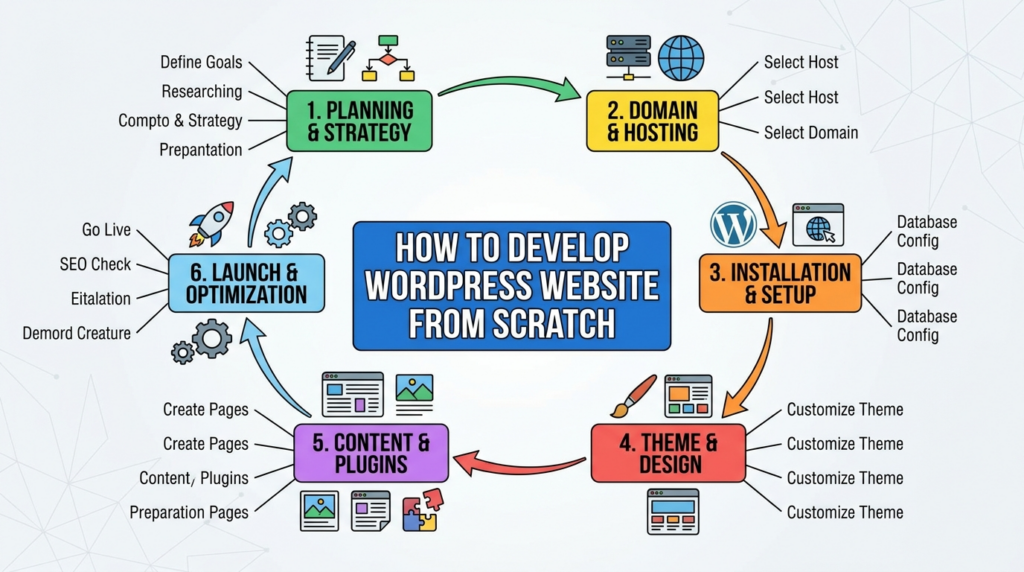
Understanding how to develop wordpress website becomes much easier when you view the process as a series of connected steps. First, define the website’s purpose and audience. Then choose a domain, select reliable hosting, install WordPress, and learn the dashboard. After that, choose a suitable theme, install only the plugins you need, create core pages, organize navigation, and customize the design.
Once the site structure is ready, focus on SEO, speed, security, backups, testing, and long-term maintenance. WordPress is powerful because it gives users both simplicity and flexibility. With the right planning and careful setup, it can support many types of websites, from small personal blogs to professional business platforms.
Câu hỏi thường gặp
1. What is the first step to develop a WordPress website?
The first step is planning. You need to define your website goal, target audience, page structure, content needs, and main features before choosing hosting, themes, or plugins.
2. Do I need coding skills to build a WordPress website?
No, you can build a basic WordPress website without coding. WordPress themes, plugins, and page builders allow you to create pages, menus, forms, and layouts through visual tools.
3. What do I need before installing WordPress?
You need a domain name, web hosting, an SSL certificate, and access to your hosting control panel. Many hosting providers also offer one-click WordPress installation.
4. Which plugins are important for a WordPress website?
Common essential plugins include SEO plugins, security plugins, backup plugins, contact form plugins, performance optimization plugins, and image compression plugins.
5. How can I make my WordPress website faster?
You can improve speed by using reliable hosting, compressing images, enabling caching, choosing a lightweight theme, reducing unnecessary plugins, and using a CDN when needed.
6. How often should I maintain my WordPress website?
You should maintain your WordPress website regularly. Check updates, backups, security, page speed, broken links, and outdated content at least once a month.