












Введение
Shopify Он создан для продаж — это совершенно очевидно.
По умолчанию каждый товар, который вы добавляете в свой магазин, предназначен для того, чтобы подтолкнуть посетителей к покупке.
Но что, если это так? нет что вы хотите?
Многие продавцы на Shopify рано или поздно сталкиваются с ситуациями, когда товары должны быть видны, но не доступны для покупки. Возможно, вы готовитесь к запуску нового продукта, демонстрируете каталог, продаете товары только оптом или просто представляете товары для ознакомления.
Именно здесь концепция товаров, предназначенных только для просмотра, становится крайне важной.
В этом руководстве мы объясним, как сделать так, чтобы товары отображались только на Shopify, почему продавцы выбирают этот вариант и какой подход лучше всего подходит в зависимости от структуры вашего магазина, уровня технических знаний и долгосрочных целей.
Никакого профессионального жаргона. Никаких допущений. Только понятные объяснения и практические рекомендации.
Что означает "Только для просмотра" в Shopify?
Товар, доступный только для просмотра, — это товар, который покупатели могут увидеть (включая изображения, описание, цену и характеристики), но не могут добавить в корзину или совершить покупку.
В большинстве случаев это означает:
- Кнопка «Добавить в корзину» скрыта, отключена или заменена.
- Оформление заказа для этого товара недоступно.
- Страница товара по-прежнему функционирует как страница с контентом или справочная страница.
Важно отметить, что в Shopify нет встроенной функции “только для просмотра”.
Таким образом, для достижения этой цели необходима целенаправленная настройка.
Зачем вам нужно, чтобы товары были доступны только для просмотра?
Прежде чем переходить к методам, важно понять следующее: почему Продавцы используют товары, доступные только для просмотра. Причина определяет оптимальное решение.
Типичные сценарии использования
1. Продукты на этапе подготовки к запуску
Вы хотите анонсировать будущие товары, не принимая пока решения о покупке.
2. Оптовые или B2B каталоги
Товары отображаются, но для определения цены или совершения покупки требуется одобрение.
3. Товары, изготовленные на заказ или по индивидуальному заказу.
Товары, по которым перед заказом требуется консультация.
4. Товары, которых нет в наличии или которые сняты с производства.
Вам по-прежнему необходимо, чтобы они были проиндексированы, доступны для поиска или на них ссылались.
5. Портфолио или демонстрация бренда
Использование Shopify в качестве каталога товаров, а не магазина с автоматической оплатой.
Для каждого из этих сценариев требуется несколько иная настройка.
Основные принципы перед началом работы
При изучении того, как сделать товары доступными только для просмотра в Shopify, помните о следующих принципах:
- В Shopify по умолчанию оформление заказа происходит в первую очередь.
- Универсального переключателя “отключить покупку” не существует.
- Решения варьируются от простых настроек административной панели до логики на уровне темы оформления.
- Наилучший метод зависит от:
- Гибкость темы
- Технические навыки
- Масштаб магазина
- Вопросы SEO
Давайте рассмотрим наиболее практичные подходы.
Метод 1: Удаление кнопки «Добавить в корзину» (в зависимости от темы оформления)
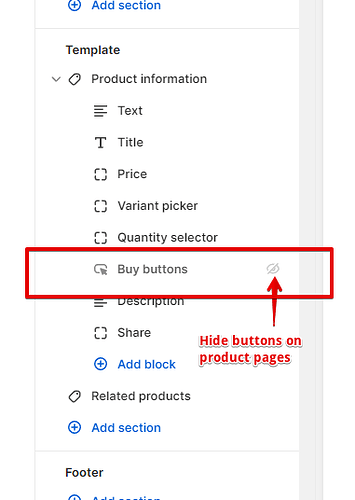
Это наиболее распространенный и гибкий подход.
Как это работает
Вы изменяете свою тему следующим образом:
- Кнопка «Добавить в корзину» скрыта или неактивна.
- Страница товара по-прежнему загружается в обычном режиме.
- Клиенты могут просмотреть весь контент, относящийся к товару.
Когда этот метод является наилучшим
- Вы хотите получить полный контроль над презентацией.
- Вас волнует SEO и индексация страниц?
- Вам нужно, чтобы отображение было доступно только для отдельных товаров, а не для всего магазина.
Типичная логика реализации
Большинство тем Shopify включают условную логику, например:
- Наличие товара
- Метки товаров
- Типы продукции
- Метаполя
Используя эти условия, можно сказать:
“Если этот товар помечен как ”только для просмотра», скройте кнопку «Добавить в корзину».”
Это позволяет вам:
- Сохраните возможность покупки обычных товаров.
- Применять статус «только для просмотра» выборочно
Плюсы
- Чистый клиентский опыт
- Никаких дополнительных приложений
- SEO-оптимизированный
- Полностью настраиваемый
Минусы
- Требуется редактирование темы или помощь разработчика.
- В разных темах оформления кнопки устроены по-разному.
Метод 2: Использование настроек доступности продукта
Это самый простой подход, но и самый ограниченный.
Как это работает
Ты:
- Удалите весь инвентарь.
- Отключить доступность товара во всех каналах продаж.
Страница товара остается видимой, но оформление заказа невозможно.
Когда это работает хорошо
- Временные ситуации
- Товары, которых нет в наличии.
- Минимальные требования к индивидуальной настройке.
Ограничения
- “Может появиться сообщение ”Все распродано».
- Не идеально подходит для целенаправленной презентации каталога.
- Ограниченный контроль над сообщениями пользователей.
Этот метод технически работает, но зачастую он скорее вносит путаницу, чем вносит ясность.
Метод 3: Замена кнопки «Добавить в корзину» на пользовательское сообщение.
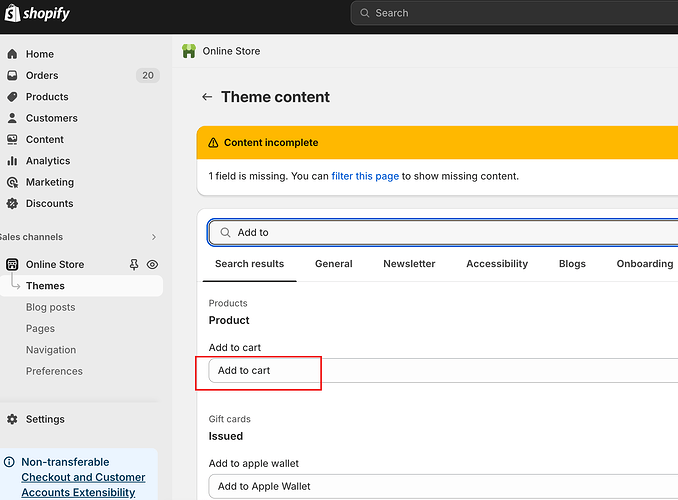
Вместо того чтобы скрывать действия по покупке, вы их заменяете.
Примеры
- “Свяжитесь с нами для уточнения цен”
- “Требуется доступ для оптовой торговли”
- “Скоро запуск”
- “Запросить ценовое предложение”
Как это обычно делается
- Скрыть кнопку «Добавить в корзину»
- Вставьте пользовательскую кнопку или сообщение.
- Ссылка на:
- Форма обратной связи
- Регистрация оптовых покупателей
- Запрос по электронной почте
Почему этот метод популярен
Это не просто исключает возможность покупки — это перенаправляет намерения.
Посетители понимают почему Они не могут купить, и что им делать дальше?.
Метод 4: Использование приложений Shopify
Существуют приложения, специально разработанные для управления видимостью товаров и ограничениями на покупки.
Общие функции приложения
- Скрыть кнопки «Добавить в корзину»
- Доступ к продуктам возможен только после авторизации.
- Ограничение покупок по группам клиентов
- Отображать каталоги только для просмотра
Когда приложения имеют смысл
- Магазины B2B или оптовые магазины
- Нетехнические торговцы
- Большие каталоги продукции
- Сложная сегментация клиентов
Компромиссы
- Ежемесячные платежи
- Влияние на производительность
- Зависимость от обновлений сторонних разработчиков.
Приложения могут быть очень полезными, но они не всегда необходимы.
Метод 5: Создание структуры магазина, ориентированной только на каталог товаров.
Некоторые продавцы идут еще дальше и проектируют свои магазины Shopify, ориентируясь в первую очередь на каталог товаров.
Что это значит
- Страницы товаров функционируют как целевые страницы.
- Акцент на:
- Визуальные материалы
- Технические характеристики
- Варианты использования
- Покупка осуществляется в офлайн-режиме или посредством запроса информации.
Такой подход распространен в:
- Высококачественная продукция, изготовленная на заказ.
- Производственные или OEM-бренды
- Сценарии трансграничного B2B-взаимодействия
Для этого требуется продуманный дизайн, а не просто технические решения.
SEO-аспекты для товаров, доступных только для просмотра

Одна из самых больших ошибок, которые допускают продавцы, — это предположение, что товары, доступные только для просмотра, вредят SEO.
В действительности, при правильном применении они могут помочь.
Передовые методы
- Обеспечьте индексацию страниц товаров.
- Используйте описательное описание продукта.
- Избегайте тупиковых ситуаций, когда все билеты распроданы.
- Замените призывы к действию (CTA) для совершения покупки на информационные призывы к действию или призывы к действию для генерации лидов.
Поисковым системам не важно, можно ли купить товар — им важно, полезен ли он.
Выбор подходящего метода для вашего магазина
Вот упрощенное руководство по принятию решений:
- Временно? → Настройки доступности
- Необходим выборочный контроль? → Логика темы
- Оптовый или закрытый доступ? → Приложения или маркировка клиентов
- Брендовый каталог или B2B? → Индивидуальный дизайн только для просмотра
Единого “лучшего” решения не существует — есть только то, которое подходит именно для ваших целей.
Распространенные ошибки, которых следует избегать
- Удаление кнопки «Добавить в корзину» без объяснения причин.
- Блокировка оформления заказа, но при этом наличие вводящих в заблуждение призывов к действию.
- Использование приложений там, где достаточно простой логики.
- Игнорирование мобильных версий макета
- Забывая о влиянии SEO
Режим "только для просмотра" должен восприниматься как продуманный, а не как недостаток.
Заключительные мысли
Научиться настраивать отображение товаров только на Shopify — это не значит лишать покупателей возможности совершать покупки, а значит контролировать процесс покупки.
Независимо от того, готовите ли вы запуск нового продукта, создаете оптовый каталог или меняете позиционирование своего бренда, Shopify достаточно гибок, чтобы поддержать это — при условии правильной настройки.
Главное — правильное выравнивание:
- Техническая настройка
- Опыт проектирования
- Деловые намерения
Как мы можем помочь
На сайте АИРСАНГ, Именно такие задачи мы и решаем.
Мы работаем с международными брендами, чтобы:
- Создавайте магазины Shopify, соответствующие реальным бизнес-моделям.
- Внедрите структуры «только для просмотра», «оптовая торговля» и «сначала каталог».
- Баланс преобразования, ясность и масштабируемость в долгосрочной перспективе
Если ваш Shopify Если вашему магазину нужно демонстрировать товары, не продавая их напрямую, или продавать их по-другому, мы с удовольствием поможем вам разработать оптимальное решение.


Спроектируем и создадим для вас WordPress-сайт или корпоративный сайт с полной системой электронной коммерции.
Ценовой диапазон: от $200.00 до $2,500.00Нестандартные требования или специальные предложения
Первоначальная цена составляла: $2.00.$1.00Текущая цена: $1.00. Не слишком ли много 50 плагинов для интернет-магазина на WordPress?
Понимание реального влияния на производительность Наличие 50 плагинов на сайте электронной коммерции WordPress не является автоматической проблемой. На самом деле, само по себе их количество редко определяет производительность.....

Дизайн основного изображения для конвертации помады на Amazon.
Введение: Разработка главного образа помады, которая продается на Amazon Когда мы разрабатываем главный образ для помады Amazon, наша ответственность выходит далеко за рамки...

Как хакеры крадут электронные письма администраторов WordPress (и как им это предотвратить)
Начнем с неприятной истины: ваша электронная почта администратора WordPress, вероятно, гораздо более публична, чем вы думаете. А хакеры? Им это нравится. Для них ваш...

Что делает основное изображение жидкой тональной основы Amazon конвертируемым?
Введение. Разработка дизайна основного изображения для жидкой тональной основы на Amazon — это не просто создание красивого внешнего вида продукта. На Amazon основное изображение и...

Разработка эффективного основного изображения Amazon для фильтрующих картриджей
Введение. Разработка основного изображения для Amazon — это не просто создание привлекательного внешнего вида товара. Речь идёт о ясности, доверии и мгновенном понимании, особенно для...

Повторные атаки на WordPress: реальная угроза или преувеличенный миф?
Давайте сначала кое-что проясним. Атаки повторного воспроизведения не выглядят страшно. Они не взламывают пароли. Они не внедряют вредоносный код с зелёным хакерским текстом, разлетающимся повсюду. Они действуют коварно...

Как скопировать страницы WordPress, ничего не сломав
Давайте посмотрим правде в глаза. Иногда вам не хочется создавать новую страницу. Вам нужна та же самая страница… но немного другая. Тот же макет. Те же блоки. Те же настройки. Потому что….

Сравнение пяти тем WordPress для сайтов о домашних животных
Введение. Выбор подходящей темы WordPress для сайтов, посвященных домашним животным, — это не просто решение, связанное с дизайном; оно напрямую влияет на удобство использования, масштабируемость и долгосрочный рост бизнеса. Уход за домашними животными и...

Сравнение пяти тем оформления для интернет-магазинов купальников
Введение. Выбор правильной тематики для независимого магазина купальников или нижнего белья — это не просто визуальное решение, оно напрямую влияет на коэффициент конверсии, масштабируемость и долгосрочную перспективу...

Как отключить комментарии в WordPress (не сойдя с ума)
Давайте поговорим о комментариях в WordPress. В теории комментарии — это здорово. Они стимулируют дискуссии. Они создают сообщество. Они делают ваш сайт “живым”. А на практике? Зачастую они притягивают...

Ошибка WordPress 500: когда ваш сайт начинает паниковать
Ваш сайт WordPress ещё минуту назад работал нормально. Вы обновили страницу. И вдруг — бац 💥 — ошибка 500 Internal Server Error. Никаких объяснений. Никаких извинений. Просто холодное, непонятное сообщение, которое, по сути...

Как связаться со службой поддержки Shopify: простое и понятное руководство
Управление магазином Shopify должно приносить удовольствие, а не путаницу. Когда возникают вопросы или проблемы замедляют вашу работу, Shopify предлагает несколько вариантов поддержки в зависимости от ситуации...

Как деактивировать магазин Shopify: понятное и практичное руководство
Деактивация магазина Shopify — несложная процедура, но она влечет за собой последствия, которые многие продавцы упускают из виду. В этом руководстве процесс описан простым и понятным языком...

Сравнение пяти тематических магазинов обуви
Введение. Выбор правильной тематики для независимого магазина, специализирующегося на обуви, — это не просто визуальное решение, оно напрямую влияет на масштабируемость, повседневную работу и долгосрочные показатели конверсии...

Shopify против Etsy: решающее противостояние в онлайн-торговле
Введение: Две платформы заходят в бар… Если бы Shopify и Etsy были людьми, Etsy был бы тем очаровательным другом, у которого уже есть место в….

Ваш сайт на Shopify или WordPress взломан? Вот что нужно делать.
Введение: Цифровой эквивалент пробуждения и разбитого окна. Представьте, что вы просыпаетесь, берете утренний кофе, открываете ноутбук… и обнаруживаете свой веб-сайт….

Как запустить магазин Shopify, не сойдя с ума
Создание магазина на Shopify звучит заманчиво. Вы представляете, как пьёте кофе в полдень, проверяете уведомления о распродажах и между делом говорите друзьям: “Да, мой магазин неплохо продаётся...».

Shopify — это легитимный сервис? Пошаговое руководство для начинающих онлайн-продавцов.
Если вы изучаете платформы для электронной коммерции, скорее всего, вы ввели в Google один очень конкретный вопрос: является ли Shopify легитимной платформой? Этот вопрос вполне обоснован. Запуск...