












Введение
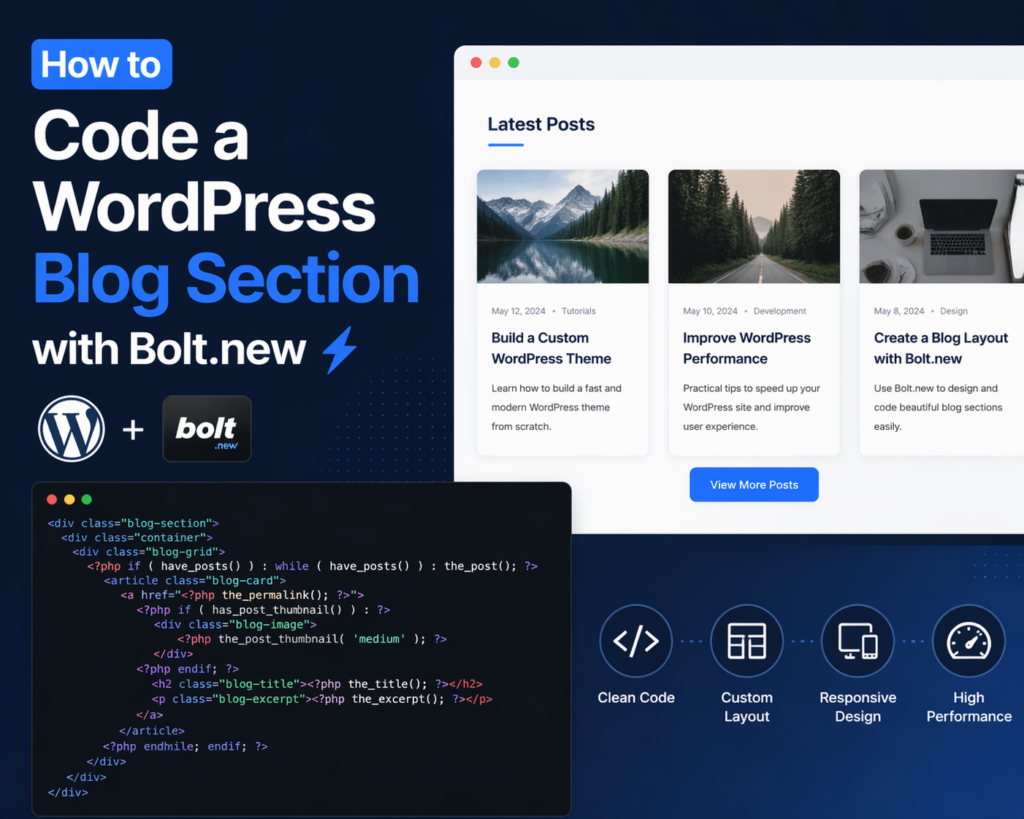
Building a modern, high-performing blog section is one of the most effective ways to enhance a WordPress website. Whether you’re aiming to improve SEO, increase engagement, or organize content more efficiently, a well-structured blog section plays a critical role. In recent years, tools like Bolt.new have made it easier to streamline development workflows, even for those who are not deeply technical.
In this guide, we’ll break down how to code a WordPress blog section with Bolt.new in a clear, beginner-friendly way. Instead of diving into overly complex development jargon, this article explains the process step by step, helping you understand both the logic and the practical implementation.
What Is Bolt.new and Why Use It?

Before diving into the coding process, it’s important to understand what Bolt.new is and why it matters.
Bolt.new is a modern development tool designed to simplify how developers and designers create components, layouts, and structured sections for websites. It allows you to quickly generate, test, and refine UI components—like a blog section—without starting from scratch every time.
Key Benefits
- Faster development workflow
- Clean, reusable code structure
- Easier customization for design-focused users
- Reduced reliance on heavy frameworks
For WordPress users, this means you can design a blog section that is both visually appealing and performance-friendly, without getting stuck in complex backend logic.
Understanding a WordPress Blog Section Structure
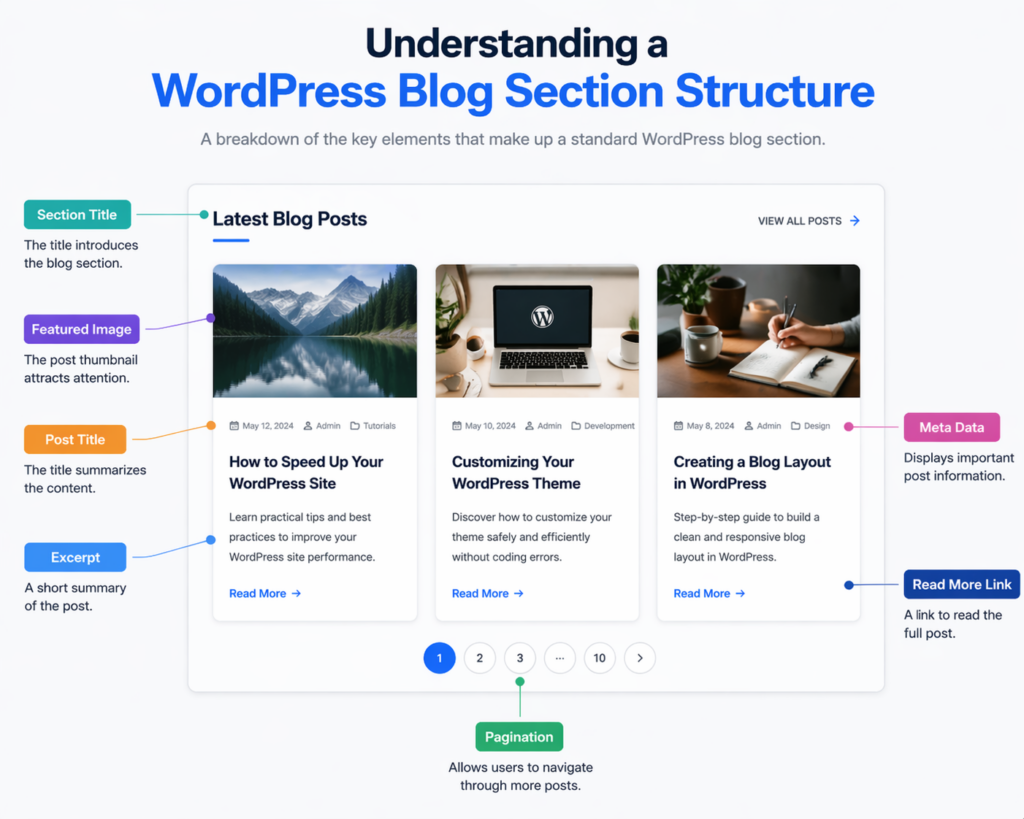
Before writing any code, you need to understand what a typical blog section includes. Most WordPress blog sections consist of:
- A container layout (grid or list)
- Featured images
- Post titles
- Excerpts or summaries
- Metadata (date, author, category)
- Pagination or load-more functionality
The goal is to organize these elements in a way that improves readability and user experience.
Step 1: Setting Up Your WordPress Environment
To begin coding your blog section, make sure your WordPress setup is ready.
Requirements
- A working WordPress installation
- Access to theme files (via FTP or dashboard)
- A child theme (recommended to avoid overwriting changes)
Using a child theme ensures your custom blog section won’t be lost during theme updates.
Step 2: Designing the Blog Layout with Bolt.new
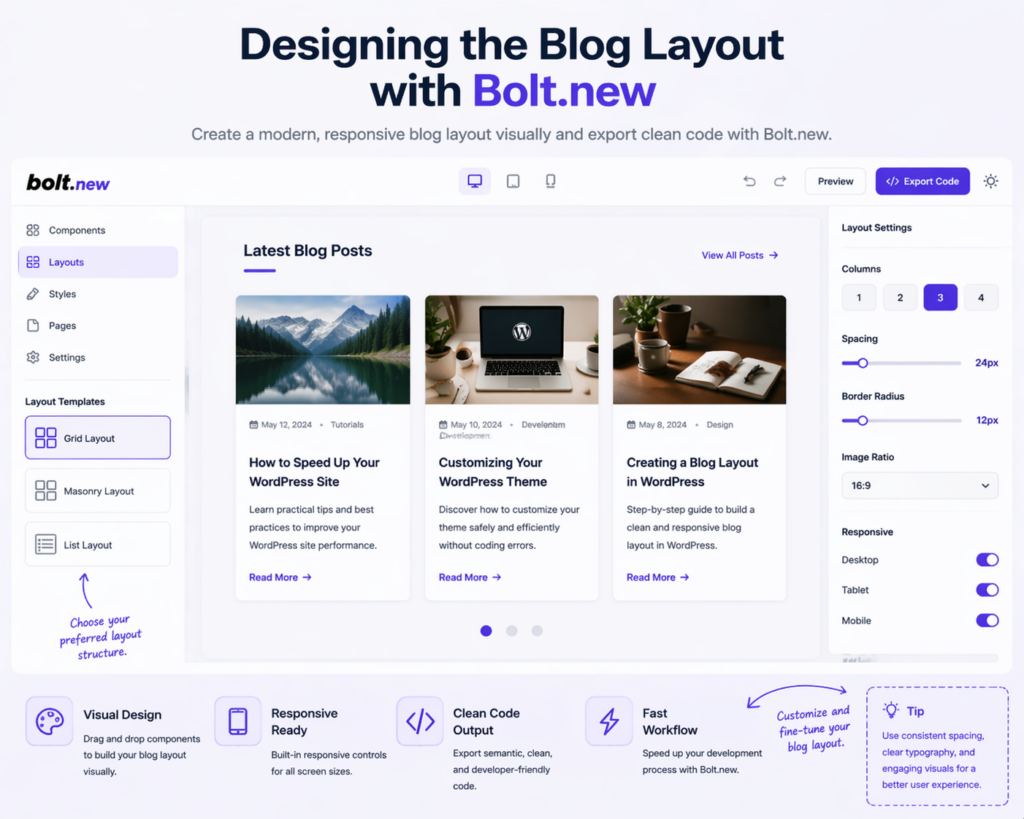
Bolt.new is particularly useful at the design stage. Instead of coding blindly, you can first structure your layout visually.
Common Layout Options
- Grid layout (popular for modern blogs)
- Masonry layout (dynamic, Pinterest-style)
- List layout (classic blog style)
For most use cases, a responsive grid layout works best because it balances readability and visual hierarchy.
Design Tips
- Keep spacing consistent
- Use clear typography hierarchy
- Ensure mobile responsiveness
- Avoid cluttered layouts
Bolt.new allows you to preview these structures quickly, helping you finalize your layout before moving into WordPress coding.
Step 3: Creating the Blog Section Template
Now it’s time to translate your design into WordPress code.
You’ll typically create or edit a template file such as:
home.phparchive.php- or a custom template like
blog-section.php
Basic Structure Example
<div class="blog-section">
  <div class="container">
    <div class="blog-grid">
      <?php if ( have_posts() ) : while ( have_posts() ) : the_post(); ?>
        <article class="blog-card">
          <a href="/ru/</?php the_permalink(); ?>">
            <?php if ( has_post_thumbnail() ) : ?>
              <div class="blog-image">
                <?php the_post_thumbnail('medium'); ?>
              </div>
            <?php endif; ?>
            <h2 class="blog-title"><?php the_title(); ?></h2>
          </a>
          <p class="blog-excerpt"><?php the_excerpt(); ?></p>
        </article>
      <?php endwhile; endif; ?>
    </div>
  </div>
</div>
This is the foundation of your blog section. It pulls posts dynamically and displays them in a structured format.
Step 4: Styling the Blog Section (CSS)
Once the structure is in place, styling becomes essential.
Example CSS
.blog-section {
  padding: 60px 0;
}.blog-grid {
  display: grid;
  grid-template-columns: repeat(3, 1fr);
  gap: 30px;
}.blog-card {
  background: #fff;
  border-radius: 12px;
  overflow: hidden;
  transition: transform 0.3s ease;
}.blog-card:hover {
  transform: translateY(-5px);
}.blog-title {
  font-size: 20px;
  margin: 15px;
}.blog-excerpt {
  font-size: 14px;
  margin: 0 15px 20px;
}
Responsive Optimization
@media (max-width: 768px) {
  .blog-grid {
    grid-template-columns: 1fr;
  }
}
A responsive layout ensures your blog section performs well across all devices, which is crucial for both user experience and SEO.
Step 5: Enhancing Functionality with Bolt.new Logic
Bolt.new isn’t just about layout—it also helps you think in modular components.
You can break your blog section into reusable parts:
- Blog card component
- Image component
- Meta info component
This modular approach makes future updates much easier.
Example Improvements
- Add category filters
- Implement “Load More” button
- Include hover effects
- Add animations for engagement
Step 6: Adding Pagination or Load More
A blog section needs navigation for multiple posts.
Basic Pagination
<div class="pagination">
  <?php the_posts_pagination(); ?>
</div>
Load More (Optional)
Using AJAX for “Load More” improves user experience by avoiding full page reloads.
Step 7: Optimizing for SEO and Performance
A blog section isn’t just about design—it must also perform well.
SEO Best Practices
- Use proper heading tags (H1, H2, H3)
- Optimize image sizes
- Include descriptive alt text
- Ensure fast loading speed
Performance Tips
- Use lightweight CSS
- Avoid unnecessary scripts
- Enable caching
- Compress images
Step 8: Testing and Refinement
After building your blog section, testing is critical.
What to Check
- Адаптивность для мобильных устройств
- Loading speed
- Неработающие ссылки
- Layout consistency
Tools like browser developer tools can help you debug and refine the design.
Распространенные ошибки, которых следует избегать
When learning how to code a WordPress blog section with Bolt.new, beginners often make these mistakes:
- Overcomplicating the layout
- Ignoring mobile design
- Using too many plugins instead of clean code
- Not optimizing images
- Skipping testing phase
Keeping your design simple and structured usually leads to better results.
Почему этот подход работает
Using Bolt.new alongside WordPress provides a balanced workflow:
- Design-first thinking ensures better user experience
- Clean coding structure improves maintainability
- Modular components allow easy updates
- Performance-focused layout enhances SEO
This combination is especially powerful for designers who want more control without diving too deep into backend development.
Заключение
Learning how to code a WordPress blog section with Bolt.new doesn’t have to be overwhelming. By breaking the process into clear steps—planning the layout, structuring the template, styling the design, and optimizing performance—you can build a blog section that is both functional and visually appealing.
Bolt.new simplifies the design process, while WordPress handles content management, making the two a strong combination. Focus on clarity, responsiveness, and performance, and your blog section will not only look great but also deliver real results in terms of user engagement and search visibility.
Часто задаваемые вопросы
Bolt.new is a modern tool that helps streamline the process of designing and coding website components. It allows users to visually build layouts and generate clean code, making it easier to create WordPress blog sections efficiently.
Basic knowledge of HTML, CSS, and WordPress templates is helpful, but Bolt.new simplifies the process, making it accessible even for beginners who want to build structured blog layouts.
Common files include home.php, archive.php, or custom template files like blog-section.php. These templates control how blog posts are displayed on your site.
You can use CSS Grid or Flexbox along with media queries to ensure your blog layout adapts smoothly to different screen sizes, including mobile and tablet devices.
Yes, Bolt.new allows you to create custom layouts such as grid, list, or masonry styles, and then export clean code that can be integrated into your WordPress theme.
Focus on fast loading speed, clean design, proper heading structure, optimized images, and mobile responsiveness to improve both user experience and SEO performance.


Спроектируем и создадим для вас WordPress-сайт или корпоративный сайт с полной системой электронной коммерции.
Ценовой диапазон: от $200.00 до $2,500.00custom-requirements-or-special-quotations
Первоначальная цена составляла: $2.00.$1.00Текущая цена: $1.00. Не слишком ли много 50 плагинов для интернет-магазина на WordPress?
Понимание реального влияния на производительность Наличие 50 плагинов на сайте электронной коммерции WordPress не является автоматической проблемой. На самом деле, само по себе их количество редко определяет производительность.....

Дизайн главного изображения для домашнего физиотерапевтического устройства Amazon: пояснения.
Введение: Создание достоверного изображения для домашних терапевтических приборов на Amazon При разработке главного изображения для домашнего терапевтического прибора на Amazon мы в первую очередь...

Дизайн основного изображения для конвертации помады на Amazon.
Введение: Разработка главного образа помады, которая продается на Amazon Когда мы разрабатываем главный образ для помады Amazon, наша ответственность выходит далеко за рамки...

Как хакеры крадут электронные письма администраторов WordPress (и как им это предотвратить)
Начнем с неприятной истины: ваша электронная почта администратора WordPress, вероятно, гораздо более публична, чем вы думаете. А хакеры? Им это нравится. Для них ваш...

Что делает основное изображение жидкой тональной основы Amazon конвертируемым?
Введение. Разработка дизайна основного изображения для жидкой тональной основы на Amazon — это не просто создание красивого внешнего вида продукта. На Amazon основное изображение и...

Разработка эффективного основного изображения Amazon для фильтрующих картриджей
Введение. Разработка основного изображения для Amazon — это не просто создание привлекательного внешнего вида товара. Речь идёт о ясности, доверии и мгновенном понимании, особенно для...

Повторные атаки на WordPress: реальная угроза или преувеличенный миф?
Давайте сначала кое-что проясним. Атаки повторного воспроизведения не выглядят страшно. Они не взламывают пароли. Они не внедряют вредоносный код с зелёным хакерским текстом, разлетающимся повсюду. Они действуют коварно...

Как скопировать страницы WordPress, ничего не сломав
Давайте посмотрим правде в глаза. Иногда вам не хочется создавать новую страницу. Вам нужна та же самая страница… но немного другая. Тот же макет. Те же блоки. Те же настройки. Потому что….

Сравнение пяти тем WordPress для сайтов о домашних животных
Введение. Выбор подходящей темы WordPress для сайтов, посвященных домашним животным, — это не просто решение, связанное с дизайном; оно напрямую влияет на удобство использования, масштабируемость и долгосрочный рост бизнеса. Уход за домашними животными и...

Сравнение пяти тем оформления для интернет-магазинов купальников
Введение. Выбор правильной тематики для независимого магазина купальников или нижнего белья — это не просто визуальное решение, оно напрямую влияет на коэффициент конверсии, масштабируемость и долгосрочную перспективу...

Как отключить комментарии в WordPress (не сойдя с ума)
Давайте поговорим о комментариях в WordPress. В теории комментарии — это здорово. Они стимулируют дискуссии. Они создают сообщество. Они делают ваш сайт “живым”. А на практике? Зачастую они притягивают...

Ошибка WordPress 500: когда ваш сайт начинает паниковать
Ваш сайт WordPress ещё минуту назад работал нормально. Вы обновили страницу. И вдруг — бац 💥 — ошибка 500 Internal Server Error. Никаких объяснений. Никаких извинений. Просто холодное, непонятное сообщение, которое, по сути...

Создание масштабируемого веб-сайта на WordPress для научно-ориентированного бренда: проект AminoUSA
Введение. В современном цифровом пространстве веб-сайт — это больше, чем просто место для размещения информации о товарах. Для научно-ориентированных брендов, работающих в регулируемых или научно-исследовательских отраслях, это….

Создание масштабируемого магазина Shopify для глобального бренда ножей: проект CoolKatana
Введение. В трансграничной электронной коммерции веб-сайт Shopify — это больше, чем просто витрина магазина. Для брендов, работающих в нишевых, ориентированных на культуру категориях, веб-сайт должен делать гораздо больше, чем...

Разработка высокоэффективного магазина Shopify для карточек Pokémon.
Введение. В мире электронной коммерции коллекционных товаров, особенно на рынке коллекционных карточных игр Pokémon, веб-сайт должен делать больше, чем просто перечислять товары...

Высокоэффективный дизайн Shopify для индивидуального бренда стационарной торговой точки.
Введение. В условиях современной конкурентной среды электронной коммерции, особенно в сегменте персонализированных подарков и коллекционных товаров, веб-сайт на платформе Shopify должен делать гораздо больше, чем просто отображать товары. Он...

Как связаться со службой поддержки Shopify: простое и понятное руководство
Управление магазином Shopify должно приносить удовольствие, а не путаницу. Когда возникают вопросы или проблемы замедляют вашу работу, Shopify предлагает несколько вариантов поддержки в зависимости от ситуации...

Как деактивировать магазин Shopify: понятное и практичное руководство
Деактивация магазина Shopify — несложная процедура, но она влечет за собой последствия, которые многие продавцы упускают из виду. В этом руководстве процесс описан простым и понятным языком...