












소개
쇼피파이 is built to sell — that much is clear.
By default, every product you add to your store is designed to move visitors toward a purchase.
But what if that’s ~ 아니다 what you want?
Many Shopify merchants eventually run into situations where products should be visible but not purchasable. Maybe you’re preparing a launch, showcasing a catalog, selling wholesale-only items, or simply presenting products for reference.
This is where the concept of view-only products becomes essential.
In this guide, we’ll explain how to make products view only on Shopify, why merchants choose to do this, and which approach works best depending on your store structure, technical comfort level, and long-term goals.
No jargon. No assumptions. Just clear explanations and practical guidance.
What Does “View Only” Mean on Shopify?
A view-only product is a product that customers can see — including images, descriptions, pricing, and specifications — but cannot add to cart or purchase.
In most cases, this means:
- The Add to Cart button is hidden, disabled, or replaced
- Checkout is not accessible for that product
- The product page still functions as a content or reference page
Importantly, Shopify does not have a built-in “view only” toggle.
So achieving this requires intentional configuration.
Why Would You Want Products to Be View Only?
Before jumping into methods, it’s important to understand 왜 merchants use view-only products. The reason determines the best solution.
Common Use Cases
1. Pre-Launch Products
You want to tease upcoming products without allowing purchases yet.
2. Wholesale or B2B Catalogs
Products are visible, but pricing or purchasing requires approval.
3. Custom or Quote-Based Items
Products that require consultation before ordering.
4. Out-of-Stock or Discontinued Items
You still want them indexed, searchable, or referenced.
5. Portfolio or Brand Showcase
Using Shopify as a catalog rather than a checkout-driven store.
Each of these scenarios calls for a slightly different setup.
Key Principles Before You Start
When learning how to make products view only on Shopify, keep these principles in mind:
- Shopify is checkout-first by default
- There is no universal “disable purchase” switch
- Solutions range from simple admin settings to theme-level logic
- The best method depends on:
- Theme flexibility
- Technical skill
- Store scale
- SEO considerations
Let’s walk through the most practical approaches.
Method 1: Removing the Add to Cart Button (Theme-Based)
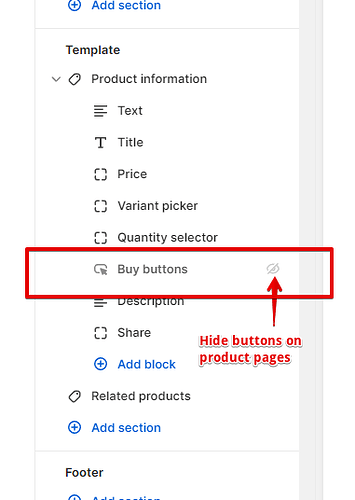
This is the most common and most flexible approach.
작동 방식
You modify your theme so that:
- The Add to Cart button is hidden or disabled
- The product page still loads normally
- Customers can view all product content
When This Method Is Best
- You want full control over presentation
- You care about SEO and page indexing
- You want view-only behavior on specific products, not the entire store
Typical Implementation Logic
Most Shopify themes include conditional logic like:
- Product availability
- Product tags
- 제품 유형
- Metafields
By using these conditions, you can say:
“If this product is tagged as view-only, hide the Add to Cart button.”
This allows you to:
- Keep normal products fully purchasable
- Apply view-only status selectively
장점
- Clean customer experience
- No extra apps
- SEO-friendly
- Fully customizable
단점
- Requires theme editing or developer help
- Different themes structure buttons differently
Method 2: Using Product Availability Settings
This is the simplest approach, but also the most limited.
작동 방식
You:
- Remove all inventory
- Disable product availability across sales channels
The product page remains visible, but checkout isn’t possible.
When This Works Well
- Temporary situations
- Out-of-stock displays
- Minimal customization needs
제한 사항
- “Sold out” messaging may appear
- Not ideal for intentional catalog presentation
- Limited control over user messaging
This method technically works, but it often creates confusion rather than clarity.
Method 3: Replacing Add to Cart with Custom Messaging
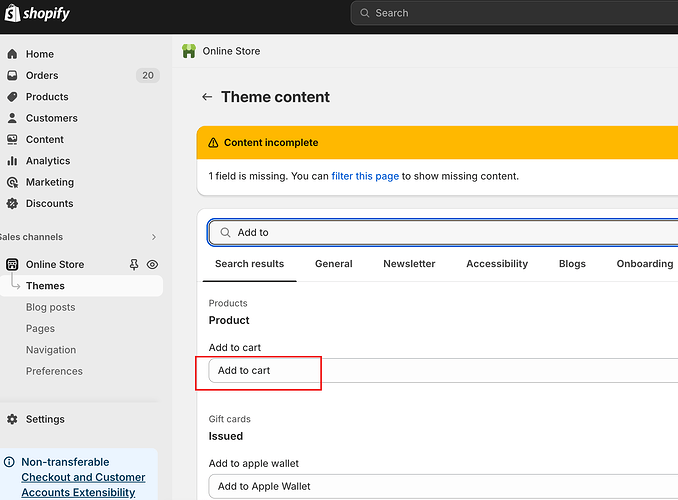
Instead of hiding purchase actions, you replace them.
Examples
- “Contact us for pricing”
- “Wholesale access required”
- “Launching soon”
- “Request a quote”
How This Is Typically Done
- Hide Add to Cart button
- Insert a custom button or message
- Link to:
- 문의 양식
- Wholesale signup
- Email inquiry
Why This Method Is Popular
It doesn’t just remove purchasing — it redirects intent.
Visitors understand 왜 they can’t buy and what to do next.
Method 4: Using Shopify Apps
There are apps designed specifically to manage product visibility and purchase restrictions.
Common App Features
- Hide Add to Cart buttons
- Lock products behind login
- Restrict purchasing by customer group
- Display view-only catalogs
When Apps Make Sense
- B2B or wholesale stores
- Non-technical merchants
- Large product catalogs
- Complex customer segmentation
Trade-Offs
- Monthly fees
- Performance impact
- Dependency on third-party updates
Apps can be powerful, but they are not always necessary.
Method 5: Creating a Catalog-Only Store Structure
Some merchants go a step further and design their Shopify store as a catalog-first experience.
What This Means
- Product pages function like landing pages
- Emphasis on:
- Visuals
- Specs
- Use cases
- Purchasing happens offline or via inquiry
This approach is common in:
- High-value custom products
- Manufacturing or OEM brands
- Cross-border B2B scenarios
It requires thoughtful design, not just technical switches.
SEO Considerations for View-Only Products

One of the biggest mistakes merchants make is assuming view-only products hurt SEO.
In reality, they can help when done correctly.
Best Practices
- Keep product pages indexable
- Use descriptive product content
- Avoid “sold out” dead ends
- Replace purchase CTAs with informational or lead-generation CTAs
Search engines don’t care if a product is purchasable — they care if it’s useful.
Choosing the Right Method for Your Store
Here’s a simplified decision guide:
- Just temporary? → Availability settings
- Selective control needed? → Theme logic
- Wholesale or gated access? → Apps or customer tagging
- Brand catalog or B2B? → Custom view-only design
There is no single “best” solution — only the right one for your goals.
흔히 저지르는 실수들을 피하는 방법
- Removing Add to Cart without explanation
- Blocking checkout but leaving confusing CTAs
- Using apps when simple logic would suffice
- Ignoring mobile layouts
- Forgetting SEO impact
View-only should feel intentional, not broken.
마지막으로
Learning how to make products view only on Shopify isn’t about disabling sales — it’s about controlling the buying journey.
Whether you’re preparing a launch, building a wholesale catalog, or positioning your brand differently, Shopify is flexible enough to support it — when configured correctly.
The key is aligning:
- Technical setup
- Design experience
- Business intent
How We Can Help
에서 AIRSANG, this is exactly the kind of challenge we solve.
We work with cross-border brands to:
- Design Shopify stores that match real business models
- Implement view-only, wholesale, and catalog-first structures
- Balance conversion, clarity, and long-term scalability
만약 당신이 쇼피파이 store needs to show products without selling them — or sell them differently — we’d be happy to help you design the right solution.


완전한 전자상거래 시스템을 갖춘 워드프레스 웹사이트 또는 기업 사이트를 디자인하고 구축하세요.
가격 범위: $200.00~$2,500.00사용자 지정 요구 사항 또는 특별 견적
원래 가격: $2.00.$1.00현재 가격: $1.00. 워드프레스 전자상거래 쇼핑몰에 플러그인 50개는 너무 많은 걸까요?
실제 성능에 미치는 영향 이해하기 워드프레스 전자상거래 사이트에 50개의 플러그인이 있다고 해서 자동으로 문제가 되는 것은 아닙니다. 사실 그 숫자만으로 성능이 결정되는 경우는 거의 없습니다....

아마존 립스틱 전환을 위한 메인 이미지 디자인
소개: 소개: 아마존에서 판매되는 립스틱 메인 이미지 디자인하기 아마존 립스틱의 메인 이미지를 디자인할 때 우리의 책임은 그 이상입니다.

해커들이 워드프레스 관리자 이메일을 훔치는 방법(그리고 이를 막는 방법)
불편한 진실부터 말씀드리자면, 워드프레스 관리자 이메일은 생각보다 훨씬 더 많이 공개되어 있습니다. 그들은 그것을 좋아합니다. 해커에게 여러분의...

아마존 리퀴드 파운데이션 메인 이미지 변환의 특징은 무엇일까요?
서론 아마존 리퀴드 파운데이션의 메인 이미지 디자인은 단순히 제품을 아름답게 보이게 하는 것만이 아닙니다. 아마존에서 메인 이미지와...

필터 카트리지 제품을 위한 효과적인 아마존 메인 이미지 디자인하기
서론 아마존 메인 이미지 디자인은 단순히 제품을 매력적으로 보이게 하는 것만이 아닙니다. 명확성, 신뢰, 그리고 즉각적인 이해를 제공하는 것이 중요합니다. 특히...

워드프레스에 대한 리플레이 공격: 실제 위협인가, 과장된 신화인가?
먼저 한 가지를 분명히 해두죠. 리플레이 공격은 겉보기에 무섭지 않습니다. 비밀번호를 날려버리지도 않고, 초록색 해커 텍스트가 사방에 흩날리는 악성 코드를 주입하지도 않습니다. 그저 교묘하게 이루어질 뿐입니다.

WordPress 페이지를 손상 없이 복제하는 방법
솔직히 말해봅시다. 때로는 새 페이지를 만들고 싶지 않을 때가 있죠. 그냥 기존 페이지를 약간만 다르게 하고 싶을 때가 있어요. 레이아웃도, 블록도, 설정도 그대로요. 왜냐하면...

반려동물 관련 워드프레스 테마 5가지 비교
서론 반려동물 관련 워드프레스 테마를 선택하는 것은 단순한 디자인 결정 이상의 의미를 지닙니다. 사용성, 확장성, 그리고 장기적인 비즈니스 성장에 직접적인 영향을 미치기 때문입니다. 반려동물 관리 및 관련...

수영복 온라인 쇼핑몰 테마 5가지 비교
서론 수영복이나 란제리 독립 매장에 적합한 테마를 선택하는 것은 단순히 시각적인 결정에 그치는 것이 아니라, 전환율, 확장성, 그리고 장기적인 성공에 직접적인 영향을 미칩니다.

워드프레스에서 댓글 기능을 끄는 방법 (정신줄 놓지 않고)
워드프레스 댓글에 대해 이야기해 봅시다. 이론적으로 댓글은 훌륭합니다. 토론을 장려하고, 커뮤니티를 형성하며, 웹사이트에 생동감을 불어넣습니다. 하지만 현실은 어떨까요? 댓글은 종종 문제를 야기하기도 합니다...

워드프레스 500 오류: 웹사이트가 갑자기 오류를 일으킬 때
방금 전까지만 해도 워드프레스 사이트는 아무 문제 없었는데, 페이지를 새로고침하자마자 갑자기 💥 500 내부 서버 오류가 발생했습니다. 아무런 설명도, 사과도 없이 그저 차갑고 혼란스러운 메시지만 남았습니다.

Shopify 고객 지원팀에 문의하는 방법: 간단하고 스트레스 없는 가이드
쇼피파이 스토어 운영은 흥미진진해야지 혼란스러워서는 안 됩니다. 궁금한 점이 생기거나 문제가 발생하여 진행이 늦어질 때, 쇼피파이는 상황에 따라 다양한 지원 경로를 제공합니다.

쇼피파이 스토어 비활성화 방법: 명확하고 실용적인 가이드
쇼피파이 스토어를 비활성화하는 것은 복잡하지 않지만, 많은 판매자가 간과하는 몇 가지 결과가 따릅니다. 이 가이드에서는 비활성화 과정을 간단하고 유익하게 설명합니다.

신발 매장 테마 5가지 비교
서론: 신발 전문 독립 매장에 적합한 테마를 선택하는 것은 단순히 시각적인 결정에 그치는 것이 아니라, 매장 확장성, 일상적인 운영, 그리고 장기적인 전환율에 직접적인 영향을 미칩니다.

쇼피파이 vs. 에tsy: 궁극의 온라인 판매 대결
서론: 두 플랫폼이 술집에 들어갔다… 쇼피파이와 에츠이를 사람에 비유하자면, 에츠이는 이미 어느 행사장에 부스를 차려놓은 매력적인 친구와 같을 것이다….

Shopify 또는 WordPress 사이트가 해킹당했나요? 해결 방법은 다음과 같습니다.
서론: 깨진 창문을 마주한 것과 같은 디지털 세상 상상해 보세요. 아침에 일어나 커피를 마시고 노트북을 켰는데… 웹사이트가 깨져 있는 모습을 발견하는 겁니다….

정신줄 놓지 않고 쇼피파이 스토어 시작하는 방법
쇼피파이 스토어를 시작하는 건 꽤 멋진 일처럼 들립니다. 점심에 커피를 마시며 판매 알림을 확인하고, 친구들에게 "내 스토어가 꽤 잘 됐어..."라고 태연하게 말하는 모습을 상상하게 되죠.

쇼피파이는 믿을 만한 플랫폼일까요? 온라인 판매 초보자를 위한 명확한 가이드
전자상거래 플랫폼을 알아보고 있다면, 구글에 아주 구체적인 질문 하나를 입력해 봤을 가능성이 높습니다. 바로 "쇼피파이는 믿을 만한 플랫폼일까?"라는 질문이죠. 이 질문은 지극히 당연합니다. 온라인 쇼핑몰을 시작하려면...