








When developing an enterprise website, the team often first asks “Which CMS is the best to use?” This question is too broad: a foreign trade official website targeting customer inquiries, a content portal co-managed by multiple departments, and an event page that takes two weeks to go online have different priorities. What really affects subsequent costs is usually who maintains the content, who expands the functionality, whether the website can be migrated, and who is responsible for security and updates after it goes online. This article puts WordPress, Joomla, Drupal, Squarespace and Wix under the same decision-making framework to help you narrow down your choices first and then verify them with a pilot.
First confirm what the website is going to do, and then choose a CMS
The basic mission of a content management system is to enable teams without programming backgrounds to create, edit, review, and publish pages. Before choosing, write down the main tasks of the website: Is it to maintain a regular corporate page, continue to publish articles, operate a member community, or process products and orders? These jobs have different requirements for permissions, data structures, and scaling methods. All five platforms can get a website online, but it is the editing and maintenance process after it goes online that determines whether it is suitable for long-term use.
Enterprise page and content portal
If the official website contains product, solution, recruitment and multiple regional pages, at least test the column permissions, media library, site search and multi-language version. Asking the marketing department, product manager, and administrator to complete one modification each will provide a better judgment than just looking at the supplier’s demo homepage. As the number of pages increases, unified templates and review processes will also affect maintenance costs.
Blog, News & Knowledge Content
Websites that regularly publish articles need clear classification, author permissions, draft review, internal linking and sharing processes. This type of project tests whether the entire process of an article from writing to updating: title, picture description, link, and mobile presentation can be completed independently by the editor. If every release relies on development, the so-called ease of use will only remain in the demonstration stage.
Community and User Content
Forums, member communities and submission sites not only publish the company’s own content, but also manage user profiles, comments, reports, audits and privacy requirements. Once content is created by external users, permissions and anti-abuse mechanisms become more important than template selection. First list what content can be made public, who can review it, and how to deal with violation information, and then determine whether the ready-made extension can cover it.
E-commerce and multi-merchant marketplace
Sales websites have additional considerations for merchandise, inventory, payments, logistics, taxes, refunds, and customer data. The multi-merchant model also involves merchant entry, account sharing and platform rules. Don’t think that the business process has been solved just because a platform “supports stores”; you should take a real order and go through payment, delivery and after-sales, and then check the cost and data export method.
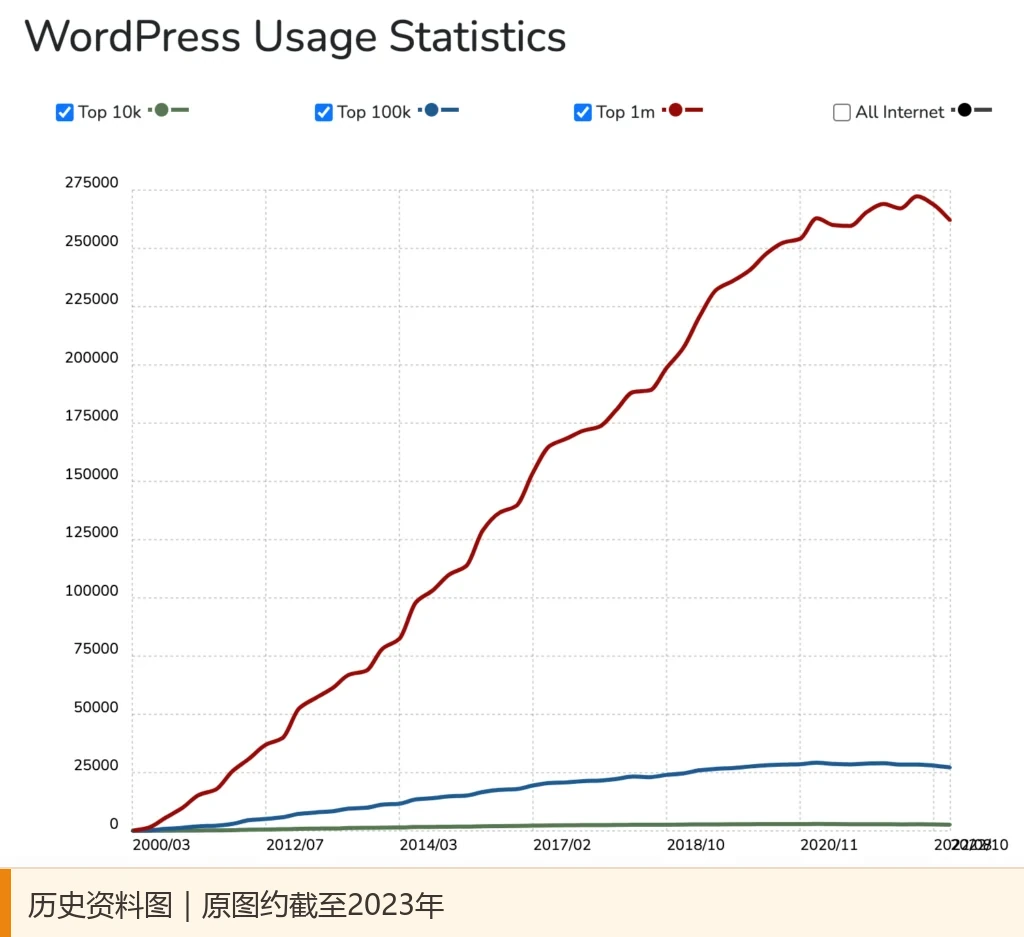
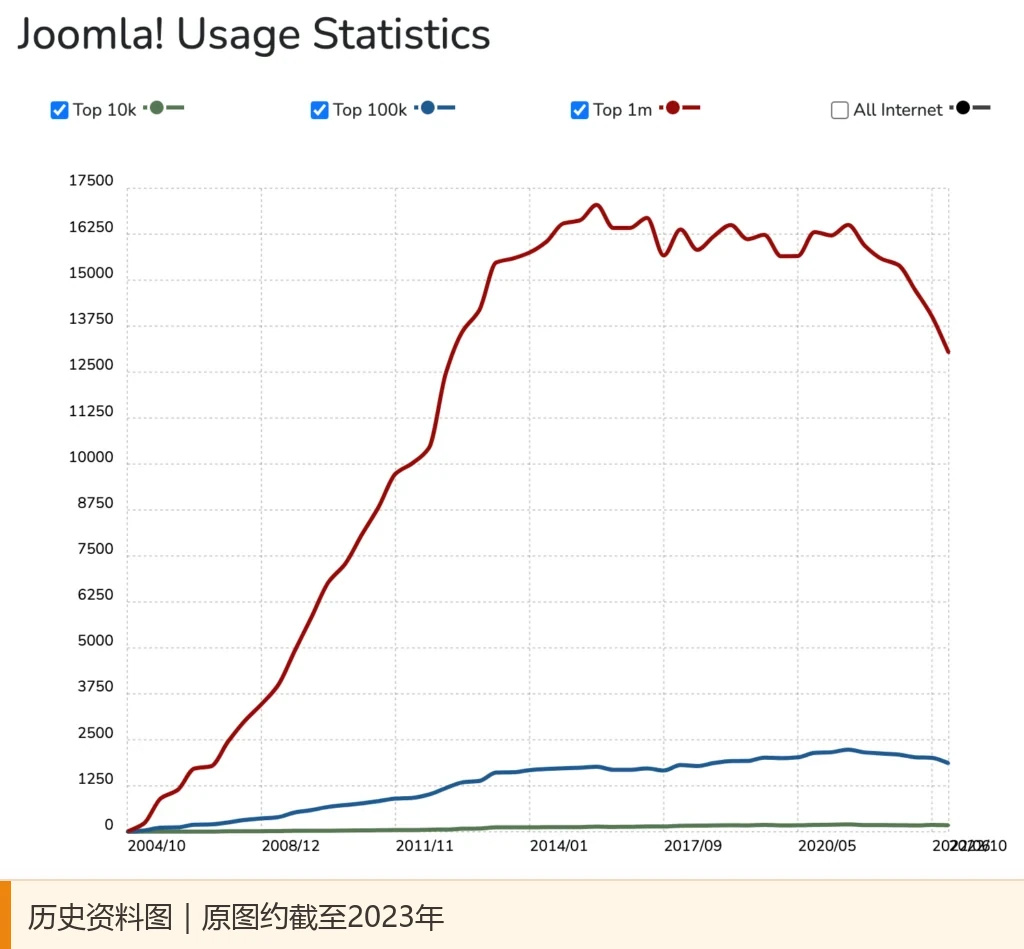
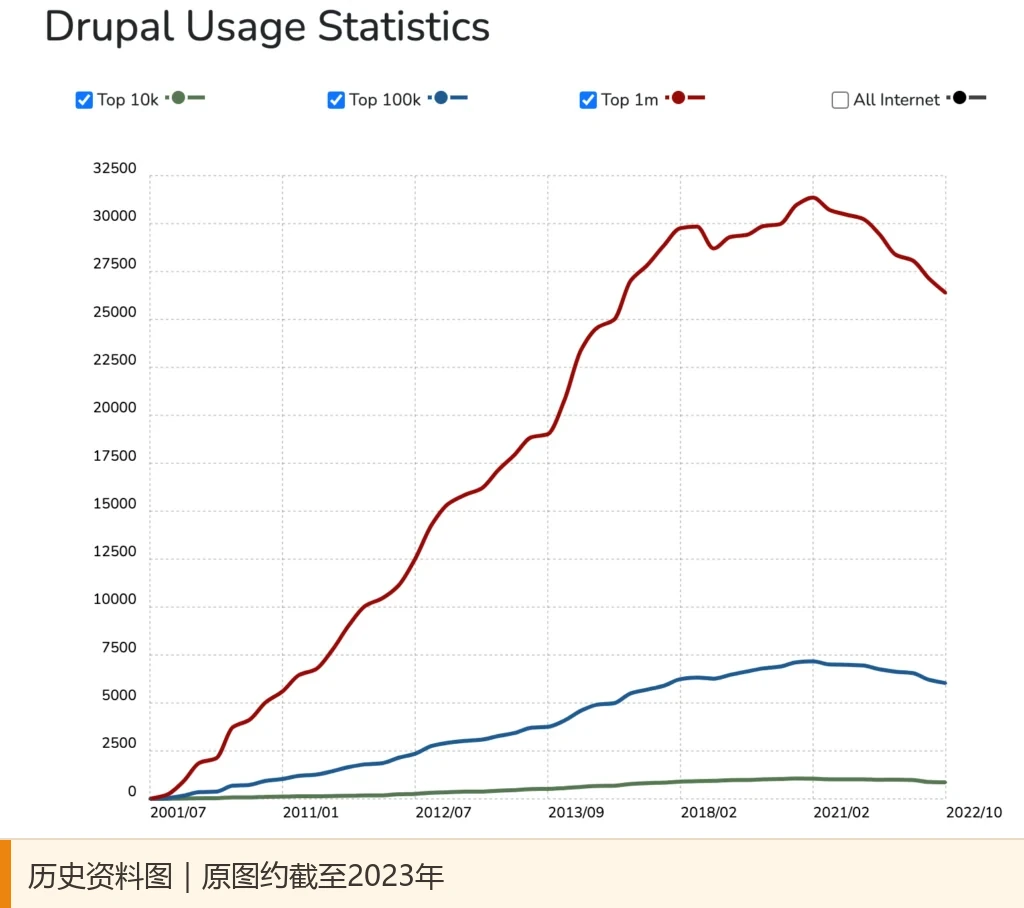
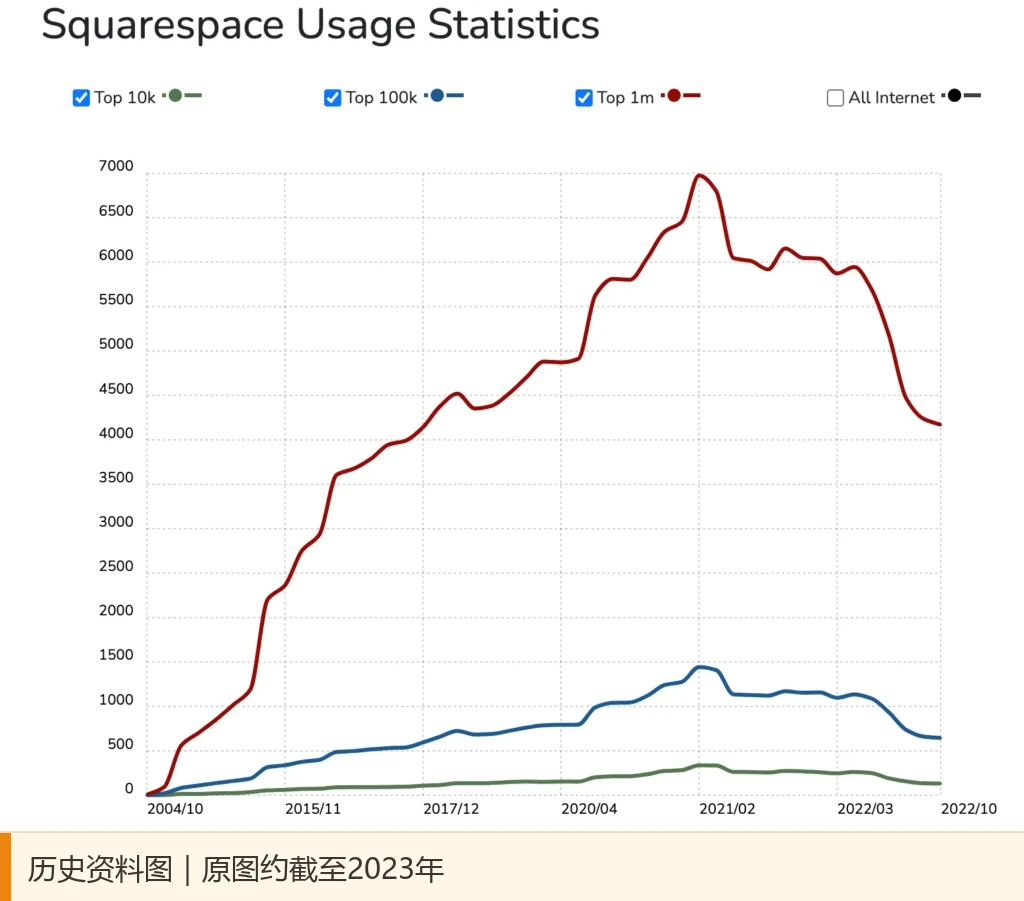
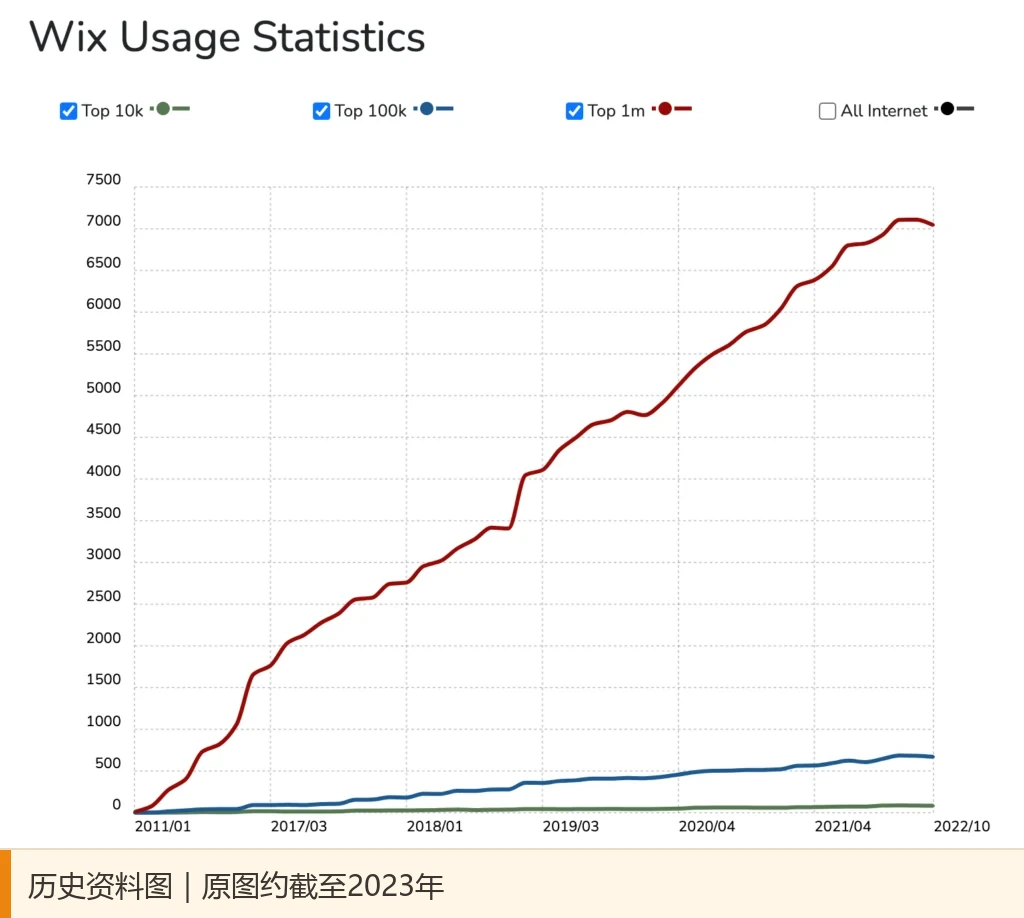
Picture description: The five usage trend charts in this article follow the authorized historical data of the original text. The curves end approximately in 2023. They only help to understand the comparison method of the original text and do not represent the market share or the number of websites in 2026.
First distinguish: open source CMS and hosted website development platform
“Open source” and “cloud” are not mutually exclusive terms; open source software can also be hosted by service providers. What needs to be distinguished here is the responsibility for software and website operation. WordPress.org, Joomla, and Drupal offer open source software that you can deploy and modify yourself; Squarespace and Wix combine editors, hosting, and updates into managed services. The former usually gives enterprises more deployment and development options, while requiring clear hosting, backup, update and security responsibilities; the latter lowers the initial operation and maintenance threshold, but requires advance homework on functional boundaries and migration methods. The official platform documentation explains respectively WordPress Software Freedom and Extension Mechanism 、 Joomla’s open source and multilingual capabilities , and Wix websites need to run on their servers 。
First write down three boundaries: whether to connect to the business system, how to migrate the data, and who is responsible for maintenance.
How Five Platforms Compare: Look at How They Work, Not the “Best” Label
| 플랫폼 | Delivery method | Suitable for first verification needs | Check before signing |
|---|---|---|---|
| WordPress.org | Open source software, host or hosting provider of your choice | Content marketing, corporate official website, plug-in extension | Plug-in dependencies, backup and update responsibilities |
| Joomla | Open source software, optional deployment | Multilingualism, Permissions and Portal Content | Team editing habits, extended maintenance |
| Drupal | Open source software; Core is different from pre-configured CMS products | Complex content structure, approval, system integration | Implementation team, content model, and ongoing governance |
| Squarespace | Managed website development services | Display website, small editorial staff | Export scope, store and special page migration |
| 윅스 | Managed website development services | Quick test page and small team maintenance | Platform dependencies, functions and package boundaries |
The table above is not a performance or SEO ranking. Speed, security, and search performance depend on configuration and maintenance. Open source software “free to download” does not mean that the website costs zero: design, development, hosting, backup and maintenance still require budget. Comparable to AIRSANG International business website website development cost and budget guide Estimate total investment.
WordPress: Businesses with increasing content and expansion needs
Its advantage lies in the wide selection of content types, themes and extensions, making it suitable for incorporating corporate official websites, topics and blogs into ongoing operations plans. The editorial team can quickly get started with basic releases, but the more personalized features there are, the more it is necessary to limit plug-in sources, test updates, and maintain backups. A distinction should be made here between WordPress.org open source software and various hosting plans: under the same name, the hosting, permissions and maintenance responsibilities may be different. If you want to open a store, you must separately confirm the e-commerce expansion, payment area and order process.
If your company plans to continuously publish industry articles, product pages, and multilingual content, WordPress’ theme, block editing, and plug-in mechanisms give the team more room for combination. It is suitable for organizations that are willing to operate the website as a long-term asset, but need to establish a plugin inventory, test environment and update process. When selecting, ask the supplier to demonstrate: editing an article, adjusting navigation, exporting content, and how to roll back after plug-in conflicts. If it is mainly for foreign trade customer inquiries, the host location, access speed and subsequent maintenance should also be evaluated together. You can refer to WordPress foreign trade website host selection guide 。
Joomla: Want to organize multiple languages and permissions in one backend
Joomla has a relatively complete idea of column organization, user groups and language versions, and is suitable for websites maintained by different teams. When choosing it, you should not only look at “can the page be translated”, but also how the menus, modules and articles correspond between languages, and whether it is easy for authorized editors to understand the backend. Extensions can also increase capabilities, but compatible versions, maintenance frequency and handover documentation should be checked first. If the company does not have long-term supporters who are familiar with Joomla, follow-up training time must be factored into the budget.
Joomla officially lists multi-language, scalability, and multi-user content management as its capabilities. What makes it worthy of being on the shortlist is that the company has clear language versions, column owners and review roles. The real verification is not to look at the function list, but to let different positions edit one page each: whether the Chinese editor can only change Chinese, whether the regional manager can check the local page, and whether the administrator can track the modifications. This organizational advantage may also turn into training and transition costs if the partner vendor lacks experience in ongoing maintenance of Joomla.
Drupal: Complex content and governance processes, but differentiate between Core and Drupal CMS
Drupal is good at splitting articles, product information, people, regions and other content into reusable fields, and then managing them with permissions and workflow. Large organizations may benefit from this, but the content relationships need to be clearly drawn in the early stage and configured by the implementation team. When evaluating, don’t just let developers demo the backend; let editors try out new content, submit for review, fix bugs, and batch updates. If the team only needs a simple display station, a complex model will increase the initial investment.
When a website has multiple content types, granular permissions, approval processes, or system integrations, Drupal is worth evaluating. It should be noted that today’s Drupal is not the same as the blank framework that only developers can use in the old impression: Drupal officially differentiates Drupal Core from Drupal CMS for content and marketing teams , which provides preconfigured functionality and visual editing. If the requirement is only a dozen pages of display station, there is no need to purchase complex implementations for complexity that does not yet exist. First try it out with a real content workflow, and then compare the investment in implementation and maintenance.

Squarespace vs. Wix: Verify speed first, also confirm exit path
Squarespace is often used for visual presentations, portfolios, and small business websites; Wix provides visual construction and faster prototype testing. The two leave a lot of basic maintenance to the platform, reducing the work of building a self-built server, but there are still differences in page editing methods, available applications, payment and migration scope. Please use your own brand materials to create a mobile page, a form and a content export respectively. Do not use the same “hosting platform” label to replace the actual trial.
For projects with a small number of personnel to maintain, a relatively fixed page structure, and rapid market validation, hosting services allow the team to deal with less server and core software updates. But “being able to export content” does not mean “being able to move the website as is”. Official export instructions from Squarespace Lists exportable and non-exportable content, including some store and special page restrictions; Wix official description The website needs to run on its server. If you want to migrate in the future, first list the products, blogs, forms, images and URLs, and then confirm the available methods one by one. Do not say “we will talk about it later”.

Cloud hosting vs. open source software: Control vs. responsibility
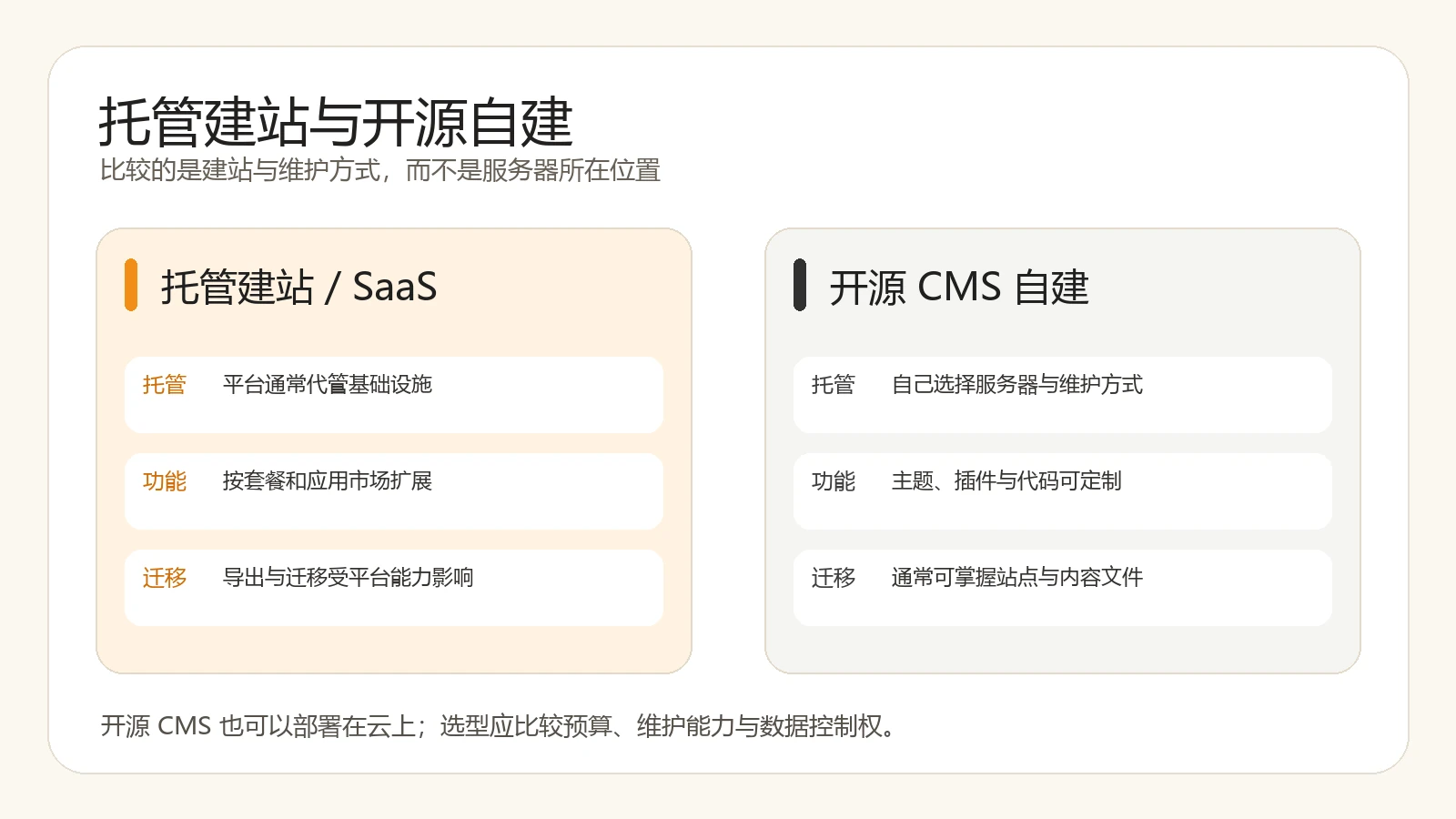
The original article compares cloud services and open source at the end. This reminder is worth retaining, but the two concepts are not in the same dimension: open source describes software licensing and modifiability, and cloud describes operation and delivery methods. Open source CMS can be deployed on cloud hosts, or you can purchase hosting services; hosted website development platforms usually put hosting, editors and updates in the same service. When comparing, four questions were asked: who can obtain the code and content, who can handle faults, who can modify the functions, and what is the cost of leaving the existing platform. It’s more useful to have the answers written into the contract and handover checklist than to argue about “free versus paid.”
Do three small tests before signing a contract to avoid discovering problems only after migration
1. Let business personnel complete an update independently
Select a piece of real product information and require non-developers to complete uploading images, modifying copy, setting links, and submitting for review. Record the time spent and the number of calls for help. If the background demonstration can only be operated by the service provider, it cannot prove that the team can maintain it in the future.
2. Take a copy of the available content backup
Export samples of article, product, media, and form data to check that files are complete, images are still accessible, and original URLs and meta information are preserved. The export range varies by platform and function, and should be subject to the official instructions and actual testing of the version used. Write “who keeps the backup, how long it will be kept, and whether it can be restored in another environment” into the delivery list.
3. Use the same demand to estimate the total cost for two years
List design and development, platform subscription or hosting, paid extensions, maintenance, training and migration reservations separately. Low subscription does not automatically mean low total cost, nor does open source being free automatically mean low total cost. The comparison is about who bears what responsibilities under the same goal and the same workload, rather than just looking at the first-year quotation. When you need to refine the website development plan into a list of pages and functions, you can start from Differences between WordPress and Shopify for foreign trade websites To further understand the cost structure of different business models; this article focuses on two platforms, and the judgment of the five platforms in this article is still based on actual demand testing.
Conclusion: Choose a platform that can be used by the team for a long time and can be handed over clearly
There is no “best CMS” for every business. If you need sustainable content and scalability, you can try WordPress first; if multi-language and role collaboration is clear, you can incorporate Joomla into the demonstration; if the content model, approval and system integration are complex, evaluate Drupal Core or Drupal CMS; if the page is light, goes online quickly, and accepts hosting boundaries, compare Squarespace and Wix. In the end, three things determine the choice: whether the actual editing task is smooth, whether the total cost of two years is affordable, and whether the content and data can be handed over as agreed. Do a small-scale pilot first, and then decide on the technology platform for the complete website.