











 Japanese
導入
Shopify is built to sell — that much is clear.
By default, every product you add to your store is designed to move visitors toward a purchase.
But what if that’s ない what you want?
Many Shopify merchants eventually run into situations where products should be visible but not purchasable. Maybe you’re preparing a launch, showcasing a catalog, selling wholesale-only items, or simply presenting products for reference.
This is where the concept of view-only products becomes essential.
In this guide, we’ll explain how to make products view only on Shopify, why merchants choose to do this, and which approach works best depending on your store structure, technical comfort level, and long-term goals.
No jargon. No assumptions. Just clear explanations and practical guidance.
What Does “View Only” Mean on Shopify?
A view-only product is a product that customers can see — including images, descriptions, pricing, and specifications — but cannot add to cart or purchase.
In most cases, this means:
- The Add to Cart button is hidden, disabled, or replaced
- Checkout is not accessible for that product
- The product page still functions as a content or reference page
Importantly, Shopify does not have a built-in “view only” toggle.
So achieving this requires intentional configuration.
Why Would You Want Products to Be View Only?
Before jumping into methods, it’s important to understand なぜ merchants use view-only products. The reason determines the best solution.
Common Use Cases
1. Pre-Launch Products
You want to tease upcoming products without allowing purchases yet.
2. Wholesale or B2B Catalogs
Products are visible, but pricing or purchasing requires approval.
3. Custom or Quote-Based Items
Products that require consultation before ordering.
4. Out-of-Stock or Discontinued Items
You still want them indexed, searchable, or referenced.
5. Portfolio or Brand Showcase
Using Shopify as a catalog rather than a checkout-driven store.
Each of these scenarios calls for a slightly different setup.
Key Principles Before You Start
When learning how to make products view only on Shopify, keep these principles in mind:
- Shopify is checkout-first by default
- There is no universal “disable purchase” switch
- Solutions range from simple admin settings to theme-level logic
- The best method depends on:
- Theme flexibility
- Technical skill
- Store scale
- SEO considerations
Let’s walk through the most practical approaches.
Method 1: Removing the Add to Cart Button (Theme-Based)
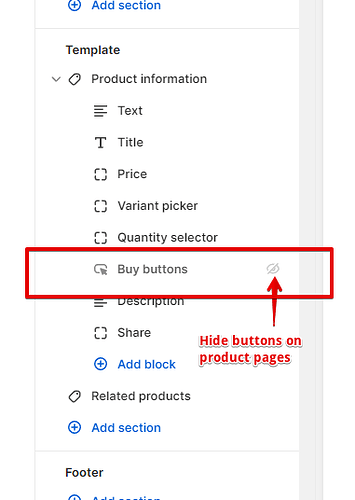
This is the most common and most flexible approach.
仕組み
You modify your theme so that:
- The Add to Cart button is hidden or disabled
- The product page still loads normally
- Customers can view all product content
When This Method Is Best
- You want full control over presentation
- You care about SEO and page indexing
- You want view-only behavior on specific products, not the entire store
Typical Implementation Logic
Most Shopify themes include conditional logic like:
- Product availability
- Product tags
- 製品タイプ
- Metafields
By using these conditions, you can say:
“If this product is tagged as view-only, hide the Add to Cart button.”
This allows you to:
- Keep normal products fully purchasable
- Apply view-only status selectively
長所
- Clean customer experience
- No extra apps
- SEO-friendly
- Fully customizable
短所
- Requires theme editing or developer help
- Different themes structure buttons differently
Method 2: Using Product Availability Settings
This is the simplest approach, but also the most limited.
仕組み
You:
- Remove all inventory
- Disable product availability across sales channels
The product page remains visible, but checkout isn’t possible.
When This Works Well
- Temporary situations
- Out-of-stock displays
- Minimal customization needs
制限事項
- “Sold out” messaging may appear
- Not ideal for intentional catalog presentation
- Limited control over user messaging
This method technically works, but it often creates confusion rather than clarity.
Method 3: Replacing Add to Cart with Custom Messaging
Instead of hiding purchase actions, you replace them.
Examples
- “Contact us for pricing”
- “Wholesale access required”
- “Launching soon”
- “Request a quote”
How This Is Typically Done
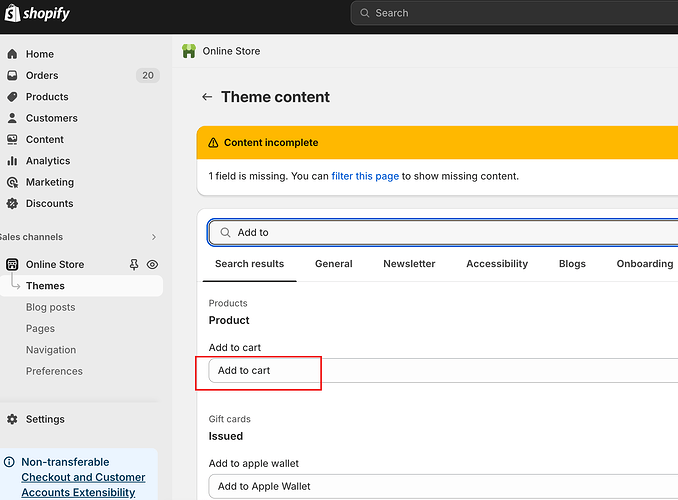
- Hide Add to Cart button
- Insert a custom button or message
- Link to:
- お問い合わせフォーム
- Wholesale signup
- Email inquiry
Why This Method Is Popular
It doesn’t just remove purchasing — it redirects intent.
Visitors understand なぜ they can’t buy and what to do next.
Method 4: Using Shopify Apps
There are apps designed specifically to manage product visibility and purchase restrictions.
Common App Features
- Hide Add to Cart buttons
- Lock products behind login
- Restrict purchasing by customer group
- Display view-only catalogs
When Apps Make Sense
- B2B or wholesale stores
- Non-technical merchants
- Large product catalogs
- Complex customer segmentation
Trade-Offs
- Monthly fees
- Performance impact
- Dependency on third-party updates
Apps can be powerful, but they are not always necessary.
Method 5: Creating a Catalog-Only Store Structure
Some merchants go a step further and design their Shopify store as a catalog-first experience.
What This Means
- Product pages function like landing pages
- Emphasis on:
- Visuals
- Specs
- Use cases
- Purchasing happens offline or via inquiry
This approach is common in:
- High-value custom products
- Manufacturing or OEM brands
- Cross-border B2B scenarios
It requires thoughtful design, not just technical switches.
SEO Considerations for View-Only Products

One of the biggest mistakes merchants make is assuming view-only products hurt SEO.
In reality, they can help when done correctly.
Best Practices
- Keep product pages indexable
- Use descriptive product content
- Avoid “sold out” dead ends
- Replace purchase CTAs with informational or lead-generation CTAs
Search engines don’t care if a product is purchasable — they care if it’s useful.
Choosing the Right Method for Your Store
Here’s a simplified decision guide:
- Just temporary? → Availability settings
- Selective control needed? → Theme logic
- Wholesale or gated access? → Apps or customer tagging
- Brand catalog or B2B? → Custom view-only design
There is no single “best” solution — only the right one for your goals.
避けるべきよくある間違い
- Removing Add to Cart without explanation
- Blocking checkout but leaving confusing CTAs
- Using apps when simple logic would suffice
- Ignoring mobile layouts
- Forgetting SEO impact
View-only should feel intentional, not broken.
最後に
Learning how to make products view only on Shopify isn’t about disabling sales — it’s about controlling the buying journey.
Whether you’re preparing a launch, building a wholesale catalog, or positioning your brand differently, Shopify is flexible enough to support it — when configured correctly.
The key is aligning:
- Technical setup
- Design experience
- Business intent
How We Can Help
で エアサン, this is exactly the kind of challenge we solve.
We work with cross-border brands to:
- Design Shopify stores that match real business models
- Implement view-only, wholesale, and catalog-first structures
- Balance conversion, clarity, and long-term scalability
もしあなたの Shopify store needs to show products without selling them — or sell them differently — we’d be happy to help you design the right solution.


WordPressのウェブサイトや、完全なeコマースシステムを備えたコーポレートサイトをデザイン・構築します。.
価格帯$200.00~$2,500.00カスタム要件または特別見積もり
元価格は$2.00。.$1.00現在の価格は$1.00。. WordPress の電子商取引ストアに 50 個のプラグインは多すぎますか?
WordPressのeコマースサイトに50個のプラグインがあるからといって、それが自動的に問題になるわけではありません。実際、数だけでパフォーマンスが決まることはほとんどありません。.

Amazon リップスティックコンバージョンのメイン画像デザイン
はじめにアマゾンで売れる口紅のメイン画像をデザインする アマゾンの口紅のメイン画像をデザインするとき、私たちの責任は...

ハッカーがWordPress管理者のメールアドレスを盗む方法(そしてそれを阻止する方法)
WordPressの管理者メールアドレスは、あなたが思っている以上に公開されているのです。ハッカーはそれが大好きです。彼らにとって、あなたの...

Amazonのリキッドファンデーションのメイン画像がコンバージョンにつながる理由
はじめに Amazonリキッドファンデーションのメイン画像デザインは、単に商品を美しく見せるだけではありません。Amazonでは、メイン画像と….

フィルターカートリッジの効果的なAmazonメインイメージのデザイン
はじめに Amazonのメイン画像をデザインする上で、商品を魅力的に見せることは決して重要ではありません。明確さ、信頼性、そして瞬時に理解できることが何よりも重要です。特に….

WordPress へのリプレイ攻撃: 本当の脅威か、それとも誇張された神話か?
まず最初に明確にしておきましょう。リプレイ攻撃は見た目には怖くありません。パスワードを破壊したり、緑色のハッカーテキストが飛び交うような悪質なコードを挿入したりもしません。彼らは狡猾なのです…。.

WordPressページを何も壊さずに複製する方法
正直に言って、新しいページを作りたくない時もあるでしょう。同じページを少しだけ変えたいだけなのに。レイアウトもブロックも設定も全部同じ。なぜなら….

ペット向けWordPressテーマ5選を比較
はじめに ペット関連のWordPressテーマを適切に選ぶことは、単なるデザイン上の決定ではありません。使いやすさ、拡張性、そして長期的なビジネスの成長に直接影響します。ペットケアとペット...

5つの水着eコマーステーマを比較
はじめに 水着やランジェリーの独立ストアに適切なテーマを選択することは、見た目だけの問題ではなく、コンバージョン率、拡張性、長期的な効果に直接影響します...

WordPressでコメント機能をオフにする方法(気が狂わずに)
WordPressのコメントについてお話しましょう。理論上は、コメントは素晴らしいものです。議論を促し、コミュニティを築き、ウェブサイトに「活気」を与えてくれます。しかし実際にはどうでしょうか?コメントはしばしば人を惹きつけ….

WordPress 500エラー:ウェブサイトがパニックに陥ったとき
WordPressサイトはほんの少し前までは問題ありませんでした。ページを更新した途端、突然…ドカーン💥…500 内部サーバーエラーが発生してしまいました。説明も謝罪もありませんでした。ただ冷たく、混乱を招くメッセージが表示され、その内容は….

Shopifyサポートへの問い合わせ方法:シンプルでストレスフリーなガイド
Shopifyストアの運営は、混乱するのではなく、ワクワクするものであるべきです。疑問が生じたり、問題が発生して作業が滞ったりした場合でも、Shopifyは状況に応じて複数のサポートパスをご用意しています。.

Shopifyストアを非アクティブ化する方法:分かりやすく実践的なガイド
Shopifyストアの無効化はそれほど複雑ではありませんが、多くのマーチャントが見落としている影響があります。このガイドでは、そのプロセスを分かりやすく解説します。.

5つの靴店のテーマを比較
はじめに フットウェアを専門とする独立系ストアに適切なテーマを選択することは、見た目だけの問題ではなく、拡張性、日々の業務、長期的なコンバージョン パフォーマンスに直接影響します。...

Shopify vs Etsy:究極のオンライン販売対決
はじめに: 2 つのプラットフォームがバーにやって来ました... Shopify と Etsy が人間だとしたら、Etsy はすでにブースを構えている魅力的な友人のような存在でしょう...

ShopifyまたはWordPressサイトがハッキングされたら?対処法はこちら
はじめに: 割れた窓で目覚めることのデジタル版 目覚めて、朝のコーヒーを手に取り、ノートパソコンを開いて…そして自分の Web サイトを発見するところを想像してみてください….

頭を悩ませることなくShopifyストアを始める方法
Shopifyストアを始めるなんて、なんだか華やかに聞こえますよね。お昼にコーヒーを飲みながら、セールの通知をチェックしながら、友達に「そうそう、うちのストア、結構売れたんだよね…」なんてさりげなく話している自分を想像してみてください。.

Shopifyは本当に信頼できるのか?オンラインセラー初心者のための分かりやすいガイド
eコマースプラットフォームを調べているなら、Googleに「Shopifyって本当に信頼できるの?」という具体的な質問を入力したことがあるのではないでしょうか。この疑問は当然のことです。Shopifyを立ち上げるには….