












ถ้าคุณเคยทำงานร่วมกับ วordpress เมื่อเวลาผ่านไปนานพอ คุณคงเคยเจอปัญหาที่น่าหงุดหงิดนี้มาแล้ว: เว็บไซต์ของคุณมีอยู่จริง เซิร์ฟเวอร์ของคุณทำงานได้ ไฟล์ต่างๆ ก็ครบถ้วน… แต่โดเมนของคุณกลับไม่ทำงานอย่างที่ควรจะเป็น.
บางทีระบบ DNS อาจยังไม่อัปเดต หรือคุณอาจกำลังย้ายเว็บไซต์ หรืออาจมีบางอย่างผิดพลาดและโดเมนของคุณชี้ไปยังที่ว่างเปล่า.
แล้วคุณจะทำอย่างไร?
คุณข้ามขั้นตอนการใช้งานโดเมนไปโดยสิ้นเชิง.
ใช่แล้ว คุณสามารถเปิดเว็บไซต์ WordPress โดยใช้ที่อยู่ IP แทนชื่อโดเมนได้ นี่เป็นเทคนิคที่มีประโยชน์มากสำหรับนักพัฒนา นักออกแบบ และทุกคนที่ทำงานเบื้องหลัง.
มาอธิบายเรื่องนี้แบบง่ายๆ และสนุกสนานกันดีกว่า.
เหตุใดคุณจึงต้องเปิดเว็บไซต์ WordPress โดยใช้ที่อยู่ IP?

ก่อนอื่น มาตอบคำถามที่ชัดเจนที่สุดกันก่อน: ทำไมใครๆ ถึงอยากทำแบบนี้?
นี่คือตัวอย่างสถานการณ์ทั่วไปบางส่วน:
1. DNS ใช้เวลานานมาก
คุณเพิ่งเชื่อมต่อโดเมนของคุณกับเซิร์ฟเวอร์ใหม่ ทุกอย่างตั้งค่าเรียบร้อยแล้ว คุณรู้สึกตื่นเต้นใช่ไหม.
แต่การเผยแพร่ข้อมูลผ่าน DNS ล่ะ? ไม่ค่อยเท่าไหร่.
แทนที่จะต้องรอหลายชั่วโมง (หรือบางครั้งนานกว่านั้น) คุณสามารถเข้าถึงเว็บไซต์ได้ทันทีผ่านทางที่อยู่ IP.
2. คุณกำลังย้ายเว็บไซต์
กำลังย้ายเว็บไซต์ WordPress จากโฮสต์หนึ่งไปยังอีกโฮสต์หนึ่งใช่ไหม?
ก่อนที่จะเปลี่ยนโดเมน คุณควรทดสอบทุกอย่างก่อน ไม่ว่าจะเป็นรูปแบบเว็บไซต์ รูปภาพ ปลั๊กอิน ขั้นตอนการชำระเงิน ฯลฯ.
การใช้ IP ช่วยให้คุณสามารถดูตัวอย่างเว็บไซต์ได้อย่างปลอดภัยก่อนที่จะเปิดใช้งานจริง.
3. โดเมนของคุณมีปัญหา
บางครั้งโดเมนก็...หยุดทำงานไปเฉยๆ.
- โดเมนหมดอายุ
- การตั้งค่า DNS ไม่ถูกต้อง
- ปัญหาเกี่ยวกับเนมเซิร์ฟเวอร์
การเข้าถึงเว็บไซต์ผ่านที่อยู่ IP จะช่วยให้คุณแก้ไขปัญหาได้โดยไม่ต้องตื่นตระหนก.
4. คุณกำลังแก้ไขข้อบกพร่องหรือกำลังพัฒนาโปรแกรมอยู่
หากคุณกำลังสร้างหรือปรับแต่งเว็บไซต์ WordPress คุณอาจต้องการเข้าถึงเว็บไซต์นั้นโดยตรงจากเซิร์ฟเวอร์.
ไม่จำเป็นต้องมีโดเมน แค่เชื่อมต่อก็พอแล้ว.
“เปิดเว็บไซต์ WordPress ด้วย IP” หมายความว่าอย่างไรกันแน่?
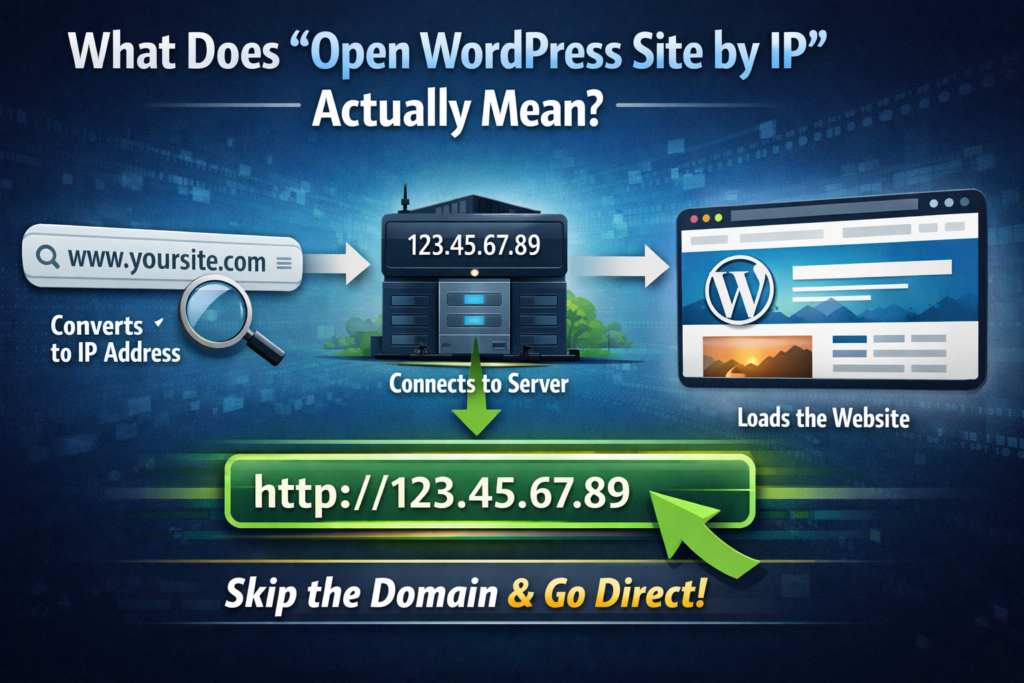
โดยปกติ เมื่อคุณพิมพ์:
www.yoursite.com
เบราว์เซอร์ของคุณ:
- แปลงโดเมนเป็นที่อยู่ IP
- เชื่อมต่อกับเซิร์ฟเวอร์
- กำลังโหลดเว็บไซต์
เมื่อคุณใช้ที่อยู่ IP โดยตรง คุณจะข้ามขั้นตอนที่ 1 ไป.
คุณจะไปที่:
http://123.45.67.89
ง่ายใช่ไหม?
อืม...ไม่เสมอไปหรอกนะ.
ข้อแม้ (เพราะมันมักจะมีอยู่เสมอ)
WordPress นั้นขึ้นอยู่กับโดเมนเป็นอย่างมาก.
ระบบจะจัดเก็บ URL ของเว็บไซต์ของคุณไว้ในฐานข้อมูล ซึ่งหมายความว่า:
- ลิงก์ภายใน
- รูปภาพ
- สคริปต์
- การเปลี่ยนเส้นทาง
...ทั้งหมดนี้เชื่อมโยงกับโดเมนของคุณ.
ดังนั้นเมื่อคุณเปิดเว็บไซต์โดยใช้ที่อยู่ IP คุณอาจเห็นข้อความดังนี้:
- เลย์เอาต์ที่เสียหาย
- รูปภาพหายไป
- ลูปการเปลี่ยนเส้นทาง
- ปัญหาการเข้าสู่ระบบ
ไม่ต้องกังวล นี่เป็นเรื่องปกติ และแก้ไขได้.
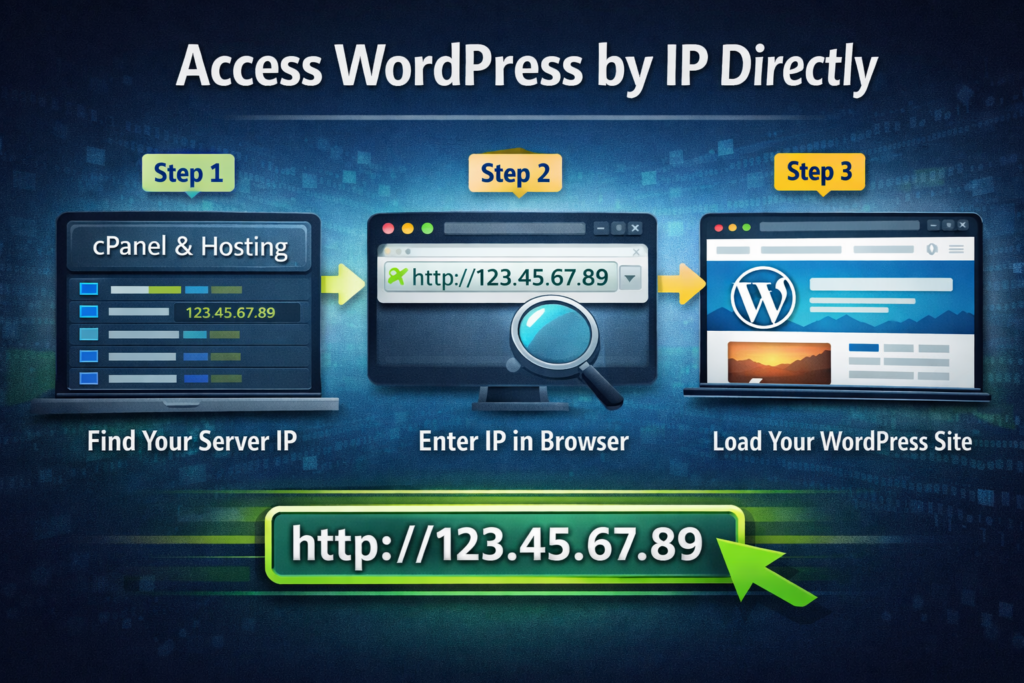
วิธีที่ 1: เข้าถึง WordPress โดยตรงผ่านที่อยู่ IP
มาเริ่มจากวิธีที่ง่ายที่สุดกันก่อน.
ขั้นตอนที่ 1: ค้นหาที่อยู่ IP ของเซิร์ฟเวอร์ของคุณ
คุณสามารถหาซื้อได้จาก:
- แดชบอร์ดโฮสติ้งของคุณ
- ซีพาเนล / คลาวด์พาเนล
- ผู้ให้บริการเซิร์ฟเวอร์
ตัวอย่าง:
123.45.67.89
ขั้นตอนที่ 2: ป้อนลงในเบราว์เซอร์ของคุณ
เพียงพิมพ์:
http://123.45.67.89
หากตั้งค่าทุกอย่างถูกต้อง เว็บไซต์ของคุณควรจะโหลดได้.
ขั้นตอนที่ 3: เพิ่มเส้นทาง WordPress (ไม่บังคับ)
บางครั้งคุณอาจต้องไปที่:
http://123.45.67.89/wp-admin
วิธีนี้จะช่วยให้คุณเข้าสู่ระบบแบ็กเอนด์ได้.
วิธีนี้ได้ผลดีที่สุดเมื่อใด
- การติดตั้งใหม่
- การทดสอบชั่วคราว
- การตั้งค่าแบบง่ายๆ
วิธีที่ 2: ใช้ไฟล์ Hosts (แนวทางปฏิบัติที่ดีที่สุด)
ถ้าคุณต้องการ จริง นี่คือตัวอย่าง (และไม่ใช่เว็บไซต์ที่ดูมีปัญหา) วิธีที่ดีที่สุด.
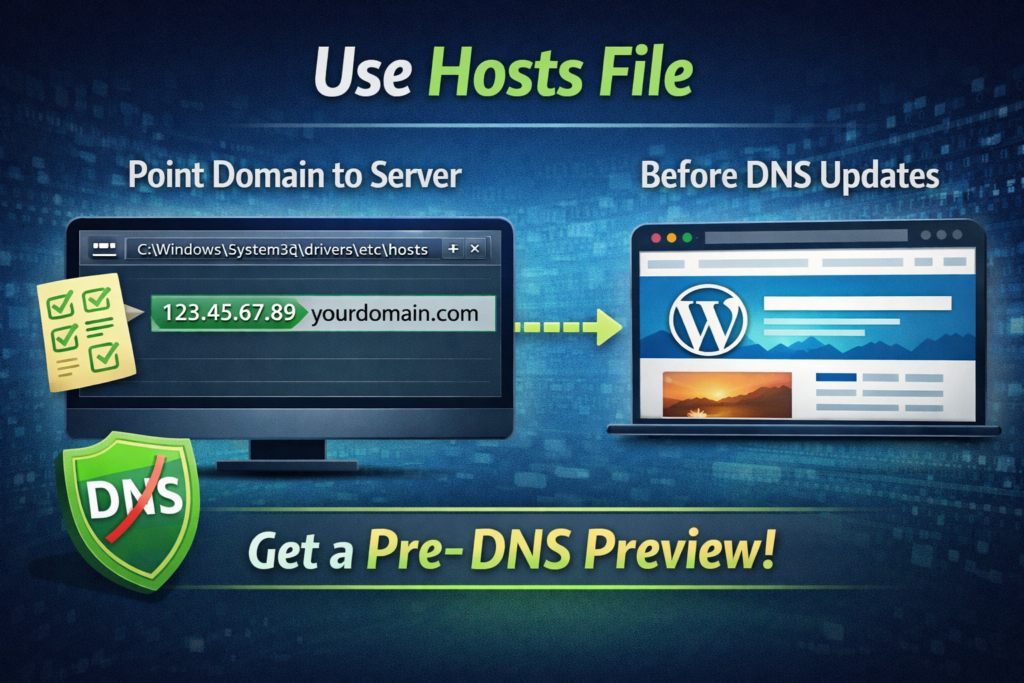
แทนที่จะใช้ที่อยู่ IP โดยตรง คุณจะหลอกคอมพิวเตอร์ให้คิดว่าโดเมนนั้นชี้ไปยังเซิร์ฟเวอร์ของคุณอยู่แล้ว.
ขั้นตอนที่ 1: ค้นหาไฟล์ Hosts ของคุณ
บนระบบปฏิบัติการ Windows:
C:\Windows\System32\drivers\etc\hosts
บน macOS:
/etc/hosts
ขั้นตอนที่ 2: เพิ่มรายการ
เพิ่มบรรทัดนี้:
123.45.67.89 yourdomain.com
ขั้นตอนที่ 3: บันทึกและรีเฟรช
เมื่อคุณเข้าชมเว็บไซต์ในปัจจุบัน:
โดเมนของคุณ.com
คอมพิวเตอร์ของคุณจะเชื่อมต่อกับเซิร์ฟเวอร์ใหม่ได้ แม้ว่า DNS จะยังไม่ได้อัปเดตทั่วโลกก็ตาม.
เหตุใดวิธีนี้จึงดีกว่า
- ไม่มีภาพที่เสียหาย
- ไม่มีปัญหาการเปลี่ยนเส้นทาง
- ตัวอย่างการใช้งานแบบเต็มรูปแบบ
- การทดสอบที่แม่นยำ
นี่คือสิ่งที่มืออาชีพใช้กัน.
วิธีที่ 3: URL ชั่วคราวจากโฮสติ้ง
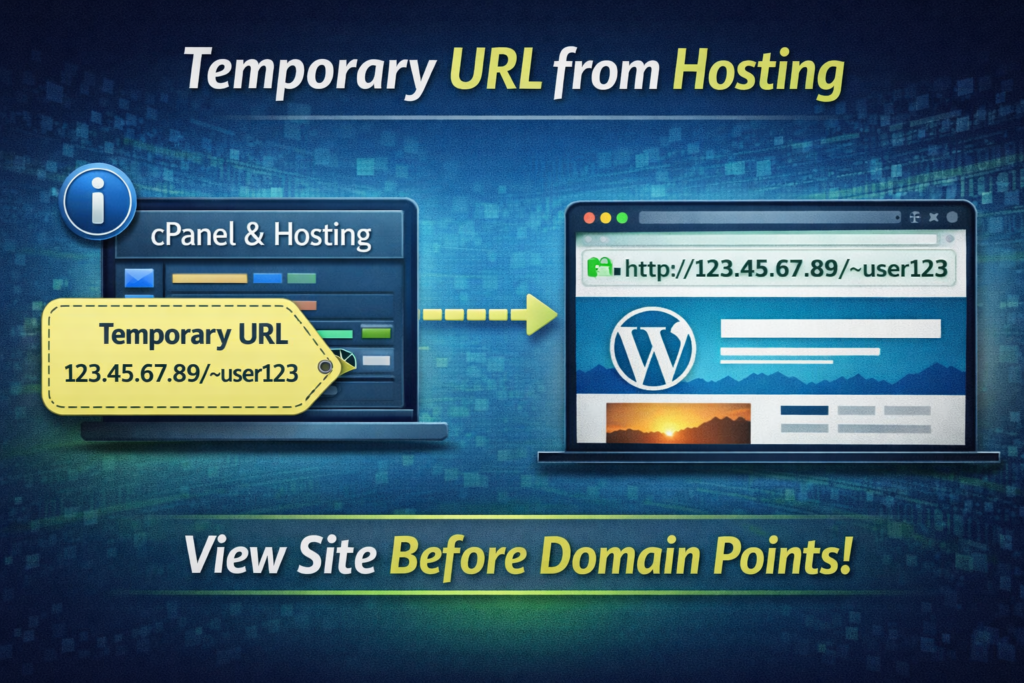
ผู้ให้บริการโฮสติ้งบางรายจะให้ URL ชั่วคราวแก่คุณ เช่นนี้:
http://server123.hosting.com/~username
นี่เป็นอีกวิธีหนึ่งในการเข้าถึงเว็บไซต์ WordPress ของคุณก่อนที่โดเมนจะพร้อมใช้งาน.
ข้อดี
- ไม่ต้องตั้งค่าใดๆ
- เข้าถึงได้ง่าย
ข้อเสีย
- การแสดงตัวอย่างไม่ถูกต้องเสมอไป
- อาจทำให้เลย์เอาต์เสียหายได้
- ฟังก์ชันบางอย่างอาจใช้งานไม่ได้
การแก้ไขปัญหาทั่วไปเมื่อใช้ IP
พูดตามตรง การเปิดเว็บไซต์ WordPress โดยใช้ที่อยู่ IP นั้นไม่ใช่เรื่องง่ายเสมอไป.
นี่คือปัญหาที่พบบ่อยที่สุด (และวิธีแก้ไข).
1. การเปลี่ยนเส้นทางลูป
WordPress อาจบังคับให้เปลี่ยนเส้นทางไปยังโดเมนของคุณ.
แก้ไข:
อัปเดต URL เว็บไซต์ของคุณในฐานข้อมูลชั่วคราว:
siteurlบ้าน
ตั้งค่าเป็น:
http://123.45.67.89
2. ภาพที่แตกหัก
โดยปกติแล้วรูปภาพจะถูกจัดเก็บโดยใช้ URL โดเมนแบบเต็ม.
แก้ไข:
- ใช้เครื่องมือค้นหาและแทนที่
- หรือละเว้น (เพื่อวัตถุประสงค์ในการทดสอบ)
3. ปัญหาการเข้าสู่ระบบ
คุกกี้และเซสชันขึ้นอยู่กับความสอดคล้องของโดเมน.
แก้ไข:
ใช้:
http://IP/wp-login.php
หรือเปลี่ยนไปใช้วิธีการตั้งค่าผ่านไฟล์ hosts ก็ได้.
4. ปัญหาเกี่ยวกับ SSL
หากเว็บไซต์ของคุณใช้ HTTPS การเข้าถึงผ่านที่อยู่ IP อาจทำให้เกิดคำเตือนได้.
แก้ไข:
- ใช้ HTTP แทน
- หรือเพิกเฉยต่อ SSL ชั่วคราว
คำถามที่พบบ่อย: เปิดเว็บไซต์ WordPress โดยใช้ที่อยู่ IP แทนชื่อโดเมน
ใช่ คุณสามารถเปิดเว็บไซต์ WordPress โดยใช้ที่อยู่ IP แทนชื่อโดเมนได้ โดยป้อนที่อยู่ IP ของเซิร์ฟเวอร์ลงในเบราว์เซอร์ของคุณโดยตรง อย่างไรก็ตาม เนื่องจาก WordPress พึ่งพา URL ที่อิงตามโดเมนเป็นอย่างมาก องค์ประกอบบางอย่าง เช่น รูปภาพ สไตล์ หรือการเปลี่ยนเส้นทาง อาจทำงานไม่ถูกต้อง.
เมื่อคุณเปิดเว็บไซต์ WordPress โดยใช้ที่อยู่ IP แทนชื่อโดเมน เว็บไซต์อาจแสดงผลผิดปกติ เนื่องจาก WordPress จัดเก็บ URL โดยใช้ชื่อโดเมน ซึ่งอาจทำให้รูปภาพหายไป ลิงก์ไม่ถูกต้อง และเกิดปัญหาด้านการจัดวาง การใช้ไฟล์ hosts เป็นวิธีที่ดีกว่าในการดูตัวอย่างเว็บไซต์อย่างถูกต้อง.
วิธีที่ดีที่สุดคือใช้ไฟล์ hosts ในคอมพิวเตอร์ของคุณเพื่อแมปโดเมนกับที่อยู่ IP ของเซิร์ฟเวอร์ วิธีนี้จะช่วยให้คุณเข้าถึงเว็บไซต์ได้ราวกับว่าโดเมนชี้ไปยังเซิร์ฟเวอร์ใหม่แล้ว ทำให้มั่นใจได้ว่าการแสดงผลจะสมบูรณ์และถูกต้องโดยไม่มีส่วนใดเสียหาย.
ใช่ โดยทั่วไปแล้วการใช้ที่อยู่ IP หรือ URL ชั่วคราวที่ผู้ให้บริการโฮสติ้งของคุณให้มานั้นปลอดภัย วิธีเหล่านี้มักใช้สำหรับการทดสอบและการพัฒนา อย่างไรก็ตาม ไม่ควรใช้เป็นวิธีแก้ปัญหาถาวรสำหรับเว็บไซต์ที่ใช้งานจริง.
เมื่อใดที่คุณไม่ควรใช้การเข้าถึงด้วย IP?
แม้ว่าวิธีนี้จะมีประโยชน์ แต่ก็ไม่ใช่ทางเลือกที่ดีที่สุดเสมอไป.
ควรหลีกเลี่ยงการใช้การเข้าถึงผ่าน IP ในกรณีต่อไปนี้:
- คุณกำลังทดสอบความถูกต้องของการออกแบบขั้นสุดท้าย
- คุณต้องการการตรวจสอบ SEO
- คุณกำลังแชร์ตัวอย่างกับลูกค้า
ในกรณีเหล่านั้น ให้ใช้วิธีการแก้ไขไฟล์ hosts แทนเสมอ.
ขั้นตอนการทำงานที่ดีที่สุด (แนะนำ)
นี่คือวิธีที่ผู้เชี่ยวชาญมักจัดการกับสถานการณ์นี้:
- อัปโหลด WordPress ไปยังเซิร์ฟเวอร์
- เข้าถึงผ่าน IP (ตรวจสอบอย่างรวดเร็ว)
- ใช้ไฟล์ hosts เพื่อดูตัวอย่างแบบเต็ม
- ทดสอบทุกอย่าง
- อัปเดต DNS
- เริ่มถ่ายทอดสด
สะอาด มีประสิทธิภาพ และไม่มีอะไรให้ต้องกังวลใจ.
การตรวจสอบความเป็นจริงอย่างรวดเร็ว
การเปิดเว็บไซต์ WordPress โดยใช้ที่อยู่ IP ไม่ใช่ฟีเจอร์ที่ใช้งานเป็นประจำทุกวัน.
มันเป็นแบบนี้มากกว่า:
- ทางลัดในการแก้ไขปัญหา
- เครื่องมือสำหรับการจัดเวที
- เทคนิคของนักพัฒนา
แต่เมื่อคุณต้องการมัน มันสามารถช่วยประหยัดเวลาได้หลายชั่วโมง หรือบางครั้งอาจถึงหลายวันเลยทีเดียว.
ข้อคิดส่งท้าย
ความสามารถในการเปิดเว็บไซต์ WordPress โดยใช้ที่อยู่ IP แทนชื่อโดเมน เป็นหนึ่งในเทคนิคเล็กๆ แต่ทรงพลังที่แยกแยะระหว่างมือใหม่กับมืออาชีพ.
มันทำให้คุณควบคุมได้.
ช่วยให้คุณทำงานได้เร็วขึ้น.
และที่สำคัญที่สุดคือ มันช่วยให้ขั้นตอนการทำงานของคุณดำเนินต่อไปได้อย่างราบรื่น แม้ว่า DNS หรือโดเมนจะมีปัญหาขัดข้องก็ตาม.
มุมมองของ AIRSANG
ที่ AIRSANG, เราเผชิญกับสถานการณ์เช่นนี้อยู่เสมอ โดยเฉพาะในโครงการอีคอมเมิร์ซข้ามพรมแดน ซึ่งจังหวะเวลา ความเสถียร และความแม่นยำในการเปิดตัวมีความสำคัญอย่างยิ่ง.
จาก ช็อปฟี่ สร้างเพื่อ วordpress สำหรับเว็บไซต์ที่ออกแบบตามความต้องการเฉพาะ เรามุ่งเน้นในด้านต่างๆ ดังนี้:
- การออกแบบที่ขับเคลื่อนด้วยการเปลี่ยนแปลง
- เวิร์กโฟลว์การปรับใช้ที่เสถียร
- การทดสอบก่อนเปิดตัวที่ราบรื่น
- ประสบการณ์ผู้ใช้ที่สะอาดตาและมีประสิทธิภาพสูง
หากคุณกำลังสร้างหรือขยายเว็บไซต์อิสระของคุณ และต้องการให้เว็บไซต์ออกมาดีทั้งในด้านรูปลักษณ์และด้านเทคนิค เราสามารถช่วยคุณได้ในส่วนนี้.
เพราะสุดท้ายแล้ว เว็บไซต์ที่ดีไม่ได้ขึ้นอยู่กับรูปลักษณ์ภายนอกเพียงอย่างเดียว.
มันอยู่ที่ว่ามันทำงานได้อย่างราบรื่นแค่ไหน แม้กระทั่งในส่วนที่มองไม่เห็นก็ตาม.


ออกแบบและสร้างเว็บไซต์ WordPress หรือเว็บไซต์องค์กรพร้อมระบบอีคอมเมิร์ซครบวงจรสำหรับคุณ.
ช่วงราคา: $200.00 ถึง $2,500.00custom-requirements-or-special-quotations
ราคาเดิมคือ: $2.00.$1.00ราคาปัจจุบันคือ: $1.00. การใช้ปลั๊กอิน 50 ตัวมากเกินไปสำหรับร้านค้าออนไลน์ที่ใช้ WordPress หรือไม่?
การเข้าใจผลกระทบที่แท้จริงต่อประสิทธิภาพ การมีปลั๊กอิน 50 ตัวบนเว็บไซต์อีคอมเมิร์ซ WordPress ไม่ใช่ปัญหาโดยอัตโนมัติ จริงๆ แล้ว จำนวนเพียงอย่างเดียวแทบจะไม่สามารถกำหนดประสิทธิภาพได้....

ภาพหลักสำหรับการออกแบบอุปกรณ์กายภาพบำบัดที่บ้านของ Amazon (อธิบายรายละเอียด)
บทนำ: การสร้างภาพลักษณ์ที่น่าเชื่อถือสำหรับอุปกรณ์บำบัดที่บ้านบน Amazon เมื่อออกแบบภาพหลักสำหรับอุปกรณ์บำบัดที่บ้านบน Amazon สิ่งสำคัญอันดับแรกของเราคือ...

ภาพหลักสำหรับการแปลงลิปสติกเป็นสินค้าสำหรับ Amazon
บทนำ: การออกแบบภาพหลักลิปสติกที่ขายได้บน Amazon เมื่อเราออกแบบภาพหลักสำหรับลิปสติกบน Amazon ความรับผิดชอบของเราไม่ได้จำกัดอยู่แค่...

แฮกเกอร์ขโมยอีเมลผู้ดูแลระบบ WordPress ได้อย่างไร (และวิธีป้องกัน)
มาเริ่มกันด้วยความจริงที่ไม่น่าสบายใจ: อีเมลแอดมิน WordPress ของคุณอาจเปิดเผยต่อสาธารณะมากกว่าที่คุณคิด และแฮกเกอร์? พวกเขาชอบมาก สำหรับพวกเขา...

อะไรทำให้รองพื้นชนิดเหลวของ Amazon (ภาพหลัก) ขายดี?
บทนำ การออกแบบภาพหลักสำหรับรองพื้นชนิดเหลวบน Amazon ไม่ใช่แค่การทำให้ผลิตภัณฑ์ดูสวยงามเท่านั้น บน Amazon ภาพหลักและ...

การออกแบบภาพหลัก Amazon ที่มีประสิทธิภาพสำหรับตลับกรอง
บทนำ การออกแบบภาพหลักสำหรับ Amazon ไม่ใช่แค่การทำให้สินค้าดูน่าดึงดูดเท่านั้น แต่ยังเกี่ยวกับความชัดเจน ความน่าเชื่อถือ และความเข้าใจได้ในทันที โดยเฉพาะอย่างยิ่งสำหรับ...

การโจมตีแบบ Replay Attack บน WordPress: ภัยคุกคามจริงหรือแค่เรื่องที่ถูกพูดเกินจริง?
ก่อนอื่นขอชี้แจงให้ชัดเจนก่อน การโจมตีแบบ Replay Attack นั้นดูไม่น่ากลัว มันไม่ได้ทำลายรหัสผ่าน มันไม่ได้แทรกโค้ดที่เป็นอันตรายพร้อมข้อความแฮ็กเกอร์สีเขียวกระจัดกระจายไปทั่ว มันแนบเนียนกว่า...

วิธีคัดลอกหน้าเว็บ WordPress โดยไม่ทำให้ระบบเสียหาย
ยอมรับกันเถอะ บางครั้งคุณอาจไม่อยากสร้างหน้าเว็บใหม่ คุณแค่อยากได้หน้าเว็บเดิม...แต่แตกต่างไปเล็กน้อย รูปแบบเหมือนเดิม บล็อกเหมือนเดิม การตั้งค่าเหมือนเดิม เพราะ...

เปรียบเทียบธีม WordPress สำหรับสัตว์เลี้ยง 5 แบบ
บทนำ การเลือกธีม WordPress ที่เหมาะสมสำหรับธุรกิจเกี่ยวกับสัตว์เลี้ยงนั้นไม่ใช่แค่เรื่องของการออกแบบเท่านั้น แต่ยังส่งผลโดยตรงต่อการใช้งาน ความสามารถในการขยายขนาด และการเติบโตของธุรกิจในระยะยาว การดูแลสัตว์เลี้ยงและ...

เปรียบเทียบธีมอีคอมเมิร์ซชุดว่ายน้ำ 5 แบบ
บทนำ การเลือกธีมที่เหมาะสมสำหรับร้านค้าอิสระที่จำหน่ายชุดว่ายน้ำหรือชุดชั้นในนั้นไม่ใช่แค่การตัดสินใจด้านภาพลักษณ์เท่านั้น แต่ยังส่งผลโดยตรงต่ออัตราการเปลี่ยนลูกค้าให้เป็นผู้ซื้อ ความสามารถในการขยายธุรกิจ และความยั่งยืนในระยะยาว...

วิธีปิดการแสดงความคิดเห็นใน WordPress (โดยไม่ต้องเสียสติ)
มาพูดถึงระบบแสดงความคิดเห็นของ WordPress กันดีกว่า ในทางทฤษฎีแล้ว ความคิดเห็นนั้นยอดเยี่ยมมาก มันช่วยกระตุ้นการสนทนา สร้างชุมชน และทำให้เว็บไซต์ของคุณดูมีชีวิตชีวา แต่ในความเป็นจริงแล้ว มันมักจะเป็นเหมือนแม่เหล็กดึงดูด...

ข้อผิดพลาด WordPress 500: เมื่อเว็บไซต์ของคุณเกิดอาการผิดปกติ
เว็บไซต์ WordPress ของคุณยังใช้งานได้ปกติดีเมื่อสักครู่ คุณรีเฟรชหน้าเว็บ แล้วจู่ๆ ก็เกิดข้อผิดพลาด 500 Internal Server Error ขึ้นมา ไม่มีคำอธิบาย ไม่มีคำขอโทษ มีเพียงข้อความที่เย็นชาและสับสนซึ่งโดยพื้นฐานแล้ว...

การสร้างเว็บไซต์ WordPress ที่ปรับขนาดได้สำหรับแบรนด์ที่ขับเคลื่อนด้วยวิทยาศาสตร์: โครงการ AminoUSA
บทนำ ในยุคดิจิทัลปัจจุบัน เว็บไซต์เป็นมากกว่าแค่สถานที่สำหรับแสดงรายการสินค้า สำหรับแบรนด์ที่ขับเคลื่อนด้วยวิทยาศาสตร์ซึ่งดำเนินงานในอุตสาหกรรมที่มีการควบคุมหรือเน้นการวิจัย...

สร้างร้านค้า Shopify ที่ปรับขนาดได้สำหรับแบรนด์ใบมีดระดับโลก: โครงการ CoolKatana
บทนำ ในธุรกิจอีคอมเมิร์ซข้ามพรมแดน เว็บไซต์ Shopify เป็นมากกว่าแค่หน้าร้าน สำหรับแบรนด์ที่ดำเนินธุรกิจในกลุ่มเฉพาะหรือกลุ่มที่ขับเคลื่อนด้วยวัฒนธรรม เว็บไซต์ต้องทำมากกว่านั้น...

การออกแบบร้านค้า Shopify ที่มีอัตราการแปลงสูงสำหรับขายการ์ดโปเกมอน
บทนำ ในโลกของอีคอมเมิร์ซสินค้าสะสม โดยเฉพาะอย่างยิ่งในตลาดเกมการ์ดโปเกมอน (TCG) เว็บไซต์จะต้องทำมากกว่าแค่แสดงรายการสินค้า...

ดีไซน์ Shopify ที่เพิ่มยอดขายสำหรับแบรนด์อิฐสั่งทำพิเศษ
บทนำ ในสภาพแวดล้อมการแข่งขันอีคอมเมิร์ซในปัจจุบัน โดยเฉพาะอย่างยิ่งในตลาดของขวัญส่วนบุคคลและของสะสม เว็บไซต์ Shopify ต้องทำมากกว่าแค่แสดงสินค้า...

วิธีติดต่อฝ่ายสนับสนุนของ Shopify: คู่มือที่ง่ายและไม่ยุ่งยาก
การบริหารร้านค้า Shopify ควรเป็นเรื่องที่น่าตื่นเต้น ไม่ใช่เรื่องที่ทำให้สับสน เมื่อมีคำถามหรือปัญหาเกิดขึ้น Shopify มีช่องทางการสนับสนุนหลายช่องทาง ขึ้นอยู่กับสถานการณ์...

วิธีปิดใช้งานร้านค้า Shopify: คู่มือที่ชัดเจนและใช้งานได้จริง
การปิดใช้งานร้านค้า Shopify นั้นไม่ซับซ้อน แต่ก็มีผลกระทบหลายอย่างที่ผู้ขายหลายรายมองข้ามไป คู่มือนี้จะอธิบายขั้นตอนอย่างละเอียดและเข้าใจง่าย...