









Project overview
The product pictures of GOURMET vacuum packaging machine need to be advanced from actual use to steps, panels and internal configuration. This case focuses on the existing 6 Ozon Russian works, dismantling the arrangements for product identification, theme description and condition verification. For brands and sellers who are preparing to produce pictures of similar products, the focus is not only on the style of the pictures, but also on understanding how different pictures distribute information so that product-related questions have corresponding reading positions.
| Услуги | Industry | Платформа |
| Ozon product primary and secondary product images design | Home department store | Озон |
| Project requirements | target market | design style |
| Advance from practical use to steps, panels and internal configurations | Russia | Tough technology, function-oriented, dark texture |
| project budget | Delivery content | Delivery time |
| ¥400 | 6 case display pictures | 7 working days |
design challenge
The sealing machine has multiple modes and operation entrances. Just looking at the front of the product is not enough to understand how to use it. The picture group needs to complement each other with hand movements, control panels and internal storage, and then focus on checking the specifications.
Design strategy: Let the entire group of works form a clear information relationship
01 Allocate information tasks first, and then arrange the key points of the screen
The work is expanded according to “Usage Overview → Three-Step Process → Panel Description → Parameter Size → Internal Configuration → Theme Summary”. Figure 1 establishes the identification first, and then switches the composition and description position according to the actual theme. This division of information allows different questions to have their own place, reducing the need to pile up all the text in the first image, and preventing subsequent images from simply repeating the same product photo.
02 Use a consistent visual language to connect different reading tasks
The dark kitchen background and the silver-black body form a stable tone. The white title and yellow-orange icons provide hierarchy, and step cards, guide lines and internal close-ups share explanations. The unified style serves the entire group identification, and composition changes serve different contents; the main title, auxiliary labels and product proportions in the picture jointly determine the reading order.
03 Reduce the explanation to specific parts, actions or choices
The focus of this body of work is to advance from practical use to steps, panels and interior configurations. When dismantling, look at the correspondence between the whole machine and parts, themes and conditions: when there is structural information, look at the positional relationship, when there is scene information, look at the objects used, and when there are numbers, look at the categories and limiting conditions. Letting each picture answer a specific question has more explanatory value than repeatedly emphasizing the excellence of the product.
Dismantling the work: explaining the screen arrangement and information responsibilities of each picture
Figure 1|Usage overview: Put the host into kitchen operation
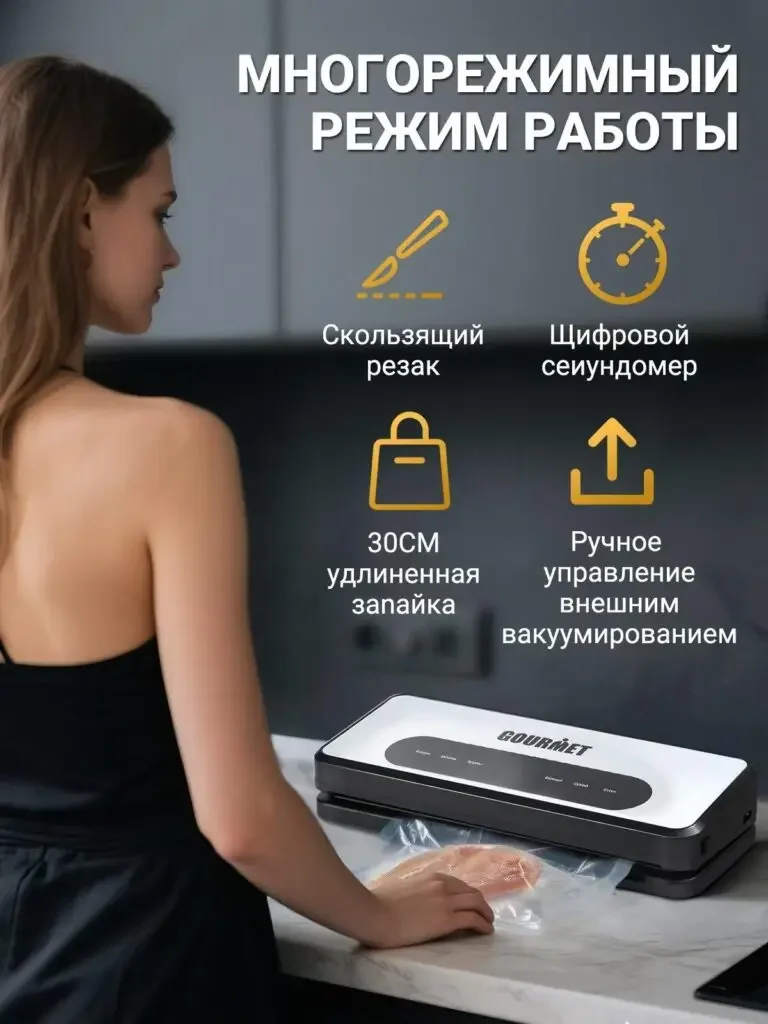
The character is using a sealing machine in front of the table, and the four icons on the upper part organize cutting, timing, bag width and external themes.
The scene explains where to use it, the icons explain which functions to look at, and the host and packaging bag remain clear and distinguishable.
Figure 2|Three-step process: arranged in order of actions
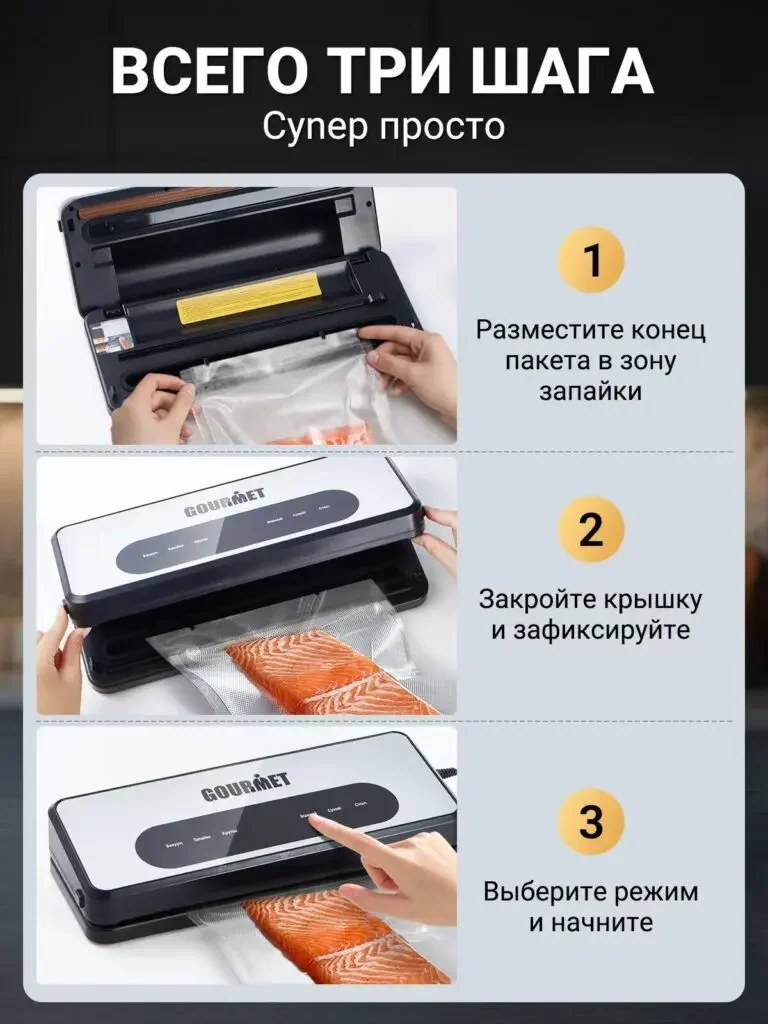
The three photos show the bag placement, closing and selection modes in sequence, with yellow serial numbers connecting the instructions for each step.
Sequential actions are easier to understand than scattered selling points, allowing first-time visitors to find the basic operation path.
Figure 3 | Panel description: Connect button name to location
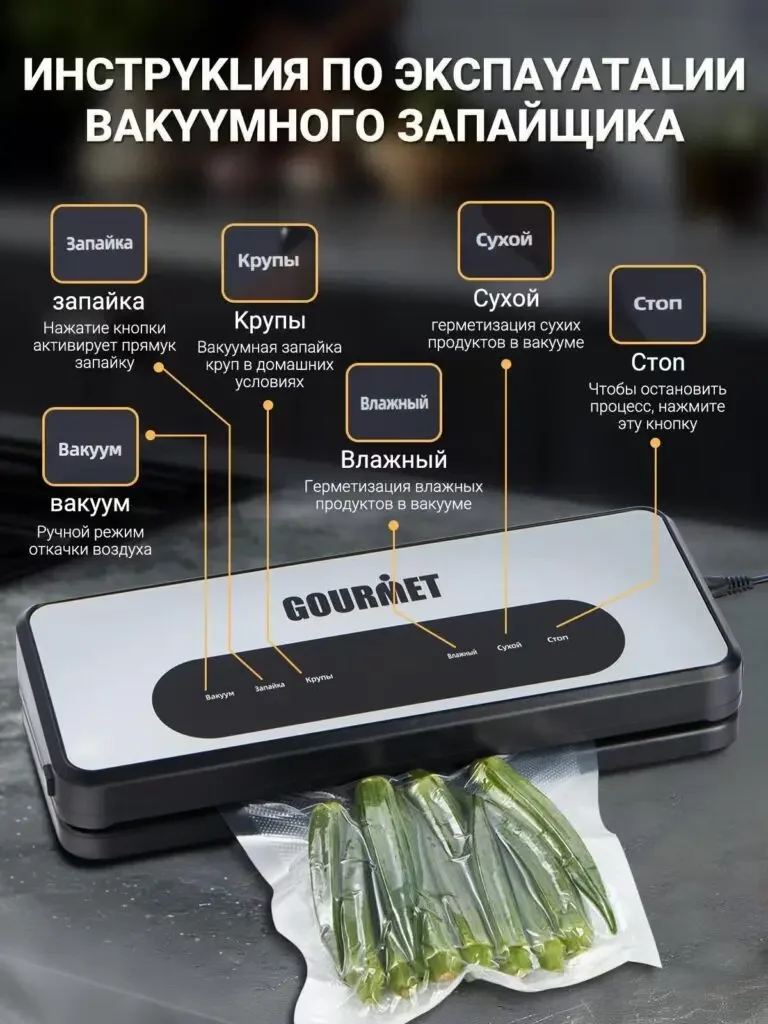
The control area on the front of the machine is located in the center, and the labels on the top point to different buttons through thin lines.
Names correspond to locations one-to-one, answering where to select functions, forming a searchable panel map.
Figure 4|Parameter size: Provide both value and direction
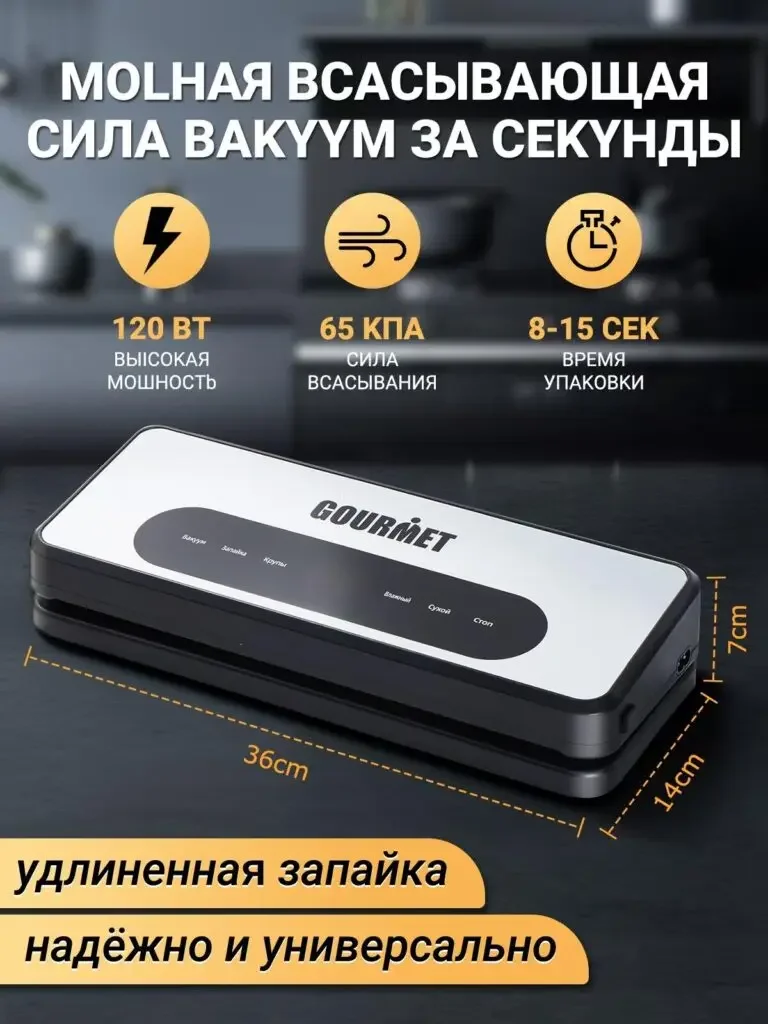
The upper part presents the themes of power, pressure and time with three icons, and the lower dimension line expands along the width, height and depth of the fuselage.
Performance themes and size themes are layered, and users can check usage conditions and placement space respectively.
Figure 5|Internal configuration: open the fuselage to explain the cutter and roll bag
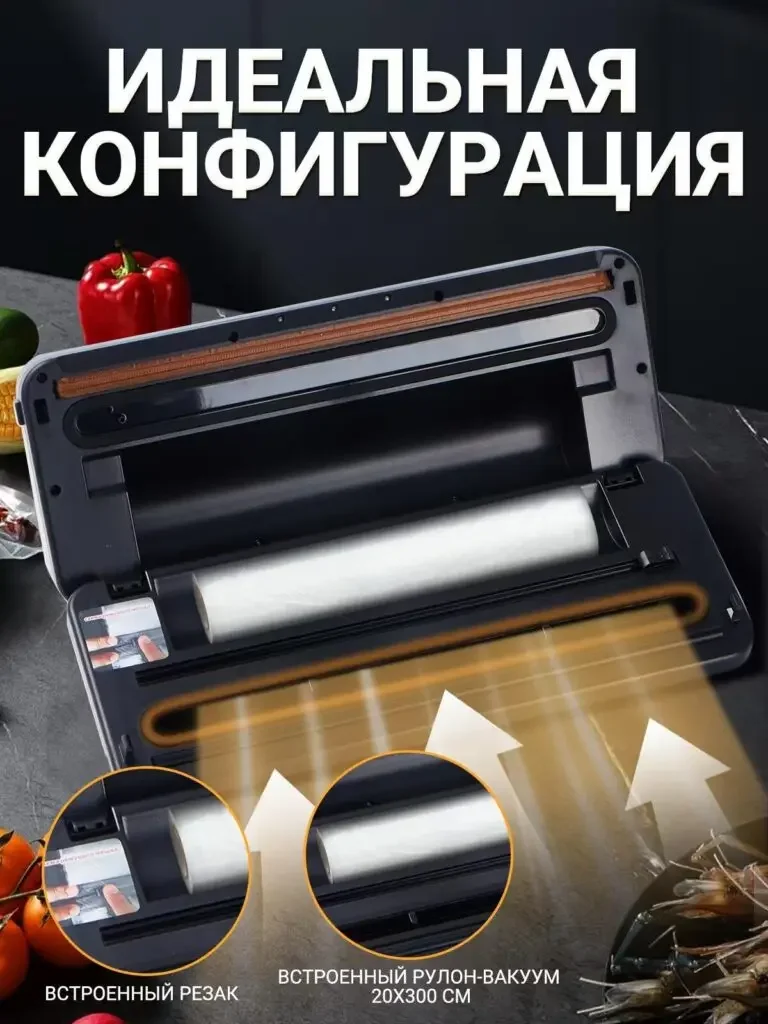
The open state shows the roll bag and sealing area, and the circular close-up below enlarges the cutter and built-in roll bag.
The internal photos clearly explain the location of the configuration and make up for the relationship between parts that cannot be shown when the closed body is closed.
Figure 6|Topic Summary: Back to the fuselage and supporting supplies
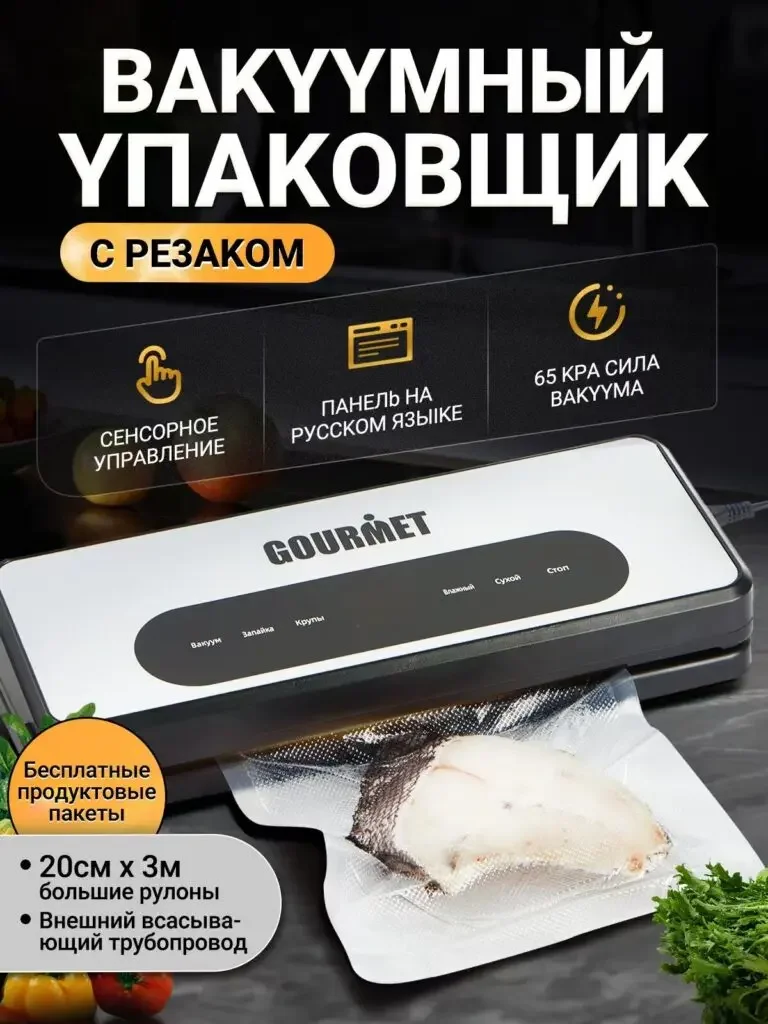
The whole machine appears together with the packaged ingredients, the icons organize the touch, panel and pressure themes, and the roll bag instructions are retained in the corners.
The last page summarizes the usage conditions covered previously, allowing product objects, operations, and supporting topics to reconnect.
Delivery summary and design value
The entire team delivers with a clear division of labor
The 6 works in this case respectively cover “Usage Overview → Three-Step Process → Panel Description → Parameter Size → Internal Configuration → Topic Summary”. The number of images depends on the actual content, and each image has its own theme while maintaining an overall identity through color, text hierarchy, or composition.
Procurement issues can be more easily mapped to specific information
Focusing on the GOURMET vacuum packaging machine, the work will “promote from actual use to steps, panels and internal configuration” into different pictures. When brands plan similar designs, they can first list the content that consumers need to identify, understand and check, and then determine the tasks and order of primary and secondary product images.
Value is based on interpretive methods and authentic works
The whole machine, part, scene and information cards provide different reading entrances, helping to organize product descriptions more clearly. The value of this case is the visible design expression and information division of labor; changes in click-through rates, sales, and conversion rates require additional statistical or test data support.
The parameters, materials and functions in this article are used to explain the content of the accompanying pictures. The specific specifications, applicable conditions and accompanying items are subject to the product information of the corresponding model.
Plan clearer product images for your Ozon products
If you also need to plan primary and secondary product images for your OzonGOURMET vacuum packaging machine, you can submit product links, existing pictures or product information to AIRSANG, explain the target market and required picture group range, and communicate the information organization and visual direction suitable for the product.
Consultation email: [email protected] · Telephone: 177-5952-2770