












소개
If you’re looking to build a website without diving deep into coding, learning how to use WordPress is one of the smartest decisions you can make.
워드프레스 powers over 40% of websites worldwide, from personal blogs to large-scale eCommerce platforms. Its flexibility, scalability, and user-friendly interface make it a top choice for beginners and professionals alike.
In this guide, we’ll walk you through everything you need to know—from understanding the dashboard to creating pages, customizing design, and managing content. Whether you’re starting a business site or building an online store, this guide will help you confidently navigate WordPress.
What Is WordPress and Why Use It?
Before learning how to use WordPress, it’s important to understand what makes it so popular.
WordPress is an open-source content management system (CMS) that allows you to create and manage websites without writing code. It offers thousands of themes and plugins, giving you full control over your site’s appearance and functionality.
Key Benefits of WordPress
- Easy to use for beginners
- Highly customizable design options
- Strong SEO capabilities
- Scalable for small and large businesses
- Massive community support
For businesses—especially in cross-border eCommerce—WordPress provides the flexibility to build a brand-driven, conversion-focused website.
Understanding the WordPress Dashboard
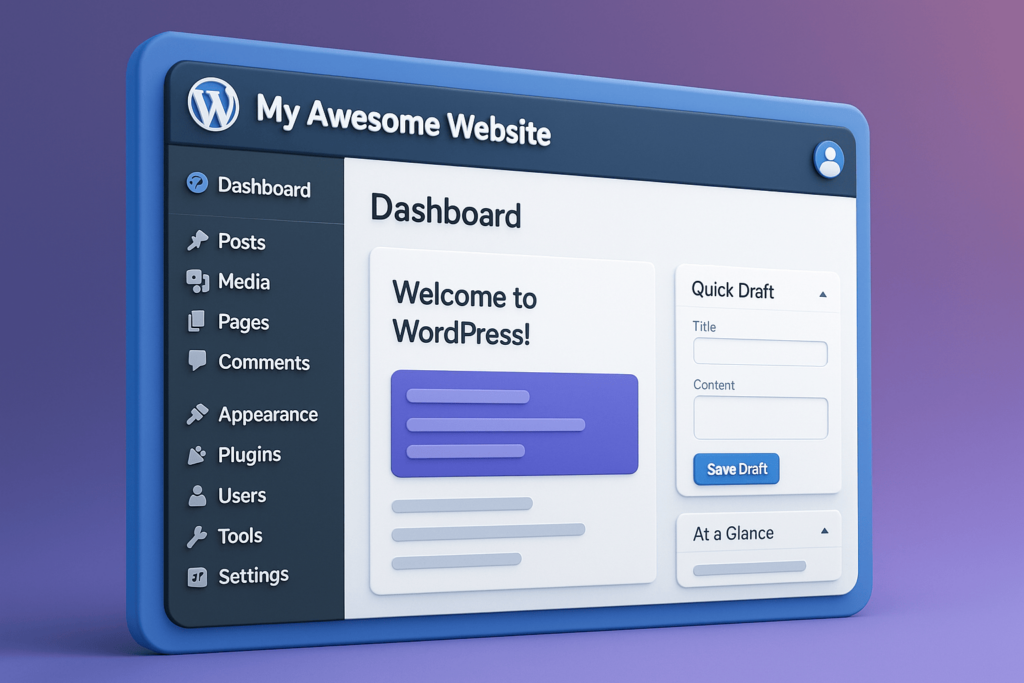
Once WordPress is installed, the first thing you’ll interact with is the dashboard.
The dashboard is your control center. From here, you can manage content, customize your design, and control your website settings.
Main Sections You Should Know
- 게시물 – Used for blog articles
- 페이지 – Static pages like Home, About, Contact
- 메디아 – Image and video library
- Appearance – Themes and design settings
- 플러그인 – Add new features and tools
- 설정 – General website configurations
Getting familiar with these sections is the first step in mastering how to use WordPress.
How to Create and Manage Content
Content is the core of any website. WordPress makes it simple to create and manage both pages and blog posts.
Creating a New Page
To create a page:
- Go to Pages → Add New
- Enter your page title
- Add content using the block editor
- Click Publish
Pages are typically used for key sections like your homepage, services, or product categories.
Creating Blog Posts
Blog posts work similarly but are more dynamic. They can be categorized and tagged, making them ideal for SEO and content marketing.
For example, if you’re targeting keywords like how to use wordpress, blog posts are the best way to rank on Google.
Using the Block Editor (Gutenberg)
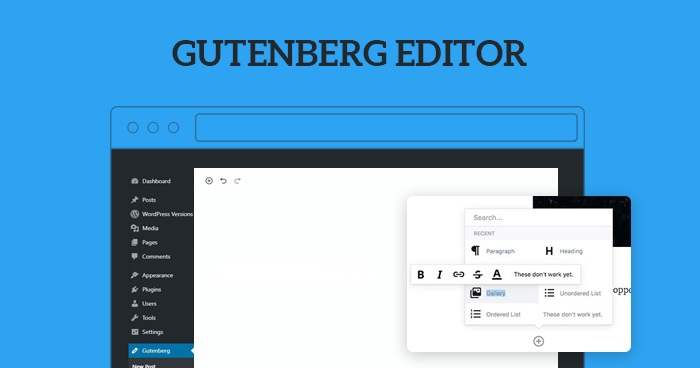
The WordPress block editor allows you to build pages visually.
Instead of writing code, you can add different blocks such as:
- Text blocks
- Image blocks
- Buttons
- 컬럼
- Videos
Each block can be customized independently, giving you full control over layout and design.
For beginners learning how to use WordPress, this visual editing experience is a major advantage.
Choosing and Customizing Themes
Your website’s design depends on the theme you choose.
A theme controls:
- Layout structure
- Typography
- 그림 물감
- Overall visual style
적합한 테마를 고르는 방법
Look for a theme that is:
- Clean and modern
- Mobile responsive
- Fast-loading
- Compatible with page builders like Elementor
Customizing Your Theme
Go to Appearance → Customize to adjust:
- Logo and branding
- Colors and fonts
- Header and footer
- Homepage layout
에서 AIRSANG, we always emphasize that design is not just about looks—it directly impacts user trust and conversion rates.
Extending Functionality with Plugins
Plugins are one of the most powerful aspects of WordPress.
They allow you to add features like:
- SEO 최적화
- 문의 양식
- Security enhancements
- eCommerce functionality
Popular Plugin Examples
- SEO plugins for better Google rankings
- Page builders for advanced layouts
- Performance plugins for faster loading
However, avoid installing too many plugins, as it can slow down your website.
How to Build Navigation and Structure
A well-structured website improves user experience and conversions.
Creating Menus
Go to Appearance → Menus to:
- Add pages to your navigation
- Organize menu hierarchy
- Set primary navigation locations
Best Practices
- Keep navigation simple
- Use clear labels
- Avoid too many menu items
For cross-border websites, clarity is critical. Users should instantly understand where to go.
Managing Media and Visual Content
Images and videos play a key role in engagement.
Uploading Media
Go to Media → Add New to upload files.
Optimization Tips
- Use compressed images
- Maintain consistent style
- Avoid cluttered visuals
High-quality visuals can significantly improve user trust—especially for eCommerce websites.
Basic SEO Setup in WordPress

If you’re learning how to use WordPress, SEO is something you can’t ignore.
Key SEO Elements
- Page titles
- Meta descriptions
- URL 구조
- Image alt text
Content Strategy
Create content around keywords like:
- how to use wordpress
- wordpress tutorial
- wordpress for beginners
Consistent content publishing helps your site rank and attract organic traffic.
Common Challenges and Solutions
Challenge 1: Slow Website Speed
해결책: Optimize images, use fewer plugins, and choose a good hosting provider.
Challenge 2: Design Looks Unprofessional
해결책: Use a clean theme and maintain consistent spacing and typography.
Challenge 3: Low Conversion Rate
해결책: Improve layout clarity, add trust signals, and simplify navigation.
에서 AIRSANG, we often see that design—not technology—is the biggest factor affecting website performance.
How WordPress Supports Business Growth
WordPress is not just a website builder—it’s a growth platform.
올바른 설정을 통해 다음을 수행할 수 있습니다.
- Build brand authority
- Generate leads
- Sell products globally
- Scale your online presence
Especially for cross-border businesses, WordPress offers the flexibility to adapt to different markets and customer behaviors.
결론
Learning how to use 워드프레스 opens the door to building powerful, flexible, and scalable websites.
From managing content to customizing design and optimizing for SEO, WordPress gives you complete control over your online presence.
However, building a truly effective website goes beyond just using the platform—it requires strategic design, user experience optimization, and a deep understanding of conversion.
That’s exactly where AIRSANG 들어온다.
We specialize in cross-border website design and WordPress site construction, helping businesses create high-converting websites that not only look professional but also drive real results.
If you’re planning to build or upgrade your WordPress website, feel free to reach out—our team is here to help you turn ideas into a powerful online presence.


완전한 전자상거래 시스템을 갖춘 워드프레스 웹사이트 또는 기업 사이트를 디자인하고 구축하세요.
가격 범위: $200.00~$2,500.00custom-requirements-or-special-quotations
원래 가격: $2.00.$1.00현재 가격: $1.00. 워드프레스 전자상거래 쇼핑몰에 플러그인 50개는 너무 많은 걸까요?
실제 성능에 미치는 영향 이해하기 워드프레스 전자상거래 사이트에 50개의 플러그인이 있다고 해서 자동으로 문제가 되는 것은 아닙니다. 사실 그 숫자만으로 성능이 결정되는 경우는 거의 없습니다....

아마존 가정용 물리치료 기기 메인 이미지 디자인 설명
소개 소개: 아마존에서 홈 테라피 기기의 신뢰할 수 있는 이미지 구축 아마존에서 홈 테라피 기기의 기본 이미지를 디자인할 때 기본 ...

아마존 립스틱 전환을 위한 메인 이미지 디자인
소개: 소개: 아마존에서 판매되는 립스틱 메인 이미지 디자인하기 아마존 립스틱의 메인 이미지를 디자인할 때 우리의 책임은 그 이상입니다.

해커들이 워드프레스 관리자 이메일을 훔치는 방법(그리고 이를 막는 방법)
불편한 진실부터 말씀드리자면, 워드프레스 관리자 이메일은 생각보다 훨씬 더 많이 공개되어 있습니다. 그들은 그것을 좋아합니다. 해커에게 여러분의...

아마존 리퀴드 파운데이션 메인 이미지 변환의 특징은 무엇일까요?
서론 아마존 리퀴드 파운데이션의 메인 이미지 디자인은 단순히 제품을 아름답게 보이게 하는 것만이 아닙니다. 아마존에서 메인 이미지와...

필터 카트리지 제품을 위한 효과적인 아마존 메인 이미지 디자인하기
서론 아마존 메인 이미지 디자인은 단순히 제품을 매력적으로 보이게 하는 것만이 아닙니다. 명확성, 신뢰, 그리고 즉각적인 이해를 제공하는 것이 중요합니다. 특히...

워드프레스에 대한 리플레이 공격: 실제 위협인가, 과장된 신화인가?
먼저 한 가지를 분명히 해두죠. 리플레이 공격은 겉보기에 무섭지 않습니다. 비밀번호를 날려버리지도 않고, 초록색 해커 텍스트가 사방에 흩날리는 악성 코드를 주입하지도 않습니다. 그저 교묘하게 이루어질 뿐입니다.

WordPress 페이지를 손상 없이 복제하는 방법
솔직히 말해봅시다. 때로는 새 페이지를 만들고 싶지 않을 때가 있죠. 그냥 기존 페이지를 약간만 다르게 하고 싶을 때가 있어요. 레이아웃도, 블록도, 설정도 그대로요. 왜냐하면...

반려동물 관련 워드프레스 테마 5가지 비교
서론 반려동물 관련 워드프레스 테마를 선택하는 것은 단순한 디자인 결정 이상의 의미를 지닙니다. 사용성, 확장성, 그리고 장기적인 비즈니스 성장에 직접적인 영향을 미치기 때문입니다. 반려동물 관리 및 관련...

수영복 온라인 쇼핑몰 테마 5가지 비교
서론 수영복이나 란제리 독립 매장에 적합한 테마를 선택하는 것은 단순히 시각적인 결정에 그치는 것이 아니라, 전환율, 확장성, 그리고 장기적인 성공에 직접적인 영향을 미칩니다.

워드프레스에서 댓글 기능을 끄는 방법 (정신줄 놓지 않고)
워드프레스 댓글에 대해 이야기해 봅시다. 이론적으로 댓글은 훌륭합니다. 토론을 장려하고, 커뮤니티를 형성하며, 웹사이트에 생동감을 불어넣습니다. 하지만 현실은 어떨까요? 댓글은 종종 문제를 야기하기도 합니다...

워드프레스 500 오류: 웹사이트가 갑자기 오류를 일으킬 때
방금 전까지만 해도 워드프레스 사이트는 아무 문제 없었는데, 페이지를 새로고침하자마자 갑자기 💥 500 내부 서버 오류가 발생했습니다. 아무런 설명도, 사과도 없이 그저 차갑고 혼란스러운 메시지만 남았습니다.

과학 중심 브랜드를 위한 확장 가능한 워드프레스 웹사이트 구축: 아미노USA 프로젝트
서론 오늘날의 디지털 환경에서 웹사이트는 단순히 제품을 나열하는 공간 이상의 의미를 지닙니다. 규제 산업이나 연구 중심 산업에서 활동하는 과학 기반 브랜드에게 웹사이트는 더욱 중요한 역할을 합니다.

글로벌 블레이드 브랜드를 위한 확장 가능한 쇼피파이 스토어 구축: 쿨카타나 프로젝트
서론: 국경을 넘나드는 전자상거래에서 Shopify 웹사이트는 단순한 매장 이상의 의미를 지닙니다. 특정 문화권에서 사업을 운영하는 브랜드의 경우, 웹사이트는 단순한 판매 공간을 넘어 훨씬 더 많은 기능을 수행해야 합니다.

포켓몬 카드 판매를 위한 높은 전환율을 자랑하는 쇼피파이 스토어 디자인하기
서론 수집품 전자상거래, 특히 포켓몬 트레이딩 카드 게임(TCG) 시장에서 웹사이트는 단순히 제품 목록을 나열하는 것 이상의 역할을 해야 합니다.

맞춤형 오프라인 브랜드에 최적화된 전환율 높은 쇼피파이 디자인
서론 오늘날 경쟁이 치열한 전자상거래 환경, 특히 맞춤형 선물 및 수집품 분야에서 Shopify 웹사이트는 단순히 제품을 전시하는 것 이상의 역할을 해야 합니다. ...

Shopify 고객 지원팀에 문의하는 방법: 간단하고 스트레스 없는 가이드
쇼피파이 스토어 운영은 흥미진진해야지 혼란스러워서는 안 됩니다. 궁금한 점이 생기거나 문제가 발생하여 진행이 늦어질 때, 쇼피파이는 상황에 따라 다양한 지원 경로를 제공합니다.

쇼피파이 스토어 비활성화 방법: 명확하고 실용적인 가이드
쇼피파이 스토어를 비활성화하는 것은 복잡하지 않지만, 많은 판매자가 간과하는 몇 가지 결과가 따릅니다. 이 가이드에서는 비활성화 과정을 간단하고 유익하게 설명합니다.