











لا توجد منتجات في سلة التسوق.

Is WordPress a CMS? Yes, ووردبريس is a content management system, often shortened to CMS. In simple terms, it is software that helps people create, organize, edit, publish, and manage website content without needing to write code for every page. The original article also describes WordPress as a CMS and explains that it supports websites through themes, plugins, page builders, hosting, domains, updates, and security features.
A CMS is a tool that lets users manage digital content from a central dashboard. Instead of building every page manually with HTML, CSS, and backend code, a CMS gives you a more user-friendly way to handle text, images, videos, blog posts, product pages, menus, and website settings.
This is why WordPress became so popular. It gives beginners a way to build a website without starting from zero, while still giving advanced users enough flexibility to customize deeper parts of the site.
WordPress is a CMS because it helps users manage almost every important part of a website. You can write blog posts, create pages, upload media, change navigation menus, manage users, install themes, add plugins, and update content from one admin area.
For example, a small business owner can publish service pages. A blogger can post articles every week. An online store owner can manage products with WooCommerce. A designer can build portfolio pages. All of these actions are content management tasks, and WordPress was built to handle them.
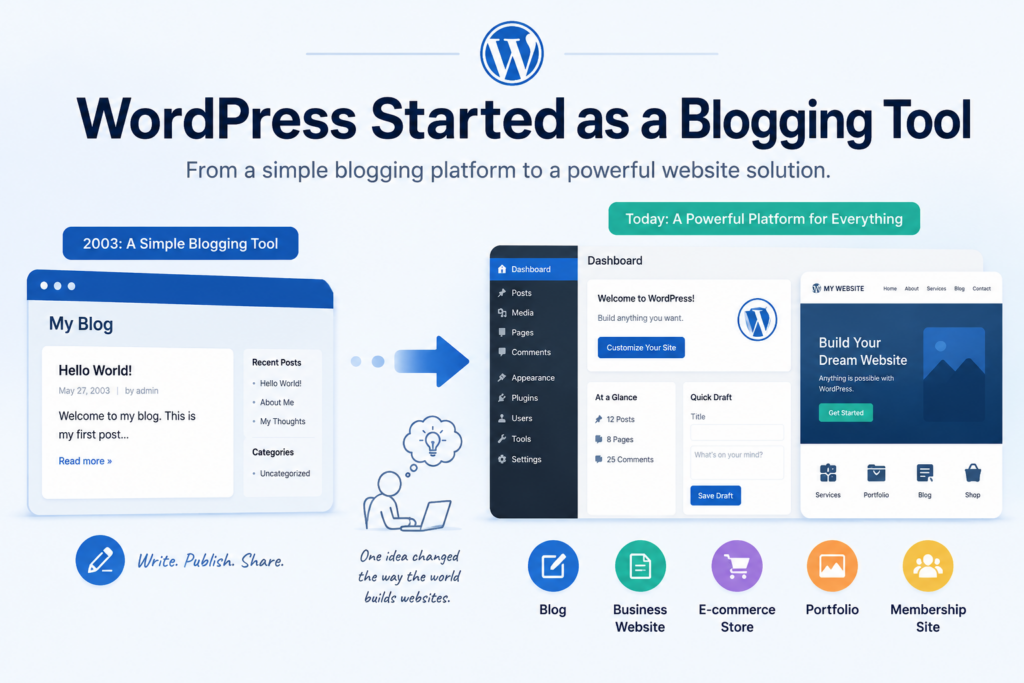
WordPress first became known as a blogging platform. Early users loved it because it made publishing articles simple. Over time, it grew far beyond blogging. Today, WordPress can power business websites, online stores, portfolios, membership sites, educational websites, directories, landing pages, and more.
This evolution is one reason people still ask, “is WordPress a CMS?” The answer is yes, but it is no longer just a blogging CMS. It is a flexible website-building platform that can support many types of websites.
When people discuss WordPress, they often confuse WordPress.org and WordPress.com.
WordPress.org is the self-hosted version. You download the WordPress software, choose your own hosting, connect your domain, install themes and plugins, and control your website more freely.
WordPress.com is a hosted service. It handles hosting for you, but some customization options depend on your plan. It can be easier for beginners, but it may feel more limited if you want full control.
Both are related to WordPress, but they serve different needs. If you want maximum flexibility, WordPress.org is usually the stronger choice.
WordPress organizes content through posts, pages, categories, tags, media files, and custom content types.
Posts are usually used for blogs, news, updates, and articles. Pages are better for static content like About, Contact, Services, Privacy Policy, or Home pages. Categories and tags help organize posts so visitors and search engines can understand the structure of your content.
The media library stores images, videos, PDFs, and other files. This makes it easier to reuse assets across multiple pages without uploading the same file again and again.
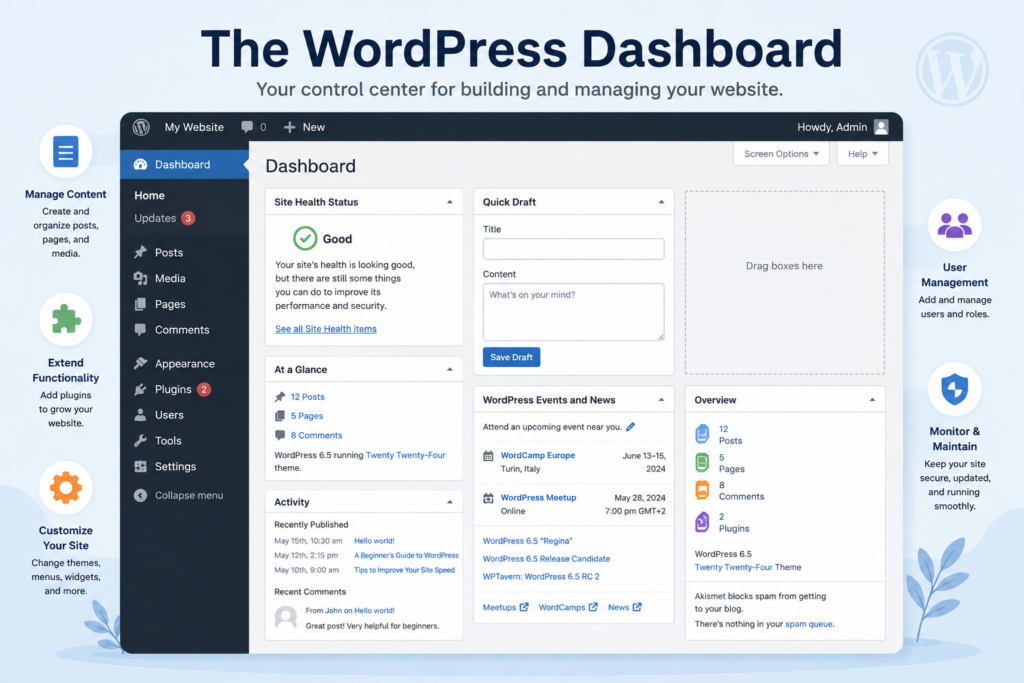
The WordPress dashboard is the control center of the website. From this area, users can create content, change designs, install tools, update settings, manage comments, and check website health.
This dashboard is one of the clearest signs that WordPress is a CMS. It turns website management into a visual process. You do not need to open code files every time you want to change a title, update a paragraph, add a photo, or publish a new blog post.
Themes control the appearance of a WordPress website. A theme can affect layout, typography, colors, spacing, header design, footer design, blog style, product page structure, and overall visual presentation.
A simple theme may only provide basic styling. A premium theme may include multiple templates, advanced settings, layout options, and design presets. This makes WordPress useful for users who want a professional-looking website without designing every page from scratch.
Themes are also important because they separate design from content. You can keep your pages and posts while changing the visual style of the site.
Plugins extend WordPress functionality. If WordPress is the foundation, plugins are the add-ons that help your website do more.
For example, plugins can add contact forms, SEO tools, security features, backups, caching, analytics, image compression, online payments, booking forms, membership systems, and e-commerce functions.
This plugin system is a major reason WordPress works for so many different industries. A restaurant, school, blogger, consultant, and online store may all use WordPress, but each site can install different plugins based on its goals.
Modern WordPress websites often use page builders. These tools allow users to design pages with visual controls instead of coding layouts manually.
WordPress also includes the Block Editor, which lets users build content sections with blocks for text, images, buttons, columns, galleries, lists, and more. Popular page builders can add even more design freedom, especially for landing pages, homepages, and service pages.
This makes WordPress more beginner-friendly while still allowing professional designers to create polished pages.
WordPress can support SEO well when the site is set up properly. It allows users to control page titles, headings, URLs, image alt text, internal links, categories, tags, and content structure.
SEO plugins can help with meta titles, meta descriptions, XML sitemaps, schema markup, redirects, and content optimization. However, WordPress itself does not guarantee rankings. Good SEO still depends on useful content, fast loading speed, mobile-friendly design, technical quality, backlinks, and search intent.
In other words, WordPress gives you a strong SEO-friendly foundation, but the final results depend on how you use it.
Many businesses use WordPress because it can support service pages, blog content, lead forms, testimonials, case studies, pricing pages, and landing pages.
A business website needs to explain what the company does, build trust, answer customer questions, and guide visitors toward taking action. WordPress makes this easier because business owners can update content without rebuilding the whole website.
For example, a company can add a new service page, publish an industry article, update its team section, or change contact details through the dashboard.
WordPress can also power online stores when combined with e-commerce plugins like WooCommerce. This allows users to manage products, categories, carts, checkout pages, payment methods, shipping options, coupons, and order details.
This is where WordPress becomes more than a basic CMS. It can manage both content and commerce. Store owners can publish buying guides, product pages, blog posts, and landing pages in the same system.
For brands that rely on content marketing, this combination can be very useful.
WordPress remains one of the strongest choices for blogging and publishing. It gives writers a clean way to draft, edit, schedule, categorize, and publish content.
For publishers, WordPress can support multiple authors, editorial workflows, featured images, archives, search functions, and related posts. This makes it suitable for personal blogs, company blogs, magazines, educational websites, and news-style platforms.
Because WordPress was originally built around publishing, its content tools still feel natural for writers and content teams.
Creative professionals can use WordPress to build portfolio websites. Designers, photographers, writers, developers, artists, architects, and agencies can showcase work through galleries, case studies, project pages, and visual layouts.
The CMS structure helps users organize projects by category, industry, style, or service type. Instead of uploading random images to static pages, portfolio owners can manage work in a more organized way.
This makes WordPress practical for both personal branding and client acquisition.
A WordPress website needs hosting and a domain name.
Hosting is where the website files and database live. A domain is the website address people type into their browser. For example, a domain works like the public address of your website, while hosting works like the space where the website is stored.
Good hosting matters because it affects speed, uptime, security, and user experience. A slow host can make even a well-designed WordPress website feel weak.
Because WordPress is widely used, security matters. Website owners should keep WordPress core, themes, and plugins updated. Updates can improve performance, fix bugs, and patch security issues.
Security also includes strong passwords, backups, trusted plugins, limited admin access, malware scanning, firewall protection, and two-factor authentication.
WordPress is not automatically unsafe, but poor maintenance can create problems. Like any CMS, it needs responsible management.
WordPress is beginner-friendly compared with building a website from scratch, but it still has a learning curve. New users need to understand hosting, domains, themes, plugins, pages, menus, and basic settings.
The good news is that most daily content tasks are simple after the initial setup. Once the site is ready, users can publish posts, edit pages, upload images, and update information from the dashboard.
For beginners who want full control, WordPress is a strong option. For users who want the simplest possible website with fewer settings, hosted builders may feel easier.
No. WordPress can support small websites and larger websites. A simple personal blog may only need a basic theme and a few plugins. A growing business site may need custom layouts, SEO tools, analytics, forms, security, and performance optimization.
The key is proper setup. As a website grows, it needs better hosting, cleaner plugin management, stronger security, optimized media, and thoughtful content structure.
WordPress can scale, but scaling depends on how carefully the website is built and maintained.
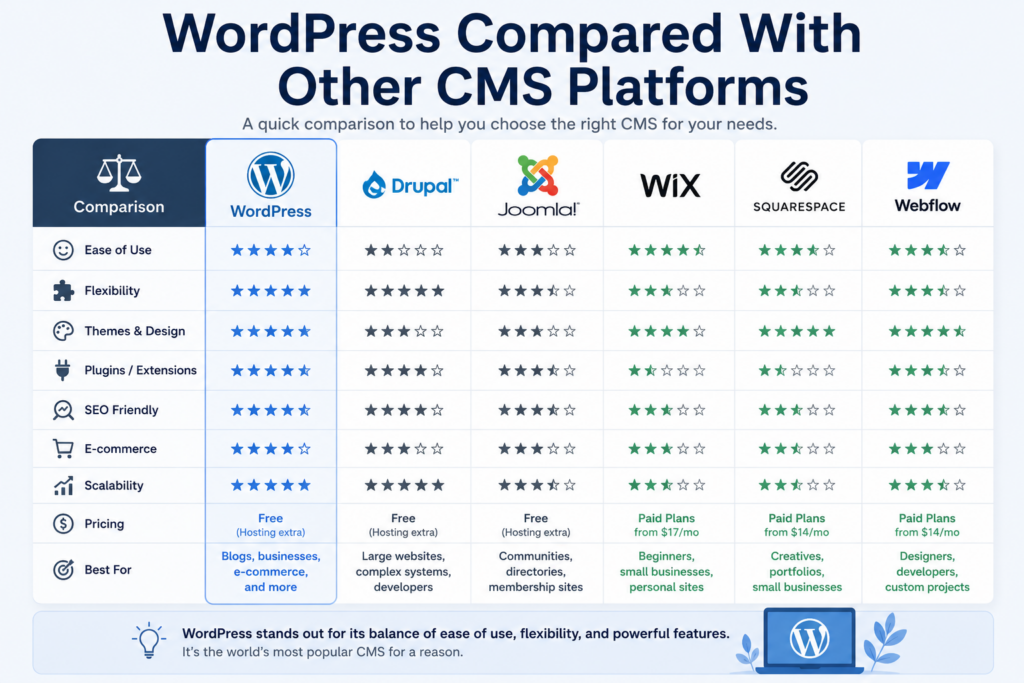
WordPress is not the only CMS. Other platforms include Drupal, Joomla, Webflow, Squarespace, Wix, Shopify, and many custom systems.
WordPress stands out because it balances flexibility, ownership, content control, community support, and plugin availability. Shopify may be stronger for users who only want a hosted e-commerce system. Webflow may appeal to designers who want visual control. Drupal may fit complex enterprise requirements. Wix and Squarespace may work for users who want simpler hosted website builders.
The best CMS depends on the project goal.
WordPress is a good choice when you want control over content, design, plugins, SEO, and long-term growth. It works well for blogs, service websites, portfolios, local businesses, content-heavy websites, and many online stores.
It is also a good choice when you want to own your website environment more directly, especially with the self-hosted version.
However, WordPress may not be the best fit if you do not want to manage hosting, updates, backups, or plugins. In that case, a fully hosted platform may feel easier.
So, is WordPress a CMS? Yes. ووردبريس is a powerful content management system that helps users create, organize, publish, and maintain websites without building every page from code. It started as a blogging tool, but it has grown into a flexible platform for business websites, blogs, portfolios, online stores, and many other types of websites.
Its main strengths include themes, plugins, content organization, SEO flexibility, user-friendly editing, and strong customization options. At the same time, users should understand that WordPress works best when it is properly hosted, secured, updated, and maintained.
In summary, WordPress is not just a website builder. It is a complete CMS that gives beginners and professionals a practical way to manage digital content and build websites for long-term growth.
1. Is WordPress a CMS?
Yes. WordPress is a CMS because it helps users create, edit, organize, and publish website content.
2. What does CMS mean?
CMS means Content Management System. It is software used to manage website content without coding every page manually.
3. Is WordPress only for blogs?
No. WordPress started as a blogging tool, but now it can build business websites, portfolios, online stores, and more.
4. Is WordPress good for beginners?
Yes. WordPress is beginner-friendly, but users still need to learn basic settings, themes, plugins, and hosting.
5. Can WordPress be used for e-commerce?
Yes. With plugins like WooCommerce, WordPress can support product pages, shopping carts, checkout, and online payments.
6. Why is WordPress popular as a CMS?
WordPress is popular because it is flexible, customizable, SEO-friendly, and supported by many themes and plugins.


















