












การแนะนำ
If you have been asking, “how do I create a website with วordpress,” the good news is that the process is much more approachable than many beginners expect. WordPress is free, open-source software, and both WordPress.org and the guide you shared outline a practical path: choose a domain and hosting plan, install WordPress, select a theme, add the features you need with plugins, create your main pages, organize navigation, and launch.
What often makes the process feel confusing is not the platform itself, but the number of choices around it. New users see hosting plans, themes, page builders, plugins, SEO tools, and security options all at once, and it starts to look technical. In reality, building a solid website with WordPress is mostly about making good decisions in the right order. Once you understand that order, the project becomes far easier to manage.
Why WordPress Is Still a Smart Choice
A big reason WordPress remains popular is flexibility. It can support a simple blog, a company website, a portfolio, a service business, or a full online store. The official WordPress ecosystem also gives beginners room to grow: the WordPress Theme Directory lists over 14,000 free themes, and the WordPress Plugin Directory is the platform’s official home for free and open-source plugins. That means you can start small and expand later without rebuilding your site from scratch.
Another reason WordPress works well for beginners is control. You are not locked into one narrow design system. You can change themes, edit pages, add tools, and refine structure as your business grows. The official Learn WordPress materials also make clear that setting up a site is meant to be a step-by-step process, not something reserved for developers.
Start With Purpose Before You Touch Design
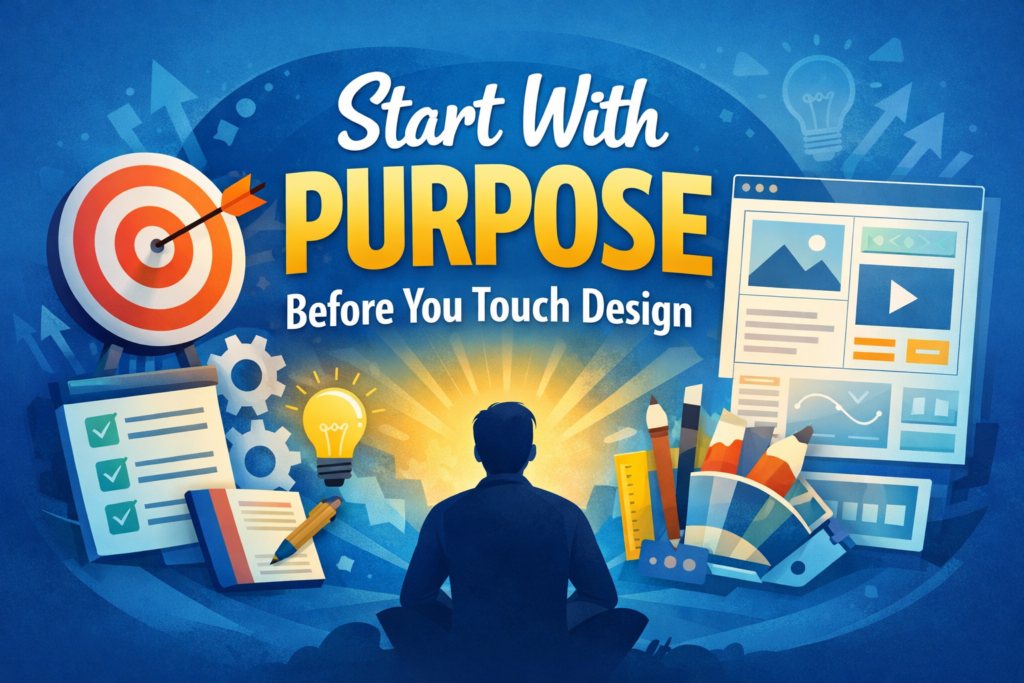
Before you install anything, define what the website needs to do. A website for a local service company should guide people toward inquiries. A blog should make content easy to read and discover. A business website should build trust fast. An eCommerce site should make product browsing and checkout simple. WordPress itself can support all of these use cases, but your structure should match your goal from day one.
This planning stage matters more than most beginners realize. WordPress.org’s getting-started documentation explicitly recommends making a plan before setup, including your environment, access details, tools, and intended site structure. That advice is useful because many website problems begin when people choose a theme first and think about strategy later. A cleaner approach is to decide your audience, core pages, and conversion goal first, then let design support that plan.
Choose a Domain Name and Hosting That Make Sense
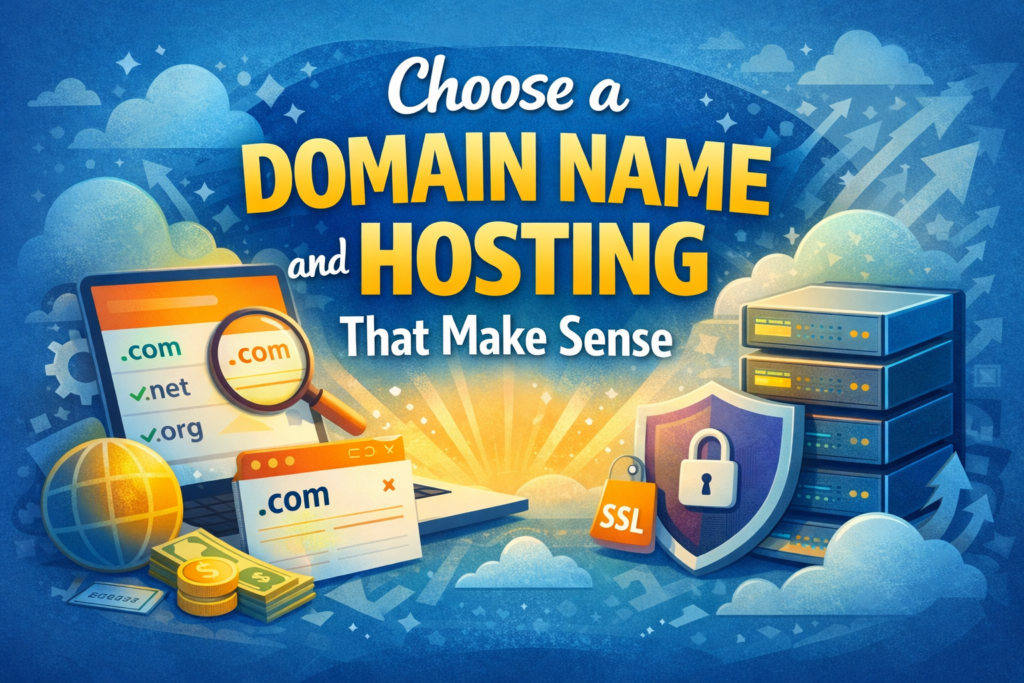
To create a WordPress website, you will need two things besides the software itself: a domain name and web hosting. The article you shared places this near the beginning for a reason. Hosting is where your site lives, and the domain is the address people type into their browser to find it. Without those two pieces, WordPress has nowhere to run publicly.
When choosing a domain, keep it short, readable, and easy to remember. Avoid unusual spellings, random hyphens, or names that are hard to say aloud. A good domain should match the business name, product line, or content niche closely enough that visitors understand what the site is about before they even land on it. This is not a technical rule, but it is a branding rule that has long-term impact on trust and recall.
Hosting choice also matters more than many first-time site owners expect. WordPress documentation notes that your hosting environment and setup requirements are part of the early planning process, and permalink behavior can depend on your web server being configured correctly. In other words, hosting affects not only speed and uptime, but also how smoothly WordPress features work later.
Install WordPress and Learn the Dashboard
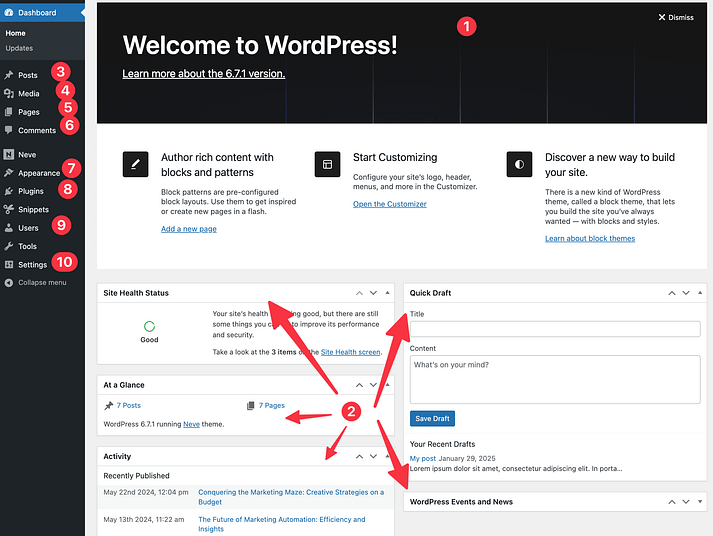
Once you have hosting and a domain, the next step is installing WordPress. The article you shared highlights one-click installation, and WordPress.org’s documentation frames installation and setup as the foundational steps for getting started. For most beginners, that means logging into the hosting dashboard, using the WordPress installer, and then signing in to the WordPress admin area.
After installation, do not rush straight into design. Spend a little time understanding the dashboard. Learn where Pages, Posts, Appearance, Plugins, Settings, and Media are located. That small investment saves a lot of time later, because WordPress becomes far less intimidating once you know where the basic controls live. The official learning materials emphasize settings, page creation, and site structure early for exactly this reason.
Pick a Theme That Supports Your Goal
The next big decision is your theme. A theme controls the visual foundation of the site, including layout, styling, and design options. WordPress Learn materials explain that beginners usually encounter block themes and classic themes, and the official installation path is straightforward: go to Appearance → Themes → Add New, choose a theme, install it, and activate it.
Choosing a theme is where many new website owners overcomplicate things. Because there are thousands of options, it is easy to chase flashy demos instead of practical design. A better method is to choose a clean, well-structured theme that matches your site type. For a business website, prioritize a strong homepage layout, flexible page templates, readable typography, and good mobile presentation. For content-heavy sites, prioritize clarity and navigation. For service brands, choose a design that makes trust, contact, and positioning immediately visible. The official WordPress theme directory exists precisely so users can browse and compare options in one place.
It also helps to remember that a theme is not your strategy. The theme should support the content, not dominate it. People do not stay on a website because it has dramatic animation or oversized visual effects. They stay because the site feels clear, useful, credible, and easy to navigate.
Add Plugins Carefully, Not Excessively
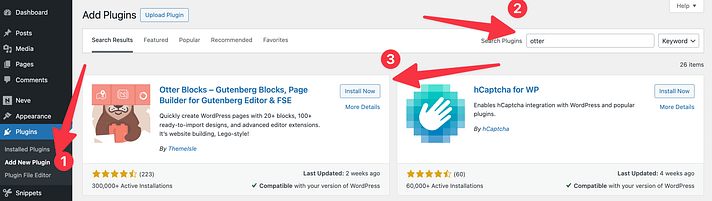
Plugins are one of WordPress’s biggest strengths, but they are also where many sites become bloated. WordPress documentation explains that plugins can be installed through the built-in installer, by uploading a zip file, or manually through SFTP. For most users, the simplest method is Plugins → Add New, search, install, and activate.
The key is restraint. You do not need twenty plugins on day one. Most new websites only need a small group of essentials, such as SEO support, form handling, backups, caching or optimization, and security tools. Add only what serves a clear business purpose. Every extra plugin adds more settings, more maintenance, and more opportunities for conflicts or slowdowns.
This is where good judgment matters. A plugin should solve a real problem, not just add a feature because it sounds impressive. If a contact form helps generate leads, that is useful. If an SEO plugin helps structure metadata, that is useful. If a backup solution protects your work, that is useful. But if a plugin only adds visual clutter or duplicates something your theme already handles, it is probably unnecessary. WordPress’s plugin documentation also encourages users to review plugin details and compatibility before activating them.
Create the Core Pages First
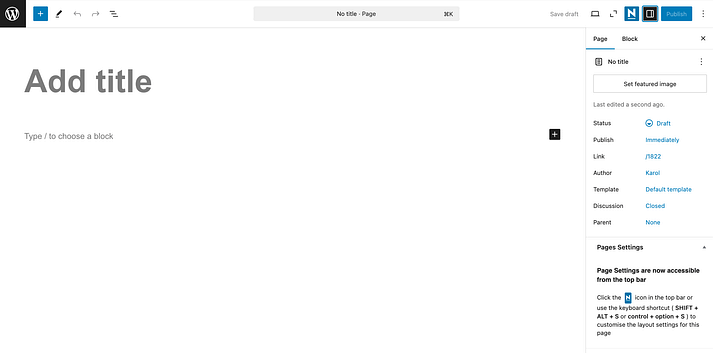
A good WordPress site is usually built around a small set of core pages before anything else. The guide you shared mentions pages like Home, About, and Contact, and WordPress’s page documentation shows that creating them is simple: go to Pages → Add New, add a title, build the content, adjust settings, and publish.
For most websites, your essential structure should begin with a homepage, an about page, a services or products page, a contact page, and, if content marketing matters, a blog page. That structure gives visitors quick answers to the most common questions: who you are, what you offer, why they should trust you, and how to take the next step.
WordPress also allows you to organize pages hierarchically through parent and child pages. The official documentation shows this clearly with examples like an About page containing subpages such as Careers or Locations, or a Services page containing nested service pages. This becomes especially helpful as your site grows, because structure affects navigation, URL clarity, and how easily users can explore your content.
Set Your Homepage, Blog, Menus, and URLs Properly
One of the most important setup decisions is your homepage. By default, WordPress displays blog post excerpts on the front page of a new site. If you want a custom business-style homepage instead, WordPress Learn explains that you should go to Settings → Reading, choose A static page, then assign one page as the homepage and another as the blog page.
This step matters because it changes the first impression of the entire website. A static homepage gives you control over messaging, layout, calls to action, featured services, testimonials, or category links. For most companies, that is a much stronger opening than showing recent blog posts first. A blog page still has value, but it works better as a content hub than as the face of the brand.
Navigation is the next part of the experience. WordPress support documentation explains that menus are used to create, edit, and organize site navigation, including links to pages, posts, and categories. A good menu should be short, obvious, and helpful. Most sites do not need ten top-level links. In many cases, five or six well-chosen items are enough.
Permalinks are another small setting with a big effect. WordPress’s documentation notes that the default permalink structure is Plain, but you can change it in Settings → Permalinks. For most websites, cleaner post-name URLs are easier for humans to read and better aligned with a polished site structure than raw query-style links.
Make the Site Trustworthy, Secure, and Easy to Use
If you want your site to feel professional, design alone is not enough. Trust also comes from technical basics. WordPress developer documentation explains that HTTPS and SSL must already be configured on the server for secure admin access features to work properly, and WordPress can force SSL admin sessions when set up correctly. In plain language, that means a serious website should be running on HTTPS, not HTTP.
Backups are just as important. WordPress learning materials on backups explain that a proper backup strategy covers both website files and the database. That matters because your content, settings, plugins, media, and structure all need protection. If you skip backups, even a well-designed site remains fragile.
Usability matters too. A website should load clearly on mobile, keep text readable, and make actions obvious. Your homepage should explain what the site is about within seconds. Your contact path should be visible. Your forms should be short. Your pages should not overwhelm users with too many competing elements. WordPress gives you the tools, but clarity is still a design discipline.
Launching Is the Beginning, Not the End
Many people think building a website ends when the homepage looks good. In reality, launch is the start of the next phase. Once the site is live, you need to refine the content, improve headings, monitor performance, update plugins, review theme updates, and keep pages current. WordPress Learn notes that theme updates should be handled carefully, and backing up the site before updates is strongly recommended.
This is also where content becomes important. If your site includes a blog, resource section, or case studies, those pages can help attract traffic and answer buyer questions over time. If your site is primarily for leads, then landing-page clarity, contact flow, and trust signals matter more. Either way, a WordPress website performs best when it continues to evolve instead of staying frozen after launch.
บทสรุป
So, how do I create a website with วordpress? You begin by clarifying your goal, securing a domain and hosting plan, installing WordPress, choosing a practical theme, adding only the plugins you truly need, creating essential pages, organizing menus, setting a static homepage, and tightening core settings like permalinks, backups, and HTTPS. That is the real foundation of a strong WordPress site.
The biggest lesson is that a successful website is not built by piling on features. It is built by making smart decisions in the right sequence. WordPress gives beginners a flexible system, a huge theme ecosystem, official plugin support, and clear ways to structure pages and navigation. Once you understand those fundamentals, creating a website with WordPress becomes less about technical complexity and more about clarity, consistency, and purpose.
คำถามที่พบบ่อย
Yes, WordPress is beginner-friendly once you understand the basic setup steps such as hosting, themes, plugins, and page creation.
Yes, if you use WordPress.org, you need both a domain name and hosting to make your website live online.
The cost depends on your domain, hosting plan, premium theme, plugins, and whether you hire professional design help.
Yes, WordPress works well for business websites, portfolios, blogs, service sites, and eCommerce stores.
Most new websites should start with a homepage, about page, services or products page, contact page, and blog page.


ออกแบบและสร้างเว็บไซต์ WordPress หรือเว็บไซต์องค์กรพร้อมระบบอีคอมเมิร์ซครบวงจรสำหรับคุณ.
ช่วงราคา: $200.00 ถึง $2,500.00custom-requirements-or-special-quotations
ราคาเดิมคือ: $2.00.$1.00ราคาปัจจุบันคือ: $1.00. การใช้ปลั๊กอิน 50 ตัวมากเกินไปสำหรับร้านค้าออนไลน์ที่ใช้ WordPress หรือไม่?
การเข้าใจผลกระทบที่แท้จริงต่อประสิทธิภาพ การมีปลั๊กอิน 50 ตัวบนเว็บไซต์อีคอมเมิร์ซ WordPress ไม่ใช่ปัญหาโดยอัตโนมัติ จริงๆ แล้ว จำนวนเพียงอย่างเดียวแทบจะไม่สามารถกำหนดประสิทธิภาพได้....

ภาพหลักสำหรับการออกแบบอุปกรณ์กายภาพบำบัดที่บ้านของ Amazon (อธิบายรายละเอียด)
บทนำ: การสร้างภาพลักษณ์ที่น่าเชื่อถือสำหรับอุปกรณ์บำบัดที่บ้านบน Amazon เมื่อออกแบบภาพหลักสำหรับอุปกรณ์บำบัดที่บ้านบน Amazon สิ่งสำคัญอันดับแรกของเราคือ...

ภาพหลักสำหรับการแปลงลิปสติกเป็นสินค้าสำหรับ Amazon
บทนำ: การออกแบบภาพหลักลิปสติกที่ขายได้บน Amazon เมื่อเราออกแบบภาพหลักสำหรับลิปสติกบน Amazon ความรับผิดชอบของเราไม่ได้จำกัดอยู่แค่...

แฮกเกอร์ขโมยอีเมลผู้ดูแลระบบ WordPress ได้อย่างไร (และวิธีป้องกัน)
มาเริ่มกันด้วยความจริงที่ไม่น่าสบายใจ: อีเมลแอดมิน WordPress ของคุณอาจเปิดเผยต่อสาธารณะมากกว่าที่คุณคิด และแฮกเกอร์? พวกเขาชอบมาก สำหรับพวกเขา...

อะไรทำให้รองพื้นชนิดเหลวของ Amazon (ภาพหลัก) ขายดี?
บทนำ การออกแบบภาพหลักสำหรับรองพื้นชนิดเหลวบน Amazon ไม่ใช่แค่การทำให้ผลิตภัณฑ์ดูสวยงามเท่านั้น บน Amazon ภาพหลักและ...

การออกแบบภาพหลัก Amazon ที่มีประสิทธิภาพสำหรับตลับกรอง
บทนำ การออกแบบภาพหลักสำหรับ Amazon ไม่ใช่แค่การทำให้สินค้าดูน่าดึงดูดเท่านั้น แต่ยังเกี่ยวกับความชัดเจน ความน่าเชื่อถือ และความเข้าใจได้ในทันที โดยเฉพาะอย่างยิ่งสำหรับ...

การโจมตีแบบ Replay Attack บน WordPress: ภัยคุกคามจริงหรือแค่เรื่องที่ถูกพูดเกินจริง?
ก่อนอื่นขอชี้แจงให้ชัดเจนก่อน การโจมตีแบบ Replay Attack นั้นดูไม่น่ากลัว มันไม่ได้ทำลายรหัสผ่าน มันไม่ได้แทรกโค้ดที่เป็นอันตรายพร้อมข้อความแฮ็กเกอร์สีเขียวกระจัดกระจายไปทั่ว มันแนบเนียนกว่า...

วิธีคัดลอกหน้าเว็บ WordPress โดยไม่ทำให้ระบบเสียหาย
ยอมรับกันเถอะ บางครั้งคุณอาจไม่อยากสร้างหน้าเว็บใหม่ คุณแค่อยากได้หน้าเว็บเดิม...แต่แตกต่างไปเล็กน้อย รูปแบบเหมือนเดิม บล็อกเหมือนเดิม การตั้งค่าเหมือนเดิม เพราะ...

เปรียบเทียบธีม WordPress สำหรับสัตว์เลี้ยง 5 แบบ
บทนำ การเลือกธีม WordPress ที่เหมาะสมสำหรับธุรกิจเกี่ยวกับสัตว์เลี้ยงนั้นไม่ใช่แค่เรื่องของการออกแบบเท่านั้น แต่ยังส่งผลโดยตรงต่อการใช้งาน ความสามารถในการขยายขนาด และการเติบโตของธุรกิจในระยะยาว การดูแลสัตว์เลี้ยงและ...

เปรียบเทียบธีมอีคอมเมิร์ซชุดว่ายน้ำ 5 แบบ
บทนำ การเลือกธีมที่เหมาะสมสำหรับร้านค้าอิสระที่จำหน่ายชุดว่ายน้ำหรือชุดชั้นในนั้นไม่ใช่แค่การตัดสินใจด้านภาพลักษณ์เท่านั้น แต่ยังส่งผลโดยตรงต่ออัตราการเปลี่ยนลูกค้าให้เป็นผู้ซื้อ ความสามารถในการขยายธุรกิจ และความยั่งยืนในระยะยาว...

วิธีปิดการแสดงความคิดเห็นใน WordPress (โดยไม่ต้องเสียสติ)
มาพูดถึงระบบแสดงความคิดเห็นของ WordPress กันดีกว่า ในทางทฤษฎีแล้ว ความคิดเห็นนั้นยอดเยี่ยมมาก มันช่วยกระตุ้นการสนทนา สร้างชุมชน และทำให้เว็บไซต์ของคุณดูมีชีวิตชีวา แต่ในความเป็นจริงแล้ว มันมักจะเป็นเหมือนแม่เหล็กดึงดูด...

ข้อผิดพลาด WordPress 500: เมื่อเว็บไซต์ของคุณเกิดอาการผิดปกติ
เว็บไซต์ WordPress ของคุณยังใช้งานได้ปกติดีเมื่อสักครู่ คุณรีเฟรชหน้าเว็บ แล้วจู่ๆ ก็เกิดข้อผิดพลาด 500 Internal Server Error ขึ้นมา ไม่มีคำอธิบาย ไม่มีคำขอโทษ มีเพียงข้อความที่เย็นชาและสับสนซึ่งโดยพื้นฐานแล้ว...

การสร้างเว็บไซต์ WordPress ที่ปรับขนาดได้สำหรับแบรนด์ที่ขับเคลื่อนด้วยวิทยาศาสตร์: โครงการ AminoUSA
บทนำ ในยุคดิจิทัลปัจจุบัน เว็บไซต์เป็นมากกว่าแค่สถานที่สำหรับแสดงรายการสินค้า สำหรับแบรนด์ที่ขับเคลื่อนด้วยวิทยาศาสตร์ซึ่งดำเนินงานในอุตสาหกรรมที่มีการควบคุมหรือเน้นการวิจัย...

สร้างร้านค้า Shopify ที่ปรับขนาดได้สำหรับแบรนด์ใบมีดระดับโลก: โครงการ CoolKatana
บทนำ ในธุรกิจอีคอมเมิร์ซข้ามพรมแดน เว็บไซต์ Shopify เป็นมากกว่าแค่หน้าร้าน สำหรับแบรนด์ที่ดำเนินธุรกิจในกลุ่มเฉพาะหรือกลุ่มที่ขับเคลื่อนด้วยวัฒนธรรม เว็บไซต์ต้องทำมากกว่านั้น...

การออกแบบร้านค้า Shopify ที่มีอัตราการแปลงสูงสำหรับขายการ์ดโปเกมอน
บทนำ ในโลกของอีคอมเมิร์ซสินค้าสะสม โดยเฉพาะอย่างยิ่งในตลาดเกมการ์ดโปเกมอน (TCG) เว็บไซต์จะต้องทำมากกว่าแค่แสดงรายการสินค้า...

ดีไซน์ Shopify ที่เพิ่มยอดขายสำหรับแบรนด์อิฐสั่งทำพิเศษ
บทนำ ในสภาพแวดล้อมการแข่งขันอีคอมเมิร์ซในปัจจุบัน โดยเฉพาะอย่างยิ่งในตลาดของขวัญส่วนบุคคลและของสะสม เว็บไซต์ Shopify ต้องทำมากกว่าแค่แสดงสินค้า...

วิธีติดต่อฝ่ายสนับสนุนของ Shopify: คู่มือที่ง่ายและไม่ยุ่งยาก
การบริหารร้านค้า Shopify ควรเป็นเรื่องที่น่าตื่นเต้น ไม่ใช่เรื่องที่ทำให้สับสน เมื่อมีคำถามหรือปัญหาเกิดขึ้น Shopify มีช่องทางการสนับสนุนหลายช่องทาง ขึ้นอยู่กับสถานการณ์...

วิธีปิดใช้งานร้านค้า Shopify: คู่มือที่ชัดเจนและใช้งานได้จริง
การปิดใช้งานร้านค้า Shopify นั้นไม่ซับซ้อน แต่ก็มีผลกระทบหลายอย่างที่ผู้ขายหลายรายมองข้ามไป คู่มือนี้จะอธิบายขั้นตอนอย่างละเอียดและเข้าใจง่าย...