












การปิดใช้งาน ช็อปฟี่ การปิดร้านค้าไม่ใช่เรื่องซับซ้อน แต่ก็มีผลกระทบหลายอย่างที่พ่อค้าแม่ค้าหลายรายมองข้าม คู่มือนี้จะอธิบายขั้นตอนต่างๆ อย่างง่ายๆ และให้ความรู้ เพื่อให้คุณรู้ว่าเกิดอะไรขึ้นก่อน ระหว่าง และหลังจากที่คุณปิดร้านค้าแล้ว.
การ "ปิดใช้งานร้านค้า Shopify" หมายความว่าอย่างไรกันแน่?
เมื่อคุณปิดใช้งานของคุณ ช็อปฟี่ คุณกำลังยกเลิกการสมัครสมาชิกร้านค้าของคุณ ร้านค้าจะปิดตัวลงโดยอัตโนมัติเมื่อสิ้นสุดรอบการเรียกเก็บเงินปัจจุบันของคุณ และหน้าร้านของคุณจะออฟไลน์ คุณจะไม่สามารถเข้าถึงส่วนผู้ดูแลระบบของ Shopify ได้จนกว่าคุณจะเปิดใช้งานร้านค้าอีกครั้งด้วยวิธีการชำระเงินที่ถูกต้อง.
สำคัญ: ฝ่ายสนับสนุนของ Shopify ไม่สามารถปิดใช้งานร้านค้าของคุณให้ได้ มีเพียงเจ้าของร้านค้าเท่านั้นที่สามารถทำได้จากแผงควบคุมผู้ดูแลระบบ.
สิ่งที่คุณควรรู้ก่อนปิดใช้งาน
ลองนึกถึงการปิดใช้งานว่าเหมือนกับการกดปุ่ม “หยุดชั่วคราวพร้อมผลที่ตามมา” นี่คือสิ่งที่ควรพิจารณาก่อน:
1. URL ร้านค้าของคุณหายไปตลอดกาล
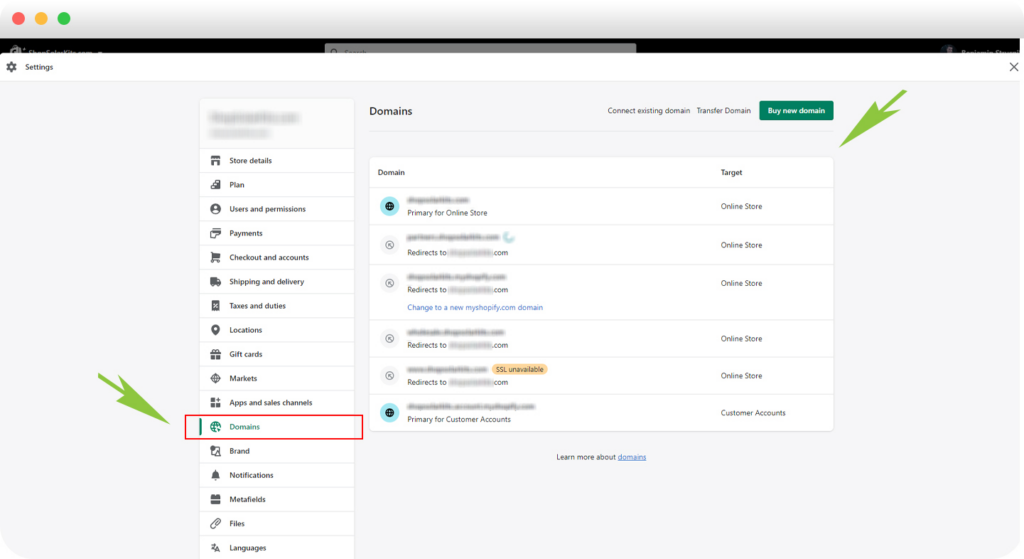
แต่ละ มายshopify.com โดเมนนี้มีเอกลักษณ์เฉพาะตัว เมื่อถูกปิดใช้งานแล้ว คุณจะไม่สามารถนำ URL เดิมกลับมาใช้ใหม่ได้อีก แม้ว่าคุณจะเปิดร้านค้าใหม่โดยใช้ชื่อแบรนด์เดิมในภายหลังก็ตาม.
2. สำรองข้อมูลของคุณ

ส่งออกข้อมูลสำคัญ เช่น:
- สินค้า
- คำสั่งซื้อ
- ลูกค้า
- บัตรของขวัญ (โดยเฉพาะอย่างยิ่งหากมีเงินคงเหลือที่ยังไม่ได้ใช้)
การส่งออกไฟล์ CSV คือตาข่ายนิรภัยของคุณ.
3. ธีมและลิขสิทธิ์มีความสำคัญ
หากคุณซื้อธีมแบบชำระเงิน โปรดดาวน์โหลดไฟล์สำรอง ใบอนุญาตธีมใช้ได้เฉพาะกับร้านค้าต้นฉบับเท่านั้น แต่ ช็อปฟี่ บางครั้งฝ่ายสนับสนุนอาจช่วยโอนใบอนุญาตไปยังร้านค้าอื่นที่คุณเป็นเจ้าของได้.
4. ปัญหาทางการเงินที่ยังค้างคาอยู่ไม่ได้หายไปไหน
แม้หลังจากปิดใช้งานแล้ว:
- การจ่ายเงินที่ค้างอยู่ของ Shopify Payments ยังคงดำเนินการอยู่
- อาจยังคงมีค่าธรรมเนียมสำหรับแอปพลิเคชันจากผู้พัฒนาภายนอก
- การขอคืนเงินยังคงเกิดขึ้นได้ และคุณจะไม่สามารถส่งหลักฐานใหม่ได้อีก
5. โดเมนที่กำหนดเองต้องการการดูแลเป็นพิเศษ
- โดเมนที่ซื้อจาก Shopify สามารถโอนย้ายออกได้
- ควรลบโดเมนของบุคคลที่สามออกจาก Shopify ก่อนที่จะปิดใช้งาน
- นโยบายความปลอดภัย HSTS ของ Shopify จะยังคงใช้งานได้เป็นเวลา 90 วัน ซึ่งหมายความว่าแพลตฟอร์มที่ไม่ใช้ HTTPS อาจแสดงคำเตือนด้านความปลอดภัยในเบราว์เซอร์
วิธีปิดใช้งานร้านค้า Shopify ของคุณ (เวอร์ชันเดสก์ท็อป)
- ไปที่ การตั้งค่า → แผน
- คลิก ยกเลิกแผน (หรือ ยกเลิกการทดลองใช้ หากมี)
- ตรวจสอบตัวเลือกการหยุดชั่วคราว (ไม่บังคับ)
- ยืนยันการยกเลิก
- เลือกเหตุผลและป้อนรหัสผ่านของคุณ
คุณจะได้รับอีเมลยืนยันเมื่อร้านค้าถูกปิดใช้งานแล้ว.
ผู้ใช้งาน Shopify Plus: คุณต้องติดต่อฝ่ายสนับสนุนของ Shopify Plus เพื่อปิดใช้งาน.
จะเกิดอะไรขึ้นหลังจากปิดใช้งาน?
- ข้อมูลร้านค้าของคุณจะถูกจัดเก็บอย่างปลอดภัยเป็นเวลา 2 ปี
- คุณสามารถดูใบแจ้งหนี้ที่ผ่านมาได้
- คุณสามารถเปิดใช้งานใหม่ได้ทุกเมื่อภายในช่วงเวลานั้น โดยไม่จำเป็นต้องสร้างใหม่
หากคุณต้องการลบข้อมูลลูกค้าของคุณเร็วกว่ากำหนด คุณสามารถส่งคำขอการลบข้อมูลอย่างเป็นทางการได้.
การเปิดใช้งานร้านค้าที่ถูกปิดใช้งานอีกครั้ง
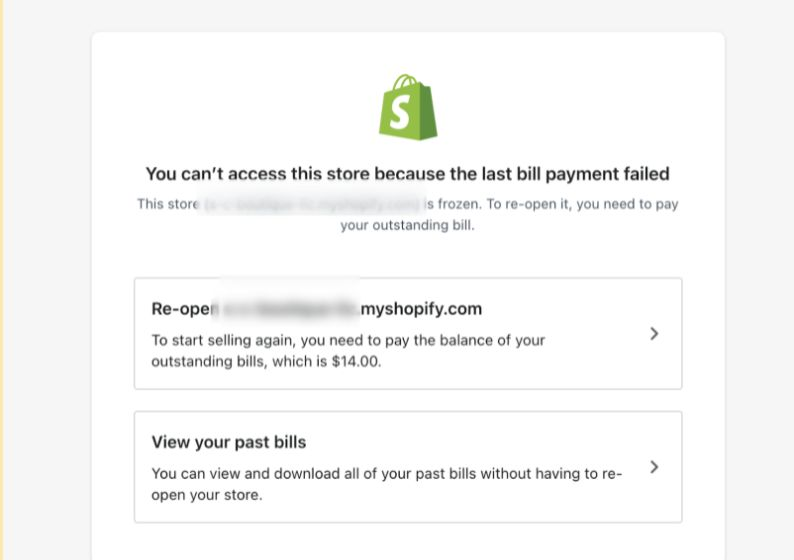
การเปิดใหม่นั้นง่ายมาก:
- เข้าสู่ระบบในฐานะเจ้าของร้าน
- คลิก เปิดใหม่ .myshopify.com
- เลือกแผนใหม่
- เพิ่มรายละเอียดการชำระเงิน
- ยืนยันและเปิดใช้งานอีกครั้ง
ร้านของคุณจะกลับมาเป็นเหมือนเดิมทุกประการ.
ข้อคิดสุดท้าย
การปิดใช้งาน ช็อปฟี่ การสร้างร้านค้าออนไลน์ไม่ใช่แค่ขั้นตอนทางเทคนิค แต่เป็นการตัดสินใจทางธุรกิจที่ส่งผลต่อแบรนด์ โดเมน ความไว้วางใจของลูกค้า และความสามารถในการขยายธุรกิจในอนาคต การเข้าใจรายละเอียดเหล่านี้จะช่วยให้คุณหลีกเลี่ยงข้อผิดพลาดที่มีค่าใช้จ่ายสูงได้.
หากคุณกำลังดำเนินธุรกิจอีคอมเมิร์ซข้ามพรมแดน วางแผนย้ายร้านค้า หรือกำลังคิดที่จะออกแบบใหม่หรือปรับโครงสร้างเว็บไซต์ Shopify ของคุณ นี่คือจุดที่กลยุทธ์มีความสำคัญอย่างยิ่ง.
ที่ AIRSANG, เราเชี่ยวชาญด้านโซลูชันอีคอมเมิร์ซข้ามพรมแดนและการออกแบบเว็บไซต์ที่เน้นการเพิ่มยอดขาย หากคุณกำลังวางแผนก้าวต่อไป หรือการกลับมาอีกครั้ง โปรดติดตามเราหรือติดต่อเราได้เลย เราสร้างร้านค้าโดยคำนึงถึงอนาคต.


ออกแบบและสร้างเว็บไซต์ WordPress หรือเว็บไซต์องค์กรพร้อมระบบอีคอมเมิร์ซครบวงจรสำหรับคุณ.
ช่วงราคา: $200.00 ถึง $2,500.00custom-requirements-or-special-quotations
ราคาเดิมคือ: $2.00.$1.00ราคาปัจจุบันคือ: $1.00. การใช้ปลั๊กอิน 50 ตัวมากเกินไปสำหรับร้านค้าออนไลน์ที่ใช้ WordPress หรือไม่?
การเข้าใจผลกระทบที่แท้จริงต่อประสิทธิภาพ การมีปลั๊กอิน 50 ตัวบนเว็บไซต์อีคอมเมิร์ซ WordPress ไม่ใช่ปัญหาโดยอัตโนมัติ จริงๆ แล้ว จำนวนเพียงอย่างเดียวแทบจะไม่สามารถกำหนดประสิทธิภาพได้....

ภาพหลักสำหรับการแปลงลิปสติกเป็นสินค้าสำหรับ Amazon
บทนำ: การออกแบบภาพหลักลิปสติกที่ขายได้บน Amazon เมื่อเราออกแบบภาพหลักสำหรับลิปสติกบน Amazon ความรับผิดชอบของเราไม่ได้จำกัดอยู่แค่...

แฮกเกอร์ขโมยอีเมลผู้ดูแลระบบ WordPress ได้อย่างไร (และวิธีป้องกัน)
มาเริ่มกันด้วยความจริงที่ไม่น่าสบายใจ: อีเมลแอดมิน WordPress ของคุณอาจเปิดเผยต่อสาธารณะมากกว่าที่คุณคิด และแฮกเกอร์? พวกเขาชอบมาก สำหรับพวกเขา...

อะไรทำให้รองพื้นชนิดเหลวของ Amazon (ภาพหลัก) ขายดี?
บทนำ การออกแบบภาพหลักสำหรับรองพื้นชนิดเหลวบน Amazon ไม่ใช่แค่การทำให้ผลิตภัณฑ์ดูสวยงามเท่านั้น บน Amazon ภาพหลักและ...

การออกแบบภาพหลัก Amazon ที่มีประสิทธิภาพสำหรับตลับกรอง
บทนำ การออกแบบภาพหลักสำหรับ Amazon ไม่ใช่แค่การทำให้สินค้าดูน่าดึงดูดเท่านั้น แต่ยังเกี่ยวกับความชัดเจน ความน่าเชื่อถือ และความเข้าใจได้ในทันที โดยเฉพาะอย่างยิ่งสำหรับ...

การโจมตีแบบ Replay Attack บน WordPress: ภัยคุกคามจริงหรือแค่เรื่องที่ถูกพูดเกินจริง?
ก่อนอื่นขอชี้แจงให้ชัดเจนก่อน การโจมตีแบบ Replay Attack นั้นดูไม่น่ากลัว มันไม่ได้ทำลายรหัสผ่าน มันไม่ได้แทรกโค้ดที่เป็นอันตรายพร้อมข้อความแฮ็กเกอร์สีเขียวกระจัดกระจายไปทั่ว มันแนบเนียนกว่า...

วิธีคัดลอกหน้าเว็บ WordPress โดยไม่ทำให้ระบบเสียหาย
ยอมรับกันเถอะ บางครั้งคุณอาจไม่อยากสร้างหน้าเว็บใหม่ คุณแค่อยากได้หน้าเว็บเดิม...แต่แตกต่างไปเล็กน้อย รูปแบบเหมือนเดิม บล็อกเหมือนเดิม การตั้งค่าเหมือนเดิม เพราะ...

เปรียบเทียบธีม WordPress สำหรับสัตว์เลี้ยง 5 แบบ
บทนำ การเลือกธีม WordPress ที่เหมาะสมสำหรับธุรกิจเกี่ยวกับสัตว์เลี้ยงนั้นไม่ใช่แค่เรื่องของการออกแบบเท่านั้น แต่ยังส่งผลโดยตรงต่อการใช้งาน ความสามารถในการขยายขนาด และการเติบโตของธุรกิจในระยะยาว การดูแลสัตว์เลี้ยงและ...

เปรียบเทียบธีมอีคอมเมิร์ซชุดว่ายน้ำ 5 แบบ
บทนำ การเลือกธีมที่เหมาะสมสำหรับร้านค้าอิสระที่จำหน่ายชุดว่ายน้ำหรือชุดชั้นในนั้นไม่ใช่แค่การตัดสินใจด้านภาพลักษณ์เท่านั้น แต่ยังส่งผลโดยตรงต่ออัตราการเปลี่ยนลูกค้าให้เป็นผู้ซื้อ ความสามารถในการขยายธุรกิจ และความยั่งยืนในระยะยาว...

วิธีปิดการแสดงความคิดเห็นใน WordPress (โดยไม่ต้องเสียสติ)
มาพูดถึงระบบแสดงความคิดเห็นของ WordPress กันดีกว่า ในทางทฤษฎีแล้ว ความคิดเห็นนั้นยอดเยี่ยมมาก มันช่วยกระตุ้นการสนทนา สร้างชุมชน และทำให้เว็บไซต์ของคุณดูมีชีวิตชีวา แต่ในความเป็นจริงแล้ว มันมักจะเป็นเหมือนแม่เหล็กดึงดูด...

ข้อผิดพลาด WordPress 500: เมื่อเว็บไซต์ของคุณเกิดอาการผิดปกติ
เว็บไซต์ WordPress ของคุณยังใช้งานได้ปกติดีเมื่อสักครู่ คุณรีเฟรชหน้าเว็บ แล้วจู่ๆ ก็เกิดข้อผิดพลาด 500 Internal Server Error ขึ้นมา ไม่มีคำอธิบาย ไม่มีคำขอโทษ มีเพียงข้อความที่เย็นชาและสับสนซึ่งโดยพื้นฐานแล้ว...

วิธีติดต่อฝ่ายสนับสนุนของ Shopify: คู่มือที่ง่ายและไม่ยุ่งยาก
การบริหารร้านค้า Shopify ควรเป็นเรื่องที่น่าตื่นเต้น ไม่ใช่เรื่องที่ทำให้สับสน เมื่อมีคำถามหรือปัญหาเกิดขึ้น Shopify มีช่องทางการสนับสนุนหลายช่องทาง ขึ้นอยู่กับสถานการณ์...

เปรียบเทียบธีมร้านขายรองเท้า 5 แบบ
บทนำ การเลือกธีมที่เหมาะสมสำหรับร้านค้าอิสระที่เน้นจำหน่ายรองเท้าไม่ใช่แค่การตัดสินใจด้านภาพลักษณ์เท่านั้น แต่ยังส่งผลโดยตรงต่อความสามารถในการขยายธุรกิจ การดำเนินงานประจำวัน และประสิทธิภาพการแปลงลูกค้าในระยะยาว...

Shopify ปะทะ Etsy: การประลองการขายออนไลน์ครั้งยิ่งใหญ่
บทนำ: สองแพลตฟอร์มเดินเข้าไปในบาร์… ถ้า Shopify และ Etsy เป็นคน Etsy ก็คงเป็นเพื่อนที่น่ารักคนนั้นที่มีบูธอยู่ที่….

เว็บไซต์ Shopify หรือ WordPress ของคุณถูกแฮ็กหรือไม่? นี่คือสิ่งที่คุณควรทำ
บทนำ: เปรียบเสมือนการตื่นขึ้นมาพบกับหน้าต่างที่แตกในโลกดิจิทัล ลองนึกภาพว่าคุณตื่นนอน หยิบกาแฟยามเช้า เปิดแล็ปท็อป… แล้วพบว่าเว็บไซต์ของคุณ….

วิธีเริ่มต้นร้านค้า Shopify โดยไม่เสียสติ
การเริ่มต้นร้านค้าบน Shopify ฟังดูหรูหรา คุณนึกภาพตัวเองกำลังจิบกาแฟตอนเที่ยง ตรวจสอบการแจ้งเตือนยอดขาย และบอกเพื่อน ๆ อย่างสบาย ๆ ว่า “ใช่ ร้านค้าของฉันทำได้ดีทีเดียว...”.

Shopify น่าเชื่อถือหรือไม่? คู่มือฉบับสมบูรณ์สำหรับผู้ขายออนไลน์มือใหม่
หากคุณกำลังค้นหาข้อมูลเกี่ยวกับแพลตฟอร์มอีคอมเมิร์ซ คุณอาจพิมพ์คำถามเฉพาะเจาะจงข้อหนึ่งลงใน Google ว่า Shopify น่าเชื่อถือหรือไม่? คำถามนั้นสมเหตุสมผลอย่างยิ่ง การเปิดตัว...
เปรียบเทียบธีมสำหรับร้านขายเสื้อผ้าเด็ก: WordPress และ Shopify
บทนำ การเลือกธีมที่เหมาะสมเป็นหนึ่งในการตัดสินใจที่สำคัญที่สุดเมื่อสร้างร้านค้าอิสระจำหน่ายเสื้อผ้าเด็กหรือทารก โทนสีของการออกแบบ ความเข้ากันได้กับแพลตฟอร์มต่างๆ...