












Введение
Search engine optimization (SEO) is one of the most powerful ways to grow a WordPress website. Whether you run a blog, an eCommerce store, or a business site, improving your SEO helps you attract more organic traffic, increase visibility, and ultimately drive conversions.
In this guide, we’ll break down how to improve SEO on WordPress in a clear, practical, and beginner-friendly way. Instead of focusing on technical complexity, this article explains the core principles, tools, and strategies you need to succeed.
What Is WordPress SEO?
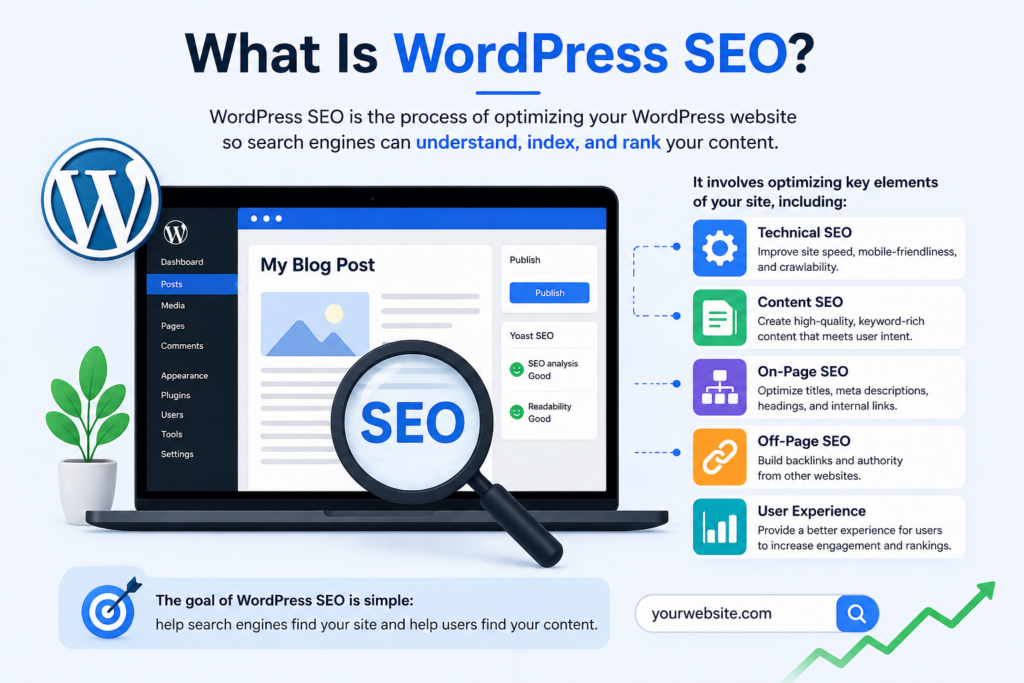
WordPress SEO refers to the process of optimizing your website so that search engines like Google can easily understand, index, and rank your content.
It involves multiple elements, including:
- Technical performance (site speed, mobile optimization)
- Content quality and keyword usage
- Site structure and navigation
- Backlinks and authority signals
The good news is that WordPress is already SEO-friendly by default. However, to truly compete in search rankings, you need to actively optimize your site.
Why SEO Matters for WordPress Websites
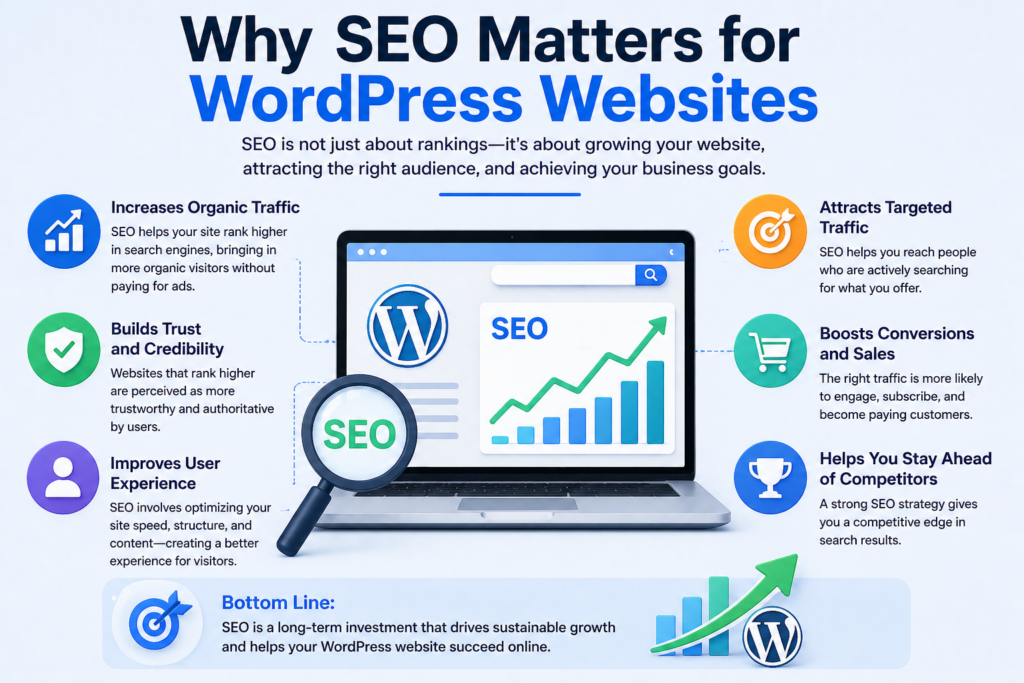
SEO is not just about rankings—it directly impacts your business growth.
Here’s why improving SEO on WordPress is essential:
- Increases organic traffic without paid ads
- Builds trust and credibility with users
- Improves user experience and site usability
- Boosts conversions through targeted traffic
Without SEO, even a well-designed website can remain invisible to potential visitors.
Step 1: Choose an SEO-Friendly WordPress Setup
Before diving into optimization, your foundation matters.
Select a Reliable Hosting Provider
A fast and stable hosting provider ensures:
- Faster page load times
- Better uptime
- Improved crawlability
Performance is a ranking factor, so hosting quality directly affects SEO.
Use a Lightweight Theme
Choose a theme that is:
- Fast-loading
- Mobile responsive
- Cleanly coded
Avoid overly complex themes with unnecessary features that slow down your site.
Step 2: Install an SEO Plugin
WordPress does not handle advanced SEO settings by default. That’s where SEO plugins come in.
Популярные варианты включают:
- Yoast SEO
- Rank Math
- All in One SEO
These tools help you:
- Optimize meta titles and descriptions
- Generate XML sitemaps
- Analyze on-page SEO
- Control indexing settings
Using an SEO plugin simplifies many technical tasks.
Step 3: Set Up Proper Permalink Structure
Permalinks are your page URLs, and they play a big role in SEO.
Best Practice
Go to Settings → Permalinks and choose:
/post-name/
This format is:
- Clean and readable
- Keyword-friendly
- Preferred by search engines
Avoid URLs with numbers or random parameters.
Step 4: Conduct Keyword Research
Keywords are the foundation of SEO.
How to Find Keywords
Используйте такие инструменты, как:
- Google Keyword Planner
- Ahrefs
- SEMrush
- Ubersuggest
Focus on:
- Search volume
- Competition level
- User intent
Types of Keywords
- Short-tail: broad (e.g., “WordPress SEO”)
- Long-tail: specific (e.g., “how to improve seo on wordpress”)
Long-tail keywords are easier to rank for and often bring higher-quality traffic.
Step 5: Optimize Your Content
Content is one of the most important ranking factors.
Use Keywords Naturally
Place your target keyword:
- In the title
- In the introduction
- In headings (H2, H3)
- Throughout the content
Avoid keyword stuffing—write naturally for users first.
Write High-Quality Content
Search engines prioritize content that:
- Solves problems
- Provides value
- Is easy to read
Использовать:
- Short paragraphs
- Bullet points
- Clear structure
Add Internal Links
Link to other relevant pages on your site to:
- Improve navigation
- Distribute link authority
- Increase time on site
Step 6: Optimize Meta Titles and Descriptions
Meta tags are what users see in search results.
Meta Title Tips
- Include your main keyword
- Keep it under 60 characters
- Make it compelling
Meta Description Tips
- Summarize the content clearly
- Include keywords naturally
- Keep it under 155 characters
Well-written meta tags improve click-through rates.
Step 7: Improve Website Speed
Site speed is a confirmed ranking factor.
Ways to Improve Speed
- Use caching plugins (e.g., WP Rocket)
- Optimize images (compress without losing quality)
- Use a Content Delivery Network (CDN)
- Minimize CSS and JavaScript files
Why Speed Matters
- Faster sites rank higher
- Users stay longer
- Bounce rates decrease
Even a 1-second delay can impact conversions.
Step 8: Make Your Site Mobile-Friendly
Most users browse on mobile devices, and Google uses mobile-first indexing.
Key Requirements
- Отзывчивый дизайн
- Fast loading on mobile
- Easy navigation
Test your site using Google’s Mobile-Friendly Test tool.
Step 9: Optimize Images for SEO
Images enhance user experience, but they also need optimization.
Передовые методы
- Use descriptive file names (e.g., wordpress-seo-guide.jpg)
- Add alt text with keywords
- Compress images for faster loading
Alt text helps search engines understand your images and improves accessibility.
Step 10: Create an XML Sitemap
An XML sitemap helps search engines find and index your pages.
How to Generate One
Most SEO plugins automatically create sitemaps.
Submit to Google
- Use Google Search Console
- Submit your sitemap URL
This ensures your content gets indexed faster.
Step 11: Fix Technical SEO Issues
Technical SEO ensures your site is easy to crawl and index.
Key Areas to Check
- Неработающие ссылки
- Duplicate content
- Crawl errors
- Redirect issues
Используйте такие инструменты, как:
- Google Search Console
- Screaming Frog
Regular audits keep your site healthy.
Step 12: Build High-Quality Backlinks
Backlinks are one of the strongest ranking signals.
What Are Backlinks?
Links from other websites pointing to your site.
How to Get Them
- Guest blogging
- Creating shareable content
- Outreach to industry websites
- Publishing data-driven articles
Focus on quality over quantity.
Step 13: Use Structured Data (Schema Markup)
Schema markup helps search engines understand your content better.
Benefits
- Rich snippets in search results
- Higher click-through rates
- Better visibility
Примеры включают:
- Отзывы
- Часто задаваемые вопросы
- Articles
Many SEO plugins support schema integration.
Step 14: Optimize for User Experience (UX)
SEO is not just about search engines—it’s about users.
Key UX Factors
- Easy navigation
- Clear layout
- Fast loading
- Engaging design
A good user experience leads to:
- Lower bounce rates
- Higher engagement
- Better rankings
Step 15: Update Content Regularly
Fresh content signals relevance to search engines.
Why Updates Matter
- Keeps information accurate
- Improves rankings
- Attracts returning visitors
Update old posts with:
- New data
- Improved structure
- Additional keywords
Распространенные ошибки, которых следует избегать
When learning how to improve SEO on WordPress, avoid these pitfalls:
- Keyword stuffing
- Ignoring mobile optimization
- Using slow, heavy themes
- Not optimizing images
- Skipping meta tags
- Forgetting internal links
Fixing these issues can quickly improve performance.
How Long Does SEO Take to Work?
SEO is a long-term strategy.
Typical Timeline
- 1–3 months: initial improvements
- 3–6 months: noticeable growth
- 6–12 months: strong results
Consistency is key. The more you optimize, the better your results over time.
Заключительные мысли
Improving SEO on WordPress doesn’t require advanced technical skills—it requires consistency, strategy, and attention to detail. By focusing on strong content, proper structure, fast performance, and user experience, you can significantly increase your visibility in search engines.
From choosing the right setup to optimizing content and building backlinks, every step contributes to better rankings. SEO is not a one-time task but an ongoing process that evolves with your website.
Start with the basics, apply these best practices, and continue refining your approach. Over time, your WordPress site will become more discoverable, more authoritative, and more successful in attracting organic traffic.
Часто задаваемые вопросы
1. How can I improve SEO on WordPress for beginners?
Start by installing an SEO plugin, choosing a clean permalink structure, and creating high-quality content with targeted keywords. Also, focus on site speed and mobile responsiveness.
2. What is the best SEO plugin for WordPress?
Popular options include Yoast SEO, Rank Math, and All in One SEO. Each helps optimize meta tags, sitemaps, and on-page SEO without needing technical skills.
3. How important is site speed for WordPress SEO?
Site speed is a major ranking factor. Faster websites improve user experience, reduce bounce rates, and help your pages rank higher in search results.
4. How do I optimize WordPress content for SEO?
Use relevant keywords naturally, structure content with headings, add internal links, and ensure your content provides real value to readers.
5. Do I need backlinks for WordPress SEO?
Yes, backlinks are essential. They signal authority and trust to search engines, helping your website rank higher over time.
6. How long does it take to see SEO results on WordPress?
SEO is a long-term strategy. You may see initial improvements in 1–3 months, but strong results typically take 3–6 months or longer depending on competition.


Спроектируем и создадим для вас WordPress-сайт или корпоративный сайт с полной системой электронной коммерции.
Ценовой диапазон: от $200.00 до $2,500.00custom-requirements-or-special-quotations
Первоначальная цена составляла: $2.00.$1.00Текущая цена: $1.00. Не слишком ли много 50 плагинов для интернет-магазина на WordPress?
Понимание реального влияния на производительность Наличие 50 плагинов на сайте электронной коммерции WordPress не является автоматической проблемой. На самом деле, само по себе их количество редко определяет производительность.....

Дизайн главного изображения для домашнего физиотерапевтического устройства Amazon: пояснения.
Введение: Создание достоверного изображения для домашних терапевтических приборов на Amazon При разработке главного изображения для домашнего терапевтического прибора на Amazon мы в первую очередь...

Дизайн основного изображения для конвертации помады на Amazon.
Введение: Разработка главного образа помады, которая продается на Amazon Когда мы разрабатываем главный образ для помады Amazon, наша ответственность выходит далеко за рамки...

Как хакеры крадут электронные письма администраторов WordPress (и как им это предотвратить)
Начнем с неприятной истины: ваша электронная почта администратора WordPress, вероятно, гораздо более публична, чем вы думаете. А хакеры? Им это нравится. Для них ваш...

Что делает основное изображение жидкой тональной основы Amazon конвертируемым?
Введение. Разработка дизайна основного изображения для жидкой тональной основы на Amazon — это не просто создание красивого внешнего вида продукта. На Amazon основное изображение и...

Разработка эффективного основного изображения Amazon для фильтрующих картриджей
Введение. Разработка основного изображения для Amazon — это не просто создание привлекательного внешнего вида товара. Речь идёт о ясности, доверии и мгновенном понимании, особенно для...

Повторные атаки на WordPress: реальная угроза или преувеличенный миф?
Давайте сначала кое-что проясним. Атаки повторного воспроизведения не выглядят страшно. Они не взламывают пароли. Они не внедряют вредоносный код с зелёным хакерским текстом, разлетающимся повсюду. Они действуют коварно...

Как скопировать страницы WordPress, ничего не сломав
Давайте посмотрим правде в глаза. Иногда вам не хочется создавать новую страницу. Вам нужна та же самая страница… но немного другая. Тот же макет. Те же блоки. Те же настройки. Потому что….

Сравнение пяти тем WordPress для сайтов о домашних животных
Введение. Выбор подходящей темы WordPress для сайтов, посвященных домашним животным, — это не просто решение, связанное с дизайном; оно напрямую влияет на удобство использования, масштабируемость и долгосрочный рост бизнеса. Уход за домашними животными и...

Сравнение пяти тем оформления для интернет-магазинов купальников
Введение. Выбор правильной тематики для независимого магазина купальников или нижнего белья — это не просто визуальное решение, оно напрямую влияет на коэффициент конверсии, масштабируемость и долгосрочную перспективу...

Как отключить комментарии в WordPress (не сойдя с ума)
Давайте поговорим о комментариях в WordPress. В теории комментарии — это здорово. Они стимулируют дискуссии. Они создают сообщество. Они делают ваш сайт “живым”. А на практике? Зачастую они притягивают...

Ошибка WordPress 500: когда ваш сайт начинает паниковать
Ваш сайт WordPress ещё минуту назад работал нормально. Вы обновили страницу. И вдруг — бац 💥 — ошибка 500 Internal Server Error. Никаких объяснений. Никаких извинений. Просто холодное, непонятное сообщение, которое, по сути...

Создание масштабируемого веб-сайта на WordPress для научно-ориентированного бренда: проект AminoUSA
Введение. В современном цифровом пространстве веб-сайт — это больше, чем просто место для размещения информации о товарах. Для научно-ориентированных брендов, работающих в регулируемых или научно-исследовательских отраслях, это….

Создание масштабируемого магазина Shopify для глобального бренда ножей: проект CoolKatana
Введение. В трансграничной электронной коммерции веб-сайт Shopify — это больше, чем просто витрина магазина. Для брендов, работающих в нишевых, ориентированных на культуру категориях, веб-сайт должен делать гораздо больше, чем...

Разработка высокоэффективного магазина Shopify для карточек Pokémon.
Введение. В мире электронной коммерции коллекционных товаров, особенно на рынке коллекционных карточных игр Pokémon, веб-сайт должен делать больше, чем просто перечислять товары...

Высокоэффективный дизайн Shopify для индивидуального бренда стационарной торговой точки.
Введение. В условиях современной конкурентной среды электронной коммерции, особенно в сегменте персонализированных подарков и коллекционных товаров, веб-сайт на платформе Shopify должен делать гораздо больше, чем просто отображать товары. Он...

Как связаться со службой поддержки Shopify: простое и понятное руководство
Управление магазином Shopify должно приносить удовольствие, а не путаницу. Когда возникают вопросы или проблемы замедляют вашу работу, Shopify предлагает несколько вариантов поддержки в зависимости от ситуации...

Как деактивировать магазин Shopify: понятное и практичное руководство
Деактивация магазина Shopify — несложная процедура, но она влечет за собой последствия, которые многие продавцы упускают из виду. В этом руководстве процесс описан простым и понятным языком...