












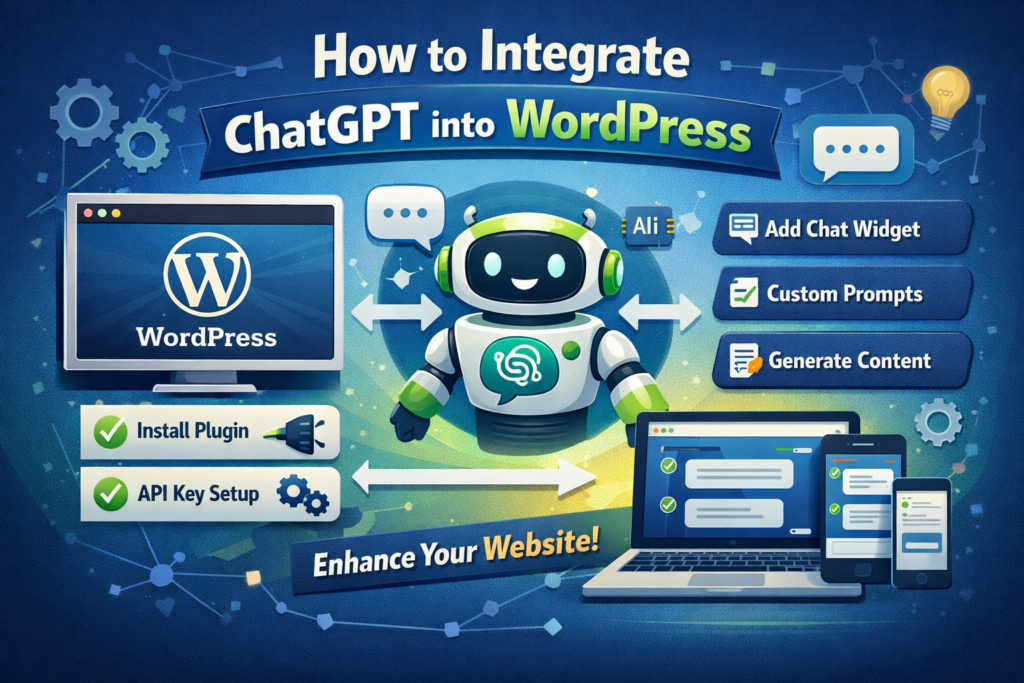
If you’ve ever wished your WordPress site could “think,” write, chat, and assist users like a real human—well, welcome to the age of AI. Integrating ChatGPT into WordPress is no longer a futuristic concept; it’s something you can actually do today (and honestly, you probably should).
In this guide, we’re going to break down how to integrate ChatGPT into WordPress in a simple, practical, and slightly entertaining way. No heavy technical jargon, no boring textbook explanations—just a clear path from “I heard about ChatGPT” to “my website now works smarter than me.”
Why Even Bother Integrating ChatGPT into WordPress?
Let’s start with the obvious question: why should you care?
Because ChatGPT turns your website from a static page into a dynamic experience.
Вместо:
- Visitors reading content and leaving
You get:
- Visitors chatting, asking questions, getting personalized answers
- Automated content creation
- Faster customer support
- Higher engagement (and yes… better conversions)
Think of it like hiring a 24/7 assistant who never complains, never sleeps, and doesn’t ask for a raise.
What You Need Before Getting Started
Before we jump into the “how,” let’s quickly cover the basics.
To integrate ChatGPT into WordPress, you’ll need:
- A WordPress website (obviously)
- An API key from OpenAI
- A plugin or custom integration method
- A clear idea of what you want ChatGPT to actually do
That last one matters more than people think.
Because adding AI without a purpose is like installing a Ferrari engine in a bicycle—cool, but kind of pointless.
3 Main Ways to Integrate ChatGPT into WordPress

There isn’t just one way to do this. Depending on your skills (and patience), you can choose from three main approaches.
1. Using a WordPress Plugin (The Easy Way)
This is the fastest and most beginner-friendly method.
There are several plugins designed specifically to connect ChatGPT with WordPress. These plugins typically allow you to:
- Add AI chatbots to your site
- Generate blog content
- Automate FAQs
- Enhance SEO writing
Как это работает:
- Install a ChatGPT-compatible plugin
- Enter your OpenAI API key
- Configure behavior (chatbot tone, responses, etc.)
- Embed it into pages or widgets
Boom. You’re live.
Плюсы:
- Программирование не требуется
- Quick setup
- User-friendly interface
Cons:
- Ограниченные возможности персонализации
- Depends on plugin updates
If you’re running a Shopify-style content site or a WordPress business site, this is usually the best starting point.
2. Using API Integration (The Flexible Way)

If you want more control, this is where things get interesting.
Instead of relying on plugins, you connect directly to OpenAI’s API.
What this allows:
- Custom chatbot logic
- Personalized user interactions
- Advanced automation workflows
- Integration with forms, CRM, or product pages
Basic process:
- Get your API key from OpenAI
- Create a backend function (PHP or JavaScript)
- Send user input to ChatGPT
- Display the response dynamically
Yes, this requires some coding—but the payoff is huge.
Вы можете построить:
- AI-powered product recommendation systems
- Smart FAQ engines
- Dynamic landing pages
This is where your website stops being “just a site” and starts becoming a tool.
3. Using Page Builders + AI Tools (The Hybrid Way)

If you’re using builders like Elementor (which you probably are), you can combine:
- ChatGPT
- Custom HTML blocks
- Инструменты автоматизации
This gives you a semi-custom solution without going full developer mode.
Например:
- Add a chatbot widget inside Elementor
- Connect it via API
- Style it to match your brand
This is especially useful for:
- eCommerce sites
- Lead generation pages
- Service-based websites
What Can ChatGPT Actually Do on Your Website?
Now comes the fun part.
Once you integrate ChatGPT into WordPress, here’s what it can actually do:
1. AI Customer Support
Вместо:
“Please wait 24–48 hours for a reply…”
You get:
Instant answers.
ChatGPT can handle:
- Product questions
- Shipping info
- Базовая диагностика неисправностей
And it doesn’t lose patience.
2. Content Generation
Need blog posts? Product descriptions? Landing page copy?
Сделанный.
ChatGPT can:
- Generate SEO-friendly content
- Rewrite existing articles
- Create outlines and drafts
It’s basically your backup copywriter.
3. Smart Recommendations
Imagine this:
A visitor lands on your site and asks:
“What’s the best product for beginners?”
ChatGPT replies instantly—with context-aware suggestions.
That’s conversion power.
4. Interactive User Experience
Instead of passive scrolling, users can:
- Ask questions
- Explore options
- Get guided journeys
This keeps them on your site longer—and that’s always a good thing.
SEO Benefits of Integrating ChatGPT
Let’s talk about what you really care about: traffic.
Integrating ChatGPT into WordPress can help with:
- Content scalability (more pages, faster)
- Keyword optimization
- User engagement signals
- Reduced bounce rates
And if you structure it right, you can even create:
- AI-generated FAQ pages
- Long-tail keyword content
- Dynamic blog updates
All of this helps boost rankings for keywords like:
👉 how to integrate chatgpt into wordpress
(Yes, just like this article.)
Распространенные ошибки, которых следует избегать
Before you go full AI mode, let’s avoid a few classic mistakes.
1. Overusing AI Content
Google is smart.
If your site becomes a copy-paste AI factory, your rankings might suffer.
👉 Solution:
Edit, refine, and humanize your content.
2. No Clear Purpose
Adding a chatbot “just because” is a waste.
👉 Solution:
Define a role:
- Support agent
- Sales assistant
- Content generator
3. Ignoring UX
A badly placed chatbot = annoying popup.
👉 Solution:
Make it helpful, not intrusive.
4. No Training or Context
Out-of-the-box ChatGPT is powerful—but generic.
👉 Solution:
Customize prompts and responses to match your brand.
Best Practices for a High-Converting AI Website
If you want results (not just cool tech), follow these:
- Keep the interface clean
- Use conversational tone
- Guide users with prompts
- Combine AI with strong design
- Optimize for mobile
Помнить:
AI is a tool.
Design is what makes it work.
The Future of WordPress + AI
We’re just getting started.
Soon, websites won’t just display information—they’ll:
- Understand user intent
- Adapt in real-time
- Personalize experiences automatically
And honestly?
Websites without AI will start to feel outdated.
Заключительные мысли
Learning how to integrate ChatGPT into WordPress isn’t just about adding a feature—it’s about upgrading your entire website experience.
From smarter content to better conversions, the impact is real.
But here’s the truth most people overlook:
👉 AI alone doesn’t build a great website.
👉 Design + structure + strategy do.
That’s exactly where we come in.
На сайте АИРСАНГ, we focus on cross-border eCommerce and high-converting website design. From WordPress на Shopify, we help brands turn their websites into powerful sales tools—combining clean design, user experience, and now, smart AI integration.
If you’re thinking about upgrading your site with ChatGPT (and actually making it convert), it might be time to do it the right way.
Let’s build something smarter.


Спроектируем и создадим для вас WordPress-сайт или корпоративный сайт с полной системой электронной коммерции.
Ценовой диапазон: от $200.00 до $2,500.00custom-requirements-or-special-quotations
Первоначальная цена составляла: $2.00.$1.00Текущая цена: $1.00. Дизайн главного изображения для домашнего физиотерапевтического устройства Amazon: пояснения.
Введение: Создание достоверного изображения для домашних терапевтических приборов на Amazon При разработке главного изображения для домашнего терапевтического прибора на Amazon мы в первую очередь...

Дизайн основного изображения для конвертации помады на Amazon.
Введение: Разработка главного образа помады, которая продается на Amazon Когда мы разрабатываем главный образ для помады Amazon, наша ответственность выходит далеко за рамки...

Как хакеры крадут электронные письма администраторов WordPress (и как им это предотвратить)
Начнем с неприятной истины: ваша электронная почта администратора WordPress, вероятно, гораздо более публична, чем вы думаете. А хакеры? Им это нравится. Для них ваш...

Что делает основное изображение жидкой тональной основы Amazon конвертируемым?
Введение. Разработка дизайна основного изображения для жидкой тональной основы на Amazon — это не просто создание красивого внешнего вида продукта. На Amazon основное изображение и...

Разработка эффективного основного изображения Amazon для фильтрующих картриджей
Введение. Разработка основного изображения для Amazon — это не просто создание привлекательного внешнего вида товара. Речь идёт о ясности, доверии и мгновенном понимании, особенно для...

Повторные атаки на WordPress: реальная угроза или преувеличенный миф?
Давайте сначала кое-что проясним. Атаки повторного воспроизведения не выглядят страшно. Они не взламывают пароли. Они не внедряют вредоносный код с зелёным хакерским текстом, разлетающимся повсюду. Они действуют коварно...

Как скопировать страницы WordPress, ничего не сломав
Давайте посмотрим правде в глаза. Иногда вам не хочется создавать новую страницу. Вам нужна та же самая страница… но немного другая. Тот же макет. Те же блоки. Те же настройки. Потому что….

Сравнение пяти тем WordPress для сайтов о домашних животных
Введение. Выбор подходящей темы WordPress для сайтов, посвященных домашним животным, — это не просто решение, связанное с дизайном; оно напрямую влияет на удобство использования, масштабируемость и долгосрочный рост бизнеса. Уход за домашними животными и...

Сравнение пяти тем оформления для интернет-магазинов купальников
Введение. Выбор правильной тематики для независимого магазина купальников или нижнего белья — это не просто визуальное решение, оно напрямую влияет на коэффициент конверсии, масштабируемость и долгосрочную перспективу...

Как отключить комментарии в WordPress (не сойдя с ума)
Давайте поговорим о комментариях в WordPress. В теории комментарии — это здорово. Они стимулируют дискуссии. Они создают сообщество. Они делают ваш сайт “живым”. А на практике? Зачастую они притягивают...

Создание масштабируемого веб-сайта на WordPress для научно-ориентированного бренда: проект AminoUSA
Введение. В современном цифровом пространстве веб-сайт — это больше, чем просто место для размещения информации о товарах. Для научно-ориентированных брендов, работающих в регулируемых или научно-исследовательских отраслях, это….

Создание масштабируемого магазина Shopify для глобального бренда ножей: проект CoolKatana
Введение. В трансграничной электронной коммерции веб-сайт Shopify — это больше, чем просто витрина магазина. Для брендов, работающих в нишевых, ориентированных на культуру категориях, веб-сайт должен делать гораздо больше, чем...

Разработка высокоэффективного магазина Shopify для карточек Pokémon.
Введение. В мире электронной коммерции коллекционных товаров, особенно на рынке коллекционных карточных игр Pokémon, веб-сайт должен делать больше, чем просто перечислять товары...

Высокоэффективный дизайн Shopify для индивидуального бренда стационарной торговой точки.
Введение. В условиях современной конкурентной среды электронной коммерции, особенно в сегменте персонализированных подарков и коллекционных товаров, веб-сайт на платформе Shopify должен делать гораздо больше, чем просто отображать товары. Он...

Как связаться со службой поддержки Shopify: простое и понятное руководство
Управление магазином Shopify должно приносить удовольствие, а не путаницу. Когда возникают вопросы или проблемы замедляют вашу работу, Shopify предлагает несколько вариантов поддержки в зависимости от ситуации...

Как деактивировать магазин Shopify: понятное и практичное руководство
Деактивация магазина Shopify — несложная процедура, но она влечет за собой последствия, которые многие продавцы упускают из виду. В этом руководстве процесс описан простым и понятным языком...

Пример разработки веб-сайта на платформе Shopify для премиального цветочного бренда.
Введение. В условиях современной конкурентной среды электронной коммерции веб-сайт на платформе Shopify должен делать гораздо больше, чем просто отображать товары. Он должен мгновенно передавать ценность бренда, направлять пользователей...

Пример проекта дизайна на Shopify: магазин ретро-игр
Введение. В условиях высокой конкуренции в сфере электронной коммерции визуальная ясность и эмоциональная связь часто определяют, станет ли посетитель клиентом. Это особенно актуально в...