
Введение
Learning how to add keywords in WordPress is not about repeating the same phrase as many times as possible. Modern SEO works best when a page answers a clear question, uses relevant language naturally, and organizes information so readers and search engines can understand it.
WordPress gives you several useful places to include keywords, such as the page title, URL, headings, paragraphs, image alt text, and meta description. However, beginners often confuse normal SEO keywords with the old meta keywords tag. These are different, and understanding that difference can save you from spending time on a method that does not improve Google rankings.
This guide explains where WordPress keywords belong, how to avoid stuffing, and how to add a meta keywords tag when a project still requires one.
What Are Keywords in WordPress?
Keywords are words or phrases that describe the main subject of a webpage. They often reflect what a person types into a search engine when looking for information, a product, or a solution.
For example, someone creating a tutorial may target “how to create a contact page in WordPress.” A local bakery may use “custom birthday cakes in Austin.” A product page may focus on a phrase that combines the product name with its material, size, feature, or intended use.
WordPress does not include one universal keyword field that automatically improves rankings. Instead, you place a primary keyword in the visible and technical parts of the page where it provides useful context.
The most important locations usually include the title, URL, main heading, introduction, relevant subheadings, body content, image alt text, meta description, and internal links.
A keyword should help explain the page. It should never be added only to increase repetition.
Keywords and Meta Keywords Are Not the Same
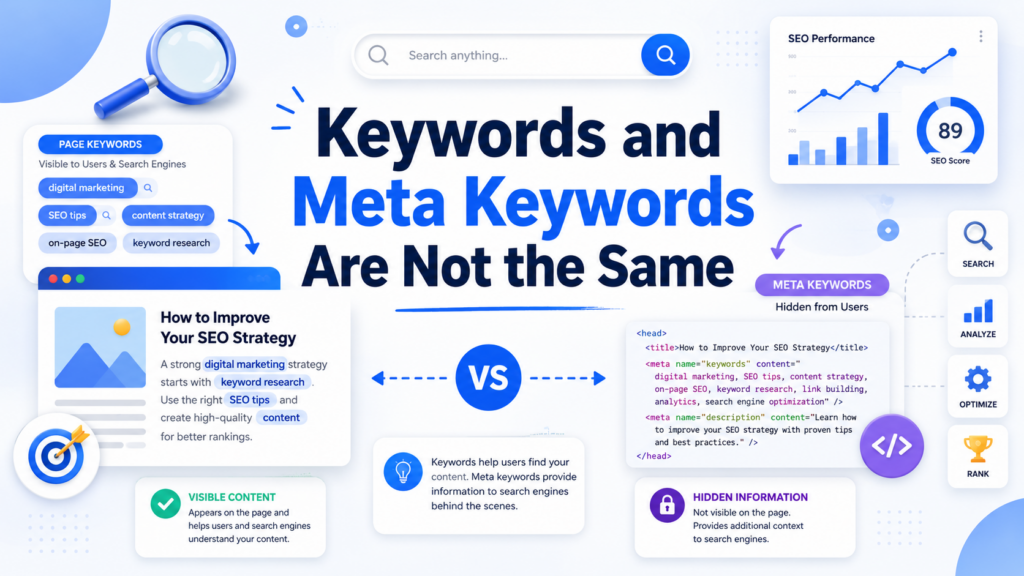
When people search for how to add keywords in WordPress, they may be asking about two different practices.
The first is on-page keyword optimization. This means using a target phrase naturally in the title, headings, content, URL, images, and other meaningful page elements.
The second is the meta keywords tag, a hidden HTML element placed inside the <head> section of a webpage:
<meta name="keywords" content="wordpress seo, keyword research, blogging tips">
Meta keywords were once used to list a page’s topics for search engines. Google now states that it does not use the meta keywords tag for indexing or ranking. It supports other metadata, including descriptions and robots directives, but ignores the keywords tag.
Adding this tag will therefore not help a page rank higher in Google. It may still be required by a legacy platform, internal search system, specialized database, or client workflow. For most WordPress websites, improving visible content, page structure, titles, and internal links is far more valuable.
Choose One Primary Keyword
Before editing a WordPress post or page, choose one primary keyword that closely matches its purpose.
A useful primary keyword should:
- Describe what the page actually offers
- Match the likely intention behind the search
- Be specific enough to guide the content
“WordPress” is too broad for a beginner tutorial. “How to add keywords in WordPress” is more focused because it reveals exactly what the reader wants to learn.
You can also identify several related phrases, such as “WordPress SEO keywords,” “keyword placement in WordPress,” “add meta keywords in WordPress,” and “optimize WordPress content.”
Related terms should expand the topic rather than repeat minor variations of the same phrase.
Add the Keyword to the Page Title
In the WordPress block editor, enter the post or page title at the top of the editing screen. The title should describe the subject accurately and give readers a clear reason to click.
Например:
How to Add Keywords in WordPress: A Beginner-Friendly Guide
This title includes the target phrase while setting an honest expectation. Avoid vague titles, unnecessary clickbait, or titles packed with several similar keyword variations.
Search engines may use the page’s <title> element and other prominent text when creating a result title. A relevant title also helps users judge whether the page matches their needs. e a Clear URL Slug
The slug is the editable portion of the page address after the domain name.
A clean example is:
example.com/how-to-add-keywords-in-wordpress/
WordPress usually lets you edit the URL through the post or page settings. Keep the slug short, readable, and closely connected to the main topic.
Use lowercase words and separate them with hyphens. Remove unnecessary dates, numbers, and filler words. A good URL should remain understandable even if the article is updated later.
Changing an existing URL can break published links unless the old address redirects to the new one.
Use the Keyword in the Main Heading
Most WordPress themes display the page title as the H1 heading. If your theme already does this, do not add a second identical H1 inside the article.
The H1 should state the main topic. H2 and H3 headings should divide the article into clear sections.
Например:
- H1: How to Add Keywords in WordPress
- H2: Choose a Primary Keyword
- H2: Add Keywords to Titles and URLs
- H2: Use Keywords in Image Alt Text
- H2: Add Meta Keywords Without a Plugin
The exact phrase does not need to appear in every heading; use natural variations.
Mention the Keyword Near the Beginning
Include the primary phrase in the introduction, preferably within the first paragraph or two. This quickly confirms that the page addresses the searcher’s question.
The sentence must still sound natural.
Awkward wording:
“Learn how to add keywords in WordPress with this how to add keywords in WordPress guide for WordPress keywords.”
Better wording:
“Learning how to add keywords in WordPress starts with understanding where keywords provide useful context, including titles, headings, URLs, and page content.”
The second example uses the phrase once and explains the page immediately.
Build Helpful Content Around the Keyword
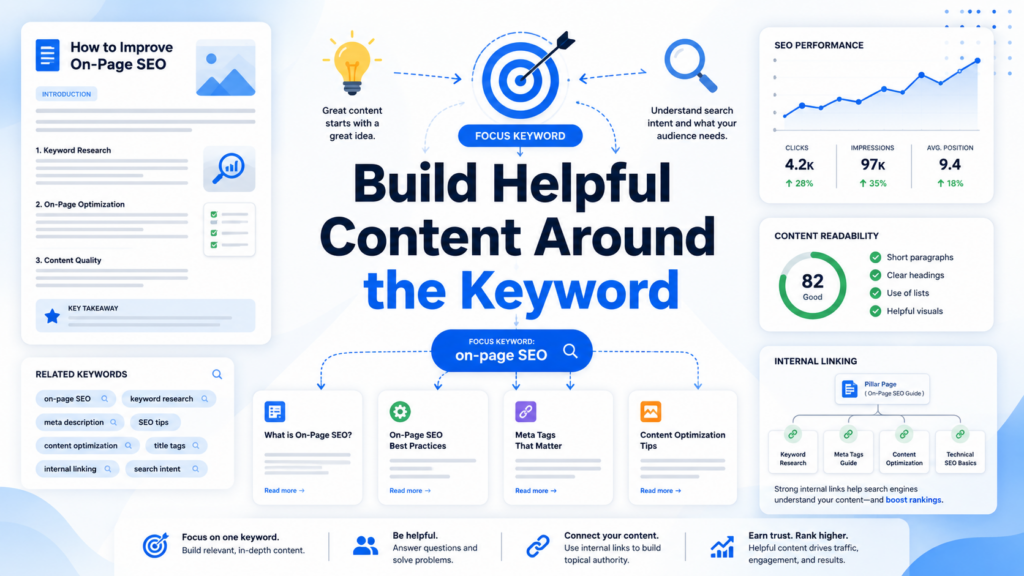
Keywords do not replace useful information. Search systems evaluate pages through many signals, and relevance depends heavily on whether the content satisfies the query. Google explains that its systems aim to return relevant, high-quality results rather than ranking a page simply because it repeats a phrase. WordPress article should answer the main question directly, explain unfamiliar terms, use practical examples, break difficult steps into sections, and address common follow-up questions.
Write for the person behind the search. A tutorial should provide ordered instructions. A comparison should explain meaningful differences. A buying guide should discuss benefits, limitations, and suitable use cases.
Thorough writing creates natural opportunities to use the main keyword and related terms.
Use Keywords in Subheadings Naturally
Subheadings help readers scan a long page and understand how each section connects to the main topic.
Use the keyword or a close variation when it accurately labels the section. Examples include:
- How to Add Keywords in WordPress Posts
- Where to Place WordPress SEO Keywords
- How to Add Meta Keywords Without a Plugin
Do not force the exact phrase into every heading. Repetition sounds mechanical and makes headings less informative.
Write Accurate Image Alt Text
WordPress lets you add alternative text through the Media Library or image block settings. Alt text should describe the relevant purpose of an image for people who cannot see it.
For a screenshot of the URL settings, suitable alt text could be:
“Editing the URL slug for a WordPress post”
Do not turn alt text into a list of keywords. Text such as “WordPress keywords SEO WordPress best keywords” does not accurately describe an image and creates a poor experience.
Decorative images may use empty alt attributes, while informative images usually need concise descriptions.
Add a Useful Meta Description
A meta description summarizes the page and may appear below the title in search results. Google may use the supplied description when it represents the page well, but it can also generate a different snippet from the visible content for a particular search. le example is:
“Learn how to add keywords in WordPress using titles, headings, URLs, content, images, and manual meta tags without keyword stuffing.”
The description includes the main phrase and clearly summarizes the page.
Avoid using a comma-separated keyword list. A description should help a person decide whether the page answers the question.
How to Add Meta Keywords in WordPress Without a Plugin
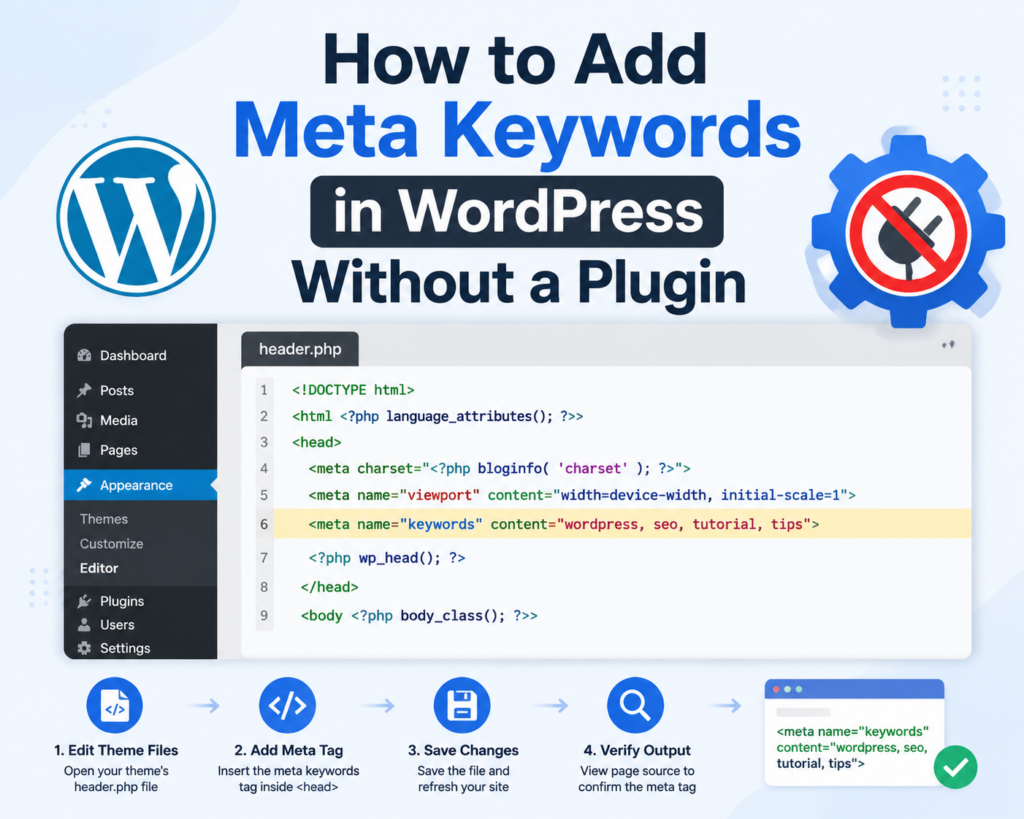
Although meta keywords do not improve Google rankings, you can still add the tag manually when a system or project specifically requires it.
Before editing any theme file, create a complete backup. The WordPress Theme File Editor does not make backup copies, and a small PHP error can make the site inaccessible. WordPress also recommends using a child theme so that parent-theme updates do not overwrite custom changes. od 1: Edit header.php
Open the active child theme through your hosting file manager, SFTP, or the Theme File Editor.
Locate header.php, find the <head> section, and add the tag before the closing </head> element:
<meta name="keywords" content="wordpress seo, keyword placement, wordpress tutorials">
Save the file, clear the website cache, and open the page source in your browser. Search for meta name="keywords" to confirm that the tag appears.
This method normally adds the same keyword list to every page that uses the header template. It is simple, but it is not appropriate when each page needs different values.
Method 2: Use functions.php and wp_head
A more organized theme-based approach uses the wp_head action hook. WordPress triggers this hook inside the <head> area when the theme includes the standard wp_head() function. code to the child theme’s функции.php file:
function site_add_meta_keywords() {
    echo '<meta name="keywords" content="wordpress seo, keyword placement, wordpress tutorials">' . "\n";
}
add_action( 'wp_head', 'site_add_meta_keywords' );
Replace the samples, save the file, clear the cache, and inspect the page source.
WordPress loads the active theme’s функции.php; changing themes may remove this output. od 3: Add Unique Keywords With Custom Fields
If individual posts need different meta keywords, store a value in a custom field named:
meta_keywords
Enter a comma-separated list for each post, then use code that retrieves and outputs the field:
function site_add_post_meta_keywords() {
    if ( is_singular() ) {
        $keywords = get_post_meta( get_queried_object_id(), 'meta_keywords', true );

        if ( ! empty( $keywords ) ) {
            echo '<meta name="keywords" content="' . esc_attr( $keywords ) . '">' . "\n";
        }
    }
}
add_action( 'wp_head', 'site_add_post_meta_keywords' );
The code retrieves the saved value on singular pages, escapes it for HTML output, and prints the tag only when the field is not empty.
After saving the code, open a post, view the page source, and confirm that the correct value appears.
Common Keyword Mistakes
Keyword stuffing is common, but other mistakes also matter.
Common problems include targeting a phrase that does not match the page, optimizing several pages for the same primary keyword, using irrelevant terms in alt text, creating too many tags, repeating one meta description across many pages, and adding duplicate metadata through both a theme and a plugin.
Manual code creates additional risks. Editing the parent theme can cause changes to disappear after an update. Incorrect PHP syntax may break the site. A cached version may also make it seem that a change failed when the code is actually correct.
Always review the published page, clear relevant caches, and inspect the page source after changing metadata.
How Often Should a Keyword Appear?
There is no universal keyword density that guarantees better rankings. A 500-word product page and a 2,000-word tutorial naturally use language differently.
A primary keyword may appear once in the title, once in the URL, once in the H1, near the beginning, in a relevant subheading, naturally throughout the body, and in the meta description when it reads well.
After that, focus on synonyms, related concepts, examples, and complete explanations.
Read the article aloud. If the wording sounds repetitive or unnatural, revise it. The goal is not to reach a percentage. The goal is to create the clearest and most useful page for the intended search.
Final Summary
Knowing how to add keywords in WordPress means placing one focused search phrase in useful locations, not hiding a long list of terms in the source code. Use the primary keyword naturally in the title, URL, main heading, introduction, relevant subheadings, body content, image descriptions, internal links, and meta description.
The meta keywords tag is separate from normal on-page optimization and does not influence Google indexing or rankings. Add it only when a specific system or project requires it. When manual code is necessary, create a backup, use a child theme, avoid duplicate tags, escape dynamic values, and verify the result in the published page source.
A strong WordPress keyword strategy combines clear structure, accurate metadata, descriptive images, useful links, and content that fully answers the reader’s question.
FAQ: How to Add Keywords in WordPress
1. Do keywords still matter for WordPress SEO?
Yes. Keywords are still important because they help search engines understand the topic and purpose of your content. However, modern SEO focuses on using keywords naturally in titles, headings, URLs, content, and other relevant areas instead of repeating the same phrase excessively.
2. How do I add keywords in WordPress without a plugin?
You can add keywords manually by placing them in important areas such as the page title, URL slug, headings, introduction, body content, image alt text, and meta description. If you specifically need a meta keywords tag, you can add it manually through your theme’s header.php file or функции.php.
3. Do meta keywords help improve Google rankings?
No. Google does not use the meta keywords tag as a ranking factor. Adding meta keywords will not improve your position in search results. Instead, focus on creating helpful content, optimizing page structure, and using relevant keywords naturally.
4. Where should I place keywords in a WordPress page?
The most important locations include the SEO title, URL, main heading, first paragraph, subheadings, image descriptions, internal links, and meta description. These placements help users and search engines quickly understand what your page is about.
5. Can I add meta keywords in WordPress without installing a plugin?
Yes. You can manually add a meta keywords tag by editing your theme files. However, you should create a backup first and preferably use a child theme to prevent your changes from being removed during theme updates.
6. How many times should I use a keyword in a WordPress article?
There is no fixed keyword number or ideal keyword density. Use your main keyword where it naturally fits and focus on answering the reader’s question. High-quality, useful content is more important than repeating keywords many times.