













Введение
In modern digital business systems, companies rarely rely on a single platform to manage customers and content. Instead, they combine powerful CRM tools with flexible website platforms. One of the most common combinations is integrating Salesforce with WordPress.
A frequent question businesses ask is how to display from Salesforce to WordPress in a way that is dynamic, secure, and easy to maintain. This means not just connecting the two systems, but actually showing real Salesforce data—such as leads, contacts, opportunities, or custom objects—directly on a WordPress website.
This guide breaks down the entire process in a simple, educational way. You will learn what this integration means, why it matters, and how to implement it using different methods ranging from plugins to APIs.
Understanding Salesforce and WordPress Integration
Before learning how to display from Salesforce to WordPress, it is important to understand how these two systems function.
Salesforce is a cloud-based customer relationship management system. It stores customer data, tracks sales pipelines, manages marketing automation, and provides analytics.
WordPress is a content management system used to build websites, blogs, and eCommerce platforms. It is highly flexible and supports plugins, themes, and custom development.
When integrated, Salesforce becomes the “data brain,” while WordPress becomes the “front-end display layer.” This allows businesses to show real-time CRM data directly on their website.
Why Display Salesforce Data on WordPress?
Displaying Salesforce data on WordPress is not just a technical feature—it is a business strategy. Here are the main reasons companies implement it:
1. Real-Time Customer Data Visibility
Businesses can show updated customer information, product interest data, or service status directly on their website without manual updates.
2. Improved Lead Generation
When Salesforce data is displayed on landing pages, users can see dynamic offers or personalized content based on CRM segments.
3. Better User Experience
Instead of static pages, visitors interact with live data, which increases engagement and trust.
4. Centralized Data Management
Sales teams continue working in Salesforce while marketing teams use WordPress for presentation—no duplicate data entry required.
5. Automation Efficiency
Once configured, updates in Salesforce automatically reflect on WordPress pages, reducing operational workload.
Common Use Cases for Displaying Salesforce Data
Understanding how to display from Salesforce to WordPress becomes easier when you look at real-world examples:
- Displaying customer dashboards on membership websites
- Showing lead status updates for sales portals
- Embedding product availability or inventory data
- Creating personalized user dashboards
- Displaying event registrations or booking data
- Showing testimonials stored in CRM records
These use cases demonstrate how flexible the integration can be.
Methods to Display Salesforce Data in WordPress
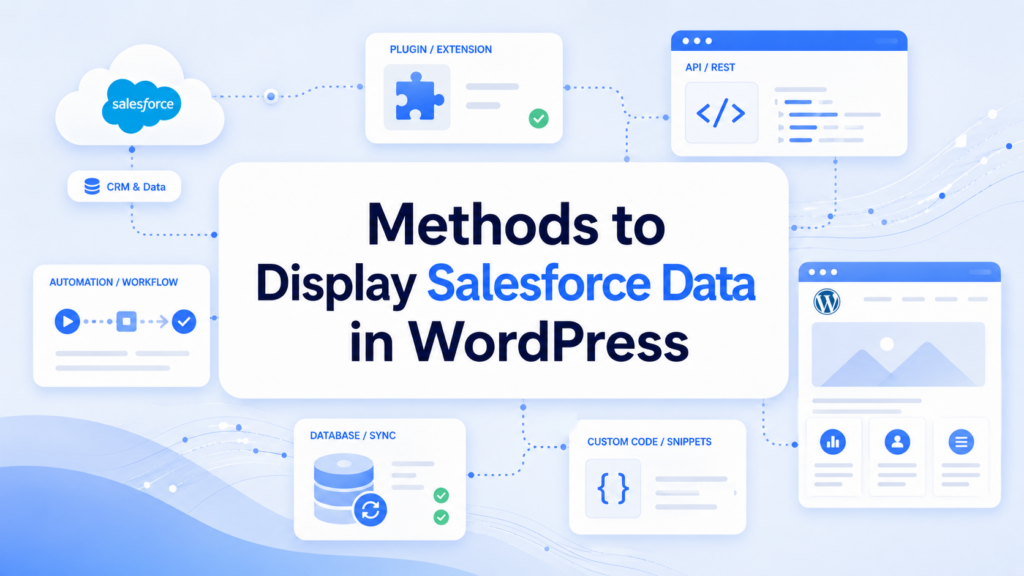
There are several approaches to achieve integration between Salesforce and WordPress. The best method depends on your technical skill level and business requirements.
Method 1: Using WordPress Salesforce Plugins
One of the easiest ways is using pre-built plugins.
Popular plugins allow you to:
- Connect Salesforce via API credentials
- Sync leads and contacts automatically
- Display CRM data using shortcodes
- Embed forms connected to Salesforce
Advantages:
- Простая настройка
- Программирование не требуется
- Faster deployment
Ограничения:
- Ограниченные возможности персонализации
- May require premium plans for advanced features
This method is ideal for beginners or small businesses.
Method 2: Using Salesforce REST API
For full control over how to display from Salesforce to WordPress, developers often use the Salesforce REST API.
This method allows WordPress to directly request data from Salesforce and display it dynamically.
Как это работает:
- Authenticate with Salesforce using OAuth
- Send API requests from WordPress
- Retrieve data in JSON format
- Render data on WordPress pages using PHP or JavaScript
Example data types you can display:
- Accounts
- Leads
- Opportunities
- Custom objects
Advantages:
- Высокая гибкость
- Real-time data access
- Full customization
Ограничения:
- Requires development skills
- Needs secure authentication handling
This is the most powerful method for enterprise-level integration.
Method 3: Using Middleware Tools (No-Code Integration)
Another popular option is using automation platforms such as Zapier, Make, or similar tools.
These platforms act as a bridge between Salesforce and WordPress.
Как это работает:
- Salesforce triggers an event (new lead, updated record, etc.)
- Middleware sends data to WordPress
- WordPress displays updated content via API or database update
Advantages:
- Программирование не требуется
- Easy workflow automation
- Quick setup
Ограничения:
- Monthly cost
- Limited customization for complex data structures
This method is best for marketing teams or small businesses needing automation without development.
Method 4: Embedding Salesforce Components
Salesforce also allows embedded components like dashboards or forms.
Ты можешь:
- Embed lead capture forms into WordPress pages
- Display reports using iframe or Lightning components
- Show customer portals hosted by Salesforce inside WordPress
Advantages:
- Fast implementation
- Official Salesforce support
- Secure display layer
Ограничения:
- Less control over styling
- Dependent on Salesforce UI structure
Step-by-Step Guide: How to Display Salesforce Data in WordPress
Now let’s break down a practical workflow for how to display from Salesforce to WordPress using a standard API approach.
Step 1: Prepare Salesforce API Access
Inside Salesforce:
- Create a connected app
- Enable OAuth authentication
- Get Client ID and Client Secret
- Set callback URL for WordPress
This allows WordPress to securely access CRM data.
Step 2: Configure WordPress Environment
Inside WordPress:
- Install a custom plugin or use functions.php
- Enable HTTPS for secure API calls
- Set up environment variables for credentials
Security is critical at this stage.
Step 3: Connect to Salesforce API
Use WordPress HTTP functions or cURL:
- Authenticate using OAuth token
- Store token securely
- Set refresh token logic
This ensures continuous access to Salesforce data.
Step 4: Fetch Data from Salesforce
Request specific objects such as:
- /services/data/vXX.X/sobjects/Lead
- /Account
- /Opportunity
The response will be in JSON format.
Step 5: Display Data on WordPress Pages
Once data is received:
- Use PHP loops or JavaScript rendering
- Map Salesforce fields to WordPress UI elements
- Display data in tables, cards, or dashboards
This is the core of how to display from Salesforce to WordPress effectively.
Step 6: Style and Optimize Output
Make sure displayed data:
- Matches your WordPress theme
- Is responsive for mobile users
- Loads quickly with caching techniques
Best Practices for Salesforce to WordPress Integration
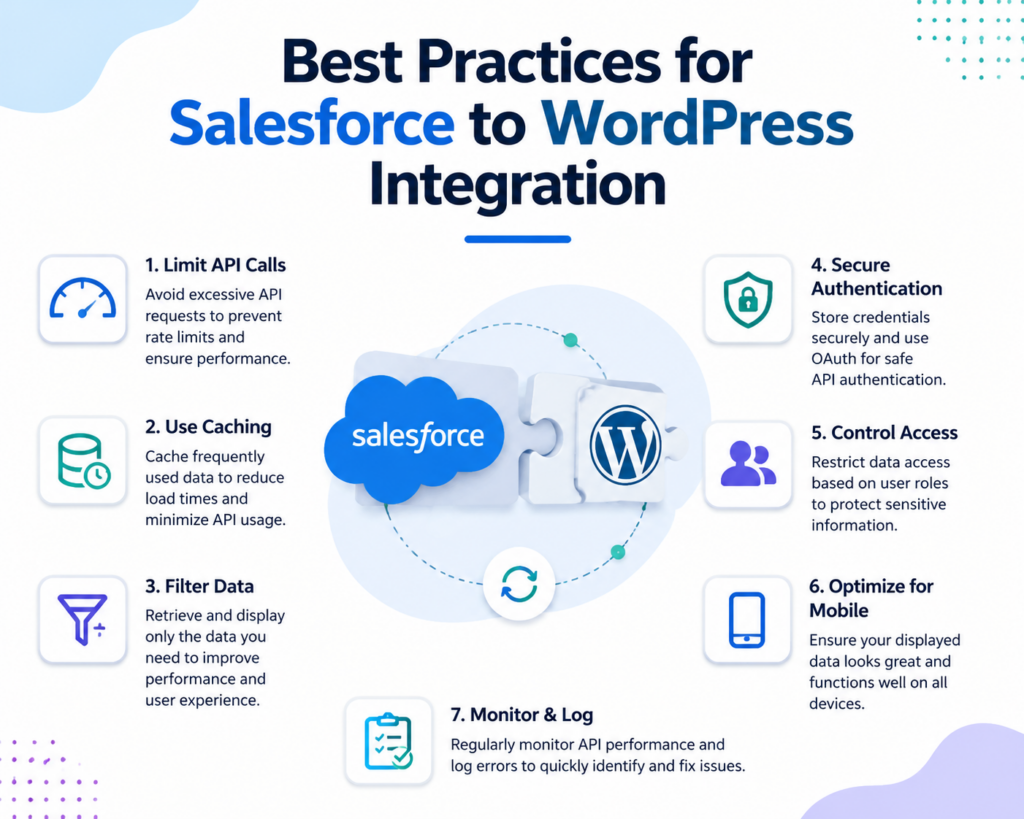
To ensure stable performance, follow these best practices:
1. Limit API Calls
Avoid excessive requests to Salesforce to prevent rate limits.
2. Use Caching
Store frequently used data temporarily in WordPress to reduce API load.
3. Secure Authentication
Never expose Salesforce credentials in frontend code.
4. Filter Data Before Display
Only display necessary CRM fields to improve performance.
5. Optimize for Mobile
Ensure CRM data tables are responsive.
Common Problems and Solutions
Problem 1: Slow Data Loading
Solution: Use caching or scheduled sync instead of real-time calls.
Problem 2: Authentication Errors
Solution: Check OAuth tokens and refresh settings.
Problem 3: Data Not Displaying
Solution: Verify API endpoint permissions in Salesforce.
Problem 4: WordPress Compatibility Issues
Solution: Ensure plugin compatibility and PHP version updates.
Security Considerations
When working with CRM data inside WordPress, security is critical:
- Always use HTTPS
- Encrypt API credentials
- Restrict user access roles
- Validate all incoming data
- Avoid exposing sensitive CRM fields publicly
This ensures customer data remains protected while still being useful on your website.
Choosing the Right Method
If your goal is simple display, plugins or embedding tools are enough. If you need advanced control over how to display from Salesforce to WordPress, API-based integration is the best option.
Here is a quick breakdown:
- Beginners → Plugins
- Marketers → Automation tools
- Developers → REST API integration
- Enterprises → Custom hybrid systems
Заключение
Displaying Salesforce data inside WordPress bridges the gap between CRM intelligence and website presentation. By understanding different integration methods—plugins, APIs, automation tools, and embedded components—you can choose the best approach for your business needs. Whether your goal is lead generation, customer dashboards, or real-time data display, learning how to display from Salesforce to WordPress helps you build a more dynamic and data-driven website experience.
Часто задаваемые вопросы
1. How do I display Salesforce data in WordPress?
You can display Salesforce data in WordPress using plugins, REST API integration, or automation tools like Zapier. The best method depends on whether you need simple setup or full customization.
2. Do I need coding skills to connect Salesforce with WordPress?
No. You can use no-code plugins or automation platforms. However, if you want advanced real-time data display, API integration requires basic development knowledge.
3. What types of Salesforce data can be shown in WordPress?
You can display leads, contacts, accounts, opportunities, custom objects, and even dashboard-style reports depending on your integration method.
4. Is Salesforce to WordPress integration real-time?
Yes, it can be real-time if you use API-based integration. Plugin or cached methods may have slight delays depending on sync settings.
5. Is it safe to connect Salesforce with WordPress?
Yes, as long as you use secure authentication (OAuth), HTTPS, and proper access control. Never expose API keys on the frontend.
6. What is the easiest method for beginners?
The easiest method is using a WordPress Salesforce plugin or automation tools like Zapier, which require minimal technical setup.


Спроектируем и создадим для вас WordPress-сайт или корпоративный сайт с полной системой электронной коммерции.
Ценовой диапазон: от $200.00 до $2,500.00custom-requirements-or-special-quotations
Первоначальная цена составляла: $2.00.$1.00Текущая цена: $1.00. Не слишком ли много 50 плагинов для интернет-магазина на WordPress?
Понимание реального влияния на производительность Наличие 50 плагинов на сайте электронной коммерции WordPress не является автоматической проблемой. На самом деле, само по себе их количество редко определяет производительность.....

Дизайн главного изображения для домашнего физиотерапевтического устройства Amazon: пояснения.
Введение: Создание достоверного изображения для домашних терапевтических приборов на Amazon При разработке главного изображения для домашнего терапевтического прибора на Amazon мы в первую очередь...

Дизайн основного изображения для конвертации помады на Amazon.
Введение: Разработка главного образа помады, которая продается на Amazon Когда мы разрабатываем главный образ для помады Amazon, наша ответственность выходит далеко за рамки...

Как хакеры крадут электронные письма администраторов WordPress (и как им это предотвратить)
Начнем с неприятной истины: ваша электронная почта администратора WordPress, вероятно, гораздо более публична, чем вы думаете. А хакеры? Им это нравится. Для них ваш...

Что делает основное изображение жидкой тональной основы Amazon конвертируемым?
Введение. Разработка дизайна основного изображения для жидкой тональной основы на Amazon — это не просто создание красивого внешнего вида продукта. На Amazon основное изображение и...

Разработка эффективного основного изображения Amazon для фильтрующих картриджей
Введение. Разработка основного изображения для Amazon — это не просто создание привлекательного внешнего вида товара. Речь идёт о ясности, доверии и мгновенном понимании, особенно для...

Повторные атаки на WordPress: реальная угроза или преувеличенный миф?
Давайте сначала кое-что проясним. Атаки повторного воспроизведения не выглядят страшно. Они не взламывают пароли. Они не внедряют вредоносный код с зелёным хакерским текстом, разлетающимся повсюду. Они действуют коварно...

Как скопировать страницы WordPress, ничего не сломав
Давайте посмотрим правде в глаза. Иногда вам не хочется создавать новую страницу. Вам нужна та же самая страница… но немного другая. Тот же макет. Те же блоки. Те же настройки. Потому что….

Сравнение пяти тем WordPress для сайтов о домашних животных
Введение. Выбор подходящей темы WordPress для сайтов, посвященных домашним животным, — это не просто решение, связанное с дизайном; оно напрямую влияет на удобство использования, масштабируемость и долгосрочный рост бизнеса. Уход за домашними животными и...

Сравнение пяти тем оформления для интернет-магазинов купальников
Введение. Выбор правильной тематики для независимого магазина купальников или нижнего белья — это не просто визуальное решение, оно напрямую влияет на коэффициент конверсии, масштабируемость и долгосрочную перспективу...

Как отключить комментарии в WordPress (не сойдя с ума)
Давайте поговорим о комментариях в WordPress. В теории комментарии — это здорово. Они стимулируют дискуссии. Они создают сообщество. Они делают ваш сайт “живым”. А на практике? Зачастую они притягивают...

Ошибка WordPress 500: когда ваш сайт начинает паниковать
Ваш сайт WordPress ещё минуту назад работал нормально. Вы обновили страницу. И вдруг — бац 💥 — ошибка 500 Internal Server Error. Никаких объяснений. Никаких извинений. Просто холодное, непонятное сообщение, которое, по сути...

Создание масштабируемого веб-сайта на WordPress для научно-ориентированного бренда: проект AminoUSA
Введение. В современном цифровом пространстве веб-сайт — это больше, чем просто место для размещения информации о товарах. Для научно-ориентированных брендов, работающих в регулируемых или научно-исследовательских отраслях, это….

Создание масштабируемого магазина Shopify для глобального бренда ножей: проект CoolKatana
Введение. В трансграничной электронной коммерции веб-сайт Shopify — это больше, чем просто витрина магазина. Для брендов, работающих в нишевых, ориентированных на культуру категориях, веб-сайт должен делать гораздо больше, чем...

Разработка высокоэффективного магазина Shopify для карточек Pokémon.
Введение. В мире электронной коммерции коллекционных товаров, особенно на рынке коллекционных карточных игр Pokémon, веб-сайт должен делать больше, чем просто перечислять товары...

Высокоэффективный дизайн Shopify для индивидуального бренда стационарной торговой точки.
Введение. В условиях современной конкурентной среды электронной коммерции, особенно в сегменте персонализированных подарков и коллекционных товаров, веб-сайт на платформе Shopify должен делать гораздо больше, чем просто отображать товары. Он...

Как связаться со службой поддержки Shopify: простое и понятное руководство
Управление магазином Shopify должно приносить удовольствие, а не путаницу. Когда возникают вопросы или проблемы замедляют вашу работу, Shopify предлагает несколько вариантов поддержки в зависимости от ситуации...

Как деактивировать магазин Shopify: понятное и практичное руководство
Деактивация магазина Shopify — несложная процедура, но она влечет за собой последствия, которые многие продавцы упускают из виду. В этом руководстве процесс описан простым и понятным языком...