












If you’ve decided that 쇼피파이 is no longer the right platform for your online store, you’re not alone — many e-commerce owners reassess their tools as their business evolves. Whatever your reason for wanting to cancel your Shopify subscription and close your store, this guide breaks down exactly what that means, how to do it step-by-step, and what to think about before you click that final button.
Understanding What “Cancel Shopify Subscription” Really Means
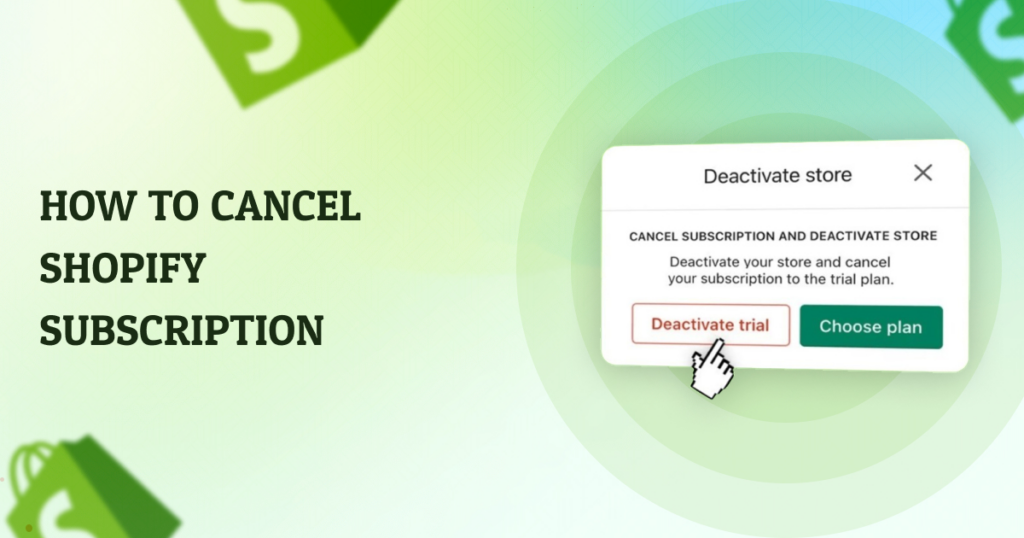
When people talk about canceling a Shopify subscription, they’re usually referring either to deactivating their entire store or simply stopping the monthly billing. These are related but slightly different actions:
- Deactivate your store / cancel subscription – Ends future billing and prevents access to your Shopify admin once your current billing cycle ends.
- Pause your store instead of canceling – If you aren’t sure you want to leave Shopify forever, you can reduce costs by pausing with lower fees.
- Delete your store permanently – After cancellation, you can also choose to delete your store and data completely, but this is irreversible.
Before you take action, it’s important to understand the implications. Shopify retains your store data for up to two years after deactivation, so you can reopen within that time without rebuilding from scratch. After two years, your store and its data may be removed.
Before You Cancel: Essential Preparations
1. Backup Your Store Data
If keeping any part of your store is important — like products, orders, customer lists, or images — export everything before canceling. Shopify won’t keep your data forever once the grace period passes. You can export product and order data as CSV files from your Shopify admin.
2. Uninstall Paid Apps
Many Shopify stores connect to third-party apps for marketing, shipping, subscriptions, and more. If you cancel your Shopify plan without uninstalling these apps, you could still be billed for them separately. Make sure to go to Apps in your admin panel and remove or downgrade any paid services.
3. Handle Your Custom Domain
If you used a custom domain instead of the default myshopify.com address, you might want to transfer it to another platform before your Shopify subscription ends. Domains purchased through Shopify can be transferred after 60 days, or removed if purchased elsewhere.
4. Notify Your Customers
Especially if you’re closing your business or changing platforms, your customers deserve a heads-up. Send an email or post an announcement on social media and your website explaining changes so they aren’t surprised by sudden downtime.
Step-by-Step: How to Cancel Shopify Subscription
Here is the basic process to cancel your Shopify monthly subscription and deactivate your store:
- Log in to your Shopify admin dashboard.
This requires your store owner credentials. - Navigate to Settings > Plan (or Billing).
Shopify labels these slightly differently depending on updates or UI changes. - Choose “Deactivate store” or “Cancel plan.”
Shopify will ask you whether you want to pause the store instead (like Pause and Build) or continue with full cancellation. - Select a reason for canceling.
Shopify asks for a cancellation reason — this feedback helps them improve their platform. - Enter your password to confirm.
This is a security step that ensures it’s you making the change. - Finalize the cancellation.
Once you confirm, your store remains active until the end of your current billing cycle, then it’s deactivated and billing stops.
Tip: If you’re still in Shopify’s free trial and never started a paid plan, you may not need to take additional steps other than letting the trial expire.
What Happens After You Cancel
Here’s what to expect once you finish canceling your Shopify subscription:
- You lose access to your store admin.
You can’t log in to make changes or view orders once the billing cycle ends. - Your storefront goes offline.
Customers can’t browse or purchase anything — the website becomes inactive. - Data may still be available for up to 2 years.
Shopify retains your store data so you can reactivate if you change your mind during that window. - Third-party app charges must be separately canceled.
Canceling Shopify does not automatically cancel every individual app subscription.
Alternative Options to Canceling
If you’re not fully sure that you want to leave Shopify forever, here are a few other options:
Pause and Build Plan
Instead of canceling, Shopify offers a low-cost Pause and Build plan that lets you access your admin and update content, but customers can’t check out. This is ideal if you’re redesigning your store or planning a relaunch.
Temporary Vacation Mode
For store owners who are taking a break — for seasonal business or personal reasons — Shopify sometimes lets you put a store into a sort of vacation mode so customers see a message but can’t buy products temporarily.
Final Thoughts: Is Canceling Right for You?
Deciding to cancel your Shopify subscription isn’t something to rush into. It affects your online presence, your data access, and your business continuity. Make sure you consider exporting your data, handling domains, disconnecting apps, and notifying customers before going forward. But when the time comes, Shopify makes canceling a clear process that you can complete from the admin dashboard.
Need Help With E-Commerce Transitions or Website Design?
If you’re thinking about canceling 쇼피파이 because you’re unhappy with your current store setup, or you want to migrate to another platform with better performance and design, we can help.
에서 AIRSANG, we specialize in cross-border e-commerce solutions and professional website design that help brands grow globally. Whether you need help optimizing your current store, migrating platforms, or building a brand-new e-commerce site that converts, our team has the experience and creativity to support your vision. If you have questions about canceling Shopify or want to explore better alternatives, feel free to reach out — we’d love to help you take the next step in your e-commerce journey.


완전한 전자상거래 시스템을 갖춘 워드프레스 웹사이트 또는 기업 사이트를 디자인하고 구축하세요.
가격 범위: $200.00~$2,500.00사용자 지정 요구 사항 또는 특별 견적
원래 가격: $2.00.$1.00현재 가격: $1.00. 워드프레스 전자상거래 쇼핑몰에 플러그인 50개는 너무 많은 걸까요?
실제 성능에 미치는 영향 이해하기 워드프레스 전자상거래 사이트에 50개의 플러그인이 있다고 해서 자동으로 문제가 되는 것은 아닙니다. 사실 그 숫자만으로 성능이 결정되는 경우는 거의 없습니다....

아마존 립스틱 전환을 위한 메인 이미지 디자인
소개: 소개: 아마존에서 판매되는 립스틱 메인 이미지 디자인하기 아마존 립스틱의 메인 이미지를 디자인할 때 우리의 책임은 그 이상입니다.

해커들이 워드프레스 관리자 이메일을 훔치는 방법(그리고 이를 막는 방법)
불편한 진실부터 말씀드리자면, 워드프레스 관리자 이메일은 생각보다 훨씬 더 많이 공개되어 있습니다. 그들은 그것을 좋아합니다. 해커에게 여러분의...

아마존 리퀴드 파운데이션 메인 이미지 변환의 특징은 무엇일까요?
서론 아마존 리퀴드 파운데이션의 메인 이미지 디자인은 단순히 제품을 아름답게 보이게 하는 것만이 아닙니다. 아마존에서 메인 이미지와...

필터 카트리지 제품을 위한 효과적인 아마존 메인 이미지 디자인하기
서론 아마존 메인 이미지 디자인은 단순히 제품을 매력적으로 보이게 하는 것만이 아닙니다. 명확성, 신뢰, 그리고 즉각적인 이해를 제공하는 것이 중요합니다. 특히...

워드프레스에 대한 리플레이 공격: 실제 위협인가, 과장된 신화인가?
먼저 한 가지를 분명히 해두죠. 리플레이 공격은 겉보기에 무섭지 않습니다. 비밀번호를 날려버리지도 않고, 초록색 해커 텍스트가 사방에 흩날리는 악성 코드를 주입하지도 않습니다. 그저 교묘하게 이루어질 뿐입니다.

WordPress 페이지를 손상 없이 복제하는 방법
솔직히 말해봅시다. 때로는 새 페이지를 만들고 싶지 않을 때가 있죠. 그냥 기존 페이지를 약간만 다르게 하고 싶을 때가 있어요. 레이아웃도, 블록도, 설정도 그대로요. 왜냐하면...

반려동물 관련 워드프레스 테마 5가지 비교
서론 반려동물 관련 워드프레스 테마를 선택하는 것은 단순한 디자인 결정 이상의 의미를 지닙니다. 사용성, 확장성, 그리고 장기적인 비즈니스 성장에 직접적인 영향을 미치기 때문입니다. 반려동물 관리 및 관련...

수영복 온라인 쇼핑몰 테마 5가지 비교
서론 수영복이나 란제리 독립 매장에 적합한 테마를 선택하는 것은 단순히 시각적인 결정에 그치는 것이 아니라, 전환율, 확장성, 그리고 장기적인 성공에 직접적인 영향을 미칩니다.

워드프레스에서 댓글 기능을 끄는 방법 (정신줄 놓지 않고)
워드프레스 댓글에 대해 이야기해 봅시다. 이론적으로 댓글은 훌륭합니다. 토론을 장려하고, 커뮤니티를 형성하며, 웹사이트에 생동감을 불어넣습니다. 하지만 현실은 어떨까요? 댓글은 종종 문제를 야기하기도 합니다...

워드프레스 500 오류: 웹사이트가 갑자기 오류를 일으킬 때
방금 전까지만 해도 워드프레스 사이트는 아무 문제 없었는데, 페이지를 새로고침하자마자 갑자기 💥 500 내부 서버 오류가 발생했습니다. 아무런 설명도, 사과도 없이 그저 차갑고 혼란스러운 메시지만 남았습니다.

Shopify 고객 지원팀에 문의하는 방법: 간단하고 스트레스 없는 가이드
쇼피파이 스토어 운영은 흥미진진해야지 혼란스러워서는 안 됩니다. 궁금한 점이 생기거나 문제가 발생하여 진행이 늦어질 때, 쇼피파이는 상황에 따라 다양한 지원 경로를 제공합니다.

쇼피파이 스토어 비활성화 방법: 명확하고 실용적인 가이드
쇼피파이 스토어를 비활성화하는 것은 복잡하지 않지만, 많은 판매자가 간과하는 몇 가지 결과가 따릅니다. 이 가이드에서는 비활성화 과정을 간단하고 유익하게 설명합니다.

신발 매장 테마 5가지 비교
서론: 신발 전문 독립 매장에 적합한 테마를 선택하는 것은 단순히 시각적인 결정에 그치는 것이 아니라, 매장 확장성, 일상적인 운영, 그리고 장기적인 전환율에 직접적인 영향을 미칩니다.

쇼피파이 vs. 에tsy: 궁극의 온라인 판매 대결
서론: 두 플랫폼이 술집에 들어갔다… 쇼피파이와 에츠이를 사람에 비유하자면, 에츠이는 이미 어느 행사장에 부스를 차려놓은 매력적인 친구와 같을 것이다….

Shopify 또는 WordPress 사이트가 해킹당했나요? 해결 방법은 다음과 같습니다.
서론: 깨진 창문을 마주한 것과 같은 디지털 세상 상상해 보세요. 아침에 일어나 커피를 마시고 노트북을 켰는데… 웹사이트가 깨져 있는 모습을 발견하는 겁니다….

정신줄 놓지 않고 쇼피파이 스토어 시작하는 방법
쇼피파이 스토어를 시작하는 건 꽤 멋진 일처럼 들립니다. 점심에 커피를 마시며 판매 알림을 확인하고, 친구들에게 "내 스토어가 꽤 잘 됐어..."라고 태연하게 말하는 모습을 상상하게 되죠.

쇼피파이는 믿을 만한 플랫폼일까요? 온라인 판매 초보자를 위한 명확한 가이드
전자상거래 플랫폼을 알아보고 있다면, 구글에 아주 구체적인 질문 하나를 입력해 봤을 가능성이 높습니다. 바로 "쇼피파이는 믿을 만한 플랫폼일까?"라는 질문이죠. 이 질문은 지극히 당연합니다. 온라인 쇼핑몰을 시작하려면...